|
Free Lessons Courses Seminars |
TechHelp Fast Tips Templates |
Topic Index Forum ABCD |
|
||||||
|
Access Web Sync Seminar Use Access to Power your Web Site, Collect Data WelcomeThis seminar covers integrating your Microsoft Access database and your Web Site. You will learn how to use Access to feed your Web Site with data and use Access to read information from the Web. ResourcesMain Seminar Goals
Topics CoveredYou will begin by learning how to pull information from different Web pages into your Access database. We'll see how to read the current temperature, and how to pull down current stock prices.
Next, you will learn how to create a customer data collection database on your web site. You will collect names and email addresses and then pull that information down into your Access database.
Then you will learn how to use Access to maintain a product database and upload that information to your Web site. The benefit is that someone with absolutely no skills with Access or Web design can maintain and update your Web site with just the click of one button.
You will learn how to use the Microsoft Web Browser control inside of Access so you can use it to load and analyze any page on the Web.
We'll program a timer event to make your Access database automatically go out to the Web every couple of minutes to download real-time stock quotes and store them in your database for analysis.
Next you will learn how to create a form on your Web site to collect user information: name, email address, etc.
Then we'll learn how to use Access to download that data from our Web site so we can collect the names and addresses every day - or whenever there is new data.
Next we'll learn how to use our Access database to control the content of our Web site. We'll store the text for each of our Web pages in our Access database and then with the click of a button be able to update our Web site. This way, someone who doesn't know Web design can easily update the content on your Web site.
Finally, we'll do the same thing with a product database. We'll create a local product table and form in our Access database, and then with the click of a button update our Web site with all of the product information that has recently changed. Again, it's one-click maintenance of your Web site, and it allows you to synchronize the data between both databases.
This seminar is for anyone who wants to work with their Access database and the Web. Whether you're pulling information down from your Web site, collecting data from other sites, or even pushing information back up to the Web, this seminar is for you. This seminar is long (over five hours) but it's broken up into 30 easily managed lessons of about 8 to 15 minutes each. You can sit down, watch a lesson, review the material, test the code out yourself, and experiment. Do a little bit each day. It's long, but it's comprehensive - you won't miss a single step as I've recorded everything from start to finish. All of the sample database files are available on the Web site. There is also an optional printed (or PDF) handbook you can purchase to go with the course that has full screen shots and source code listings to follow along with - or refer back to afterward. You can use the information from this seminar to gather data from Web sites, collect data from your own site, keep your Web site information up-to-date, etc. The list goes on, and the sky's the limit. Of course, if you have any questions about whether or not this seminar is for you, please contact me.
Pre-RequisitesThis is a Developer-Level Seminar. There will be a lot of VBA. It is strongly recommended that you have completed my entire Access Beginner and Expert series. My Developer 1 class is highly recommended so you understand the basics of programming in VBA. If not, at least watch my free Intro to VBA video. VersionI am using Access 2007 in this seminar. The version of Access that you have doesn't really matter. This will work with anything from Access 2007 up. I use Classic ASP for the web site. That's perfectly fine too. My site still runs on it. I used Expression Web as a web page editor. That's no longer available. I recommend EditPlus now. Also, some of the web sites mentioned in this seminar may no longer be available. Important Notice: Keep in mind also that this seminar is OK for anyone who has real simple data needs. If you want to get serious about powering your web site with a database, I strongly recommend my Access SQL Server Online Seminar instead. Enroll TodayEnroll now so that you can watch these lessons, learn with us, post questions, and more.
Questions?Please feel free to post your questions or comments below. If you are not sure as to whether or not this product will meet your needs, I'd rather help you before you buy it. Remember, all sales are final. Thank you. Keywordsmicrosoft web access, microsoft access web form, microsoft access web based, web based microsoft access, Get Data From the Web into Access, Get Data From the Internet into Microsoft Access, Capture Data From the Web into Microsoft Access, Using Microsoft Access to post data into Web sites, Collecting and Using Data from Your Website Visitors, Publish your Access database online, Setting up an Access Database for Your Web Site, microsoft access real-time stock quotes, microsoft access stock quotes, microsoft access online database, microsoft access online product database, microsoft access online customer database, webbrowser control
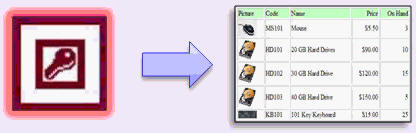
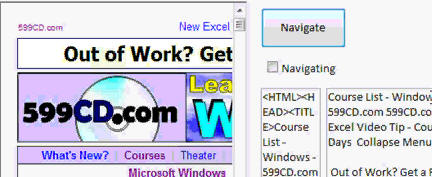
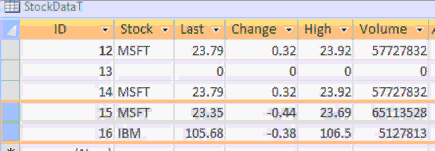
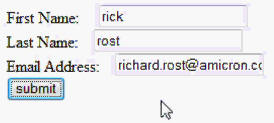
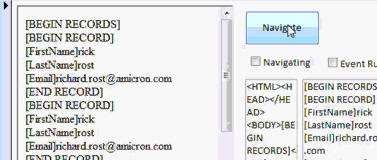
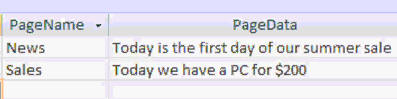
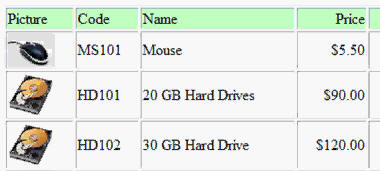
IntroIn this video, you'll learn how to share data between a local Microsoft Access database and the web. We'll cover how to pull information from websites like weather and stock sites directly into Access, use web forms to collect user data and bring it into your database, and post updates from Access back to your website for things like sales bulletins and product listings. You'll see how to set up the web browser control, read and parse HTML, automate data collection with timers, and work with online forms using tools like Microsoft Expression Web or FrontPage.TranscriptIntroducing the Access Web Synchronization Seminar brought to you by AccessLearningZone.com.The purpose of this seminar is to show you how you can share data between a local Microsoft Access Database and the web. This Web Seminar has three goals. One, to read information from websites and pull that information down into your local Access Database. We'll show you how to read temperature information from a popular weather site. We'll show you how to pull stock information down from different stock websites. The tools we show you in this seminar can be used to pull any information off any website and import it into your Access Database. Next, we'll teach you how to collect data on your website using a web form and then copy that information down to your Access Database over the web. This technique is useful for gathering customer information, email signups, and lots more data. Finally, we'll teach you how to post data from your local Access Database up to the web. You can use this technique to update page information like sales bulletins or news. We'll also see how you can keep a local product database with product names, pricing, quantity on hand, and all that stuff, and then post that information up to your website as well. The benefit, of course, is that someone who has absolutely no experience with Access or web design can automatically update your website with a click of one button. In the first lesson, you'll learn about the web browser control, how to insert it into your Access Forms, and how to use it to create your own little web browser right inside of Access. We'll add some functionality like a URL address and the ability to tell whether or not the web browser control is currently navigating. Next, we'll actually learn how to analyze that web page and read the HTML code from it, as well as read all the page text that comes from that web page. This is how we can get data off the web page later. We'll actually use our little web browser to find the current temperature using a popular mobile site, and we'll read the page data that comes down and pick out the temperature information. We'll learn how to take all that temperature data and save it to a table. So every time we run it, it saves a history of all those temperatures. I'll teach you how to program a record set to save data to your table. For those of you who haven't already taken my Access 320 to 320 in-classes, I'll spend a few minutes showing you how to create a record set in code. I'll show you how to program a timer event so that we can launch an event every, let's say, 10 seconds. We'll create a table that'll store a list of zip codes, and then our event timer will run down that list of zip codes every 10 seconds and gather up the temperature data from the website automatically. That's how we can run multiple events in our web forms. Now, getting weather data like temperature is handy, but checking stock quotes is a lot more useful. So next we're going to turn our web form into something that we can use to check stock quotes off the internet. We'll get information like trades, opens, highs, volumes, last price, all that stuff. We'll make a table that'll have all the stocks in it that we want to check. This example just shows Microsoft and IBM. We'll make the timer form be able to check temperature and/or stock quotes, and we'll set the interval - the number of seconds between the times it checks. This way you can make your database go out to the web, check your stocks every, let's say, 10 minutes, maybe even sound an alarm if you want, and record the stock name, the last price, the change, the volume, all that stuff. Next, we're going to learn how to collect data on your website. Now, I'm going to use Microsoft Expression Web, but these lessons are the same whether you're using Expression Web or Front Page going all the way back to Front Page 2000. You can use a different web editor if you want. You won't get as much out of the lesson, but you'll see how to set this up. We'll create a form on our website to collect user email signups: first name, last name, email address. I'll show you a neat feature in Expression Web and Front Page that lets Front Page create the database for you to save this data on your website. Then you'll see how to submit that data to the database on your web. Now, the form confirmation page that Front Page has for you isn't very interesting looking. I'll show you how to take some ASP code and make your own confirmation page that the user sees when they submit their data. You can also check and validate the information too and make sure it's correct before submitting it. Now that we know how to collect data on our website from our users or visitors, we're going to create a page to actually display that information back in a format that our Access Database can read back in. Now that we know how to display that information on our web page, we can use the same techniques in the earlier lessons to read that web page from our Access Database and parse all the information out. Now we're saving that information into our table. That's how we get the information from the web down into our Access Database. Of course, then once you pull the data down from the web server, we'll have to delete it from the server so our server database doesn't fill up. Next, we're going to learn how to feed your website with data so you can have live content on your website that is database fed. This is great, for example, if you want people who aren't familiar with web design to be able to update your website. For example, we'll create two bits of information in a table on our website, a news page and a sales page. We'll put some content in each of those pages. For example, the news page just says today is the first day of our summer sale. We'll throw in a database connection and a little ASP code and then voila, your web pages are fed with data from a database. Now, this example here, as you can see and explore, isn't that pretty, but you can make this page as pretty as you want with tables and graphics and colors and all that stuff. My goal is to show you how to take data from the database and display it on your web page for the viewers. Now, my goal here is to control the content on my website from my local Access Database. That way, the secretary can just update information in her little Access Database, click a button, and post all that information up to the website using the techniques we've learned earlier. This way, she can update web contents, just news and information like that, or you can update product information, customer details, all that stuff can be posted straight up to the website from your local Access Database. And see, here it is, one simple form, one button click, update all change pages, and your website is instantly updated. Next, we'll learn how to get data onto our website using a web form, but we're not going to be posting the information in the web form ourselves. I'm going to teach the Access Database to fill in the web form fields and hit submit. This way you can use secure pages to transfer information to your website securely. Now, what we're going to do is create an actual product form in our Access Database and make it so that with one click I can update this information to my website and generate a nice product list. And here's the final product. I click one button on my Access Database, it uploads all this product information directly to my website's database, and then we made an ASP page with a little bit of HTML, some table stuff in there where it displays the picture, the product name, the price, the quantity on hand, and all that. The benefit here is that someone who knows nothing about databases, nothing about websites, can instantly update your product list on your website with one button click. To find out more about the Access Web Synchronization Seminar, visit my website at AccessLearningZone.com. QuizQ1. What is the primary focus of the Access Web Synchronization Seminar?A. Creating PowerPoint presentations in Access B. Sharing data between a local Access Database and the web C. Designing game applications using Access D. Building standalone web apps without a database Q2. Which of the following is NOT one of the seminar's three main goals? A. Reading information from websites into your Access Database B. Collecting data on your website and copying it to Access C. Teaching advanced SQL server integration D. Posting data from Access up to your website Q3. What control is introduced in the first lesson of the seminar? A. Subform control B. Web browser control C. Option group control D. Combo box control Q4. How does the seminar propose reading temperature information into Access? A. Manually entering it B. Importing CSV files regularly C. Downloading and parsing it from a website D. Using a barcode scanner Q5. What does programming a timer event in Access allow you to do? A. Lock records between certain times B. Schedule automatic data gathering at intervals C. Automatically backup your database daily D. Synchronize Access with Outlook Calendar Q6. Which web editors are mentioned as compatible for creating web forms to collect data? A. Only Notepad B. Microsoft Expression Web and Front Page C. Visual Studio exclusively D. Google Web Designer Q7. Why is it important to delete data from the server after pulling it into Access? A. To save on web hosting costs B. To keep the database from filling up unnecessarily C. To speed up website loading times D. It improves website security directly Q8. What is one of the benefits of feeding your website with data from a database as shown in the seminar? A. Website content can only be changed by programmers B. Anyone can update website content through Access easily C. Only images can be updated this way D. The content is locked and cannot be altered Q9. What feature does Access enable regarding secure web form submission? A. Access can auto-fill and submit web forms to secure web pages B. Access encrypts local databases only C. Access can only read, not submit, web forms D. Access provides built-in SSL certificates Q10. What is a key advantage highlighted about updating website data via Access for non-technical users? A. Updates require advanced training B. Anyone can perform updates with a single button click C. Manual HTML editing is always required D. All updates take effect only after server reboots Answers: 1-B; 2-C; 3-B; 4-C; 5-B; 6-B; 7-B; 8-B; 9-A; 10-B DISCLAIMER: Quiz questions are AI generated. If you find any that are wrong, don't make sense, or aren't related to the video topic at hand, then please post a comment and let me know. Thanks. SummaryToday's video from Access Learning Zone covers the Access Web Synchronization Seminar, which focuses on sharing data between a local Microsoft Access database and the web.The seminar is structured around three main goals. First, I will show you how to retrieve information from websites and import that data into your local Access database. For example, we will walk through pulling temperature data from a weather site and importing stock information from various financial websites. The techniques you will learn here apply to extracting any kind of data from any website and saving it in your Access database. The next objective is to demonstrate how to collect information through a form on your own website and then download that data into your Access database. This technique is perfect for situations such as collecting customer details, email sign-ups, or any other form-based data collection. Finally, I will teach you how to send data from your Access database up to your website. This could be used for updating content on the web, such as posting news updates or sales announcements. You will also see how to keep your product inventory in Access and then publish product details, pricing, inventory counts, and more directly to your site. This entire process allows anyone, even those with no experience in Access or web design, to update website content with just a single button click. The seminar begins with a lesson on the web browser control in Access. You will learn how to add a web browser to your Access forms to create a mini browser within your database. I will explain how to add features like a URL address field and determine whether the browser is currently navigating. Once the browser is in place, I will guide you through analyzing the web page's HTML and reading all the text it contains. This is key to extracting the data you want from a web page. As a practical example, we will use this method to retrieve the current temperature from a weather website. The next step is to take this temperature data and save it to a table so you maintain a history of readings every time you run the process. I will cover how to program a record set to store data and introduce you to creating timer events in code, so you can automate these tasks, such as running the data collection every ten seconds. We will also create a table to store a list of zip codes, then use the timer to automatically gather temperatures for each zip code at regular intervals. This introduces the concept of running automated events through your web forms. Since financial data is often more useful than weather updates, we will adjust the web form to collect stock quote information from the internet. This includes trade prices, opening and high prices, volume, last price, and more. We will set up a table to track the stocks you are interested in and allow the form to check both temperature and stock data at set intervals. Your database can then regularly fetch stock quotes and save the details, and you can even include alerts if certain conditions are met. Moving on, I will show you how to collect data through a web form hosted on your own site. Though I use Microsoft Expression Web, these lessons apply equally to those using Front Page or even older versions going back to Front Page 2000. If you use a different web editor, you may need to adapt the steps, but you will understand the general process. We will build a basic signup form to collect first name, last name, and email address. I will demonstrate a feature in Expression Web and Front Page that lets you automatically create an online database to store these submissions. I will also show you how to submit this data to your web database. Default confirmation pages tend to be plain, so I will show you how to replace them with your own confirmation page using a bit of ASP, making it both more attractive and functional by allowing you to validate incoming information before it is submitted. Once you are comfortable with collecting website data from users, we will cover how to display this data on a page in a way that your Access database can read. By applying the same techniques you learned earlier, you will be able to read and parse this web page from Access, storing the collected data directly in your tables. Afterwards, I will show you how to remove the data from the web database on the server, preventing unnecessary buildup. After that, we will look at how to send data to your website, creating live content directly from the database. This is a valuable tool if you want someone without web design experience to update content. For example, we will store news and sales messages in a web table, then set up a web page that displays the latest information directly from your database. I will show you how to connect the web page to your database and display the information with a bit of ASP. While the initial example may look basic, you can customize the design with formatting and graphics as you wish. The main benefit is being able to control website content from Access. Your staff can simply update the database, click a button, and publish information online instantly. This makes it possible to update anything from general announcements to detailed product information or customer records straight from Access to your website. I will also show you how to automate posting data through a secure web form by teaching your Access database how to fill out and submit form fields online, which lets you transmit data securely. We will then create a product form in Access, allowing you to update your website's product catalog with just one button click. All your product details, such as photos, descriptions, price, and inventory count, go right to the website database, and an ASP page will display the products in a nicely formatted table. Overall, this seminar provides the ability for anyone, regardless of their experience with databases or web design, to keep their website data current and accurate through a user-friendly Access interface. If you want the full seminar experience with detailed, step-by-step instructions on absolutely everything discussed here, you can find the complete video tutorial on my website at the link below. Live long and prosper, my friends. Topic ListInserting and configuring the web browser control in AccessCreating a custom web browser form in Access Reading and parsing HTML code from web pages Extracting text and data from web pages Importing weather data into Access from a website Saving web data to a temperature history table Programming recordsets to save data in tables Automating data collection using event timers Building a zip code table for automated lookups Automatically retrieving data at timed intervals Fetching stock quotes from web pages into Access Creating and using a stocks table for quote tracking Recording and storing stock data in Access tables Designing a web form for collecting email signups Configuring web forms to save data to a website database Creating custom confirmation pages with ASP Validating submitted web form data Displaying web form submissions for Access import Parsing and importing web form data into Access tables Deleting processed records from the web server Building live, database-driven content for web pages Connecting web pages to back-end databases with ASP Controlling website content updates from Access Posting data from Access to a website with a button click Automating product updates from Access to the website Generating dynamic product lists on the web with Access data Auto-filling online web forms from Access and submitting securely Displaying uploaded product data with images and pricing on the web |
||
|
| |||
| Keywords: access seminar microsoft web access, microsoft access web form, microsoft access web based, web based microsoft access, Get Data From the Web into Access, Get Data From the Internet into Microsoft Access, Capture Data From the Web into Microsoft Access, U Page Tag: whatsnew PermaLink Microsoft Access Web Sync Seminar |