|
||||||
Access Genealogy SeminarDo you want to learn how to build a database for tracking Genealogy in Microsoft Access? If so, this seminar is for you. Learn More
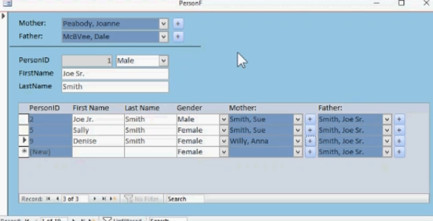
What's Covered?This seminar is over 8 hours long and will teach you everything you need to know to build a Genealogy Database from the ground up. We'll start by building the basic tables and forms needed, and learning about self-join relationships. You will learn how to create clickable fields so you can quickly jump to a person's parent or child records. We'll make quick-add buttons so you can add people to the database who aren't already in there without leaving the current record.
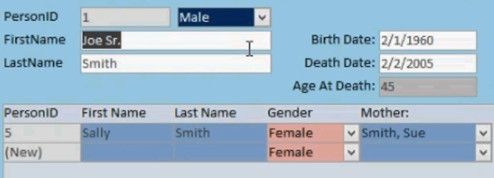
We will see how to store dates of birth and death, and have the database automatically calculate their age. If they're still alive, you'll get their current age. If they're deceased, you'll get their age at death. You'll also see how to colorize the gender combo boxes accordingly.
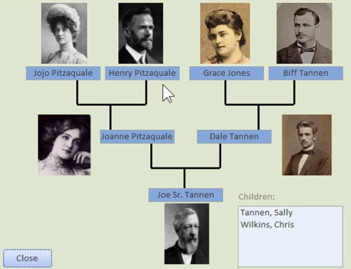
You will learn a quick way to store profile pictures in your database. Then you'll learn a better way to have access store them in an external folder customized for each person. We will build a graphical family tree that you can use to quickly move up through your ancestors and down through your descendants. Click on someone and the tree reorganizes around that person. A great way to navigate through your family.
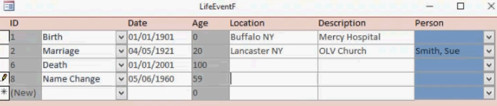
We will track life events for people in our database. You can log their birth and death dates, marriages, divorces, jobs, education, name changes, and anything else you wish. You can specify which events, such as marriages, get linked to another person – for example a person’s spouse.
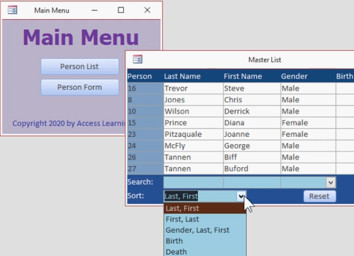
We’ll build a main menu, and a master list of people. You can search, filter, and sort by names, gender, birth and death dates. And we’ll throw in a ton of enhancements, such as customized delete warning messages, and showing or hiding fields and buttons based on the data shown.
Template OnlyIf you want to purchase the database template but don't need the video lessons that go with it, you may do so here. However, please note that the template by itself does not come with any support. If you have questions about the construction of the database, that's what the Seminar is for. Outline
Possible Future UpdatesThese are topics that are on my list for potential future upgrades of this Seminar in Part 2:
QuestionsPost your questions or comments below
More InformationTranscriptDo you want to learn how to build a database for tracking genealogy in Microsoft Access? Introducing the Access Genealogy database brought to you by AccessLearningZone.com. I am your instructor, Richard Rost. This seminar is over 8 hours long and will teach you everything you need to know to build a genealogy database from the ground up. We will start by building the basic tables and forms and learning about self-join relationships. You will learn how to create clickable fields so you can double-click on any blue field, such as a person's mother, father, or children, to jump to that person's record. We will also make quick add buttons and forms to allow us to add parents and children that are not in the database yet. You will see how to store dates of birth and death and have the database automatically calculate age. If the person is still alive, you will get their current age. If they are deceased, you will get their age at death. You will also see how to colorize the gender combo boxes accordingly. You will learn a quick way to store profile pictures in your database, and then you will learn a better way to have Access store them in an external folder customized for each person. We will build a graphical family tree that you can use to quickly move up through your ancestors and down through your descendants. Click on someone, and the tree reorganizes around that person. This is a great way to navigate through your family graphically. We will track life events for people in our database. You can log their birth and death dates, marriages, divorces, jobs, education, name changes, and anything else you wish. You can specify which events, such as marriages, get linked to another person, for example, the person's spouse. We will build a main menu and a master list of people. You can search, filter, and sort by names, gender, birth, and death dates. We will include a variety of enhancements, such as customized delete warning messages and showing or hiding fields and buttons based on the data shown. Depending on the success of part one of the seminar, I have a number of possible upgrades coming up for part two. If you are interested in the genealogy database but do not want the full eight-hour seminar, you can purchase a fully customizable version of the database itself. This will give you access to everything built in class through part one of the seminar. There is also a free, locked version of the database you can download to try before you purchase. You will also find a link to a full walkthrough video below to show you how to use all of the features of the database. If you have any questions about the seminar or the template, please feel free to contact me. Thank you. IntroIn this video, we will talk about building a genealogy database in Microsoft Access. I will introduce the Access Genealogy Seminar and show you how to set up tables, forms, and self-join relationships to track family connections. We will cover features such as quick add buttons for parents and children, automatic age calculation, storing profile pictures, color-coded gender fields, and building a graphical family tree. You will also see how to log life events, link records for events like marriages, manage and search your data, and make interface enhancements to improve usability. QuizNo quiz available. SummaryToday's video from Access Learning Zone showcases the Access Genealogy database, a comprehensive seminar designed to teach you how to create a genealogy tracking system in Microsoft Access. My name is Richard Rost and I will be your instructor for this in-depth seminar, which runs for over eight hours and covers everything you need in order to build a robust genealogy database from scratch. We will begin by setting up the fundamental tables and forms, focusing specifically on self-join relationships, which are essential for tracking family connections such as parents and children. Throughout the course, you will learn how to create interactive fields that allow you to double-click on blue fields like mother, father, or child to easily navigate to their records. You will discover how to add quick add buttons and forms, making it straightforward to include new parents or children who are not yet in your system. Managing vital statistics is another key feature; you will learn how to store birth and death dates, and how the database can automatically calculate a person's current age if they are alive or their age at the time of death if they have passed. We will explore how to use color coding for the gender selection fields to enhance user experience. I will show you a simple method for storing profile pictures directly in your database, as well as a more advanced approach where Access saves images in a separate, person-specific folder. A highlight of the seminar is building a graphical family tree, allowing you to visually move up to ancestors or down to descendants with ease. Selecting a person in the tree reorganizes it around that individual, offering a visually intuitive way to navigate your family lineage. Tracking life events is another important skill we will cover. You will be able to record a range of significant events, from birth and death to marriages, divorces, various jobs, educational milestones, and name changes. Events such as marriages can be linked to another person, such as a spouse, providing a more complete historical record. Organizational features will also be included. We will set up a main menu and a master list of people, with options to search, filter, and sort by criteria like name, gender, and relevant dates. Additional enhancements will be implemented, including custom delete warning messages and dynamic options to show or hide fields and buttons based on what is currently displayed. Depending on how well the first part of the seminar is received, I am considering several upgrade ideas for a possible second installment. For those interested in the genealogy database but not ready to commit to the complete seminar, a customizable version of the database template is available for separate purchase. This template provides full access to everything created during the first part of the seminar. There is also a free, locked version of the database that you can download and try before choosing to buy. To help you get started, you will also find a link to a full walkthrough video, which demonstrates how to use all of the database features. If you have any questions regarding the seminar or the available template, please do not hesitate to reach out to me. You can find a complete video tutorial with step-by-step instructions on everything discussed here on my website at the link below. Live long and prosper, my friends. Topic ListThis is a promotional overview for a Microsoft Access genealogy database course, describing its features and inviting viewers to enroll or learn more. Primary Topicsgenealogy database design, Microsoft Access, self-join relationships, forms, data entry optimization, calculations, navigation, event tracking Secondary Topicsinterface enhancements, database usability, profile photo management |
||||||||||||||||||||||||||||||||||||||||||||||||||||||||||||||||||||||||||||
|
| |||
| Keywords: access genealogy seminar ancestry family tree Page Tag: whatsnew PermaLink Microsoft Access Genealogy Seminar |