|
||||||
Access Expert 27Date Functions, Date Math, Aging ReportsWelcome to Access Expert 27. In this course you will learn how to work with Date and Time functions such as Date, Time, and Now in Microsoft Access, use proper date and time formatting and criteria in queries, and perform date math for tasks like calculating accounts receivable aging. You will see how to set up tables and forms with date/time fields, filter records for specific date ranges, and address issues like two-digit years and midnight shifts. We will also discuss displaying hours and minutes, and introduce more advanced techniques for handling date/time values. Lessons
Update (2026)
Resources
Lesson SummaryWelcome! Date Math & Accounts Receivable - Welcome to Microsoft Access Expert Level 27. In this course we will focus on working with dates and times in Access. We will cover the Date, Time, and Now functions, discuss date mathematics, and build an accounts receivable aging calculation. We will also talk about different ways to display hour and minute data, and the fundamentals of handling date/time values. Before beginning, it is recommended that you complete the Beginner series and Expert Levels 1 through 26, as we build on those skills throughout this Expert Level 27 class.
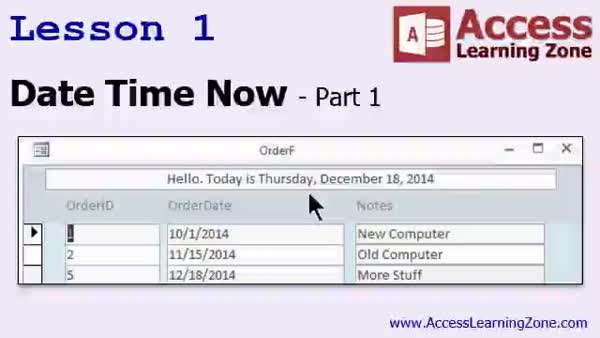
Lesson 1: Date, Time, Now: Formatting & Criteria - In Lesson 1, we begin exploring the Date, Time, and Now functions in Access, including how and where to use them for default values in tables and forms, entering current dates and times with keyboard shortcuts, and properly formatting and displaying date and time values. We will walk through setting up a basic order table, demonstrate date/time data entry methods, and discuss potential issues such as the 2030 problem with two-digit years. I also show how to use these functions as criteria in queries to filter for records based on specific dates or ranges. We will discuss date/time math in the next lesson.
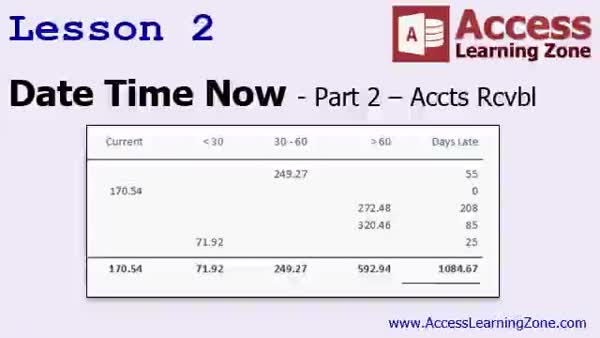
Lesson 2: Accounts Receivable Aging by Date - In Lesson 2, we continue exploring date, time, and now functions by building an accounts receivable report with aging in Microsoft Access. We discuss handling date and time components in queries, demonstrate how Access stores date/time values numerically, and cover ways to filter records for specific date ranges. We walk through creating a query to categorize outstanding orders by their aging status (current, less than 30 days, 30-60 days, and more than 60 days overdue) and show how to format, aggregate, and present these results in a report. We will also discuss conditional formatting to help display data more clearly.
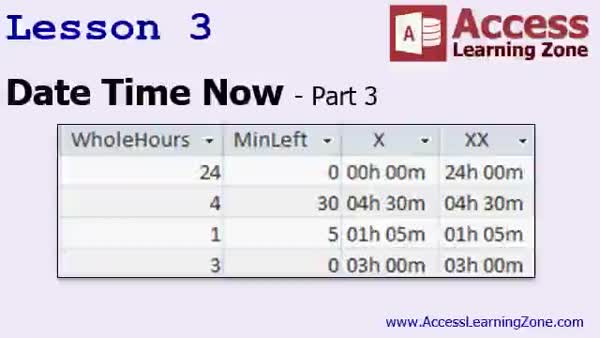
Lesson 3: Date & Time Math, Hours & Midnight - In Lesson 3, we are continuing with date/time values in Microsoft Access, focusing on how hours, minutes, and seconds are stored and calculated as fractions of a day. We will walk through different date math scenarios, such as adding fractional days, calculating age in years from dates, and handling situations like shifts that span midnight. I will show you how to display and format results, use the CDate and Format functions, address issues when storing only times, and how to fix problems that arise with time calculations in timesheets, including converting hours worked into hours and minutes.
Lesson 4: Date/Time Functions & Formatting - In this course we learned about the Date, Time, and Now functions in Microsoft Access, explored how to use proper date and time calculations, and worked with various scenarios such as finding records for future or past dates, adding hours or minutes, and displaying records between date ranges. We built an accounts receivable report with aging categories and discussed formatting time values. We also talked about topics for the next lesson, including breaking apart date values, weekday calculations, calculating workdays, and using functions like DateAdd, DateDiff, DatePart, and DateSerial for more advanced date and time operations.
NavigationKeywordsdate functions, time functions, Now function, date math, accounts receivable aging, aging report, date criteria query, date formatting, time formatting, date value calculation, date ranges, date filtering, conditional formatting, shift over midnight
More InformationTranscriptWelcome to Microsoft Access Expert Level 27, brought to you by AccessLearningZone.com. I am your instructor, Richard Rost. Today's class is Part 3 of my Comprehensive Function Guide for Microsoft Access. Part 1, which was Access Expert 25, covered string and logical functions. Part 2 covered math and type conversion functions. Part 3, which is today's class, Expert 27, will cover the Date, Time, and Now functions, date mathematics, and will build an age to count receivable. Originally, I had planned for this to be one big class, but it got way too long. It's well over three hours, so I split this up into two classes: 27 and 28. Expert 28 will cover many more different date and time functions, as well as a bunch of new examples. Today's class covers all the fundamentals and sets up how to work with dates and times. The next class, Expert 28, will have a bunch of new functions and some additional examples to work with. If you want to learn how to work with dates and times properly in Access, I recommend both classes, starting with 27. Before taking this class, it is strongly recommended that you have finished my beginner series and Expert levels 1 through 26. This class was recorded using Access 2013. Everything covered today should work with 2007 and 2010. I am pretty sure that most of the functions covered today also work with 2003, but I can't guarantee it. If you are using 2003 or older, you really should upgrade to 2013. My courses are broken up into beginner, expert, advanced, and developer-level classes. Beginner-level classes are for novices. You should understand all the topics covered in them by the time you get to the expert-level classes, which you are in now. When you finish all the expert-level classes, the advanced classes will cover event programming and macros, and the developer classes will cover Visual Basic for Applications. Each group of classes is broken down into multiple levels: level 1, 2, 3, and so on. In addition to my normal Access classes, I also have seminars designed to teach specific topics. Some of my seminars include building web-based databases, creating forms and reports that look like calendars, securing your database, working with images and attachments, writing work orders and running a service business, tracking accounts payable, learning the SQL programming language, creating loan amortization schedules, and lots more. You can find details on all of these seminars and more on their website at accesslearningzone.com. If you have questions about the topics covered in today's lessons, please feel free to post them in my student forums. If you are watching this course in the online theater on my website, you should see the student forum for each lesson appear in a small window next to the class video. Here, you will see all of the questions that other students have asked, as well as my responses to them and comments that other students have made. I encourage you to read through these questions and answers as you start each lesson and feel free to join in the discussion. If you are not watching these lessons on my website, you can still visit the student forums later by visiting accesslearningzone.com/forums. To get the most out of this course, I recommend you sit back, relax, and watch each lesson completely through once without trying to do anything on your computer. Then, replay the lesson from the beginning and follow along with my examples. Actually, create the same database that I make in the video, step by step. Do not try to apply what you are learning right now to other projects until you have mastered the sample database from class. If you get stuck or do not understand something, watch the video again from the beginning or tell me what is wrong in the student forum and I will do my best to help you. Most importantly, keep an open mind. Access may seem intimidating at first, but once you get the hang of it, you will see that it is really easy to use. I strongly encourage you to build the database that I build in today's class by following along with the videos. However, if you would like to download a sample copy of my finished database file, you can find it on my website at accesslearningzone.com/databases. Sometimes, if you get stuck, the easiest way to learn is to tear apart someone else's database. One of the ways that I taught myself Access years ago was by tearing apart the Northwind Traders database that comes with Microsoft Access. You will find there is a sample database for each of my courses on my website. Now, let's take a few minutes and go over exactly what we are going to cover in today's class. In lesson one, we are going to begin taking a close look at the Date, Time, and Now functions. In lesson two, we are continuing on with the Date, Time, and Now functions. In this lesson, we are going to build an accounts receivable with aging. In lesson three, we are continuing with date and time values. We are going to see how to use hours and minutes as a fraction of a day and we will learn some different ways to display that data. Thank you. IntroIn lesson 27 you will learn how to work with Date, Time, and Now functions in Microsoft Access. We will cover the basics of date and time calculations, learn how to build an accounts receivable aging report, and explore how hours and minutes are stored and displayed as fractions of a day in Access. This is part 3 of the Comprehensive Function Guide series. QuizQ1. What is the primary focus of Access Expert Level 27? A. String and logical functions in Access B. Math and type conversion functions in Access C. Date and time functions, including Date, Time, and Now functions in Access D. Creating forms and reports that look like calendars Q2. Which lesson in this course shows how to build an accounts receivable with aging? A. Lesson one B. Lesson two C. Lesson three D. Lesson four Q3. What should you do to get the most out of this course according to the instructor? A. Skip the video and only read the transcript B. Watch each lesson fully at least once, then follow along to create the sample database C. Immediately apply concepts to your current projects D. Only download the finished database and review it Q4. What is recommended before starting Access Expert Level 27? A. Taking only the beginner-level classes B. Completing Expert levels 1 through 10 C. Completing all beginner classes and Expert levels 1 through 26 D. Having experience with Access Advanced classes Q5. What versions of Access is this course primarily recorded with? A. Access 2007 B. Access 2013 C. Access 2003 D. Access 2016 Q6. Where can you find additional seminars on specialized topics like building web-based databases or SQL programming? A. On the Microsoft website B. At accesslearningzone.com C. In the Access Help section D. Included in every Access installation Q7. What does the instructor recommend if you do not understand something or get stuck during the class? A. Skip to the next topic B. Watch the video again or ask for help in the student forum C. Wait for the next class D. Restart your computer Q8. Which method does the instructor NOT advise for learning Access? A. Tearing apart someone else's database B. Skipping lessons and jumping directly to advanced material C. Watching lessons in order and building the provided database D. Using student forums for discussion Q9. What additional resource does the instructor provide if students want to review the finished database? A. Printed versions of the database B. A downloadable sample copy on his website C. Personal one-on-one video calls D. Free email delivery of databases Q10. What is the planned content of lesson three in this class? A. Building web-based databases B. Working with hours and minutes as a fraction of a day and displaying them C. Programming with Visual Basic for Applications D. Creating calendar-style reports Answers: 1-C; 2-B; 3-B; 4-C; 5-B; 6-B; 7-B; 8-B; 9-B; 10-B DISCLAIMER: Quiz questions are AI generated. If you find any that are wrong, don't make sense, or aren't related to the video topic at hand, then please post a comment and let me know. Thanks. SummaryToday's video from Access Learning Zone focuses on Microsoft Access Expert Level 27. I'm Richard Rost, your instructor, and this is Part 3 of my Comprehensive Function Guide for Microsoft Access. If you recall, Access Expert 25 covered string and logical functions, and Part 2 focused on math and type conversion functions. In this class, which is Expert 27, we're turning our attention to the Date, Time, and Now functions. We'll look at how date mathematics works in Access and build an accounts receivable aging system. Originally, I intended to fit all of this content into one lesson, but it grew too lengthy, so this material is split into two classes: Expert 27 and Expert 28. Expert 28 will take you further, expanding on date and time functions with several new examples and more advanced approaches. Today, though, we'll stick to the foundational concepts and make sure you have a solid understanding of how to handle dates and times in Access. If you're serious about mastering this topic, I highly recommend you work through both classes, starting with this one. Before you begin, it's important that you've finished my beginner series and completed Expert Levels 1 through 26. This class was recorded in Access 2013, but the techniques will also apply to Access 2007 and Access 2010. Many of the functions should work in Access 2003, but I can't promise compatibility for everything; if you're using an older version, you should consider upgrading. Let me remind you about how my course structure works. There are beginner, expert, advanced, and developer-level classes. Beginner classes are for those new to Access. By the time you reach the expert level, like you are now, you should feel comfortable with the basic material. Once you've worked through all the expert-level classes, my advanced courses introduce event programming and macros, and the developer classes will cover topics like Visual Basic for Applications. Each tier is split into multiple levels, from level 1 upwards. Apart from the standard classes, I also offer focused seminars on specific Access topics. Some of these cover building web-based databases, designing calendar-style forms and reports, securing your database, handling images and attachments, managing work orders and service businesses, dealing with accounts payable, learning SQL, creating loan amortization schedules, and more. You can find details on all these seminars at my website. If you have questions about anything in today's lessons, I invite you to use the student forums. If you're watching the course in the online theater on my site, you'll see a forum window alongside the lesson video. Here, you can view questions from other students, my responses, and read the discussion. It often helps to read through this material before starting each lesson. You're always welcome to participate in the discussions. If you're not currently watching this on my website, you can always access the forums later at accesslearningzone.com/forums. For the best learning experience, I suggest you watch each lesson all the way through at least once before trying to follow along on your computer. After that, play the lesson again and work alongside me, building the same database step by step. Hold off on applying your new skills to other projects until you've had success repeating the examples from class. If you run into trouble or are confused about something, try watching the lesson again or post in the student forum so I can help. Most importantly, keep an open mind. Access might seem overwhelming at first, but with a bit of practice, you'll see that it's quite approachable. I encourage you to build the database in class by following the video, but if you need a reference or want to compare your progress, you can download a copy of my finished database file from my website. Sometimes, it helps to study someone else's work to pick up new techniques. This mirrors how I first taught myself Access, by taking apart the Northwind Traders sample database included with Access. You'll be able to find a sample database for every course I teach on my website. Now, let me outline what we'll cover in today's class. In the first lesson, we'll start with the Date, Time, and Now functions. The second lesson continues working with these functions while building an accounts receivable aging system. In lesson three, we'll explore date and time values further, such as handling hours and minutes as fractions of a day and learning various ways to display this information. You can find a complete video tutorial with step-by-step instructions on everything discussed here on my website at the link below. Live long and prosper, my friends. Topic ListDate, Time, and Now functions in Access Building an accounts receivable with aging Working with date and time values Using hours and minutes as fractions of a day Displaying date and time values in different formats Primary TopicsDate functions, Time functions, Now function, date mathematics, accounts receivable aging Secondary Topicsdisplaying time as day fractions, sample databases, Access version compatibility |
||||||||||||||||||||||||||||||||||||||||||||||
|
| |||
| Keywords: date functions, time functions, Now function, date math, accounts receivable aging, aging report, date criteria query, date formatting, time formatting, date value calculation, date ranges, date filtering, conditional formatting, shift over midnight PermaLink Microsoft Access Expert 27 |