|
||||||
Access Developer 4Order Detail Notes, Tiered Commissions, FormsWelcome to Access Developer 4. In this course you will learn how to add and edit order detail notes in your Access order forms, enhance your application to track tiered sales commissions based on order amounts, and update your forms and tables to support these features. We will walk through selecting sales reps, calculating commissions, setting paid dates, adding notes, and logging all activity to the commission table, while discussing relevant VBA techniques and interface improvements. Lessons
Updates
Resources
Lesson SummaryWelcome! Order Notes & Tiered Commissions - Welcome to Microsoft Access Developer Level 4. In this course we will build on concepts from previous Developer levels. We will start by adding and editing notes on order details in the order form. We will then update the commission system to allow for commission rates based on the amount of each order, setting different rates for different sales amounts. Finally, we will finish the commissions by order form, showing how to select the sales rep and order ID, calculate the order amount and commission, set the paid date, add notes, and log everything to the commission table.
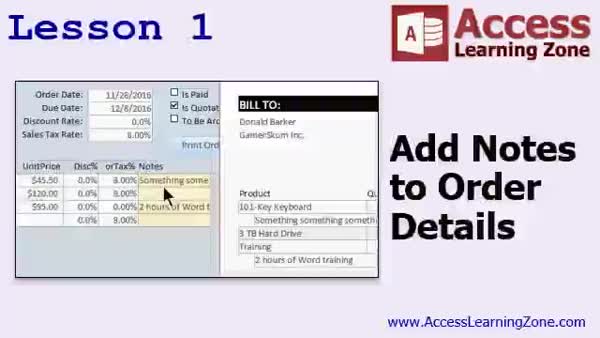
Lesson 1: Editable Notes on Orders & Invoices - In Lesson 1, we will walk through how to add notes to order details on an order form. You will see how to bring product notes into each order, allow users to edit those notes, and add a notes field to both the order detail table and the form. I will show you how to adjust the form design, set up resizing behaviors for the notes field, work with variables for dynamic field sizing, modify tab order, and demonstrate adding the notes field to a printable invoice. We will discuss some alternative interface options and cover relevant VBA techniques.
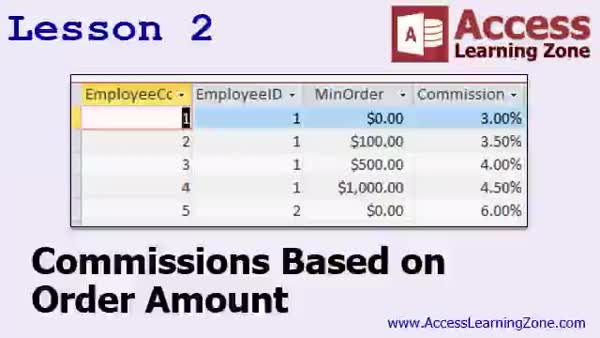
Lesson 2: Set Commission Rates by Order Amount - In Lesson 2, we will update the commissions system to allow employees to earn commissions based on the order amount of each sale, instead of using a flat rate. I will show you how to redesign your tables and forms, remove outdated fields, and set up a new employee commission table that assigns different commission rates depending on the sales thresholds. We will walk through how to link orders to commissions, use queries to identify unpaid commissions, and set up forms so that selecting a sales rep displays their unpaid orders. We will continue this work in the next lesson.
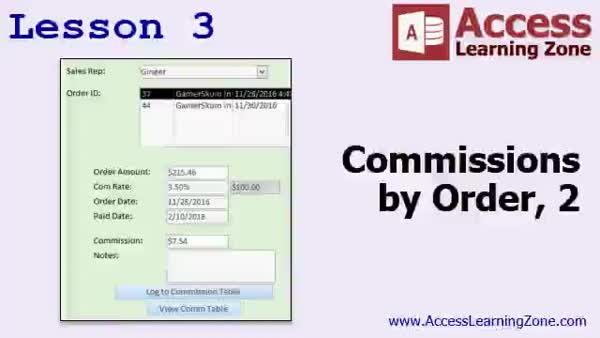
Lesson 3: Log Commissions by Order Amount - In Lesson 3, we finish building our commissions by order amount form in Access. We will configure list boxes for selecting sales reps and unpaid orders, set up lookups and calculations for order amounts and commission rates based on previous lessons, and ensure fields like order date and paid date are automatically populated. I will show you how to update the form and commission table, refresh lists, and organize your VBA code for efficiency. We will also discuss optional enhancements, such as adding buttons to open related forms and ways you might handle multi-step commission payment processes.
Lesson 4: Topics Review & Next Steps - In this course we learned about the different ways to continue your Microsoft Access Developer education, including upcoming lessons, available older Access 2003 tutorials that still apply to newer versions, and various seminars covering topics like Accounts Payable and Work Orders. We discussed how to access forums for help, contact the instructor, and the importance of using the correct channels for support. Information about course licensing, survey participation, and where to find updates for future lessons was also provided.
NavigationKeywordsorder detail notes, editable order notes, tiered sales commissions, commission rates by order amount, commission calculation, sales rep commissions, commission paid date, invoice notes, order form customization, dynamic form fields, commission table
More InformationTranscriptWelcome to Microsoft Access Developer Level 4 brought to you by AccessLearningZone.com. I am your instructor, Richard Rost. This class follows Microsoft Access Developer Level 3. It is recommended that you have taken the beginner, expert, and advanced series before beginning the developer series, and of course, have taken levels 1 through 3 before this one. In this class, I will be using Microsoft Access Version 2016, but everything covered should work in Access 2010 and 2013 as well, and probably 2007 also. My courses are broken down into various groups. There are beginners, experts, advanced, and developer. The beginner level classes are for people who have never used a database before. Expert gets you into things like relationships and expert form building. Advanced mostly covers macros - a very short series - and then developer is where we are at now, where we are covering VBA programming. Each series is broken down into different levels that are each at least an hour long. This is developer level 4. I recommend that you build the database with me in class while following along with the videos. If you want to grab my database off the website, there is the address. You can log on. You will need the password that you got when you registered for this class in order to download the database. Now let's take a look at what is covered in today's class. In lesson one, we are going to begin by adding notes to our order details in our order form. We have the product, the unit price, and the quantity, but we have notes on our products and I want to be able to bring those notes into each order so we can print them out on our invoices and such. Or have the user be able to edit those notes. Right now, we are not bringing them in or giving our people a way to edit that. So in this lesson, we are going to learn how to do that. In lesson two, we are going to update our commissions system. Currently, an employee gets one flat commission rate, so 3 - that is all they get. In this lesson, I am going to show you how to set up a table so that an employee can get commissions based on the order amount of each sale. For example, you can also tell something, if $400, you get the $3.5 commission; if he sells the $500 order, he gets a 4 commission. You can use this on a per-order basis, or using the same techniques, you can easily change this to adjust as monthly commissions or as annual commissions based on a list of values, not one static amount. In lesson three, we are finishing up our commissions by order form. We are going to pick the sales rep, pick the order ID. The system will calculate the order amount, bring it up from the order, calculate the commission rate based on the table we created in the last order, pull up the order date, and the paid date is going to be defaulted to today. It will calculate the commission, we can add some notes, and then log it to our commission table and then update the entire form. IntroIn lesson 4 of my Microsoft Access Developer series, you will learn how to add and edit product notes on order details in your Access database, update your commission system to support tiered commission rates based on order amounts, and finish building a form to record and track commissions for your sales reps. We will walk through real examples and work step by step to enhance your order and commission tracking features using VBA programming. QuizQ1. What is the prerequisite for taking Microsoft Access Developer Level 4? A. Completing only the beginner series B. Completing developer levels 1 through 3 and earlier series C. Jumping directly into Developer Level 4 D. Only knowledge of basic databases is needed Q2. Which versions of Microsoft Access does this course primarily reference? A. Only Access 2007 B. Access 2016, and it should work with 2010 and 2013, and probably 2007 C. Only Access 2013 and 2016 D. Only Access 2019 Q3. What major topic does the Developer series primarily focus on in these courses? A. Building simple tables B. Advanced macro design C. VBA programming D. Importing/exporting data Q4. What is suggested for students to do while watching the course videos? A. Only take notes and watch B. Memorize all form fields C. Build the database along with the instructor D. Skip lessons that seem difficult Q5. What needs to be done to download the database for the course from the website? A. No registration required, just download B. Email the instructor for access C. Use the password received during registration D. Pay an extra fee for each download Q6. What is the objective of Lesson One in this course? A. Designing a login form for users B. Adding notes to each order detail in the order form C. Developing a monthly sales report D. Creating relationships between tables Q7. According to the video, how is the commission system enhanced in Lesson Two? A. Employees receive only one flat commission rate B. Commissions are calculated based on product category C. Employees earn commissions based on the order amount using a table of rates D. Commissions are removed entirely Q8. What is one benefit of the advanced commission system described? A. Commissions stay fixed for all employees B. It can adjust commissions on monthly or annual bases using a list of values C. It only works for single sales, not recurring ones D. Sales reps cannot view their commission history Q9. What does Lesson Three focus on completing? A. Modifying the notes table B. Creating a commissions by order form and finalizing the commission automation C. Redesigning the entire database interface D. Linking Access with Excel Q10. What is defaulted to today's date in the commissions by order form, as per Lesson Three? A. The order date B. The product shipping date C. The commission paid date D. The delivered-to address Answers: 1-B; 2-B; 3-C; 4-C; 5-C; 6-B; 7-C; 8-B; 9-B; 10-C DISCLAIMER: Quiz questions are AI generated. If you find any that are wrong, don't make sense, or aren't related to the video topic at hand, then please post a comment and let me know. Thanks. SummaryToday's video from Access Learning Zone is Microsoft Access Developer Level 4. I am your instructor, Richard Rost. This course builds on Developer Level 3, and I strongly suggest that you have already completed the beginner, expert, and advanced series before starting the developer series. Naturally, you should also have completed Developer Levels 1 through 3 before working through this course. For this class, I am using Microsoft Access 2016, but the material applies equally well to Access 2010 and 2013, and is likely compatible with Access 2007 as well. My Access courses are organized into several tracks. The beginner series is aimed at those who have never used a database before. The expert series takes you further by covering topics such as relationships and advanced form building. The advanced series is relatively brief and focuses primarily on macros. Finally, the developer series, where you are now, covers VBA programming so you can really customize your databases. Each level in the series is at least an hour long and is broken down by topic. Developer Level 4 is today's focus. I always recommend following along as we build the database together in class. If you would like, you can also download a copy of my database files from the website. Just log in with the password you received after registering for the class. Now, let me give you a rundown of what we will cover in today's class. In the first lesson, we are going to enhance the order form by adding notes to the order details. You may already have products, unit prices, and quantities listed, but we want to be able to include notes for each product. This way, whether you want to show notes on the invoice or let users edit them, you'll have that flexibility. Currently, the system lacks the ability to bring in product notes or let users update that information, so that's what we will be addressing. In lesson two, we will update the commissions system. At the moment, every employee just gets a single, flat commission rate such as 3 percent. I will demonstrate how to set up a table so commission rates can vary depending on the size of each order. For example, if the sales amount is $400, the employee might earn 3.5 percent, and for $500 orders, perhaps 4 percent. This new setup will allow you to handle commissions on a per-order basis, and you can also adapt this technique to calculate commissions based on monthly or yearly totals, using a list of rate values instead of a fixed amount. In lesson three, we will finish up the commissions by order form. Here, we will let you select the sales representative and the corresponding order ID. The system will automatically calculate the order amount, retrieve that information, and look up the correct commission rate using the table we set up in the previous lesson. It will also show you the order and paid dates, with the paid date defaulting to today. The commission amount will be calculated, you can enter notes if needed, and then the information will be logged into the commission table and the form will refresh with the updated data. You can find a complete video tutorial with step-by-step instructions on everything discussed here on my website at the link below. Live long and prosper, my friends. Topic ListAdding editable product notes to order details Displaying product notes on order forms Printing product notes on invoices Creating a commission rates table based on order amounts Assigning commission rates by order amount thresholds Calculating commission rates dynamically per order Integrating commission selection into order entry Automatically retrieving order details for commissions Defaulting paid date to today in commission records Calculating and logging commissions to a commission table Refreshing the commissions form after record updates Primary Topicsadding editable order notes, dynamic commission tables, commission calculation per sale, VBA programming, updating order forms, sales rep commission logging Secondary Topicsusing existing product notes, default values, updating forms, none |
||||||||||||||||||||||||||||||||||||||||||||||
|
| |||
| Keywords: order detail notes, editable order notes, tiered sales commissions, commission rates by order amount, commission calculation, sales rep commissions, commission paid date, invoice notes, order form customization, dynamic form fields, commission table PermaLink Microsoft Access Developer 4 |