Access Fiscal Year Seminar
Perform Fiscal Year Calculations in Microsoft Access
Welcome
This seminar will teach you how to perform Fiscal Year (also called budget year or financial year) calculations in Microsoft Access. You will learn about aggregate queries, report grouping levels, and various ways to perform fiscal year calculations for one or multiple companies in the same database.
 Resources Resources
Relationships Covered
- Learn how to calculate a simple fiscal year
- Create sales totals with an aggregate query
- Create sales totals with report grouping
- Fiscal year not based on the 1st of a month
- Determine fiscal year for multiple companies
Topics Covered
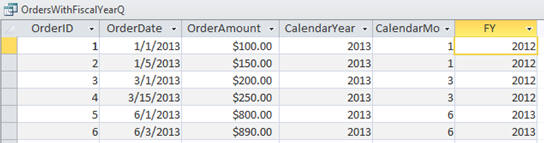
We're going to start out by learning how to calculate a simple fiscal year. We'll look at a company with a FY starting June 1st. You'll learn about the MONTH, YEAR, and IIF functions.
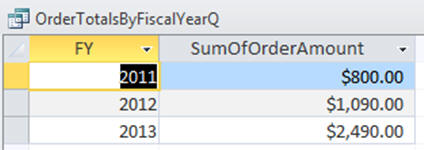
Next, we'll learn how to calculate totals by fiscal year using both an aggregate query and a report sorting & grouping level.
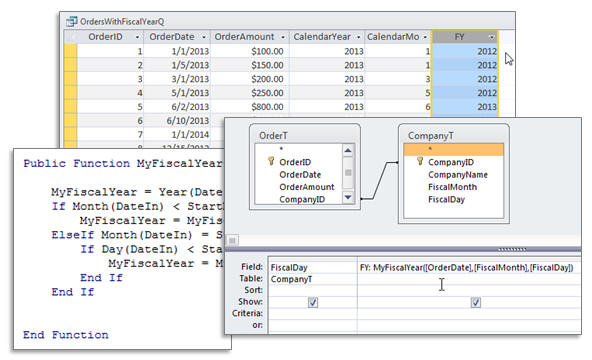
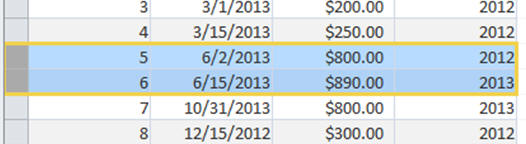
What happens if the company's fiscal year doesn't start on the 1st of a month? We'll learn how to write our own custom VBA (Visual Basic for Applications) function to calculate fiscal year data based on any start date. You'll learn about functions, parameters, return values, nested if/then statements, and more.
Finally, we'll learn how to manage a database that has to be able to calculate totals for multiple companies with different fiscal year start and end dates at the same time. This is great for accountants, attorneys, consultants, and large financial departments.
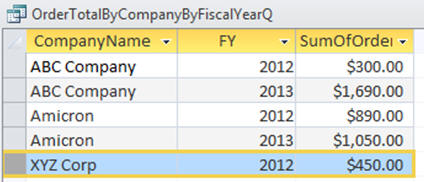
This is the perfect seminar for anyone who needs to learn how to perform calculations and generate reports based on fiscal years in their access databases. Of course, if you have any questions about whether or not this seminar is for you, please feel free to contact me. I'd be happy to answer any questions you might have.
Pre-Requisites
It is strongly recommended that you have completed my entire Access Beginner and Expert series.
Version
I am using Access 2010 in this seminar, however the lessons are perfectly valid for all versions of Access from 2003 and later. It's currently 2022 and I just recently verified that everything in this seminar still works with Access 2019 and Office 365.
Enroll Today
Enroll now so that you can watch these lessons, learn with us, post questions, and more.

Questions?
Please feel free to post your questions or comments below. If you are not sure as to whether or not this product will meet your needs, I'd rather help you before you buy it. Remember, all sales are final. Thank you.
Keywords
microsoft access fiscal, fiscal year, month, day, calculate fiscal, tax year, financial year, budget year, financial statements
More InformationTranscript Welcome to another seminar brought to you by AccessLearningZone.com. My name is Richard Rost. Today's seminar is all about calculating fiscal year in your Microsoft Access queries.
There are four lessons in this short fiscal year seminar.
In lesson one, I'll show you how to calculate a simple fiscal year. That's where your fiscal year starts on the first day of any given month; for example, June 1st.
In lesson two, I'll show you how to calculate fiscal year totals, either in an aggregate query or in a grouping and sorting level in a report.
In lesson three, I'll show you a more advanced situation where your fiscal year starts on a day that's not the first of a month, like June 15th.
Finally, in lesson four, if you have multiple companies in your database and you have to be able to calculate the fiscal year based on that company's fiscal year start date, we'll cover that in this lesson.
I consider this an intermediate-level Microsoft Access seminar. You should have at least completed my beginner lessons and possibly Expert One as well. If not, you should have a solid understanding of how to create tables, queries, and reports in Access.
There will be a little bit of VBA programming in lessons three and four, but do not worry, I will show you everything step by step as if you've never programmed before.
If you want to download the sample database file from this lesson, you can find it at this webpage: 599cd.com/xstudb. Although the database is tiny, you really should build the database that I've built in the lessons. You will get a much better understanding for how this works.
If you have any questions about the lessons covered today, feel free to post them in the Access forum on my website.
Now sit back, relax, and get ready for lesson one. Thanks for watching. Intro In this seminar, you will learn how to calculate fiscal years in Microsoft Access queries through a series of four lessons. We'll cover setting a fiscal year based on the first day of any month, calculating fiscal year totals in queries and reports, handling fiscal years that begin on any day of the month, and working with databases that include multiple companies with different fiscal year start dates. Some lessons include step-by-step VBA programming, but no prior coding experience is required. This seminar is designed for intermediate Access users who already know how to work with tables, queries, and reports. Quiz Q1. What is the primary topic of this seminar?
A. Calculating fiscal year in Microsoft Access queries
B. Managing inventory in Access
C. Creating user interface forms in Access
D. Importing data from Excel into Access
Q2. Which of the following is covered in lesson one?
A. Calculating a simple fiscal year starting on the first day of any month
B. Designing Access tables for fiscal reports
C. Automating data import using VBA
D. Building custom input forms
Q3. What is the focus of lesson two in the seminar?
A. Calculating fiscal year totals in queries and reports
B. Creating security groups in Access
C. Automating backup schedules
D. Integrating Access with SQL Server
Q4. In lesson three, what scenario is addressed for calculating fiscal years?
A. Fiscal years that start on a day not the first of the month
B. Fiscal years based on calendar years only
C. Fiscal years starting only on January 1st
D. Fiscal years limited to financial institutions
Q5. What additional complexity is introduced in lesson four?
A. Calculating fiscal years for multiple companies with different fiscal year start dates
B. Integrating Access with external APIs
C. Building dashboards with macros
D. Securing reports with passwords
Q6. What is the recommended skill level for participants of this seminar?
A. Intermediate-level Access users
B. Complete beginners with no experience
C. Professional C++ programmers
D. Only users with Access certification
Q7. What should students do to best understand the material in the seminar?
A. Build the database demonstrated in the lessons themselves
B. Only download and review the sample database file
C. Memorize all Access database functions
D. Read the forum posts before watching the video
Q8. What programming language is briefly introduced in lessons three and four?
A. VBA (Visual Basic for Applications)
B. Python
C. JavaScript
D. C#
Q9. If participants have questions, what does Richard recommend?
A. Posting in the Access forum on his website
B. Emailing Microsoft support directly
C. Attending a follow-up live workshop
D. Trying to find answers in the video comments section
Answers: 1-A; 2-A; 3-A; 4-A; 5-A; 6-A; 7-A; 8-A; 9-A
DISCLAIMER: Quiz questions are AI generated. If you find any that are wrong, don't make sense, or aren't related to the video topic at hand, then please post a comment and let me know. Thanks. Summary Today's video from Access Learning Zone focuses on how to calculate fiscal years in your Microsoft Access queries.
This seminar is divided into four lessons. In the first lesson, I explain how to determine a simple fiscal year when your fiscal year begins on the first day of any month, such as June 1st. The second lesson covers how to calculate fiscal year totals, whether you are working in an aggregate query or organizing your data by grouping and sorting on a report.
Lesson three deals with a more advanced scenario where your fiscal year starts on a date that is not the first of the month, like June 15th. For the final lesson, I cover the situation where your database contains multiple companies and you need to calculate the fiscal year according to each company's individual start date.
This is an intermediate-level Microsoft Access seminar. Before taking this lesson, you should already know how to create tables, queries, and reports, or you should have completed my beginner lessons and possibly the first Expert course. Lessons three and four introduce some VBA programming, but I lead you through each step, even if you have never programmed before.
You can find the sample database file for this seminar on my website. The file is very small, but I strongly recommend that you build your own database along with the lessons. Doing so will help you gain a better understanding of the material.
If you have any questions about what is covered today, you are welcome to post them in the Access forum on my website.
You can find a complete video tutorial with step-by-step instructions on everything discussed here on my website at the link below. Live long and prosper, my friends. Topic List Calculating a simple fiscal year starting on any month
Calculating fiscal year totals in aggregate queries
Calculating fiscal year totals in report groupings
Handling fiscal years starting mid-month (not the 1st)
Calculating fiscal years for multiple companies with different start dates Primary Topics fiscal year calculation, Microsoft Access queries, fiscal year totals, Access reports, aggregate queries, company-specific fiscal years, VBA for fiscal year logic Secondary Topics Access database building, beginner prerequisites |




