|
||||||

|
|
||||||
|
Access JobsBy Richard Rost
 4 years ago
Access Jobs - Is Microsoft Access a Valuable Skill? Is Microsoft Access a valuable skill to have when looking for employment? The answer is definitely a resounding "yes!" Not only are there no shortage of employers looking for people with Microsoft Access on their resume, but there is a ton of work to be found as either a freelancer or a consultant with Access database skills. Links
Access is In Demand!
First of all, yes, Microsoft Access is very much used in today's business environment. Granted, you will find Access being used more in small and mid-sized companies, however there are over 31 million small business that make up more than 99% of all businesses in the US, and they account for 44% of all US economic activity. https://599cd.com/AccessJobs1 Many small businesses have custom databases built for them using Microsoft Access. I know. I've build hundreds of them myself during my developer days. Even large businesses will have Access databases used throughout the organization to interface with big back-end systems like SQL Server. Access is everywhere. In addition to work as an Access developer, there are also lots of companies looking for Access training too. I get emails every week asking if I offer live training for Access. I used to, and I had no shortage of work. I only stopped doing it because I prefer to spend my time making videos for you nice folks. Because I care about you. You're like my family. :) Actual Jobs
In 2020, ZipRecruiter indicated that database management skills (including Microsoft Access) were in demand. https://599cd.com/AccessJobs2 I did a search on Indeed.com, Dice.com, and LinkedIn Jobs and had no problems finding lots of employers looking for Microsoft Access as one of their required skills. Here's LinkedIn with over 31,000 Access jobs listed: https://599cd.com/AccessJobs3 Payscale.com lists the average base salary for a Microsoft Access developer as $63k per year. That's about $30/hour, which isn't bad. Of course this will change based on your level of experience, and where you're located. https://tinyurl.com/y7mqqgdx Freelancing
I've checked out a couple of sites like Freelancer.com, Upwork.com, and Fiverr.com. Honestly, I've never gotten any work from them. I set up sample accounts on them, but my rate is a lot higher than what other people on those sites charge, that I'm not surprised I didn't get any bites. But I've heard some of my students tell me that they were able to get some decent work from a few of them. The problems with online freelancing sites for US developers is that we're competing with people in countries that have a much lower cost of living. There are developers that literally charge $5 per hour. So unless you can convince the prospective client why you're worth so much more, you'll have a difficult go of it. Of course, someone's always cheaper. I've got a whole page dedicated to this topic: Advice for Consultants. I've got a video coming out on this soon. https://599cd.com/Advice What Do You Need?
You should be well versed in the SQL language as it pertains to Access. Again, take a look at the outlines for my SQL Seminars and make sure you know most of that. https://599cd.com/SQL You'll need to know how to build databases with proper relational structure, and be able to deploy them securely in multi-user environments. See my Security Seminar for details on this. https://599cd.com/Security You must be able to teach people how to use the database you build, so communication skills and a mastery of the English language are important. Or, of course, whatever language is prevalent in your country. This is something, unfortunately, that comes with experience. The more you interact with customers, the better you'll get. After you master Microsoft Access alone, there are a dozen ways you can expand your skills. Learn SQL Server to be able to deploy your Access database to larger organizations or even on the Internet. https://599cd.com/SQLServer Learn ASP (or ASP.NET) to be able to develop web-based applications around your database. https://599cd.com/ASP Access is Not Going AnywhereAt least once a week I get asked a question like "is Microsoft Access going away?" "is Access being phased out?" or "is Access being discontinued?" Of course, the answer to all of these questions is a resounding NO. https://599cd.com/Retired Ignore Naysayers
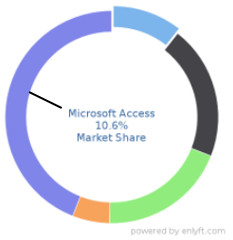
I've been using and teaching Access for 28 years now. I've built Access solutions (with and without SQL Server) for hundreds of clients in my developer days, and I've taught literally hundreds of thousands of people how to build with Access since starting my YouTube channel in 2006. The people who put Microsoft Access down are usually the ones who truly don't understand and appreciate the power and flexibility of this "cheesy" little app. Customer acquisition firm Enlyft lists over 98,000 companies that use Microsoft Access. Access has over 10% of the overall database management market share. https://599cd.com/AccessJobs4 And yes, I realize the callout line points to the wrong slice of the chart. Oops. Access is The Best
I've had hundreds of my students thank me for teaching them the skills they needed to either start their own businesses providing Access consulting, or getting a well-paying job in a company using Access. So yes, my friends... learn Access... especially if it's your first experience with building databases. ConclusionI hope this video helped to show you that Microsoft Access is definitely a skill that will help you either find a job, start a new career as a freelance developer, or even start your own business as an Access consultant or trainer. The possibilities are endless. Microsoft Access is definitely in demand. Thanks for watching. Again, I'm Richard Rost with Access Learning Zone. Keep learning! Your Comments & QuestionsIf you are interested in learning more about any of the topics mentioned above, then leave a comment below and let me know exactly what your needs are. The more people that comment, the higher the priority I give specific topics. Keywordsaccess 2016, access 2019, access 365, microsoft access, ms access, ms access tutorial, #msaccess, #microsoftaccess, #help, #howto, #tutorial, #learn, #lesson, #training, #database, #fasttips, microsoft access jobs, microsoft access developer jobs, jobs that use microsoft access, microsoft access jobs salary, what jobs use microsoft access, jobs using microsoft access, microsoft access freelance jobs, ms access jobs near me, microsoft access database developer jobs, microsoft access job description, microsoft access jobs uk, microsoft access jobs from home, microsoft access contract jobs, microsoft access programmer jobs, microsoft access programming jobs, jobs that require microsoft access knowledge, Is Microsoft Access a valuable skill, microsoft access freelance jobs, microsoft access vba jobs, microsoft access jobs salary, microsoft access jobs from home, access consulting work, access consulting service
More InformationTranscriptIs Microsoft Access a valuable skill in today's job market? Hi folks, this is Richard Rost with AccessLearningZone.com, and the answer to that question is definitely a resounding yes. Not only is there no shortage of employers looking for people with Access on their resume, but there is a ton of work to be found as either a freelancer or a consultant with Access database skills. First of all, yes, Microsoft Access is very much used in today's business environment. Granted, you will find Access being used more in small and mid-size companies. However, there are over 31 million small businesses that make up more than 99% of all businesses in the United States, and they account for 44% of all US economic activity. So when people say, Access is only used in small businesses, that's great. There's tons of them and tons of work. Many small businesses have custom databases built for them using Microsoft Access. I know I've built hundreds of them myself during my developer days. Even large businesses will have Access databases used throughout the organization to interface with big back end systems like SQL Server. Access is everywhere. In addition to work as an Access developer, there are also tons of companies looking for Access training too. I get emails every week asking if I offer live training for Access. I used to, and I had no shortage of work. I only stopped doing it because I prefer to spend my time making videos for you nice people because I care about you. You are like family. Let's talk about actual jobs. In 2020, ZipRecruiter indicated that database management skills, including Microsoft Access, were in demand. I did a search on Indeed.com, Dice.com, and LinkedIn Jobs, and I had no problems finding lots of employers looking for Microsoft Access as one of the required skills. The LinkedIn results had over 31,000 Access jobs listed. Payscale.com lists the average base salary for a Microsoft Access developer as $63,000 per year. That's about $30 an hour, which isn't bad. Of course, this will change based on your level of experience and where you're located. Now, the real opportunities are for those who are interested in freelancing or starting a consulting business. I spent several years as a consultant building databases for small businesses before I got involved with training. I had no shortage of work, and this was back in the 90s before the days of social media. Now it's easy to find people looking for help with Access. I even created a forum on my website to match up developers with people looking for help with Access. I call it the Access Developer Network. I've checked out a couple of the sites like Freelancer.com, Upwork, and Fiverr.com. Honestly, I've never gotten any work from them. I set up sample accounts on them, but the rate that I posted is a lot higher than what other people on those sites charge, so I'm not surprised that I didn't get any bites. But I've heard from some of my students that they were able to get some decent work from a few of these sites. One of the problems with freelancing sites for US developers is that we're competing with people in countries that have much lower cost of living. There are developers that literally charge $5 an hour, so unless you can convince the prospective client why you're worth so much more, you'll have a difficult go of it. Of course, I always say someone is always cheaper. I've got a whole page dedicated to this. It's called Advice for Consultants. It's from my 30 years in the business, and I've got a video coming up on this soon. But trust me, there's no shortage of consulting work. So what do you need to hang your shingle and become an Access developer? Well, you should be proficient with Access, of course, on a developer level and have a strong understanding of VBA. I would suggest taking a look at my Access class outlines, especially the expert and developer classes, and make sure you know most of the material that I cover in those lessons. You should be well-versed in the SQL language as it pertains to Access. Again, take a look at the outlines for my SQL seminars and make sure you know most of that as well. You don't necessarily need to know SQL Server, just the SQL language. SQL Server is good if you want to upsize someone into a bigger database, but you can build pretty good databases just with Access alone. You'll need to know how to build databases with proper relational structure and be able to deploy them securely in multi-user environments. See my Security seminar for details on this. Very important is you must be able to teach people how to use the database you build. Communication skills and a mastery of the English language are important, or of course, whatever language is prevalent in your country. This is something unfortunately that comes with experience. The more you interact with customers, the better you'll get. I'd say being a consultant is about 60% technical skills and 40% personal skills. After you master Microsoft Access alone, there are a dozen ways you can expand your skills. You can learn SQL Server to be able to deploy your Access database to larger organizations or even on the Internet. You can learn ASP, Active Server Pages or ASP.NET, to develop web-based applications around your database. At least once a week I get asked a question like, Is Microsoft Access going away? I hear it's being phased out or is it being discontinued? Of course not. The answer to all these questions is a resounding no. I have a whole video explaining that, so go watch that video up on the link down below you can click on. Ignore the naysayers. When I was doing research for this video, I came across another YouTuber who called Access Microsoft's, quote, weird little cheesy database for dummies app. I have been using and teaching Access for almost 30 years. I built Access solutions with and without SQL Server for hundreds of clients in my developer days, and I have literally taught hundreds of thousands of people how to build with Access since starting my YouTube channel in 2006. I started my business in 2002. The people who put Microsoft Access down are usually the ones who do not truly understand and appreciate the power and flexibility of this cheesy little app. Customer acquisition firm Enlyft lists over 98,000 companies that use Microsoft Access. It has over 10% of the overall database management market share. Quite simply, Access is the best database platform available for rapid development, especially for small and midsize companies. When you outgrow that, Access is still a fantastic front end for more powerful back end databases like SQL Server, and from there you'll have no problems getting your data on the web. I have had hundreds of my students thank me for teaching them the skills they need to either start their own businesses providing Access consulting or getting a well-paying job in a company using Access. So yes, my friends, learn Access, especially if it's your first experience with building databases. I hope this video helped to show you that Microsoft Access is definitely a skill that will help you either find a job, start a new career as a freelance developer, or even start your own business as an Access consultant or trainer. The possibilities are endless. Microsoft Access is definitely in demand. Thanks for watching. Again, I'm Richard Rost with Access Learning Zone. Keep learning. Thanks for watching. IntroIn this video, we talk about the current demand for Microsoft Access skills in the job market, including employment opportunities, freelance work, and consulting. I share statistics on how widely Access is used in businesses, where to find Access-related jobs, average salary information, and tips on what skills you need to succeed as an Access developer or consultant. We also discuss misconceptions about Access, how it fits into the broader database landscape, and the importance of communication skills when working with clients. QuizQ1. Which type of businesses primarily use Microsoft Access the most? A. Small and mid-size companies B. Only Fortune 500 corporations C. Government agencies exclusively D. Non-profit organizations only Q2. What is one major career advantage of learning Microsoft Access, according to the video? A. No employers are looking for Access skills today B. Potential for both salaried positions and freelancing work C. Only part-time work is available for Access skills D. Access skills are only useful for personal projects Q3. What is the typical use of Microsoft Access in large businesses? A. As the main company-wide database B. For personal expense tracking only C. To interface with bigger backend systems like SQL Server D. Access is never used in large companies Q4. According to Payscale.com, what is the average base salary for a Microsoft Access developer? A. $45,000 per year B. $100,000 per year C. $63,000 per year D. $25,000 per year Q5. What is a big challenge for US-based freelancers on sites like Upwork or Fiverr? A. Getting certified by Microsoft B. Competing with international developers who charge lower rates C. Having to know several foreign languages D. All freelancing sites require SQL Server skills Q6. What technical skills should an aspiring Access consultant possess? A. Basic Microsoft Word proficiency only B. Developer-level Access abilities, strong VBA, and SQL as it pertains to Access C. Only graphic design skills D. Social media marketing expertise Q7. According to the video, what percentage of being a consultant is technical skills versus personal skills? A. 100% technical, 0% personal B. 60% technical, 40% personal C. 50% technical, 50% personal D. 20% technical, 80% personal Q8. After mastering Microsoft Access, what other skill could help you expand your opportunities? A. Excel chart formatting B. Learning to use SQL Server and web technologies like ASP or ASP.NET C. Photo editing D. Video production Q9. What is one important non-technical skill mentioned for Access consultants? A. Ability to play musical instruments B. Communication and language mastery C. Photography skills D. Network engineering Q10. What is the myth addressed in the video regarding Microsoft Access? A. Access is only for databases on Macs B. Access is being phased out or discontinued C. Access can only handle 10 records D. Access is only for educational use Q11. Access is described as the best platform for what purpose? A. Rapid development for small and midsize companies B. Making mobile apps C. Cloud storage management only D. Purely entertainment databases Q12. What happens when you outgrow Microsoft Access, as per the video? A. You stop using databases entirely B. Access is still useful as a front end for larger databases like SQL Server C. You must start programming in C++ immediately D. There is no upgrade path at all Answers: 1-A; 2-B; 3-C; 4-C; 5-B; 6-B; 7-B; 8-B; 9-B; 10-B; 11-A; 12-B DISCLAIMER: Quiz questions are AI generated. If you find any that are wrong, don't make sense, or aren't related to the video topic at hand, then please post a comment and let me know. Thanks. SummaryToday's video from Access Learning Zone answers the question: Is Microsoft Access a valuable skill in the current job market? The simple answer is yes, absolutely. Employers are consistently seeking candidates who have Access skills on their resumes, and there are abundant opportunities for freelancers and consultants who know how to build and manage Access databases. Microsoft Access remains widely used in business today. While it's more common in small to mid-sized companies, that's hardly a drawback since there are over 31 million small businesses in the United States alone, making up more than 99 percent of all American businesses and accounting for a significant portion of the economic activity. So even if Access is most prevalent in smaller organizations, there is a tremendous amount of opportunity available. Many of these small businesses rely on custom databases created in Access. In my own career as a developer, I built hundreds of such solutions. Large companies also make use of Access databases, often linking them to large back end systems like SQL Server. Access truly is everywhere in the business world. Beyond development work, there is also strong demand for training. I regularly receive requests from companies for Access training sessions. Years back, I provided live Access training and was never short of clients. Nowadays, I focus my energy on making video tutorials for a wider audience. Looking at job listings, you'll find that Access continues to be in demand. In 2020, ZipRecruiter listed database management, including Microsoft Access, as a sought-after skill. My own searches on sites like Indeed, Dice, and LinkedIn Jobs revealed thousands of job openings requiring Access. LinkedIn alone showed over 31,000 positions mentioning Access skills. According to PayScale.com, the average salary for a Microsoft Access developer is around $63,000 per year, or about $30 an hour. Of course, actual pay will vary depending on your location and experience. If you're interested in freelancing or starting your own consulting business, Access offers even more possibilities. I spent years as a consultant building databases for small businesses, and work was always available even before the advent of social networking. Now, it's even easier to connect with potential clients seeking help with Access databases. To support this need, I created a section on my website called the Access Developer Network, where developers and clients can connect. I've tested popular freelancing platforms such as Freelancer, Upwork, and Fiverr. Personally, I didn't land any jobs, mostly because my rates were higher than most listings, but I know students who have found good work on these sites. The main challenge for US-based freelancers is competing with developers from regions with much lower costs of living, where rates can be as low as $5 per hour. Demonstrating your value is crucial if you want to command higher rates. I have a whole resource on my website titled "Advice for Consultants," based on my three decades of experience. There is no lack of consulting work for those with the right skills. To be successful as an Access developer, you need more than just a basic knowledge of Access. You should reach a developer-level proficiency and be comfortable with VBA. Reviewing the outlines for my expert and developer classes will help you gauge what concepts you need to master. A solid understanding of SQL as it applies to Access is essential, though you do not necessarily need to know SQL Server unless you plan to upsize databases in the future. However, many effective solutions can be built using only Access. You also need to ensure your databases are well designed, use proper relational structure, and are deployed securely in multi-user environments. I cover this in detail in my Security seminar. Communication is equally important. As an Access developer, you have to teach end users how to use the systems you've built. Good communication and strong language skills are critical, and these improve with experience. In my opinion, successful consultants need about 60 percent technical expertise and 40 percent interpersonal abilities. Once you master Access, there are many ways to deepen your technical expertise. You might choose to learn SQL Server for larger deployments or to bring databases online, or you could study ASP or ASP.NET to develop web front ends for your systems. I often get questions about the future of Access: Is Microsoft discontinuing it? Is it being phased out? The answer is no. Access is not going away. I have an entire video dedicated to this topic, and I encourage you to watch it if you're concerned. There are always critics who underestimate Access. During my research for this video, I encountered individuals who referred to Access as a simple or even inferior tool. After nearly 30 years of professional experience, building hundreds of Access solutions and teaching thousands of people, I can assure you that these views overlook the true power and flexibility of Access. According to Enlyft, over 98,000 companies use Microsoft Access, which represents more than 10 percent of the database management market share. Access stands out as the best platform for rapid development, especially for small and mid-sized organizations. Even as businesses grow, Access remains a superb front end for more robust back end systems like SQL Server and serves as a strong jumping-off point for deploying data on the web. I've received feedback from hundreds of students who have successfully started their own consulting businesses or secured well-paying jobs thanks to the Access skills they developed through my tutorials. So to sum up, Microsoft Access is a skill that can help you land a job, launch a freelance career, or even start your own business as an Access consultant or trainer. The demand is strong and the opportunities are extensive. For a complete video tutorial with step-by-step instructions on everything discussed here, visit my website at the link below. Live long and prosper, my friends. Topic ListThis is a video discussing the value of Microsoft Access skills in the current job market, opportunities for employment and freelancing, required technical and communication skills, and the ongoing relevance of Access for businesses. Primary TopicsMicrosoft Access job demand, freelance consulting opportunities, business adoption of Access, required skills for Access developers, Access career paths, Access vs. SQL Server, industry market share, upskilling recommendations Secondary Topicsfreelancing site competition, importance of communication skills, expanding beyond Access, public misconceptions of Access |
||
|
| |||
| Keywords: FastTips Access Fast Tips microsoft access jobs, microsoft access developer jobs, jobs that use microsoft access, microsoft access jobs salary, what jobs use microsoft access, jobs using microsoft access, microsoft access freelance jobs, ms access jobs Page Tag: ShowOnHomePage PermaLink Microsoft Access Developer Jobs |


 The real opportunities, however, are for those who are interested in freelancing or starting a consulting business. I spent several years as a consultant, building databases for small businesses before I got involved with training. I had no shortage of work, and this was back in the 90s, before the days of social media. Now it's so easy to find people looking for help with Microsoft Access. I even created a Forum to match up Access Developers with people looking for help with Access.
  You should be proficient with Access on a Developer level and have a strong understanding of VBA. I would suggest taking a look at my Access class outlines (especially the Expert and Developer classes) and make sure you know most of what's covered there.
  When I was doing research for this video, I came across another YouTuber who called Access Microsoft's "weird little cheesy database for dummies app."
 Access is THE BEST database platform available for rapid development, especially for small and mid-sized organizations. When you outgrow that, Access is still a fantastic front-end for a more powerful back-end database like SQL Server. And of course, from there, you will have no problems getting your data on the Web.


