Decision Tree 2
By Richard Rost

 3 years ago
Access Decision Tree Database Part 2: Tables
In this series of Microsoft Access tutorials, we are going to build a decision tree database that can be used for troubleshooting, logical decision-making, questionnaires, tech support, game development, and lots more.
In today's video, we are going to build the tables necessary for the entire decision tree database, and we're going to enter some sample records to show you how the logic behind a self-join decision tree works.
Members
There is no extended cut, but here is the database download:
Silver Members and up get access to view Extended Cut videos, when available. Gold Members can download the files from class plus get access to the Code Vault. If you're not a member, Join Today!
Prerequisites
Keywords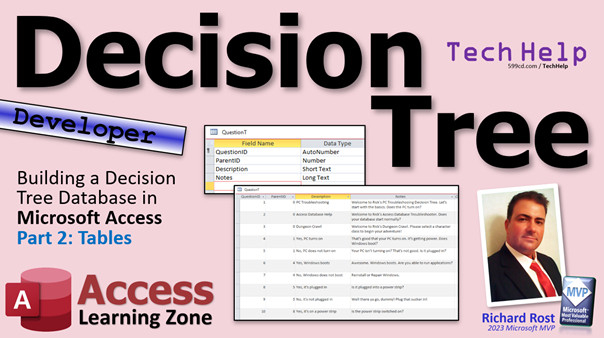
access 2016, access 2019, access 2021, access 365, microsoft access, ms access, ms access tutorial, #msaccess, #microsoftaccess, #help, #howto, #tutorial, #learn, #lesson, #training, #database, decision tree table design
More InformationTranscript Today we are continuing the Decision Tree series. This is part two. We're going to build the tables. If you have not yet watched part one, watch that first so you understand what we're doing, what all the prerequisites are, and all that other good stuff. It's a free video. It's on my website. It's on my YouTube channel. Watch that and come on back.
The nice thing about a Decision Tree is that the table structure is extremely simple. All of this stuff is one table. That's it, one table. You're going to have a record, and each record is going to have a parent ID to the record above it. For example, weather wouldn't have a parent, so its ID will be zero or you can make it null, whatever you prefer. Sunny would have its own ID. It would also have a parent ID, so now you can know who its parent is. To show all of the children for a particular node, you would just list all of the other records that have a parent ID equal to this one. So, if this guy is record one, Sunny, Overcast, and Rain would all have parent IDs that are one. So, as simple as just one table to worry about.
I'm going to start off with my TechHelp Free template. This is the database I use for most of my TechHelp videos because it's already got all the basics in it that we need to teach most lessons. If you've been following my YouTube channel for any amount of time, you're familiar with this database.
Now, what we're going to do is basically gut it. We're going to delete all the stuff out that we don't need. We're going to delete all of the tables. We're going to delete all of the queries. We're going to delete all of the forms except for the template forms, the main menu, and that trusted form. We can get rid of contact. I am holding on the control key right now, by the way. This stuff, this stuff, this stuff. Leave main menu because that will keep the main menu. Keep this because that's a part of a different thing. If you load up the database from a non-trusted location, this form comes up. Get rid of those. All right, get rid of the order invoice. We'll leave all the rest of this code stuff down here too, like the open main menu macro and that. Select all those things, hit delete. It's going to say, are you sure? You're up. Goodbye. It's going to say, order T's got some relationships. We're going to delete those. Yeah, that's fine.
So that's what we have left in our database. We'll get to work on this main menu in a little bit. Next up is to create the table that we need for our, let's call them questions. You can call them nodes, or questions, whatever. I'm going to make it a question because basically each one of these is a question. Have you tried this? What's the status of that? That kind of stuff. Or if you're doing game design, you're going to say, okay, you're walking through a dungeon and blah, blah, blah, blah, blah, you're going to end it with a question. What do you do now? The answers to that will be all of the titles of the next set of questions.
So we're going to create a table. This will be our question table. We're going to start with question ID. That's our autonumber. Every table should have an autonumber. Now we have to have a link back up to the parent record. So, parent ID, that'll be a number of type long integer. Default that to zero. You can use zero or null, whatever. Description. That'll be short text. Then notes is long text. Notes is one of my only exceptions to the singular rule. I try to keep all my fields singular, but I've been doing notes for 30 years now. So it's always going to be notes, not note. I'm sorry, just that's how it's going to be. There's exceptions to every rule.
That's it. That's really all you need in this table for the basic functionality. We might add some stuff later on. Let's save this as my question T, my question table. Now we're ready to put some data in here. It's always easier to work with building a database if you've got some sample records in there to start with. So we'll put some sample records in here.
Now the first thing, we'll do three different decision trees. You can have as many as you want, obviously. But we'll do a PC troubleshooting decision tree. We'll do an Access database help decision tree. We'll do a dungeon crawl. I'll show you how to make a game with this. Games are always fun. When you're learning something like Access, it's more fun to do it as part of a game. Then you can have fun with it too instead of just being all about work.
I'm going to maximize this because it's easier to work with tables and queries and stuff on there. And the notes field, we're going to make some big. We're going to make a form later on to be able to do this stuff. I'm going to make these a little bit taller because this is going to be notes type stuff.
Now I've already typed a lot of this stuff in, so I'm not going to make you sit here and watch me type. But what will the first node, the first question for PC troubleshooting be? I'm going to put in here: Welcome to Rick's PC troubleshooting decision tree. Let's start with the basics. Does the PC turn on? The next nodes under that will be answers to that question. Let's go down here and work on that next.
The parent ID for the node under PC troubleshooting is going to be one. This guy's parent is going to be one. See how this works? So right down here now we have to answer the question: Does the PC turn on? So yes, PC turns on. And then the next one, parent one, no, PC does not turn on.
See how that works? These guys are the children under this node. This will be a lot more evident when we get to building the forms, but it's easier to have some data in here first.
Now let's work on this one. Yes, the PC turns on. So what's the text for that one? It's good your PC turns on. It's getting power. Does Windows boot? Is the next question I'd ask. Let's work under that one now.
The next node under this guy is question ID four. The child under that, the parent will be four. We'll say yes, Windows boots. Then no, Windows does not boot. I like to have, instead of just yes and no, a little more description in here because when you jump from this node to this node, it helps you know where you were before.
We're going to do something where you can see a list of all your previous answers. That's coming. I have a lot of options for later on. We're just keeping it simple for now.
Yes, Windows boots. Awesome. Windows boots. Are you able to run applications? That would be the next one. The next children are under node six. But we're going to stop at this point. You keep building this. Keep adding stuff to it.
How about no, Windows does not boot? We can end it right here with just reinstall or repair Windows. That's it. I'm done. You can put finished here, contact tech support, or whatever you want to say.
Now let's go back up. We got yes, PC turns on. No, PC does not turn on. Let's continue this branch under question five. PC doesn't turn on. How about: Your PC isn't turning on. That's not good. Is it plugged in?
Now we're going to continue down here under five. The parent ID here is five. Is it plugged in? Yes, it's plugged in. Then we've got five, no, it's not plugged in.
For yes, it's plugged in. Is it plugged into a power strip? I believe we have had this happen. I used to do PC tech support, and I went out to multiple customers who swore to me it was plugged in and it wasn't in a power strip. I get out there, and there's a power strip under the desk that they accidentally kicked with their foot, and now the switch is off. That'll be a $100 service call, ma'am. Thank you, have a nice day.
This is a good reason, because when I used to do classroom training for another company who will remain nameless back in the 90s, I developed all of their training for onboarding new employees. The problem was that it took a while to get new techs up to the point where they just knew what questions to ask the person on the phone. So I developed something similar to this. It was basically a decision tree knowledge base that they could just run through while they were on the phone with the customer and ask them these questions in series, and it would eventually drill down to what the problem was. That's why something like this is very powerful as a way to help people understand how to diagnose and fix problems.
Yes, it's plugged in. We'll come down here under node eight now. Is it on a power strip? Yes, it's on a power strip. Or eight, no, it's not, it's plugged directly into the wall outlet.
Yes, it's on a power strip. What's the next question? Is the power strip switched on? We're going to go under node 10 now. Yes, it's switched on. That could be a bad power supply or something in the computer. Contact tech support. Or 10, no, it's not switched on. The answer to that would be, well, there you go, dummy, flip that switch. You could continue from this point: does it work now. Sometimes I like to go back up to the previous one this way.
No, it's plugged directly into the wall. You could continue on with something like, plug something else like a lamp into the wall socket. Does the lamp work? You can continue on with that. If it doesn't work, then the socket's bad. Contact an electrician, that kind of stuff.
No, it's not plugged in. Well, there you go, dummy, plug that sucker in, and so on, and you can continue down the list. There's your PC troubleshooting branch. Now you can come up and continue with the next branch if you want.
Access database help. Welcome to the Rick's Access database troubleshooting. Does the database start, that kind of stuff? Or instead of just asking yes or no questions, you could say, what is the problem and have a list of popular problems. I'm getting a compile error, the startup form won't load, and have them pick from a list of 10 different options if you want to.
Let's take a look at how to do the dungeon crawl. We'll come back to the Access database help in a future lesson, because I'm going to actually flesh this out and put this on my website. One of my goals eventually is to take this Access database and move it online so that we can use the decision tree on the web. That way your users can just run through it and use your knowledge base.
Let's do the dungeon crawl game. Welcome to Rick's dungeon crawl. Please select the character class to begin your adventure. See if we can do multiple options. This is question parent three, so we're going to come way down here and work on three now.
We'll do three is a fighter. Excuse me, 14 to be a fighter. The next three would be, we'll do a wizard, we'll do a thief. Oops, I always spell thief wrong the first time. I always spell it wrong the first time. You just think THE, and then you see it, and then you know it's wrong. I've been doing that since I was a kid. It's one of those words. Then we'll do a cleric.
Now the interesting thing is you can tell the same story in your game, but you can change the options based on the character. For example, let me just show you. I'm not going to spend a ton of time on this. Let's say you've got the fighter. I got these already written out.
Greetings mighty warrior. You take your trusty sword and head into the dungeon. After walking about 20 feet into the dank cavern, you see a group of three goblins sitting at a table playing some sort of dice game. What do you do?
The story can change for the wizard. The wizard's story would be like this: Greetings, brilliant and magical mage. You arm yourself with your trusty spellbook and staff and make your way into the dungeon. Then from that point, it's the same. After walking about 20 feet into the cavern, you see three goblins. And the thief, likewise, would get a slightly different story. Greetings, cunning master thief. You gather your thieves' tools and other miscellaneous adventuring gear and head into the dungeon. Finally for the cleric: greetings, wise and faithful brother. You gather your holy symbol and hammer and head into the dungeon, and so on. So the story is slightly different, even though it's basically the same stuff.
Now you can give each one of these player types a different set of options. For example, fighter, so question 14. Now we're under 14. We're going to give him four options. He might have: attack with my sword, ask to join their game, run away, or quietly try to sneak past.
The wizard might have slightly different options. So the wizard who is 15, we'll give him five options. He might have: attack with my staff of lightning bolts, cast a sleep spell, and the other same options—ask to join the game, run away, or quietly try to sneak past.
You can continue this on for the other character types. The thief might have a different set of options: attack with my whip, throw a dagger at one of the goblins, or the other three standard options. The cleric would have his options. You can tailor the story based on the character types.
So, quietly try to sneak past. If you're the fighter and you have swords and armor and all kinds of clanky stuff, you are not sneaking past. But the thief character might have a better chance to sneak past, so his story could change. You could sneak past the goblins.
Maybe later on, if you all are enjoying this and you give me some feedback and that's what you want to see, maybe we'll add some randomness to it where the next set of options could be like, roll a D20, and if it's a 10 or lower, they succeed and they can continue on this way.
There's all kinds of stuff you could do with this thing. So you can use it for business, you can use it for troubleshooting, you can use it for all those things I mentioned in the first lesson: a knowledge base, diagnosis, risk assessment, learning paths.
If you're doing Excel: do you know how to sort a column? No, you don't. Okay, this is where we're starting. If you do, let's continue on and see what else you know.
That's it for our table. That's all we really need. Save that. Here is my prototype database that I showed you in the last class, in the last video.
In the next lesson we're going to work on this, our editor, so we can edit this stuff in a form setting. When you're doing it in a form, it's a whole lot easier because you don't have to worry about all those IDs. I'm going to still display it up here, but you don't have to see it, you just type in the thing: pick a character class—fighter, wizard, thief, cleric. If you want to add one, put a paladin on there and then we'll continue his thing. You want to jump to the cleric and work on his, double click and there we go. We'll get to this over the next couple of lessons.
Hang in there, we're going to get there. It's not tomorrow, because today is Friday, so tune in Monday—same bat time, same bat channel—and we'll continue on with starting to build the forms. But that's going to do it for your TechHelp video for today.
Even if you didn't learn something, I hope you had some fun, and we're going to continue to have some more fun. I have to build the basic stuff first before we can get into more advanced stuff. For a lot of people, that self-join relationship is a new thing. People don't think that, oh, I can relate a table to itself. Wait till we get into some of the query stuff, you're going to see it's pretty cool in the reports.
But that's it, I hope you learned something. Live long and prosper, my friends, and don't forget to post a comment down below and tell me what features you'd like to see added to this decision tree database. I have at least another five or six lessons for this planned, so we're going to be having some fun with this. And yes, don't worry members, I have some advanced stuff coming in for you too. Live long and prosper, my friends. I'll see you next time. Intro In this video, we continue building our Decision Tree project in Microsoft Access by setting up the main table structure needed to store questions, nodes, and answers using a simple self-join relationship. I will show you how to clean up the template database, create the table design with fields for question IDs, parent IDs, descriptions, and notes, and then add sample data for scenarios like PC troubleshooting, Access help, and a dungeon crawl game. This is part 2. Quiz Q1. What is the core table structure used to build a Decision Tree in this video?
A. One table with a parent ID relating to the record above it
B. Multiple tables for each branch of the tree
C. Separate tables for questions and answers
D. A table for each possible answer
Q2. What is the main purpose of the parent ID field in the question table?
A. To identify which record is the root node
B. To store the text of the parent question
C. To link a record to its parent question
D. To generate random branching
Q3. If a node has a parent ID of zero or null, what does that indicate?
A. It is an answer node
B. It is a child node of another record
C. It is a root node without a parent
D. It is not included in the tree
Q4. Why is having sample data in your decision tree table useful during development?
A. It allows for testing queries and forms more easily
B. It slows down the database for more realistic testing
C. It is required before saving the table
D. It automates the creation of new nodes
Q5. Which of the following fields are included in the basic question table described in the video?
A. QuestionID, ParentID, Description, Notes
B. QuestionID, QuestionText, AnswerID, Category
C. Question, Parent, Response, Tags
D. ID, Link, Prompt, Details
Q6. According to the video, why is a decision tree a powerful tool for knowledge bases or troubleshooting?
A. It provides a random path for users to follow and guess
B. It organizes questions and answers in a structured, logical way
C. It automates all technical support without user input
D. It replaces the need for forms in a database
Q7. How can the story or set of options change in the dungeon crawl example?
A. By assigning options based on the character class selected
B. By shuffling all options randomly every time
C. By having only one set of options for all classes
D. By using separate tables for each room
Q8. What is the key benefit of using an autonumber for QuestionID in the table?
A. It ensures that each question has a unique identifier automatically
B. It allows users to enter IDs manually for flexibility
C. It resets the numbering every time data is added
D. It stores the parent description
Q9. What is a practical application of a decision tree besides gaming, as mentioned in the video?
A. Calculating monthly expenses
B. Diagnosing and troubleshooting technical problems
C. Sorting a table alphabetically
D. Drawing random shapes
Q10. In the self-join relationship described, what does the "self-join" refer to?
A. A table relating to itself through a parent-child relationship
B. Two unrelated tables joined by a common field
C. A join between three or more tables
D. A join that combines unrelated data
Q11. What is the advantage of building forms for editing the decision tree data, according to the video?
A. It hides the IDs and makes data entry or editing easier
B. It automates random story generation
C. It allows for deleting all data instantly
D. It avoids the need for any sample records
Q12. What is one suggested way to make decision trees more enjoyable for learning, based on the video?
A. Use game elements and storytelling
B. Limit the options to yes/no only
C. Remove all branching possibilities
D. Focus only on business applications
Q13. Why might you want to use more descriptive text instead of just "Yes" or "No" for answers?
A. It helps users keep track of the context and path
B. It makes the table longer
C. It increases randomization
D. It prevents branching
Q14. How could randomness be added to a decision tree game, according to ideas in the video?
A. By including dice rolls to determine branching outcomes
B. By automatically selecting a random answer for the user
C. By deleting previously answered questions
D. By replacing all user choices with automated responses
Q15. What makes the decision tree table structure particularly simple and flexible?
A. The entire structure can be handled with just one table and a parent-child relationship
B. It requires complex joins and multiple lookup tables
C. It can only handle binary yes/no questions
D. It must use many-to-many relationships for every branch
Answers: 1-A; 2-C; 3-C; 4-A; 5-A; 6-B; 7-A; 8-A; 9-B; 10-A; 11-A; 12-A; 13-A; 14-A; 15-A
DISCLAIMER: Quiz questions are AI generated. If you find any that are wrong, don't make sense, or aren't related to the video topic at hand, then please post a comment and let me know. Thanks. Summary Today's TechHelp tutorial from Access Learning Zone continues our Decision Tree series. This is part two, and today I will explain how to build the tables needed to create the foundation for your decision tree database. If you have not watched part one yet, I strongly recommend starting there. It covers all the prerequisites and will make it much easier to follow along, so be sure to check that out on my website or YouTube channel before moving on.
One of the best things about the decision tree model is its simplicity. The table structure is straightforward: everything you need is built around a single table. Each record in the table can have a reference to a parent record, making it easy to track where in the tree each item falls. For instance, the root node, like "weather", will have no parent, so its parent ID can be set to zero or left null, whichever you prefer. A child node such as "sunny" will have its parent ID set to reference the parent record. If "sunny" is a child of "weather" and "weather" is record one, then "sunny" will have its parent ID set to one. So, to display all the children of any given node, you just need to look for records where the parent ID matches that node's ID.
To get started, I am using my TechHelp Free template database. If you have followed my other lessons, you are probably already familiar with this template. It contains everything necessary to jump into most Access projects, but for this decision tree example, we'll begin by clearing out everything we do not need. All of the existing tables, queries, and most of the forms will be deleted, except for essential template forms like the main menu and the trusted form that appears if the database is opened from a non-trusted location. I will also keep a few macros and related objects required for basic database operations. Once we have trimmed everything down, we are left with a clean slate and can focus solely on the decision tree.
The next step is to create the main table for our questions. You can think of each of these as a "node" or as a "question" depending on your context. In most cases, each node will ask a question such as "Have you tried this?" or "What is the status of that?" This format works for many applications—from troubleshooting guides to games. If you are designing a game, for example, each question could present a choice or a scenario, asking the player, "What do you do next?" The available answers will point to new questions in the tree.
When building the table, I include the following fields: a QuestionID as an AutoNumber (since every table should have a unique identifier), a ParentID (which is a number and defaults to zero or null), a Description (short text), and Notes (long text). I prefer keeping field names singular, but I've always labeled this field as "notes," so that remains. This basic table structure is all you need for now, though we may add more fields later if the project calls for it. I save this table as "QuestionT" and add a few sample records, as having test data makes development much easier.
For demonstration, I set up three example decision trees: a PC troubleshooting tree, an Access database help tree, and a dungeon crawl game. You can create as many branches as you want. For the PC troubleshooting branch, I start with a root question: "Welcome to Rick's PC troubleshooting decision tree. Let's start with the basics. Does the PC turn on?" This root node has no parent. Then, for each possible answer, I add a new record with the parent ID pointing back to the original question. One child node is "Yes, PC turns on," and another is "No, PC does not turn on." This method continues recursively, with each answer leading to more questions or solutions, each linked by their ParentID.
By structuring the data this way, you can build out complex paths of questions and answers, making it easy to provide step-by-step guides for troubleshooting or interactive stories. For example, answering "Yes, PC turns on" might lead to "Does Windows boot?", and then that answer leads to new possibilities. I also recommend describing the answers with more than just "yes" or "no," so it is clear where each branch leads when reviewing the records. Later, I will show how to track users' previous answers, making navigation through the decision tree even clearer.
Using this approach, you can develop a tree for multiple purposes. The Access database help tree works the same way. Your root node might welcome users and ask what problem they are experiencing, with child nodes listing common errors or issues.
For the dungeon crawl game, you can be more creative. The first question welcomes the player and lets them select a character class—fighter, wizard, thief, or cleric. Each choice leads to a personalized introduction for that character, and then onto scenarios that branch based on previous decisions. For instance, the options presented to a fighter or a wizard can differ, with each role affecting the paths available. The story and available actions adapt to the player's choices. In this way, the decision tree idea is very flexible; you can use it for gaming, business solutions, tech support, education, knowledge bases, diagnosis systems, risk assessments, and more.
After you have entered some sample data into the table, you will see how manageable it is to build and grow your decision tree. The next lesson will focus on creating a form-based editor, which makes it even easier to manage your nodes and links, especially since the user will not need to worry about typing in ParentID numbers directly. We will make it user-friendly, so you can add new branches, jump to different nodes, and keep building out your tree effortlessly.
Be sure to stay tuned for the next lesson, where we will start developing the forms for editing and navigating the tree structure. We are just laying the foundation here, but once you get comfortable with the self-join relationship used in the table, you will see how powerful this pattern can be for a variety of applications. Eventually, we will also look at building advanced queries and reports to leverage all this data.
You can find a complete video tutorial with step-by-step instructions on everything discussed here on my website at the link below.
Live long and prosper, my friends. Topic List Overview of the decision tree table structure
Using a self-referencing parent ID field
Creating a single table for decision tree nodes
Setting up fields: QuestionID, ParentID, Description, Notes
Populating the table with sample data
Building a PC troubleshooting decision tree
Assigning parent IDs to create the tree hierarchy
Building an Access database help decision tree
Creating a dungeon crawl game decision tree
Adapting questions and options for different branches
Customizing game story branches by character class
Adding variation in options for each game character
Tailoring story outcomes based on character choices
Saving and reviewing the decision tree table Primary Topics decision tree structure, self-referencing tables, table design in Access, parent-child relationships, sample data entry, branching logic, customization of nodes
Secondary Topics planning for forms, future web migration, business vs game use cases, database template usage
|






