Are You Sure?
By Richard Rost

 17 months ago
Access VBA "Are You Sure?" MsgBox Helper Function In this Microsoft Access tutorial I will show you how to create a simple helper function in VBA that lets you quickly ask your users "Are you sure?" with a customizable confirmation prompt, making your code cleaner and saving you from retyping the full MessageBox code every time. You'll learn how to use optional parameters for the prompt and title, set up the function in a global module, and call it from your forms and buttons for easier confirmation dialogs. Micah from Burlington, Vermont (a Platinum Member) asks: Hey Richard, is there a shorter or easier way to ask the user "Are you sure?" in VBA? I feel like every time I want to add a simple confirmation prompt, I have to type out that whole MsgBox line with vbYesNoCancel and all those options. It gets repetitive and clutters up my code. MembersThere is no extended cut, but here is the file download: Silver Members and up get access to view Extended Cut videos, when available. Gold Members can download the files from class plus get access to the Code Vault. If you're not a member, Join Today!
PrerequisitesLinksRecommended CoursesCode Vault
Keywords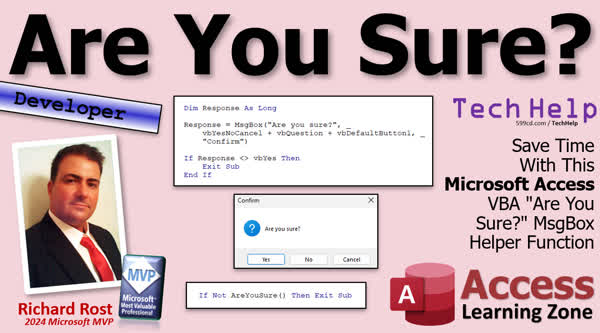 TechHelp Access, AreYouSure helper function, VBA confirmation prompt, VBA MsgBox with options, custom confirmation dialog VBA, reusable message box VBA, prompt with Yes No Cancel VBA, global module function example, optional parameters in VBA functions, VBA default button setting, Code Vault VBA functions, developer level VBA example, simplifying repetitive VBA code, custom functions in VBA, passing parameters to VBA function, improving user prompts VBA
 Subscribe to Are You Sure?
Get notifications when this page is updated
More InformationTranscript Welcome to another TechHelp video brought to you by AccessLearningZone.com. I'm your instructor, Richard Rost. Today, I'm going to show you how to create a little helper function to ask your user "Are you sure?" without having to type all of this every time you want to do it, or even just all of that. We're going to make it nice and short, just like this: "Are you sure?" That's it.
This question comes from Micah in Burlington, Vermont, one of my Platinum members. Micah says, "Hey Richard." Hey Micah. "Is there a shorter or easier way to ask the user 'Are you sure?' in VBA? I feel like every time I want to add a simple confirmation prompt, I have to type out that whole MessageBox line with the VBYesNoCancel and all those options. It gets repetitive and it clutters up my code."
Yeah, I feel you. A long time ago I wrote my own little 'Are you sure?' prompt, and it makes this so much easier and faster. Let me show you something. I was going to channel Fire Marshall Bill with that "Let me show you something," but it's too early for that.
First up: developer level video. What does that mean? That means if you don't know VBA and you want to learn, go watch this video first, about 20 minutes long. It'll teach you everything you need to know. Go watch this video so you know how to use the MessageBox function in VBA. You'll need to know how to use If Then. Go watch my video on creating your own custom function. These are all free videos, they're on my YouTube channel. They're on my website, go watch all four of those and come back when you're done.
Here I am in my TechHelp free template. This is a free database. You can grab a copy on my website if you want to. Let's say I have a customer form here. Let's say I have a button here to open up the order form. Let's say I want to ask the user if they're sure before they open up that order form. It's a silly example, but all I care about is the prompt. Go into your button, right-click, build event. Let me resize this real quick and turn off that immediate window. Here I am inside the order button click.
Now, to ask the user if they're sure, the short way to do it is just to say:
If MsgBox("Are you sure?", [options here]) Then
Now, I like three parameters in here. I like to say VBYesNoCancel, and I explain why I like Cancel in the other video about message boxes. I like to give people that Cancel option because sometimes, if they just see Yes and No, they panic, they get decision paralysis, and they don't know what to do, so they hit Cancel. If you don't give them that Cancel option, they might accidentally hit the wrong thing. So I like giving people Cancel.
Plus, VBQuestion. You've got Question, Critical, and a bunch of other options here for the type of message box. This is Question. Again, I go over the types in the other video. The last one that I like to put in here is VBDefaultButton. Which button do you want to default to? One, two, or three? For things like "Are you sure you want to delete this customer?" I usually make it No. In this case you'd probably pick one. This is totally up to you. I'm going to go with No here. Let's say this is something critical that's about to happen.
If the answer to that is anything other than Yes (so VBYes), then Exit Sub.
Now, that's the shortest I can make that. That's still a lot of typing. Even if you know what you're doing, it still takes a minute or two to type that all out. For me, I would say this exact thing here, maybe changing the prompt just slightly, like "Are you sure you want to do this?" - whatever you're doing. Aside from that, and maybe adding a title (you could put a title in here too, like "Confirm"), that's about as short as that statement gets.
When you're all done, you want to compile once in a while, close it, save it, open it, click to get your "Are you sure?" button.
The goal here is to make that shorter, so we don't have to type all that out. So we're going to make a helper function, stick it in a global module. I am going to take all of this, we're going to copy it.
Let's go out here. If you don't have a global module already, you should make one. Every database should have one. Well, every database from a VBA developer should have one where all your stuff goes that's not bound to a specific form. Create Module if you don't have one already - not Class Module, regular Module. Come in here. At the bottom down here, we're going to go:
Public Function AreYouSure() As Boolean
Function means it returns a value. AreYouSure is the name of it. For now, we're not going to send any parameters in. Then As Boolean. Boolean is True/False, Yes/No.
Paste in that code that you copied a minute ago right there.
Now we're going to change this up just a little bit. We're going to say:
If [result] = vbYes Then
AreYouSure = True
Else
AreYouSure = False
End If
Are there shorter, more compact ways of writing that? Yeah, you could play some tricks and use IIf functions. This is easy to read. I like code that's easy to write and easy to read. Is it the most compact? No. But it works and it's good and you'll understand it in the future.
Basically, we're popping up the message box and getting a value back. If that happens to be Yes, then you're going to return a True; otherwise, you're going to return a False.
Save that. Debug, compile once in a while. Come back out here. Let's go back into our button code.
Now instead of all this, I can say:
If Not AreYouSure() Then Exit Sub
Because AreYouSure is going to return a True/False answering the question "Are you sure?"
You could rewrite this if you want to do it the other way:
If AreYouSure() Then
' Do that
End If
Either way, it doesn't matter. I usually say "If Not AreYouSure()" I don't like writing functions that return a negative, like "If AreYouNotSure," that kind of thing. I always like my functions to return True for the name of the function, that's just me usually. It's always IsActive, not IsInactive. That's like a double negative.
But this will run the same way now. If I come out here, close it, save it, open it, click it, "Are you sure?" Yep, there it is. Works exactly the same.
Some parameters? You said ok, fine, you talked me into it. We can also send in parameters as options here. Usually the only two things that I care about are the prompt and the title. But you could send in the buttons as options. Like I said, 99 percent of the time I stick with these, and if I don't want to use these, guess what? I'll just write this out by hand then, for the rare message box where I need it customized.
But usually I just want to send in the prompt and the title and I'll put defaults in there for those two. You have optional parameters, right? Prompt as String, give it a value if you don't specify one, "Are you sure?" Next line down here, optional Title as String = "Confirm" or whatever you want the title to say. The default is "Microsoft Access" if you don't specify it.
Now just take your prompt and stick your prompt, and take your title, copy it, and stick your title in there. Right there, give it that quote.
Now you get your prompt, your buttons that you always like, and your title, and it works the same. Save it, debug, compile, close it, close it, open it, click it: "Are you sure?" Yep, there you go. It works, nice and easy.
Now all you have to do in the future is say "If AreYouSure() Then" whatever. You don't have to type out all of this every time you want to do a message box prompt.
Add this to your little library of functions and the world is a happier place.
I am going to stick this in the Code Vault for the Gold members so you can have a copy of it. That's not hard to make, but sometimes it's nice just to have it because I don't always copy all of these types of functions into every database that I build. Sometimes when I build a new database, I want to be able to say, "Oh, where's that AreYouSure that I ... Oh, guess what, it's in the Code Vault." I've got a nice little place where all my functions are because you don't need all your functions for all your databases.
That's the benefit of the Code Vault, and the Code Vault's available for Gold members.
Do you like this kind of stuff? Do you like learning VBA with me? If so, check out my developer lessons on my website. I have 51 levels now of different developer material, and I take you from the beginning all the way through and teach all kinds of cool tricks and tips like this: how to use VBA the right way in your Microsoft Access databases. You'll find a link down below, here it is right there.
While I've got your attention, check out my new merch store. I've got all kinds of cool stuff. I have hats, I have cups, I have teddy bears, hoodies, you name it. I have mouse pads. All the cool kids are wearing this stuff. So go check it out.
That's it. That's a nice, easy, quick way to generate a helper function that just asks "Are you sure?" I just saved you about two minutes of typing every time you have to type one of these out. You can thank me later.
That's going to be your TechHelp video for today. Hope you learned something. Live long and prosper, my friends. I will see you next time.
TOPICS:
Creating a reusable AreYouSure confirmation function in Access VBA
Using MessageBox with VBYesNoCancel in VBA
Setting default buttons and icons in MessageBox
Building a helper function with Boolean return value
Adding optional parameters for prompt and title
Implementing the function in a global VBA module
Calling the AreYouSure function from form button events
Customizing confirmation prompts using parameters
COMMERCIAL:
In today's video, we're learning about how to make your own simple helper function in Access VBA to ask users "Are you sure?" without having to type out the full MessageBox code every time. I will show you step by step how to create a reusable AreYouSure function, customize prompts and titles, and streamline your code so you can easily add confirmation dialogs with just one line. If you want to save time and keep your code clean, this is one lesson you will want to watch. You will find the complete video on my YouTube channel and on my website at the link shown. Live long and prosper my friends. Intro In this video, I will show you how to create a reusable AreYouSure helper function in Microsoft Access using VBA, so you can easily prompt users for confirmation without having to type out the full MessageBox code each time. We'll cover how to set up the function in a global module, customize the prompt and title with optional parameters, and call it from form button events to keep your code neat and efficient. Quiz Q1. What is the main purpose of creating the AreYouSure helper function in VBA?
A. To automate complex database calculations
B. To simplify and shorten the process of asking a user for confirmation
C. To create a custom form for data entry
D. To automatically back up the database
Q2. In the context of message boxes in VBA, why does Richard prefer including the Cancel option?
A. Because it looks more professional
B. Because it can reduce user decision paralysis and allow a safe option to exit
C. Because it is required by Access
D. Because Cancel always returns a True value
Q3. What does the AreYouSure function return?
A. An Integer value representing the user's selection
B. The exact text of the prompt the user sees
C. A Boolean value: True if the user clicks Yes, False otherwise
D. A string containing the title of the MessageBox
Q4. Where should you typically place the AreYouSure helper function in your Access database?
A. Inside each individual form
B. In a global Module so it can be used throughout the database
C. In a table for easier access
D. In a macro
Q5. When defining the AreYouSure function, why is it helpful to use optional parameters for the prompt and title?
A. It forces the user to provide this information every time
B. It allows flexibility in customizing the prompt and title when necessary, while providing useful defaults
C. It makes the function exclusively available to administrators
D. It ensures the function only returns a False value
Q6. What is the correct way to use the AreYouSure function in your event code to stop further execution if the user is not sure?
A. If Not AreYouSure() Then Exit Sub
B. If AreYouSure() = "No" Then Exit Sub
C. If AreYouSure() > 0 Then Exit Sub
D. If AreYouSure() = False Then Continue
Q7. What is the benefit of having a Code Vault, as mentioned by Richard in the video?
A. It is a place to store all database backups
B. It provides a centralized storage for useful functions like AreYouSure for reuse in future projects
C. It limits function access to only Platinum members
D. It automatically compiles all VBA code
Q8. Which of the following is NOT a recommended step when creating the AreYouSure helper function?
A. Save and frequently compile your code
B. Place the function in a standard Module (not a Class Module)
C. Write the function to return True when the user selects Yes
D. Include unnecessary complex code to make it as compact as possible
Q9. What is the default title of a MessageBox if no title is specified in VBA?
A. Alert
B. Confirm
C. Microsoft Access
D. Main Menu
Q10. According to Richard, what naming convention does he prefer for Boolean-returning functions?
A. Use negative forms, like IsNotActive
B. Use positive forms, like IsActive, and make them return True for positive conditions
C. Always name them beginning with Can
D. Name functions after the form they belong to
Answers: 1-B; 2-B; 3-C; 4-B; 5-B; 6-A; 7-B; 8-D; 9-C; 10-B
DISCLAIMER: Quiz questions are AI generated. If you find any that are wrong, don't make sense, or aren't related to the video topic at hand, then please post a comment and let me know. Thanks. Summary Today's TechHelp tutorial from Access Learning Zone focuses on streamlining your Microsoft Access VBA development by creating a simple helper function to prompt your users with an "Are you sure?" confirmation. I want to show you how to save time and avoid repetitive coding whenever you need to ask your users for a simple confirmation in your applications.
Often, when you need a confirmation message in VBA, you end up writing a rather long MsgBox statement, with several options like VBYesNoCancel, VBQuestion, and handling VBDefaultButton values. Typing all those out every time can clutter your code and slow you down. That is why I recommend building your own helper function for this common task.
Before we get started, if you are new to VBA or message boxes, you might want to review my introductory tutorials on VBA basics, the MsgBox function, using If Then statements, and creating custom functions. These are all available for free on my website and YouTube channel. Once you are comfortable with those concepts, you can follow along with what I am about to explain.
Imagine you have a customer form in your Access database, and you want to add a confirmation prompt before opening an order form. While you could attach a long MsgBox-related line directly to your button's event, there is a better way. Instead of writing out every single MsgBox option each time, let's create a global helper function to handle it for us.
First, create a global module in your database. Every serious VBA developer should have at least one global module, where you can put procedures and functions not tied to any specific form or report.
Now, define a new public function in that module called AreYouSure, which will return a Boolean value - True if the user confirms, False if they do not. Paste in your message box code and adjust it so that if the response is equal to VBYes, the function will return True. Otherwise, it returns False. While there are slightly more compact ways to write this, I prefer to keep my code clear and easy to read, so anyone coming back to it later will have no trouble understanding what it does.
With this setup, you can now use the function anywhere in your database by simply writing If Not AreYouSure() Then Exit Sub. This makes it easy to stop the code if the user declines, and keeps your event procedures tidy and readable.
If you want to make your function even more flexible, you can add optional parameters for the prompt and the title. By default, the prompt could be "Are you sure?" and the title "Confirm", but you can override these as needed when you call the function. For most situations, though, I find the defaults cover almost every need.
Save and compile your function, and it will be available for use throughout your database. This simple helper function can save you time with every confirmation message you need to display, and it will help standardize the way your application interacts with users.
I keep a library of functions like this one in my Code Vault, available for Gold members, so I can easily reuse them in different databases without having to retype or copy and paste code each time I start a new project.
If you enjoy learning tips and tricks like this, remember to explore my developer lessons on the website. There are many more techniques just like this to help you become a more efficient and effective Access developer.
You can find a complete video tutorial with step-by-step instructions on everything discussed here on my website at the link below. Live long and prosper, my friends. Topic List Creating a reusable AreYouSure confirmation function in Access VBA
Using MessageBox with VBYesNoCancel in VBA
Setting default buttons and icons in MessageBox
Building a helper function with Boolean return value
Adding optional parameters for prompt and title
Implementing the function in a global VBA module
Calling the AreYouSure function from form button events
Customizing confirmation prompts using parameters Primary Topics Access VBA, custom functions, MessageBox, confirmation dialogs, Boolean return, global modules, optional parameters, code reuse Secondary Topics default button settings, user prompt customization, developer workflow |




