Free Lessons
Courses
Seminars
TechHelp
Fast Tips
Templates
Topic Index
Forum
ABCD
 
Home   Courses   TechHelp   Forums   Help   Contact   Merch   Join   Order   Logon  
 
Back to Prevent Duplicates    Comments List
Upload Images   @Reply   Bookmark    Link   Email   Next Unseen 
Composite Keys
Richard Van Wagoner 
      
15 months ago
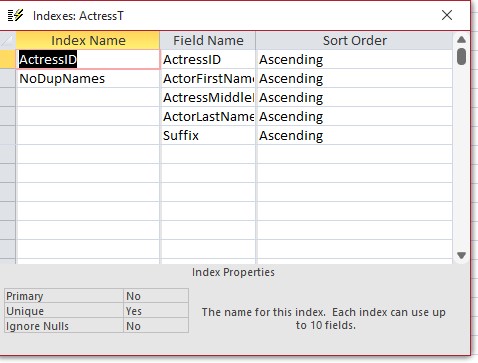
I am having a problem with my composite keys. I have a table that I don't want duplicate name in. I have setup the indexing as shown in the screenshot. But I am still allowed to put duplicate names in. What am I missing? I think that this worked at one time but now it isn't. I have watched the lesson about Composite keys (Expert 23 3) and I can't figure this out.
Richard Van Wagoner OP  @Reply  
      
15 months ago

Kevin Robertson  @Reply  
          
15 months ago
Select the first item in the Composite Key and make sure you set Unique to Yes.
Richard Van Wagoner OP  @Reply  
      
15 months ago
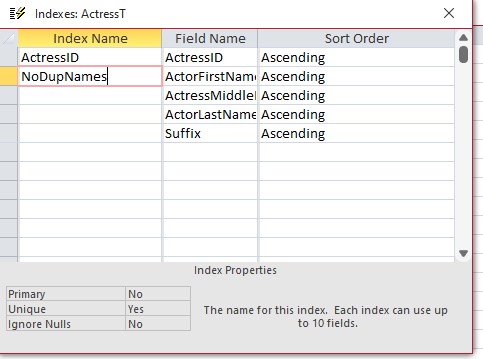
I have done this
Richard Van Wagoner OP  @Reply  
      
15 months ago

Richard Rost  @Reply  
          
15 months ago
When you have four fields like that in the index, that means you can't have a duplicate value that matches all four of those fields. So, for it to be rejected, the first name, middle name, last name, and suffix would all have to be identical.
Richard Rost  @Reply  
          
15 months ago
If you had Richard D. Rost Jr. and Richard D. Rost Sr. that would be allowed, because one of those fields is different. And yes, I'm a Jr. :)
Richard Van Wagoner OP  @Reply  
      
15 months ago
That is what I want. But my database is allowing Mark Burns and Mark Burns, same name. I can't find out why. Is it something to do with the ignore nulls part?
Richard Rost  @Reply  
          
15 months ago
OK, this brings up an interesting situation... and will make an excellent video. In a nutshell, here's what's going on:

If you're using FirstName, LastName, and Suffix as part of a composite key, you might notice that entering "Joe Smith" with no suffix allows duplicates. The issue is that two NULL values are not considered equal. NULL means "unknown," and in Access (and most databases), two unknown values are never treated as equal.

The "Ignore Nulls" setting only controls whether rows with NULL values in these fields are included in the index. If you leave "Ignore Nulls" off, those rows will still be indexed, but the comparison problem with NULL values remains.

The Fix: Make your fields required so they can't accept NULL values. Also, set the default value of the fields in the index to an empty string (""). Two empty strings are considered equal, so this will ensure your composite key works as expected. It's just a quirk of how Access handles NULL values.

Of course, if you've got data in the table already, you'll need to use an update query to change all the NULL values to "" but that's not too hard. I'll put this on my list for a video. Great question.
Richard Van Wagoner OP  @Reply  
      
15 months ago
This works Fine except I notice that capitalization does make a difference. Large case and small case are not equal.
Richard Rost  @Reply  
          
15 months ago
Not as far as I can tell, table data should be case insensitive. I know that, at the module level and in some functions, you can specify not being case sensitive, for example, using Option Compare Binary. But the data in the tables by itself should not be case sensitive when it comes to indexing. I looked, and I didn't see any properties in the file options menu to change that for the database as a whole, so that shouldn't be happening. As you can see from the following screenshot, I just tested it with a first name and last name, and if I set up an index that's unique, it still catches it even if I don't capitalize one of them.
Richard Rost  @Reply  
          
15 months ago

Richard Van Wagoner OP  @Reply  
      
15 months ago
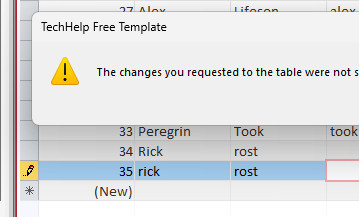
I don't know why but mine is case sensitive see my screenshot
Richard Van Wagoner OP  @Reply  
      
15 months ago

Kevin Robertson  @Reply  
          
15 months ago
But didn't you also have MiddleName and Suffix as part of the Index?
Richard Van Wagoner OP  @Reply  
      
15 months ago
Yes but I have set the default values for these to " ", as Richard has suggested above
Richard Rost  @Reply  
          
15 months ago
It looks like there's a space in front of " richard"
Richard Rost  @Reply  
          
15 months ago
The default value needs to be "" empty string not " " with a space.
Richard Van Wagoner OP  @Reply  
      
14 months ago
I have run into another problem with this subject. Everything you have helped with so far works fine. But when editing a record, say removing a middle name. Now it seems I am missing the "" Default value how do i insert this into the record with out retyping it all over?
Richard Rost  @Reply  
          
14 months ago
On editing a single record, you can type "" into the field for an empty string. What I would do is make an After Update event that says something like:

If IsNull(MiddleName) then MiddleName=""
Richard Van Wagoner OP  @Reply  
      
14 months ago
Richard, I suppose that this would apply to the other name fields as well although the first name should always have data in it. The after update event goes in the form events I suppose.
Richard Rost  @Reply  
          
14 months ago
Correct. After Update. You'll need one for each text box.
Richard Van Wagoner OP  @Reply  
      
14 months ago
Thanks!

This thread is now CLOSED. If you wish to comment, start a NEW discussion in Prevent Duplicates.
 

Next Unseen

 
New Feature: Comment Live View


The following is a paid advertisement
Computer Learning Zone is not responsible for any content shown or offers made by these ads.
 

Learn
 
Access - index
Excel - index
Word - index
Windows - index
PowerPoint - index
Photoshop - index
Visual Basic - index
ASP - index
Seminars
More...
Customers
 
Login
My Account
My Courses
Lost Password
Memberships
Student Databases
Change Email
Info
 
Latest News
New Releases
User Forums
Topic Glossary
Tips & Tricks
Search The Site
Code Vault
Collapse Menus
Help
 
Customer Support
Web Site Tour
FAQs
TechHelp
Consulting Services
About
 
Background
Testimonials
Jobs
Affiliate Program
Richard Rost
Free Lessons
Mailing List
PCResale.NET
Order
 
Video Tutorials
Handbooks
Memberships
Learning Connection
Idiot's Guide to Excel
Volume Discounts
Payment Info
Shipping
Terms of Sale
Contact
 
Contact Info
Support Policy
Mailing Address
Phone Number
Fax Number
Course Survey
Email Richard
[email protected]
Blog RSS Feed    YouTube Channel

LinkedIn
Copyright 2026 by Computer Learning Zone, Amicron, and Richard Rost. All Rights Reserved. Current Time: 4/30/2026 4:39:30 PM. PLT: 1s