Free Lessons
Courses
Seminars
TechHelp
Fast Tips
Templates
Topic Index
Forum
ABCD
 
Home   Courses   TechHelp   Forums   Help   Contact   Merch   Join   Order   Logon  
 
Back to Access Forum    Comments List
Upload Images   @Reply   Bookmark    Link   Email   Next Unseen 
Lean Mean v Getting the Job Done Combo Boxes
Colin Eastaugh 
     
15 months ago
A field within a record, which I will call the TICK field, can have over 500 different values.

I would like to "combo box" the field, but I don't want to have to type in several characters into the combo field to get the results I'm seeking.

What I would like to do is "split" the field by first accessing the first character of the TICK field in Combo Box No 1, and then in Combo Box 2 take the results of Combo Box No 1 and drill down further.  The advantage is that having typed say A in the first Combo Box 1, I can then visually see all the records that start with A in the TICK field.

The 'dirty' solution would be to add another field to the table, which would be the first character of the TICK field, but I would like to keep the underlying table lean and mean.

To date, I can't see how I can take the information generated in Combo Box 1 and use it in Combo Box 2 unless I add an additional field to the underlying table.  I can't seem to tell Combo Box 2 how to look at say only values that start with the letter A by using the information generated in Combo Box 1.

A drowning man not knowing what he is talking about - could recordsets, which I know nothing about, be the solution?
Kevin Robertson  @Reply  
          
15 months ago
Add a WHERE condition to the Row Source of the  Combo Boxes.
As an example I'm using FirstName from my Customer Table.

In the first Combo Box:
SELECT CustomerID, FirstName FROM CustomerT WHERE FirstName LIKE "[A-M]*" ORDER BY FirstName;

In the second Combo Box:
SELECT CustomerID, FirstName FROM CustomerT WHERE FirstName LIKE "[N-Z]*" ORDER BY FirstName;

Break them up as much as you need.
Kevin Robertson  @Reply  
          
15 months ago
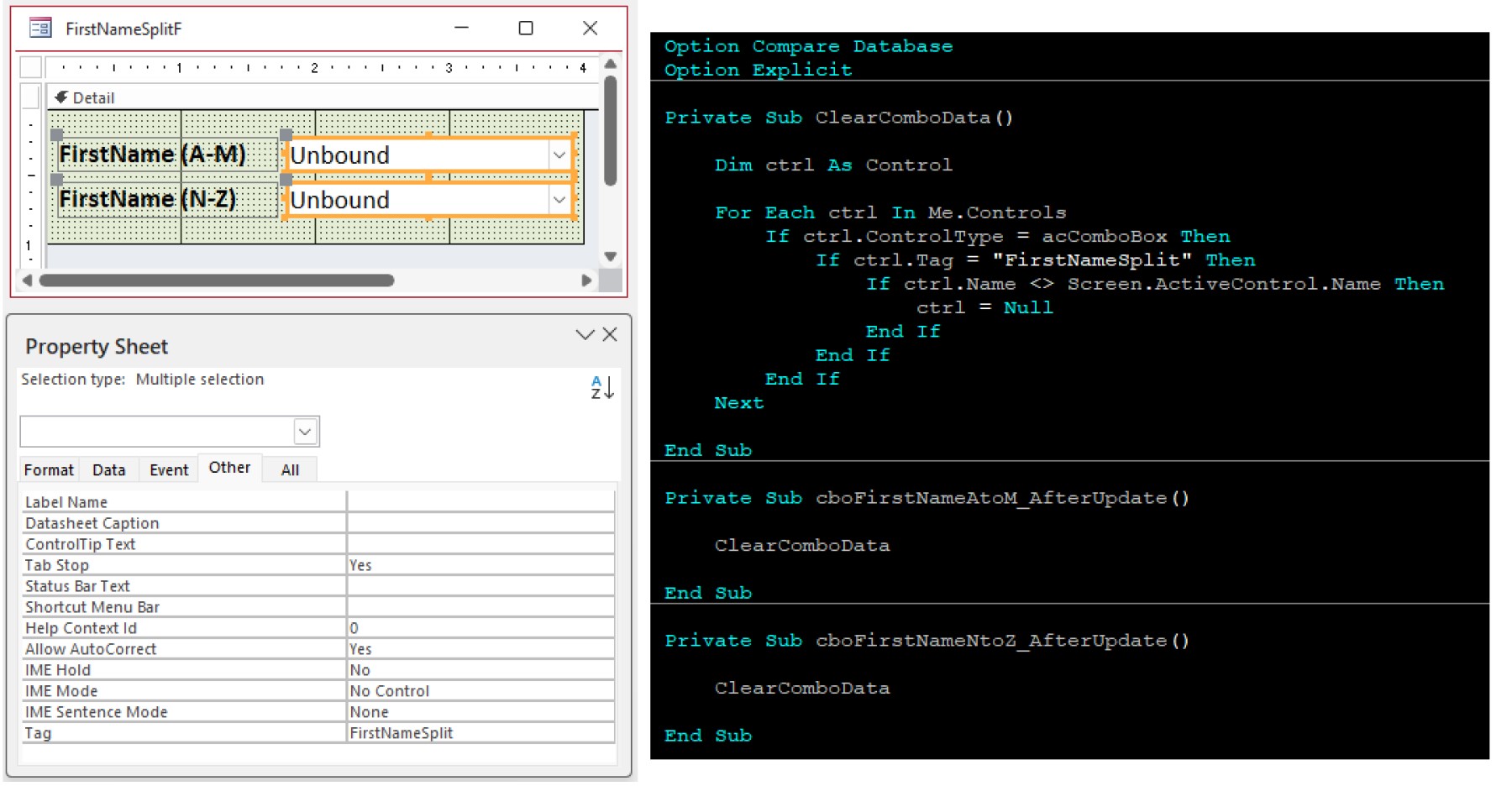
I would blank out the other Combo Box(es) when you make the selection otherwise thing will get confusing.

After Update
For Each Loop
Kevin Robertson  @Reply  
          
15 months ago

Joe Holland  @Reply  
       
15 months ago
You could also watch Cascading Combo Boxes here: https://599cd.com/blog/display-article.asp?ID=1749
Colin Eastaugh OP  @Reply  
     
15 months ago
Kevin/Joe

Many thanks for replying so quicky.  You have both given me things to think about.  

I will watch Richard Rost's Cascading Combo Boxes again.  Good shot.

And I like Kevin's solution, unfortunately is it hardwired, the solution I'm seeking requires a 'soft' solution, the first box can take any value between A and Z.

Regards.

Colin
Kevin Robertson  @Reply  
          
15 months ago
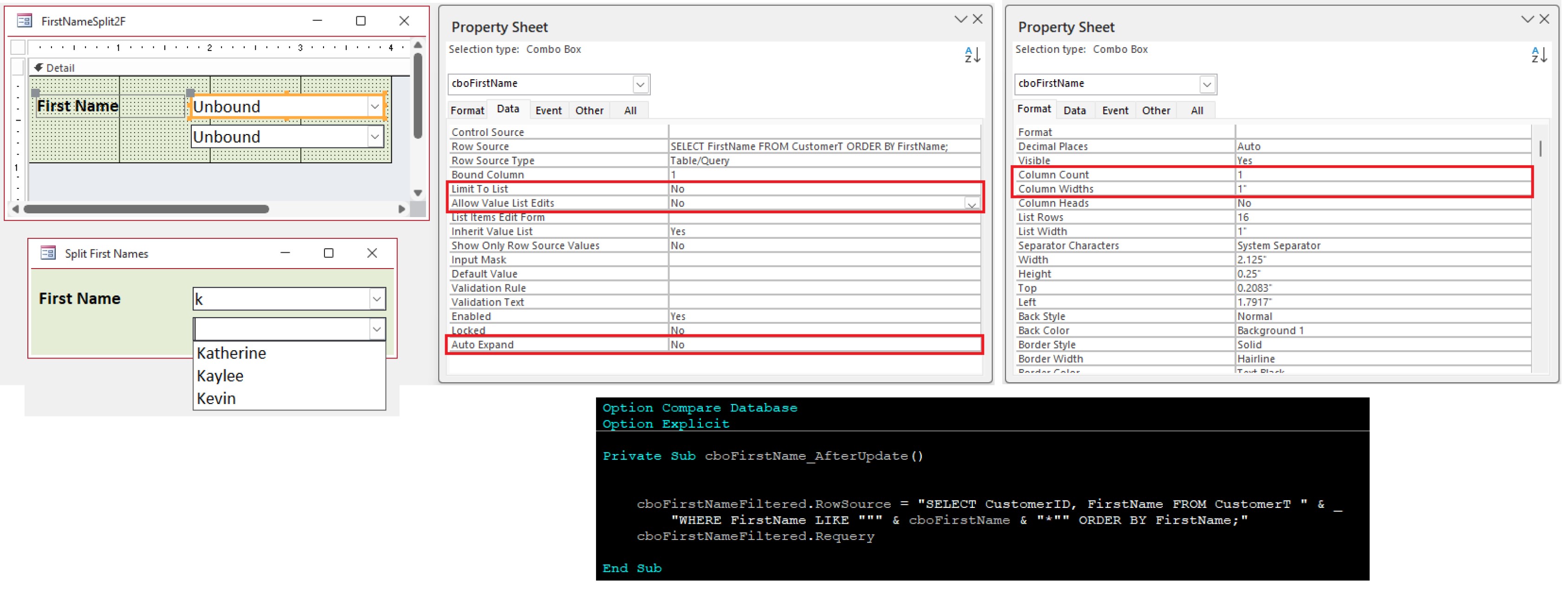
Colin Eastaugh Is this more like what you are looking to do (see screenshot)?
Kevin Robertson  @Reply  
          
15 months ago

John Davy  @Reply  
         
15 months ago
Look at Search as you type  John
Kevin Robertson  @Reply  
          
15 months ago
Instead of 2 Combo Boxes you could make the first one a Text Box which I think would be better and easier for you to implement.
Colin Eastaugh OP  @Reply  
     
15 months ago
Wow, Kevin - you have given me a lot to thing about. Thank you for spending so much time thinking about the problem.

The problem remains storing only part of the firstname field for use in the second combo box. I wonder if it is possible to temporarily store a value which isn’t in a field that can be accessed by a combo box.

I'm possibly overthinking this, perhaps I will go back and add an extra field in the underlying table. There is no problem extracting the first character of a field using Excel and then placing it into an amended table, but like others on this board, I like to keep the number of fields and the number of queries in a database to a minimum.

I will also review Richard's Cascading Combo Boxes. As an aside, I spent all weekend working through the heart of Richard's Search Seminar, that was most enlightening.  This website, and the people involved, are a great resource to the Access community.

Thanks again for writing back with so many ideas, much appreciated.
Joe Holland  @Reply  
       
15 months ago
Fantastic solution Kevin.

This thread is now CLOSED. If you wish to comment, start a NEW discussion in Access Forum.
 

Next Unseen

 
New Feature: Comment Live View


The following is a paid advertisement
Computer Learning Zone is not responsible for any content shown or offers made by these ads.
 

Learn
 
Access - index
Excel - index
Word - index
Windows - index
PowerPoint - index
Photoshop - index
Visual Basic - index
ASP - index
Seminars
More...
Customers
 
Login
My Account
My Courses
Lost Password
Memberships
Student Databases
Change Email
Info
 
Latest News
New Releases
User Forums
Topic Glossary
Tips & Tricks
Search The Site
Code Vault
Collapse Menus
Help
 
Customer Support
Web Site Tour
FAQs
TechHelp
Consulting Services
About
 
Background
Testimonials
Jobs
Affiliate Program
Richard Rost
Free Lessons
Mailing List
PCResale.NET
Order
 
Video Tutorials
Handbooks
Memberships
Learning Connection
Idiot's Guide to Excel
Volume Discounts
Payment Info
Shipping
Terms of Sale
Contact
 
Contact Info
Support Policy
Mailing Address
Phone Number
Fax Number
Course Survey
Email Richard
[email protected]
Blog RSS Feed    YouTube Channel

LinkedIn
Copyright 2026 by Computer Learning Zone, Amicron, and Richard Rost. All Rights Reserved. Current Time: 6/22/2026 7:36:49 AM. PLT: 0s