When i open my Orders Form, the record count shows 1 of 1 when i know there are more orders! When I click next record it then changes to show the correct number of records. How do i get this to show the correct number of records from the get go?
Kindest regards
Richie Silver Member
Sami Shamma
@Reply 18 months ago
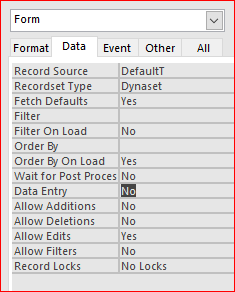
Most likely your form has "Data Entry" Set to Yes See Image below
Hi Sami,
Checked and the Data Entry is set to 'No'.
Many thanks for your support and time.
kindest regards
R
Adam Schwanz
@Reply 18 months ago
As Sami said, we need a lot more information.
What is "click next record"? Is this a button with some VBA code (If so what is that code?)? Is it the navigation bar?
When you are 1 of 1 (assuming on the navigation bar), do you see "Filtered" next to it? What is the code that is opening the record? If you are doing like DoCmd.OpenForm "CustomerF",,,"CustomerID=" & CustomerID then 1 of 1 is the expected and intended behavior.
Richie KentOP
@Reply
18 months ago
Sorry gents my fault. I've made buttons to go to previous, next record etc. I followed Richards video to show record # of #. The form is filtered to separate staff from service users! The form is opened via a button which links record to "service user" to their transport requests.
I'm brand new to Accees, but wow, what a fantastic package.
Thankyou for your guidance.
Much appreciated.
R
Adam Schwanz
@Reply 18 months ago
When you say "The form is opened via a button which links record to "service user" to their transport requests."
Is that the same kind of DoCmd.OpenForm "CustomerF",,,"CustomerID=" & CustomerID I mentioned?
If you are a Visitor, go ahead and post your reply as a
new comment, and we'll move it here for you
once it's approved. Be sure to use the same name and email address.
This thread is now CLOSED. If you wish to comment, start a NEW discussion in
Visitor Forum.