Free Lessons
Courses
Seminars
TechHelp
Fast Tips
Templates
Topic Index
Forum
ABCD
 
Home   Courses   TechHelp   Forums   Help   Contact   Merch   Join   Order   Logon  
 
Back to Access Forum    Comments List
Upload Images   @Reply   Bookmark    Link   Email   Next Unseen 
Uneditable PDF Files When Running acOutputReport
Jose Melean 
    
9 months ago
Hello everyone,
We got an Access solution that we've used for several years.
It uses "DoCmd.OutputTo acOutputReport, Me.Name, acFormatPDF, Folder, True" to print the reports in pdf and save it in the proper file.
Recently (I haven't been able to pinpoint it exactly when), we noticed the pdf files created by the vba method can't be edited any more, but they aren't secured either.
If I print the report manually like using microsoft to pdf, the pdf is fine and can be edited.
Has anyone experienced similar issue recently using vba to make pdf files?
Alex Hedley  @Reply  
           
9 months ago
What do you mean by editable?
Usually PDFs are ReadOnly
Had you added input fields?
Richard Rost  @Reply  
          
9 months ago
Access only exports static, read-only PDFs. It doesn't create editable ones with fields unless you specifically design the report with form fields and then use something like Adobe Acrobat to enable editing. Most PDF viewers, especially in your browser, will always show the file as read-only. If you need an editable PDF, you'll have to either add fields in Acrobat or use the Microsoft Print to PDF option, which produces a different type of output. There are Acrobat plugins for Microsoft Office, but they only work with the paid version of Acrobat, which I've never used.
Jose Melean OP  @Reply  
    
9 months ago
Alex Hi, let me rephrase it, the PDF files made using VBA can't be edited later.
Until early may-2025, all pdf files made with vba option could be open in a PDF editor program and be modified like adding signature or password protection. Now we can't modify the files with PDF editors.
(We use Foxit Phantom PDF but some customers use Acrobat and are reporting same issue).
It makes wonder if there was an update or something like that.
As alternative, we're printing manually to pdf (the files created by this method have no issues), but kind of defeat the purpose of automating file creation using vba.
Jose Melean OP  @Reply  
    
9 months ago

Jose Melean OP  @Reply  
    
9 months ago

Jose Melean OP  @Reply  
    
9 months ago
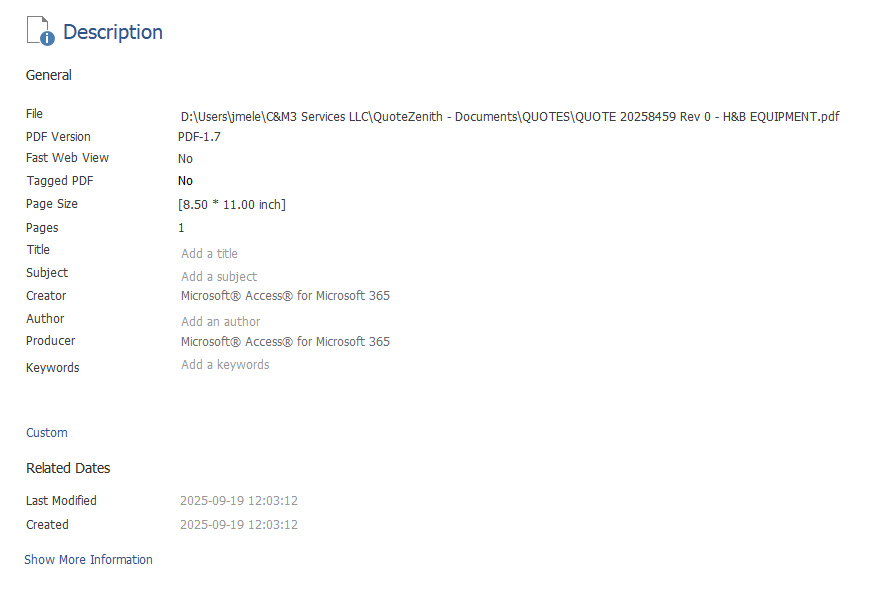
Jose These are the properties of a file recently created file which we can't edit on a PDF editor program
Jose Melean OP  @Reply  
    
9 months ago
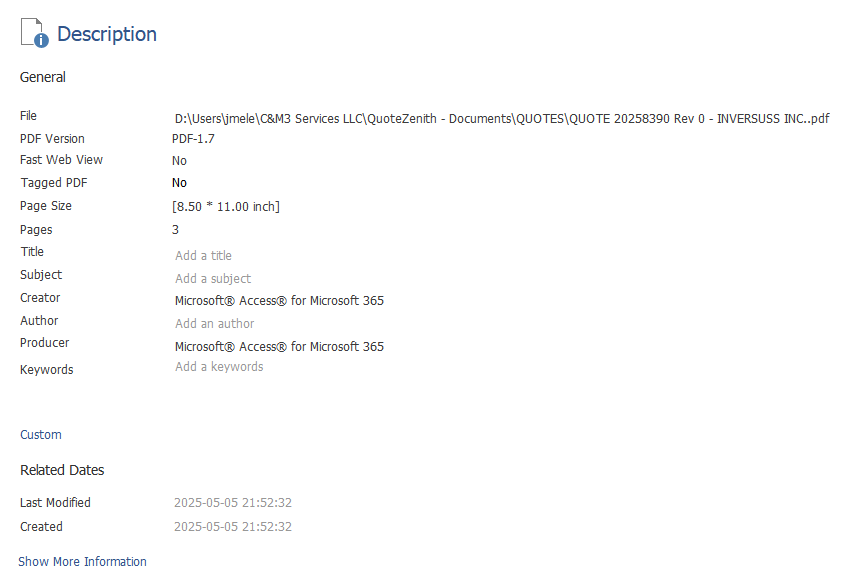
Jose Second image are the file the properties of a file which opens in the pdf editor without any problem.
I can't see any difference.
Richard Rost  @Reply  
          
9 months ago
Are you sure this wasn't a change made to your PDF editing software and not to Microsoft Access? Because as far as I'm aware, a PDF is a PDF as far as Microsoft Access is concerned.
Jose Melean OP  @Reply  
    
9 months ago
Hi Richard,
I don't believe there is a problem with the PDF editing software we use for a couple of reasons, first we can open any file created before may with our Access solution and none have any issue (I can go back years, open any file and they're just fine). Second, when I print manually from Access using MS to PDF, the resulting file works fine.
Honestly, it isn't big issue as now, but more of a nuance because we have to print manually the files we need to sign electronically.
Now that I think of it, I'll do a quick test by making a new access test database and exporting to pdf using vba and see what happens.
Kevin Yip  @Reply  
     
9 months ago
Jose  Go to Foxit or Adobe Acrobat and check the security settings of the PDFs.  An uneditable PDF may have restricted editing permissions or such.
Jose Melean OP  @Reply  
    
9 months ago
Kevin That's the thing (the crazy thing), the pdfs aren't secured or restricted in any way.
Yesterday I did a quick test using a new db exporting to pdf and the pdf file is having same issue.
Next I'll try from another computer and see what happens.
Kevin Yip  @Reply  
     
9 months ago
Jose  Another thing to try is a third-party PDF driver that allows automation.
I believe Bullzip has automation, but I've never tried.  The acFormatPDF option uses the built-in PDF driver of Access, and you want to eliminate (or confirm) the possibility of its being the culprit.
Jose Melean OP  @Reply  
    
8 months ago
Jose Thanks everyone for the comments, I found the issue with the PDF files after exporting to PDF from word. The "issue" is not only with Access, but Office 365.
When Office exports the file, it saves it as PDF/A (an ISO PDF format) which gives the files a read-only behavior when you open it like the file is protected/"secured".
Found 2 ways to fix the issue, one (depending on your pdf program) is disabling the feature to see PDFs on PDF/A mode.
The second is going to word (in my case) try to export any file to pdf, when the file picker opens up, click options ---> PDF Options ---> uncheck PDF/A complaint.
So far it seems that behavior carries to Access and I'm back having no issues with the PDF files.

This thread is now CLOSED. If you wish to comment, start a NEW discussion in Access Forum.
 

Next Unseen

 
New Feature: Comment Live View


The following is a paid advertisement
Computer Learning Zone is not responsible for any content shown or offers made by these ads.
 

Learn
 
Access - index
Excel - index
Word - index
Windows - index
PowerPoint - index
Photoshop - index
Visual Basic - index
ASP - index
Seminars
More...
Customers
 
Login
My Account
My Courses
Lost Password
Memberships
Student Databases
Change Email
Info
 
Latest News
New Releases
User Forums
Topic Glossary
Tips & Tricks
Search The Site
Code Vault
Collapse Menus
Help
 
Customer Support
Web Site Tour
FAQs
TechHelp
Consulting Services
About
 
Background
Testimonials
Jobs
Affiliate Program
Richard Rost
Free Lessons
Mailing List
PCResale.NET
Order
 
Video Tutorials
Handbooks
Memberships
Learning Connection
Idiot's Guide to Excel
Volume Discounts
Payment Info
Shipping
Terms of Sale
Contact
 
Contact Info
Support Policy
Mailing Address
Phone Number
Fax Number
Course Survey
Email Richard
[email protected]
Blog RSS Feed    YouTube Channel

LinkedIn
Copyright 2026 by Computer Learning Zone, Amicron, and Richard Rost. All Rights Reserved. Current Time: 6/17/2026 10:44:57 AM. PLT: 0s