Free Lessons
Courses
Seminars
TechHelp
Fast Tips
Templates
Topic Index
Forum
ABCD
 
Home   Courses   TechHelp   Forums   Help   Contact   Merch   Join   Order   Logon  
 
Back to Access Forum    Comments List
Upload Images   @Reply   Bookmark    Link   Email   Next Unseen 
Looking for Advice Inventory by Serial Number Org
James Chessher 
        
8 months ago
I have an inventory of equipment 2,000+ items. All part numbers are the same except Serial Numbers. I know I can do an As You Type Search Box to aid in finding what I want. My Question is: Any suggestions on Visual or other organizational tips to make it easier ? If you have faced this same situation, what did you do and did it work?
Alex Hedley  @Reply  
           
8 months ago
What are you steps for finding something?
Do you scan the barcode of the item?
Have you been sent the serial number?
James Chessher OP  @Reply  
        
8 months ago
At present, it must be manual.  I have an excel list which I am setting up in Access. The equipment is set up in a barely controlled chaos. I select them in a rotating order, but I cannot guarantee that as well. Each piece must be manually assigned to a location off-site and specific controlled functions. Scanning is not possible - yet.
Alex Hedley  @Reply  
           
8 months ago
Kevin Yip  @Reply  
     
8 months ago
James  In my old job, we put each item's physical location into the database.  E.g., Product ID 1000 would be in warehouse A, aisle 61, shelf D, etc.  This helped our workers locate the items.
Alex Hedley  @Reply  
           
8 months ago
Matt Hall  @Reply  
           
8 months ago
Get a hyperscrolling mouse like a Logitech M705.

Sort the combo box by serial number.

Depending on the serial number format, for any portion that is common across all 2000 items, you could automatically concatenate that portion to whatever value is typed in.  That way if only the last 5 digits change, you only have to type in the last 5 digits.

Ultimately, I would put labels or tags on the equipment with the serial number.  Typically, you can improve the location and readability by doing this, while providing a redundant spot to get the serial number in case of damage to the original tag.  I would also include a bar code or QR code of the serial number on the tags.  The more legible numbers will help you today and the bar/QR codes will help you in the future.  The scan gun will simply "type" in the serial number for you.

I have also seen people create their own custom index/inventory numbing systems.  In my opinion, this usually just creates an unnecessary relationship without adding much value.
Raymond Spornhauer  @Reply  
          
8 months ago
James

I would start with this Search Video.

It would help to give you a solution if we had more information on what you're referring to.  If these all have the same part number, why do you need to sort this at all?

-Raymond
Kevin Yip  @Reply  
     
8 months ago
Raymond  I imagine it's like most electronic products that share the same product IDs and UPCs but have individual, unique serial numbers at the back of the chassis.  It could be a daunting task to keep track of all the unique serial numbers in a database.
James Chessher OP  @Reply  
        
8 months ago
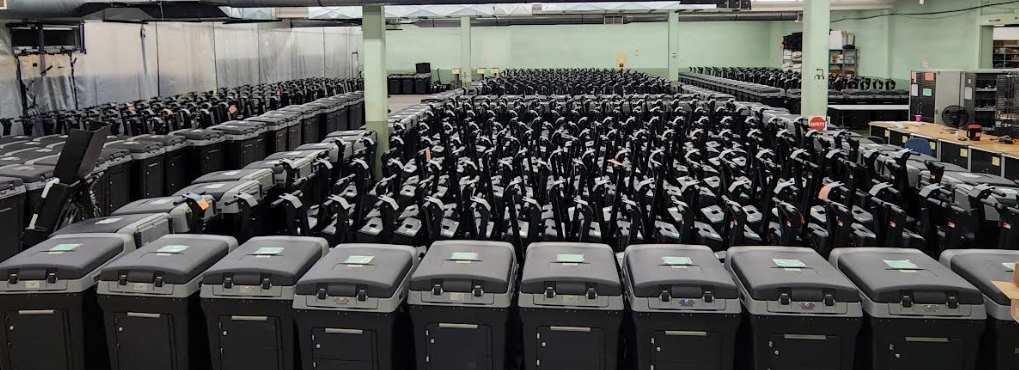
I appreciate the Search video and Inventory Management. Developing a plan now.  -- Regarding the task I am facing- the image is of part of our equipment storage. We cannot expand it further as we just do not have the room.   We have a very good process for doing what we do. It works but the legal paperwork is horrific. This database will streamline and automate it saving a forest of paper or two.  Phase 2 is to integrate a Scanning Process to support a Chain of Custody mandate.  -- Thank you all again.
James Chessher OP  @Reply  
        
8 months ago

Raymond Spornhauer  @Reply  
          
8 months ago
I apologize for lack of understanding, but I don't understand why you need to search for these by serial number or what you're really trying to accomplish.  Do you need these sorted physically by serial number?  I'm trying to think of suggestions to help, but I don't understand what you really need to accomplish.

-Raymond
James Chessher OP  @Reply  
        
8 months ago
Physically sorted by serial number would have no purpose. New explanation: I receive a list of Customers and an Order for what they want and how many. I only "rent" 4 products, they are all the same Model Number but have unique Serial Numbers.  My job is to pull the Item and Quantity needed for each Customer. Additionally, a scanning barcode system is not available at present. So, right now, (it is Crawling) I would have to scroll through a 2000+ Inventory list in Excel and select each item individually by Serial Number to add to the Order.   -- ORIGINAL QUESTION was asking for advice on what others do to speed up the Search and Select part (start Walking) in an Access database which I am developing now, instead scrolling through a long list to find the right one.  That's all.    ~However~ My Eventual End Goal is QR Code each Customer and QR Code each Item Serial Number.  Reducing a tedious manual selection to a few scans (Running).

This thread is now CLOSED. If you wish to comment, start a NEW discussion in Access Forum.
 

Next Unseen

 
New Feature: Comment Live View


The following is a paid advertisement
Computer Learning Zone is not responsible for any content shown or offers made by these ads.
 

Learn
 
Access - index
Excel - index
Word - index
Windows - index
PowerPoint - index
Photoshop - index
Visual Basic - index
ASP - index
Seminars
More...
Customers
 
Login
My Account
My Courses
Lost Password
Memberships
Student Databases
Change Email
Info
 
Latest News
New Releases
User Forums
Topic Glossary
Tips & Tricks
Search The Site
Code Vault
Collapse Menus
Help
 
Customer Support
Web Site Tour
FAQs
TechHelp
Consulting Services
About
 
Background
Testimonials
Jobs
Affiliate Program
Richard Rost
Free Lessons
Mailing List
PCResale.NET
Order
 
Video Tutorials
Handbooks
Memberships
Learning Connection
Idiot's Guide to Excel
Volume Discounts
Payment Info
Shipping
Terms of Sale
Contact
 
Contact Info
Support Policy
Mailing Address
Phone Number
Fax Number
Course Survey
Email Richard
[email protected]
Blog RSS Feed    YouTube Channel

LinkedIn
Copyright 2026 by Computer Learning Zone, Amicron, and Richard Rost. All Rights Reserved. Current Time: 6/14/2026 1:33:47 AM. PLT: 1s