Free Lessons
Courses
Seminars
TechHelp
Fast Tips
Templates
Topic Index
Forum
ABCD
 
Home   Courses   TechHelp   Forums   Help   Contact   Merch   Join   Order   Logon  
 
Back to Access Forum    Comments List
Upload Images   @Reply   Bookmark    Link   Email   Next Unseen 
Working with Richards Template
Julian Kinlaw 
    
7 months ago
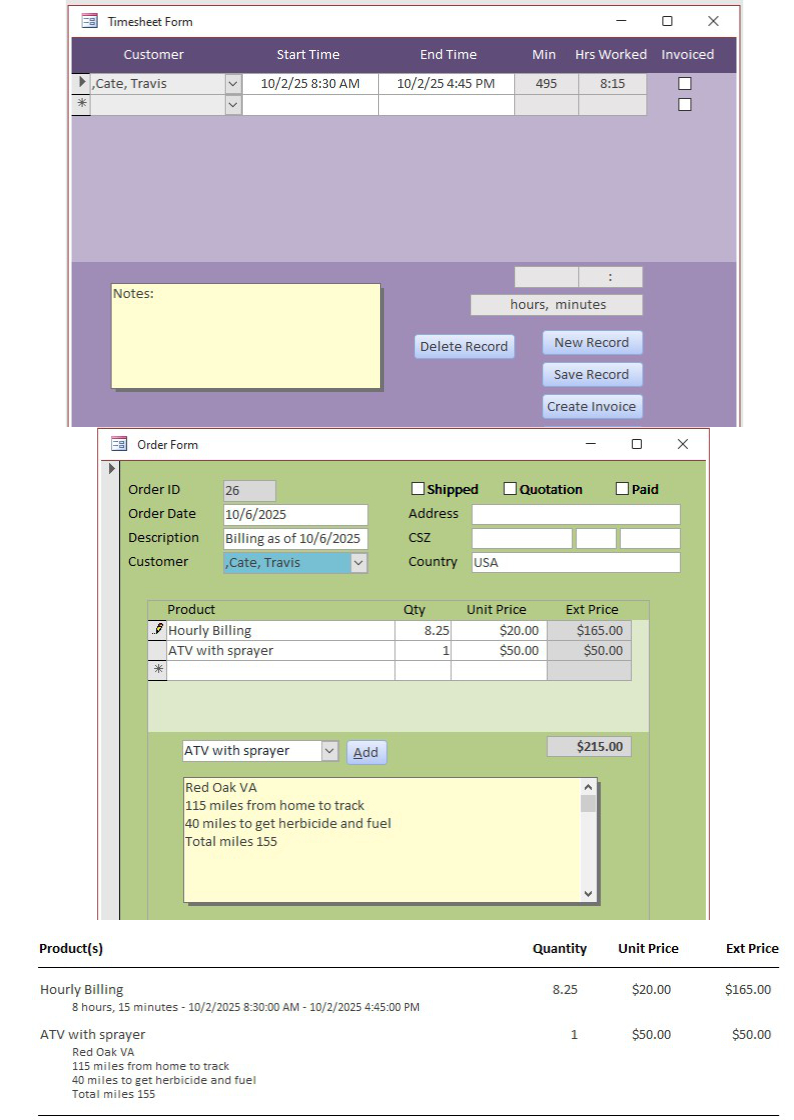
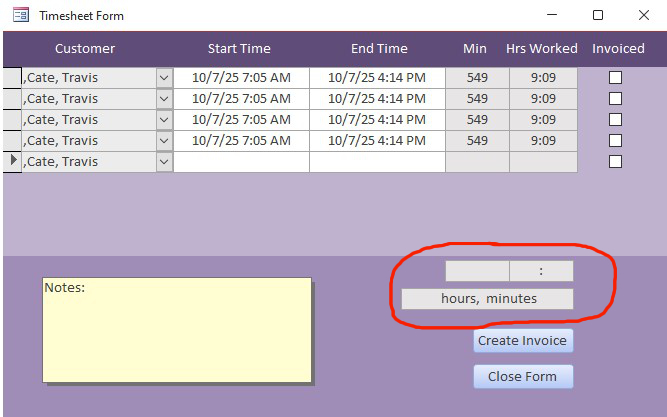
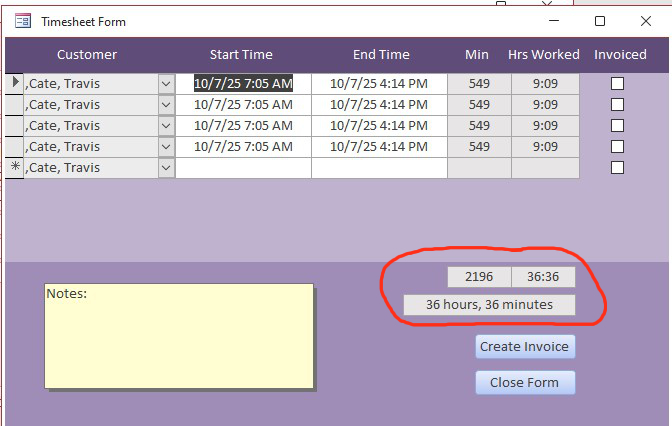
I am trying to create a setup for a specific application. I have followed the video in creating a timesheet and need to do a single date/time for each app on the order form. As you can see in photo, the footer totals will not show up until I close the form and reopen or add another date/time which I do not need. If I don't close/open the timesheet, and click Invoice to go to the order form, the Ext. Price box on the order form will show nothing. Also, as you can see, the address info will not populate unless I click the combobox on the order form.

In looking at the segment of the actual invoice it comes out really nice but I need a way to put a weeks worth of the same type info with date/time on one invoice. Is there anyway to achieve this with what I'm using or another way of doing this or another video to watch.
Julian Kinlaw OP  @Reply  
    
7 months ago

John Davy  @Reply  
         
7 months ago
Why do you have the product information in the footer when you already have in the Combo form? You can show everything when you do the report.  John
Julian Kinlaw OP  @Reply  
    
7 months ago
Not sure what you are asking but putting the info in the order form notes is what puts that info on the invoice. The photo is three different components, Timesheet, Order Form and a segment of the Invoice.
John Davy  @Reply  
         
7 months ago
Hi Julian, The Invoice has a date and an Invoice Number. The InvoiceDetail contains all the items on that invoice. When you create a query which contain all the information about the Invoice and Invoice details you have the makings of a report or (Invoice). It seems that should be the approach one should take. The only information in the InvoiceDetail footer might be totals. HTH John
Raymond Spornhauer  @Reply  
          
7 months ago
Show us the code you're using for the Form Totals that's not working.

-Raymond
Julian Kinlaw OP  @Reply  
    
7 months ago
I am using basic math in the query for the form. They are in order as presented.

TotalMinutes: DateDiff('n',[StartTime],[EndTime])
HoursWorked: Round([TotalMinutes]/60,2)
WholeHoursWorked: Int([HoursWorked])
MinutesLeft: [TotalMinutes]-([WholeHoursWorked]*60
Duration: [WholeHoursWorked] & ":" & Format([MinutesLeft],"00")

The above is working because the totals are correct when they show up either after closing and reopening the timesheet form or if I click the Create Invoice button and go back to the timesheet form the footer totals show up. Shouldn't they show after putting in date/times which creates the minutesworked total and the hours worked totals. See Timesheet Form above.

Donald Blackwell  @Reply  
       
7 months ago
Are you using any VBA or Macros with your forms? Essentially, if the footer totals are being generated in the query, you need to force a requery of the data after a record is updated/inserted.

Likewise, for your notes field, where is the information populating that coming from, if it's from your query, then it should populate with the requery.
Julian Kinlaw OP  @Reply  
    
7 months ago
Donald Good idea. In thinking more about it the footer totals are setup up to add two or more hours worked entries so a single entry probably won't populate the footer totals. There should be a way to show a single entry footer total though. I tried the requery but it didn't change results. And above mentioning it may be the fact of a single entry, well I just tried adding a second entry and the footer totals are still blank.
Donald Blackwell  @Reply  
       
7 months ago
Hmm, have you tried taking the Duration off of that query. Then create a new query with that one's * as it's main field then create the Duration field in the new query, maybe Access just can't do the calculations all at once. Sometimes a query will struggle to sum up a formula based on values calculated in that query. Hope that makes sense.
Julian Kinlaw OP  @Reply  
    
7 months ago
I have realized that the footer total fields stay blank no matter how many date/times you enter. The only way you can get them to show totals is if you close the form and reopen it.
Julian Kinlaw OP  @Reply  
    
7 months ago

Julian Kinlaw OP  @Reply  
    
7 months ago

Donald Blackwell  @Reply  
       
7 months ago
I would need to see your actual query in design view to understand what is happening.

I suspect it is because once the form has loaded, query has already run and calculated the total. By closing and reopening, it forces a complete requery of all records instead of just the current row. The reason you get blank after entering a row and moving to the next record is because there is no data in the "New Record" row, but if you click back onto a row that has data, it might at least show the totals for that row in the footer, but not sure.

Again, perhaps show your query expanded in design view as well as your form so that we could figure out what is going on.
Julian Kinlaw OP  @Reply  
    
7 months ago
In getting some suggestions I started studying info on requery and recalc. I tried requery and could get nothing to work. Looking back it may have had something to do with not putting it on all fields, not sure. I started working with recalc and the info said I just needed to place Me.Recalc in update event on the TotalMinutes and Duration Fields, upper line detail. I tried and it didn't work so I placed a recalc in all fields, detail and footer, that had to do with numbers and totals and still didn't work. Then it dawned on me that date/time are numbers so I placed recalc in StartTime and EndTime. It now works! I actually believe that as I tab over to TM and Duration the footer totals show up first. In looking back I may have been able to only add recalc to Start/EndTime, TotalMinutes and Duration but hey, it works and I am getting no compile errors.
Julian Kinlaw OP  @Reply  
    
7 months ago
Just an update in case anyone is reading or this can help. Turns out that having Me.Recalc in every field that had to do with numbers and totals did create problems. However, it works fine with just having Me.Recalc in StartTime, EndTime, TotalMinutes and Duration. In other words all the detail number fields.

This thread is now CLOSED. If you wish to comment, start a NEW discussion in Access Forum.
 

Next Unseen

 
New Feature: Comment Live View


The following is a paid advertisement
Computer Learning Zone is not responsible for any content shown or offers made by these ads.
 

Learn
 
Access - index
Excel - index
Word - index
Windows - index
PowerPoint - index
Photoshop - index
Visual Basic - index
ASP - index
Seminars
More...
Customers
 
Login
My Account
My Courses
Lost Password
Memberships
Student Databases
Change Email
Info
 
Latest News
New Releases
User Forums
Topic Glossary
Tips & Tricks
Search The Site
Code Vault
Collapse Menus
Help
 
Customer Support
Web Site Tour
FAQs
TechHelp
Consulting Services
About
 
Background
Testimonials
Jobs
Affiliate Program
Richard Rost
Free Lessons
Mailing List
PCResale.NET
Order
 
Video Tutorials
Handbooks
Memberships
Learning Connection
Idiot's Guide to Excel
Volume Discounts
Payment Info
Shipping
Terms of Sale
Contact
 
Contact Info
Support Policy
Mailing Address
Phone Number
Fax Number
Course Survey
Email Richard
[email protected]
Blog RSS Feed    YouTube Channel

LinkedIn
Copyright 2026 by Computer Learning Zone, Amicron, and Richard Rost. All Rights Reserved. Current Time: 5/6/2026 10:00:25 AM. PLT: 1s