Free Lessons
Courses
Seminars
TechHelp
Fast Tips
Templates
Topic Index
Forum
ABCD
 
Home   Courses   TechHelp   Forums   Help   Contact   Merch   Join   Order   Logon  
 
Back to Access Forum    Comments List
Upload Images   @Reply   Bookmark    Link   Email   Next Unseen 
Report Isssues
Bruce Huff 
    
8 months ago
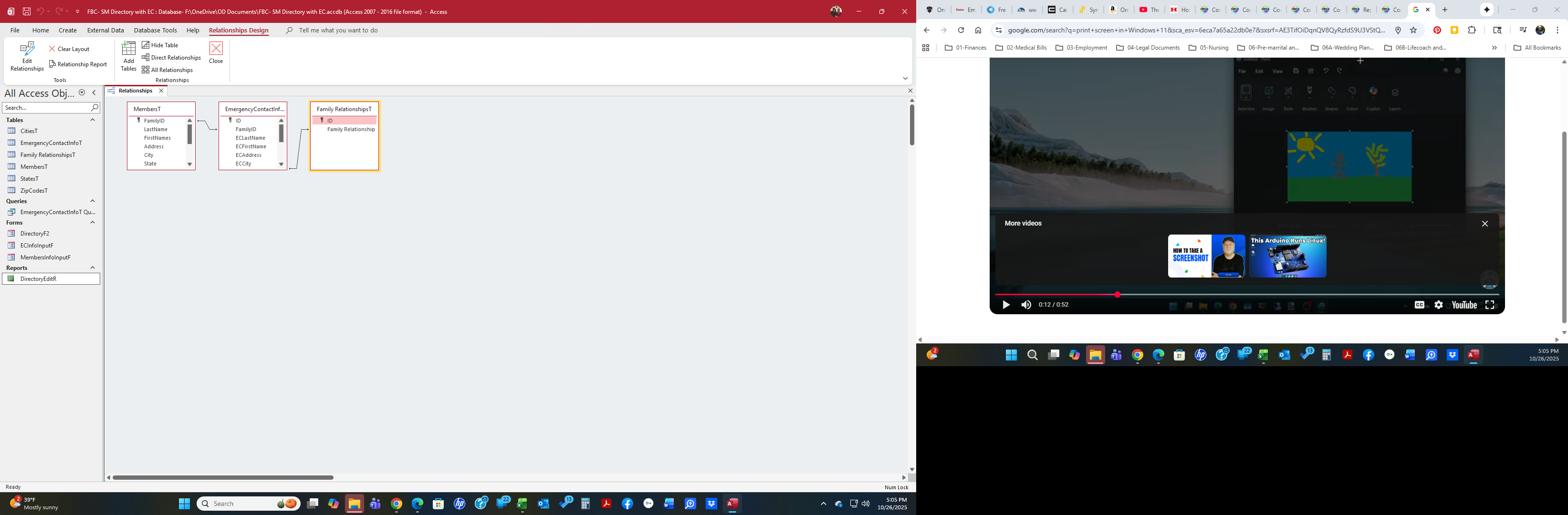
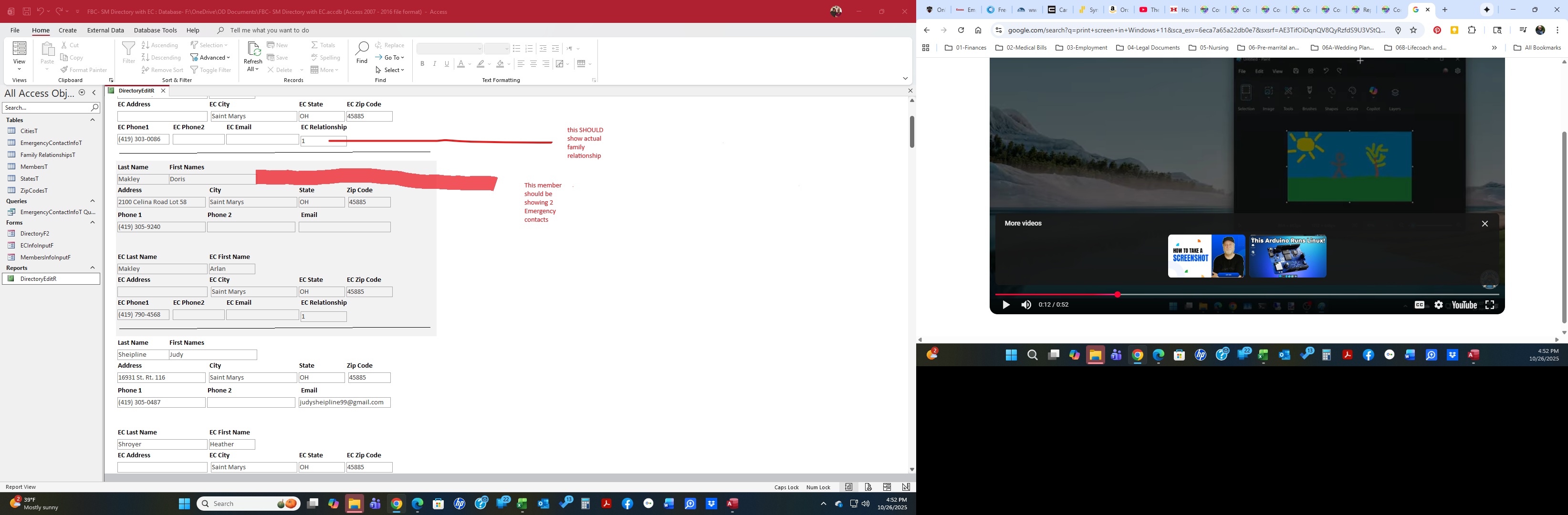
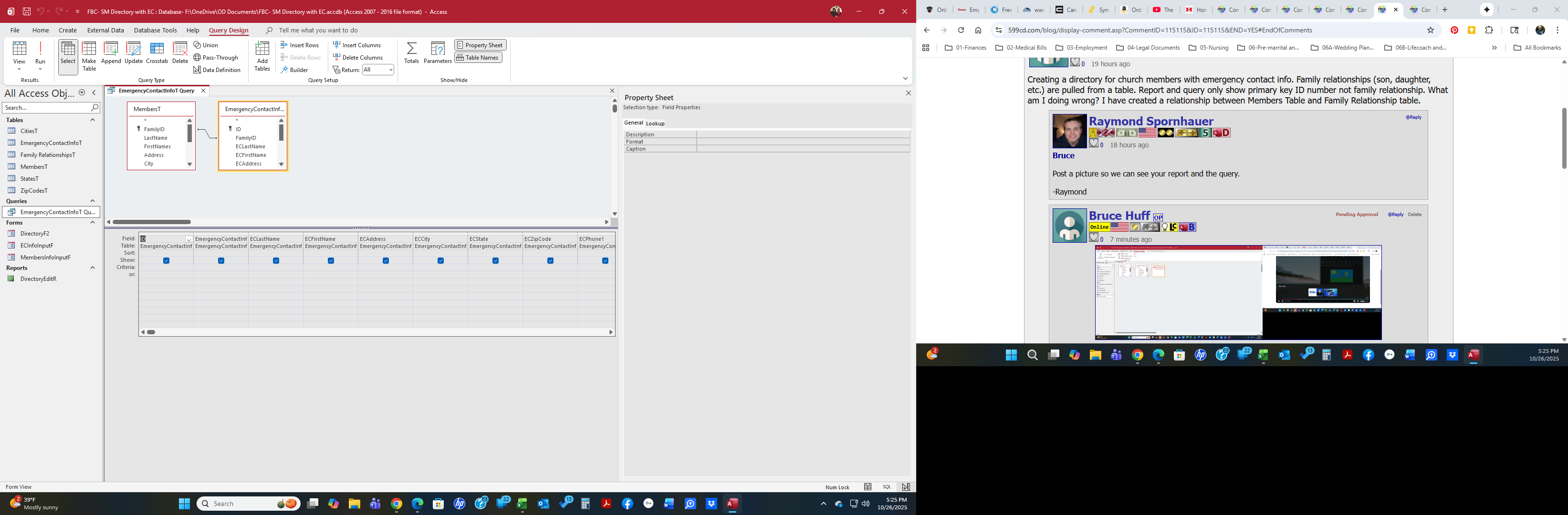
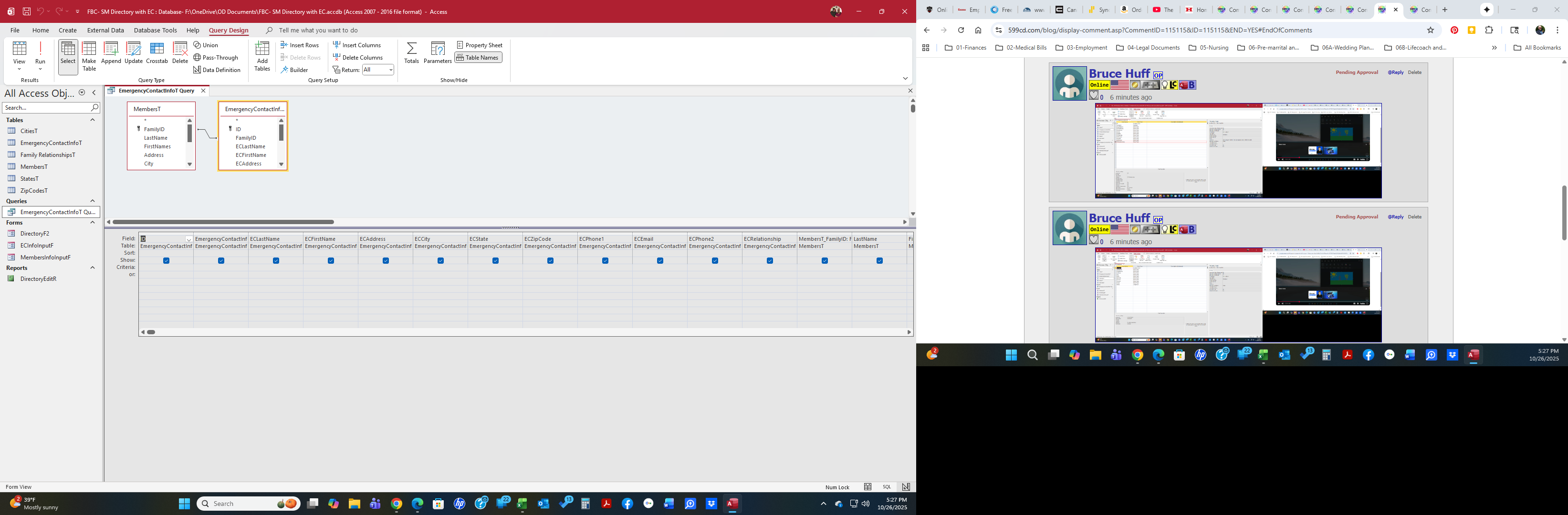
Creating a directory for church members with emergency contact info. Family relationships (son, daughter, etc.) are pulled from a table. Report and query only show primary key ID number not family relationship. What am I doing wrong? I have created a relationship between Members Table and Family Relationship table.
Raymond Spornhauer  @Reply  
          
8 months ago
Bruce

Post a picture so we can see your report and the query.

-Raymond
Bruce Huff OP  @Reply  
    
8 months ago

Bruce Huff OP  @Reply  
    
8 months ago

Bruce Huff OP  @Reply  
    
8 months ago

Bruce Huff OP  @Reply  
    
8 months ago

Bruce Huff OP  @Reply  
    
8 months ago

Bruce Huff OP  @Reply  
    
8 months ago

Donald Blackwell  @Reply  
       
8 months ago
Bruce

The easiest of your 2 dilemmas is getting the text for the relationship of the EC. The reason it shows a 1 is because that is what is stored in your table. I'm guessing that in the form where you select that, you have a combo box where you see the text you want but it has a hidden ID field. The ID is what gets stored in your table - which is how it should be. *

In order to see the text in your list, you need to add the second table to your query (Family_RelationshipsT) and in your form, show [Family Relationship] ** in that field instead of [ECRelationship].

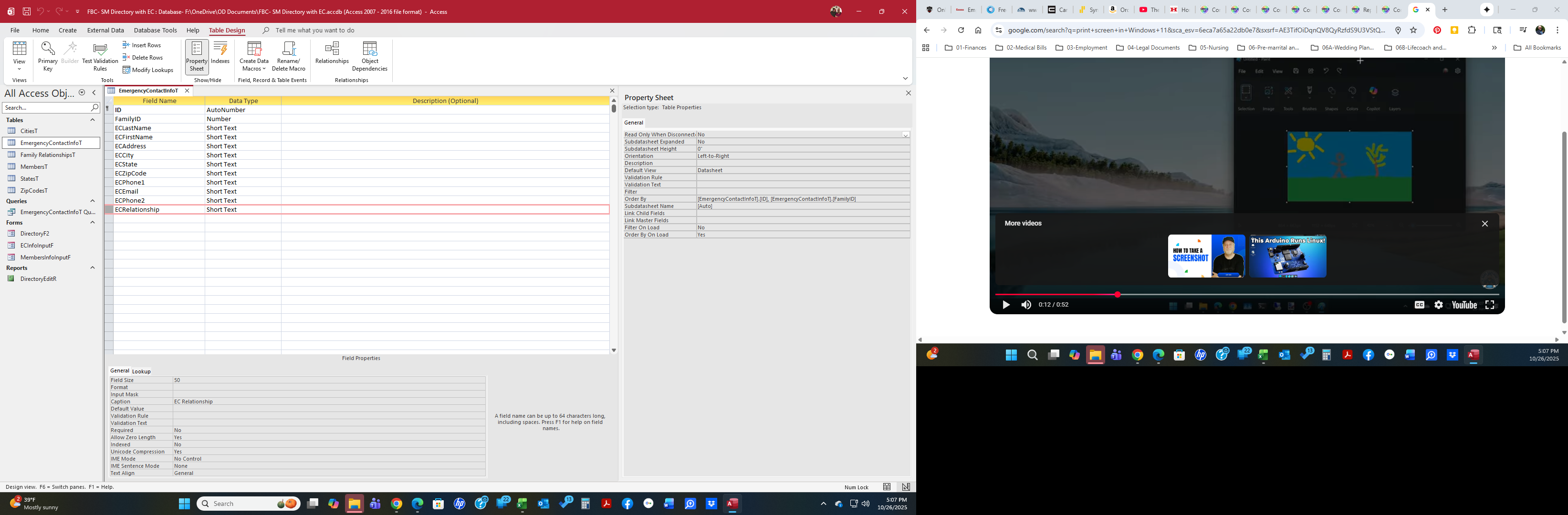
* In your EmergencyContactInfoT, ECRelationship should be stored as a Number of type Long Integer so that it matches the data type in the Family RelationshipsT

** You should avoid spaces in your table and/or field names. You'll regret it later as your project progresses. Especially as you add code or macros.

As for you other issue, I'd be interested in seeing your form in design view as it looks like you have set up a continuous form with the Primary Person and the emergency contacts in the same detail section. If that is the case, you would need to split those and have a 2nd continuous form in the footer for the emergency contacts in order to display more than 1 EC.

Don
Donald Blackwell  @Reply  
       
8 months ago
Just re-read and realized I messed up. I was thinking you were working with a form.

Would still need to see your report in design view to see what's going on. Most likely need the EC's to be in a sub report for each member so that it could pull multiple records.
Raymond Spornhauer  @Reply  
          
8 months ago
Bruce

When you're taking screenshots... expand your tables and queries out so we can actually read all the information.

1. Remove the spaced from you Table and Query Names.  This will cause you more problems in the future.

2. In your EmergencyContactInfoT, change ECRelationship to a Number.  This is an ID field and should be named ECRelationshipID.

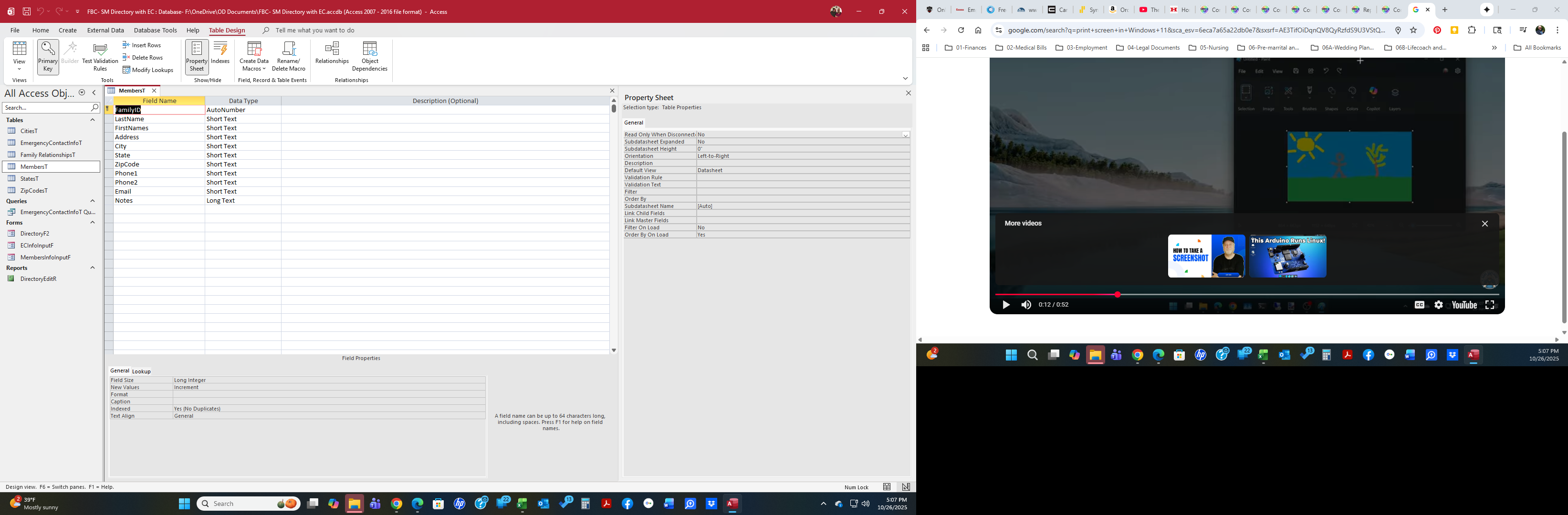
3. You should not have fields in your Tables just called 'ID'.... give these fields names that tell you what table they're in.

4. In your 'EmergencyContactInfoT Query', this is a bad name for your query.  You're identifying it as a Table and a Query, and you have a space in it.  Change this to 'EmergencyContactInfoQ'

5. Add FamilyRelationshipsT to your query with a Join line between the ECRelationshipID in the EmergencyContactInfoT and the (corrected) ID field in the Family RelationshipsT.

6. Add Family Relationship to your Query.

7. In your Report, remove the ECRelationshp Field and add the Family Relationship to your report.

-Raymond

Raymond Spornhauer  @Reply  
          
8 months ago
Bruce

With as many errors I see your your Tables, Fields and Relationship... you really should go back and watch Rick's Beginner series again and try to make your database conform to the conventions described.  You are going to create lots of problems for yourself and it will be very difficult for anyone to help because we have to assume that you're using good database development techniques.

Microsoft Access Beginner Level 1 - Complete 4-Hour Course

-Raymond
Bruce Huff OP  @Reply  
    
8 months ago
Thanks Raymond. I will do all suggested!
Bruce Huff OP  @Reply  
    
8 months ago
Thanks Everyone. I am very new at this!

This thread is now CLOSED. If you wish to comment, start a NEW discussion in Access Forum.
 

Next Unseen

 
New Feature: Comment Live View


The following is a paid advertisement
Computer Learning Zone is not responsible for any content shown or offers made by these ads.
 

Learn
 
Access - index
Excel - index
Word - index
Windows - index
PowerPoint - index
Photoshop - index
Visual Basic - index
ASP - index
Seminars
More...
Customers
 
Login
My Account
My Courses
Lost Password
Memberships
Student Databases
Change Email
Info
 
Latest News
New Releases
User Forums
Topic Glossary
Tips & Tricks
Search The Site
Code Vault
Collapse Menus
Help
 
Customer Support
Web Site Tour
FAQs
TechHelp
Consulting Services
About
 
Background
Testimonials
Jobs
Affiliate Program
Richard Rost
Free Lessons
Mailing List
PCResale.NET
Order
 
Video Tutorials
Handbooks
Memberships
Learning Connection
Idiot's Guide to Excel
Volume Discounts
Payment Info
Shipping
Terms of Sale
Contact
 
Contact Info
Support Policy
Mailing Address
Phone Number
Fax Number
Course Survey
Email Richard
[email protected]
Blog RSS Feed    YouTube Channel

LinkedIn
Copyright 2026 by Computer Learning Zone, Amicron, and Richard Rost. All Rights Reserved. Current Time: 6/16/2026 12:27:22 PM. PLT: 0s