Free Lessons
Courses
Seminars
TechHelp
Fast Tips
Templates
Topic Index
Forum
ABCD
 
Home   Courses   Templates   Seminars   TechHelp   Forums   Help   Contact   Join   Order   Logon  
 
Home > Forums > Captain's Log
Back to Captain's Log    Comments List
Upload Images   @Reply   Bookmark    Link   Email   Next Unseen 
Microsoft's Plans for Access
Richard Rost 
          
2 months ago
Karl Donaubauer over at Access Forever shared an update from the recent AEK27 conference in Germany, where the Microsoft Access team presented their current roadmap. Linda Cannon, the product manager for Access, outlined priorities through March 2026. Most of the team's effort continues to go into ongoing maintenance - bug fixes, security patches, and compliance work that keep Access stable and secure.

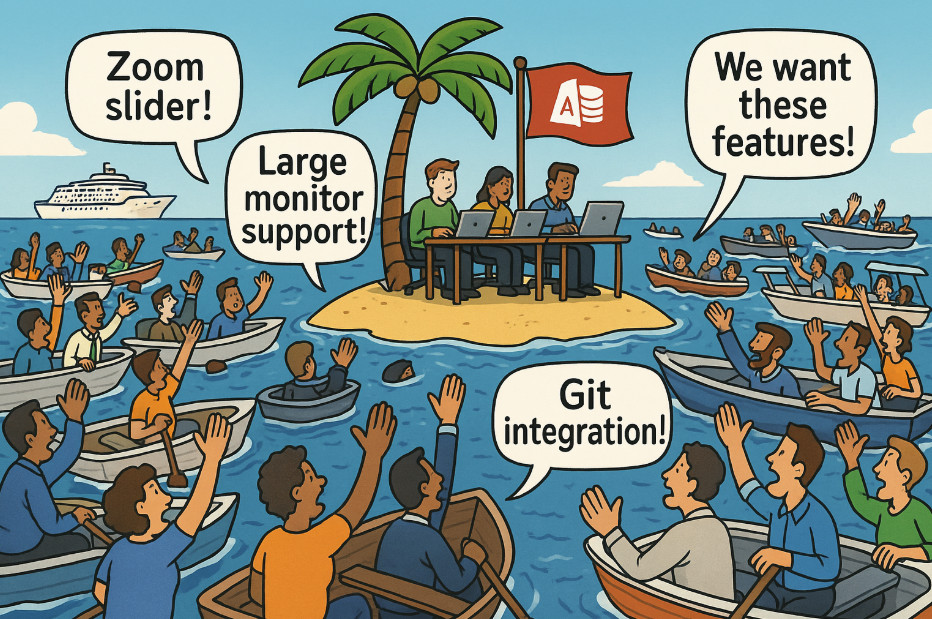
Beyond that, their main focus is on "Large Monitor Support," which includes removing the old 22-inch display limitation, modernizing form layouts for high-resolution monitors, and adding a zoom slider for forms (and eventually reports). These are being developed in stages over the next year.

Finally, if there's time, they plan to begin work on Git integration for source code management - though that's clearly a long-term goal, probably late 2026 or beyond.

Karl summed it up well: Access is still being maintained and improved, even if progress feels slow. The new large monitor support has been long overdue, and it's encouraging to see it finally coming together. Karl also noted that Microsoft has stopped giving firm release dates for new Access features. The team learned the hard way that unexpected maintenance work can derail schedules, so they're holding off on specific promises to avoid disappointing users.

My take: I completely understand delays like this. I've been building software for 30 years, and I know how priorities shift. Bug fixes for existing, widely used software always take precedence over shiny new features.

I also understand not giving dates. I used to post release schedules on my website years ago where I'd say things like "Developer 15 will be done by this date" or "Excel Expert 3 coming out by that date." I stopped doing that simply because life happens. I'm a one-man band. I wish I had a team of people to help me develop lessons, but things come up - website crashes, an unexpected flood of customer service emails, or one of my dogs needs a trip to the vet. So I stopped promising specific production dates years ago. I do what I can and get done what I can. So I get it.

Should that same logic apply to a big corporation like Microsoft? Well, that's for you to decide.

What frustrates me isn't the pace - it's that Microsoft doesn't seem to realize what an amazing product they have in Access. With more investment and vision, Access could be a powerhouse platform for small businesses and developers.

That said, this update shows that Microsoft is still actively supporting Access, maintaining it, and adding features when possible. They may not be moving at warp speed, but they're still moving forward - and for those of us who live and breathe Access, that's good news.

LLAP
RR
Richard Rost OP  @Reply  
          
2 months ago

Sam Domino  @Reply  
      
2 months ago
We need to tell Microsoft that if they don't give Access the recognition and resources their team needs, we're going to transport a bunch of tribbles to the CEO's office!  LLAP!!!
John Clifford  @Reply  
   
2 months ago
It would be nice if they were able to create a compiler and create an executable that contains all the dressings of VBA and Access that could run on multiple platforms.  That would be fun to have.  I miss VB6!!
Richard Rost OP  @Reply  
          
2 months ago
John that would definitely be sweet and a game-changer if you could make Access databases that work on Android and directly on the web. There is no telling what Microsoft could do with that. Not to mention just being able to package and deploy an Access database as a standalone EXE without having to have all of Access installed.
Kevin Yip  @Reply  
     
38 days ago
John Richard  Visual Studio can make stand-alone executables.  If you've used VB6, you should be able to learn VB in Visual Studio.  I just don't think Microsoft is ever going to give this ability to Access.  Regarding putting apps on the web, I posted recently about how you can use VB.Net to write both desktop apps and web apps and often reuse the same code, helping solve the problem that Access Web Apps once tried to solve.  All these things you wish Access would have, Microsoft has actually already given to us.  Some of you should really give Visual Studio a try, and it's free.
Richard Rost OP  @Reply  
          
38 days ago
Kevin oh I've used Visual Studio to build some apps for myself but the ease of use is nowhere near Microsoft Access. But yeah, it's on my list to make some videos for. I'm get to it. Eventually.
Kevin Yip  @Reply  
     
38 days ago
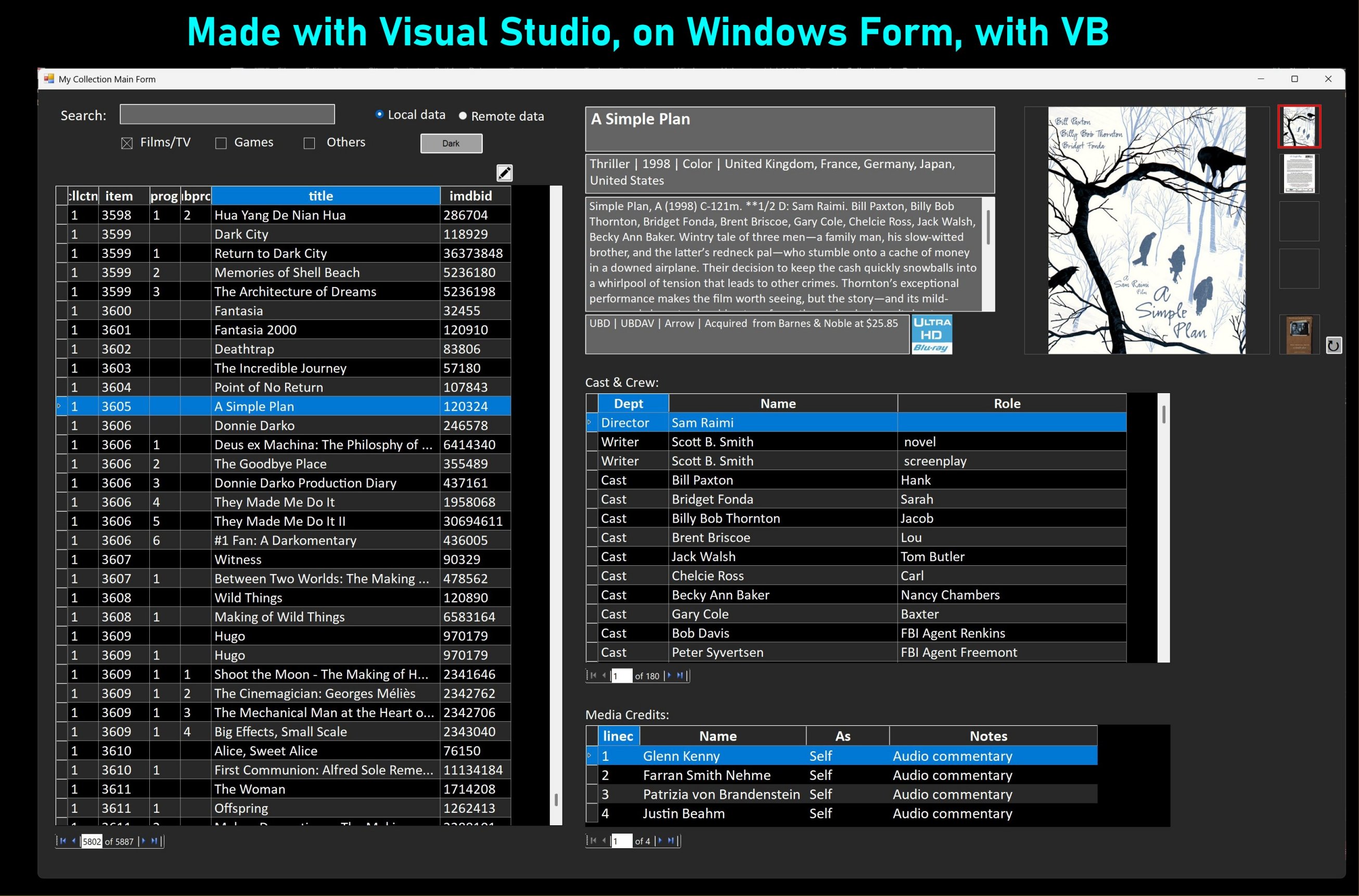
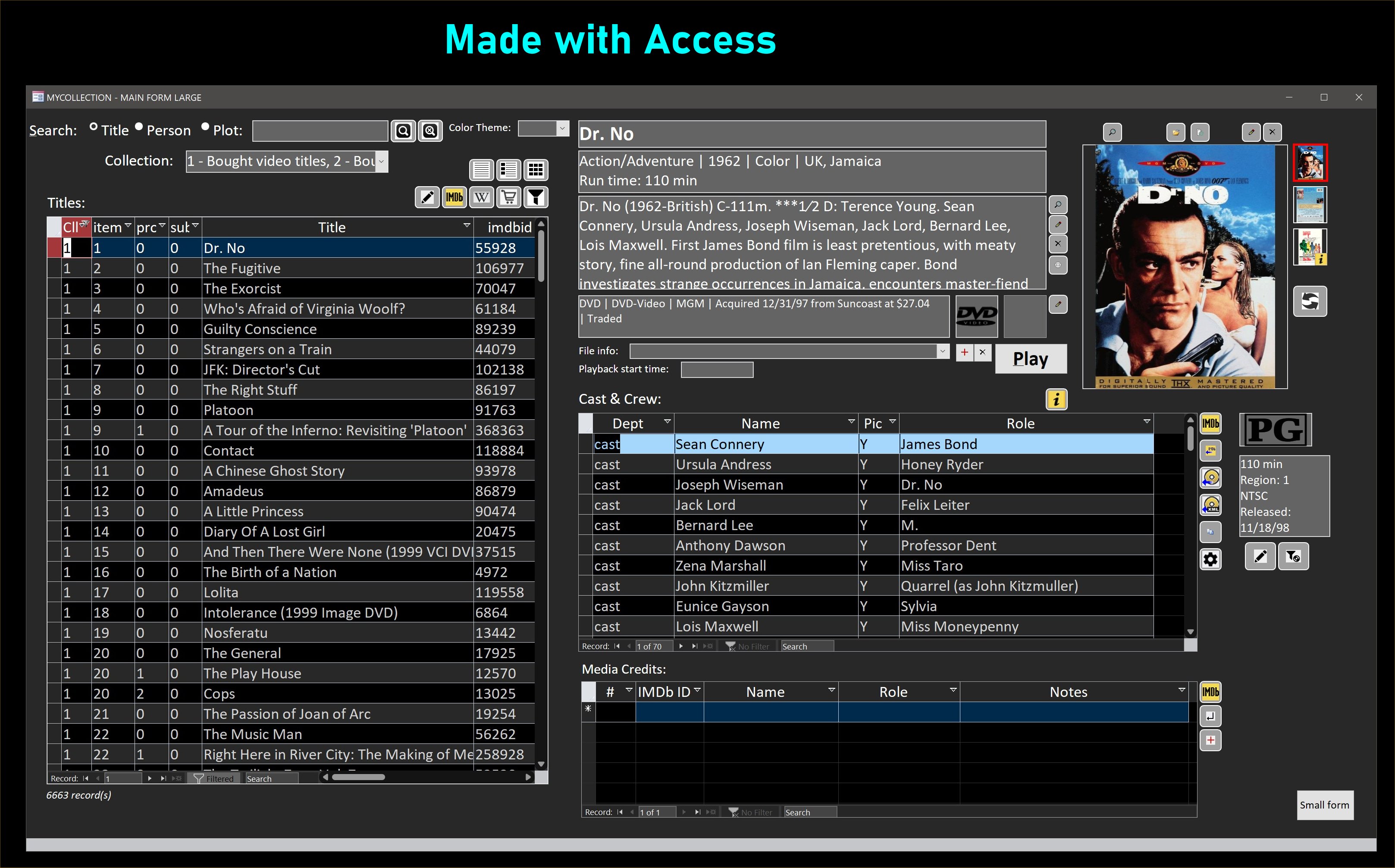
Richard "Hard" and "easy" can be used to describe everything, since they are relative terms that only have meaning to the person who uses them.  I've spent the last few weeks building some apps myself with Visual Studio (pictures below).  It does have some quirks and shortcomings (but so does everything), but the code editor is a joy to use.  Its intellisense is light-years ahead of the one in Access, and it flags a lot more errors than the VBA editor in Access.  It greatly reduces my time spent on debugging, which normally takes a lot of time, as any coder knows.

One reason I came back to this forum is hopefully to nudge some of you guys to Visual Studio.  As I've said, your site is far overdue for some content on it.  Access is just never go to have features like stand-alone executables and web app development.  And if it were to get those features, it would probably end up becoming something very different, like VB.Net, not VBA.  Some features simply require totally different environment and way of coding.
Kevin Yip  @Reply  
     
38 days ago

Kevin Yip  @Reply  
     
38 days ago

Richard Rost OP  @Reply  
          
38 days ago
Yeah, you don't have to convince me that Visual Studio is a lot more powerful and definitely has more of a future than Microsoft Access does. I think that Access is just one of those tools that's been around so long, and it's been for the most part rock solid, and so many people use it to run their businesses. But you're right. If you're going to build professional-level software, Visual Studio is the way to go.

One of these days when I get some more time, I definitely will produce some content for it. I've been using it myself for personal projects for years.
Thomas Gonder  @Reply  
      
38 days ago
Kevin One of the reasons I chose to start (again) with Access four years ago was the reality that users could create their own queries and reports, export the data to Excel for graphing, etc. With a little training of users, I wouldn't be bogged down doing a myriad of requests, such as I had to do in my old db development app.

Is there a way using Visual Studio that more advanced users could "get to" the db for these tasks? Is there a clean Visual Studio interface with SQL Server?
Richard Rost OP  @Reply  
          
38 days ago
You could develop the core of your app in VS with an SQL Server backend and then give users Access to query off that. I've set that up for users before.
Kevin Yip  @Reply  
     
38 days ago
Thomas  Visual Studio is strictly for developers, unlike Office apps which both regular users and developers can use.  Regular users could only use the apps created by VS, but not VS itself, unless they are the developers themselves.  This may be the reason why Richard is reluctant to make courses for it -- because he is not training developers per se (even though he does have developer courses).  Access i not strictly a development tool, since it is an odd hybrid that regular users can use while also doing some designing and coding on the side.

But the reality is that Access can't deal with the increasing need for connectivity.  All it takes for Access to suddenly become useless is when you have one -- just one -- remote user (even someone right next door from you) who needs to connect to your local office network.  Then you suddenly need remote connectivity, via Internet.  That was what happened to me in the early 2000s.  With slow Internet speed, I suddenly had to look for solutions other than Access.

In 10 years, Internet speed may increase tenfold, just like it has in the past 10 years.  Eventually, Internet speed may become as fast as hard drive speed of today.  Accessing a remote database in Access would seem like accessing a local database.  This is something to keep in mind.  If Access survived till then, it might be able to handle Internet by itself!
Kevin Yip  @Reply  
     
38 days ago
Richard  Any content on VS would be great for your channel and site.  It doesn't have to be courses or tech help.  Just any thoughts, concerns, experiences, etc., about Visual Studio or .NET in general, which came out way back in 2002.  That's why I said it's long overdue.  You need to start giving your students some exposure, or just a glimmer, of what is out there.
Thomas Gonder  @Reply  
      
32 days ago
When MS Access was first released, I did some speed and reliability testing of it using JET. I was pretty impressed when comparing it to the super-mini db I was using at the time with 50+ concurrent users. I think it's a shame, as I've said before, that MS hasn't kept up the product to work with Wi-Fi, the Internet and shadow backups. I know they want to sell VS and SQL Server, but I really think that's overkill for many small office environments. Most offices use an intranet that is so much faster than centralized memory and hard disks were, and those handled the job just fine.
Richard Rost OP  @Reply  
          
32 days ago
It's funny that you mention this because someone asked me the same thing a couple of days ago, and I was going to bring it up in today's Quick Queries video. But I don't usually advertise this because I really don't want people running Access over Wi-Fi. Since Access is a file-based database, even a small Wi-Fi hiccup can cause corruption.

That said, if you're using Access as a front-end with SQL Server as the back-end, and you handle data properly with unbound forms, pass-through queries, and so on, then Wi-Fi is fine - within reason. As long as you're not moving huge amounts of data, working with one record at a time or a small page of records is perfectly OK. I wouldn't run large update queries over it, but for browsing customer records or doing inventory work, it's no problem at all.

Just don't ever try that with a shared ACCDB back-end. That's where you'll get into trouble. Easiest way to corrupt an Access back-end file is to try to use it over Wi-Fi.
Kevin Yip  @Reply  
     
32 days ago
An Access database is stored in a single file, and it's like a basket with all the eggs.  As long as this is the case, corruption is always a possibility -- a fault in a single component could bring the whole database down.  Other development tools just aren't set up like that.  They are usually highly modular, with every component in a separate file.  That makes file management more complex.  This is another way Access makes things easier for users, with only one file to manage.
Thomas Gonder  @Reply  
      
31 days ago
I worked at the O/S, db engine and application level for years in a db that ran on 64KB of memory and had a 10MB hard disk (that's what it had as a configuration when I first started, the computers got more robust with time). Yes, very primitive and it could support ten concurrent users, a bit slow but acceptable (I've mentioned before the 45-minute compile times for a single program). It was usual to occasionally find corruption in the data, usually reported the next time the spot of data was accessed and the format of the record showed something amiss.

About five years ago, I fired up a new version of that old db on my laptop and then wrote an exercise program that wrote, deleted and modified data from ten processes in a manner that the old machine wouldn't finish in 1,000 years. I ran it for a week straight to see if it would fail. There wasn't a single hiccup.

IMHO, if a db design from the 1960s (ported to run on Windows/NTFS) can run massive processes without failure on modern equipment, THERE IS NO EXCUSE FOR ACCESS TO SUFFER CORRUPTIONS. Shame on Microsoft for not fixing the underlying problems and not keeping up with the modern computing environment.
Thomas Gonder  @Reply  
      
31 days ago
Kevin Yes, the single file approach does seem odd. Considering that all of it ends up in temp or permanent memory as just bits anyways, in the final analysis, it shouldn't matter how those bits get there or in what format they are. If there is corruption, then there is something wrong with the architecture.

As I mentioned in the previous post, corruptions were normal when I worked at an OEM. As a field analyst that had to fix those corruptions (each often taking an hour or more to fix and restore) for hundreds of clients, I had my suspicions that it wasn't just random "source electrical issues" that the home engineers swore were the culprit. I spent a year digging deep and finally found a design flaw in the main processor chip.

When the company, a subsidiary of McDonnell Douglas, decided to hide the defect and not replace the chips (an expensive proposition but necessary in my opinion) I walked away and went into application work on a new competitor's product. They got the architecture correct, and low and behold, all those pesky file corruptions became an issue of the past. Now, dealing with a 50 MB hard disk head-crash? Those continued for a few more years.
Richard Rost OP  @Reply  
          
31 days ago
Thomas it's funny that you bring this up because this is something that I've got on my list for a future video. Talking about Access corruption. I've been saving pieces like this for when I finally start releasing my SQL Server series. But I'll post my working script here. I'm sure you guys know all this but...

Microsoft Access and SQL Server both store data in files on disk, but they do it in very different ways.

Access is a file-based system. That means your database (the .ACCDB file) lives out on a shared network drive, and every user's copy of Access opens that same file directly. When you add or edit a record, Access goes into the file and changes just that small part, like opening a Word document and changing one paragraph instead of rewriting the whole book. It keeps track of where things are inside the file so it knows exactly where to make those changes.

That works fine when the file is sitting on your own computer or on a stable wired network. But if there is a hiccup, like a Wi-Fi dropout or someone losing connection mid-save, Access might not finish writing that change. Since all the users are sharing the same file, one bad write can mess up part of the database and cause corruption.

SQL Server, on the other hand, is a server-based system. Instead of every user opening the data file directly, only SQL Server itself touches those files. Your Access front end (or any other app) just sends SQL commands to the server. The server reads or writes the data and sends back the results. The clients never touch the files.

This design makes SQL Server much safer and more reliable, especially over a network. It also has its own built-in safety system that tracks every change before it happens. If the power goes out or a connection drops, SQL Server can roll back to a safe state automatically. That is why corruption is extremely rare.

So in short, Access lets everyone open and edit the same file directly. It is quick and easy, but risky if your network is not perfect. SQL Server lets only the server edit the data files, while everyone else talks to the server instead. It takes more setup work but is far more stable and secure.

The bottom line is this. Access is great for quick development and smaller projects where everything stays local. If you have two, three, even five people using the same Access database on a stable wired network, you will probably never have a problem. I have installed setups with five to ten users that have run for literally decades without a single corruption issue that a quick Compact and Repair could not fix.

But as your database grows and more people start using it at the same time, or you want to add remote users, the risk goes up. Once you get into the range of fifteen or more users, that is when you really want to start thinking about using SQL Server for your back end. Technically, Access can still work, but all those computers are constantly reading and writing to the same shared file, and every new connection increases the chance that something will go wrong.

SQL Server fixes that by changing how data is handled. Instead of letting every workstation reach directly into the same ACCDB file, SQL Server stands in front of it as the gatekeeper. Each user sends a request to the server, which safely reads or writes the data and returns only what was asked for. If a client drops out or there is noise on the network, the request might get lost, but the server's data remains untouched.

Think of it like a salad buffet. With Access, everyone walks up and grabs the lettuce with their own grubby little hands (because you know not everyone is using the tongs). With SQL Server, you tell the waiter what you want, and they go to the buffet for you, keeping everything clean and organized. The more people you have using the system, the more that waiter helps keep things running smoothly.

Thomas Gonder  @Reply  
      
31 days ago
Richard I understand what you're saying, but I'll stick with my original thought. If simply "more users" can corrupt the data, there is something wrong with the architecture. Dbs aren't a restaurant, and they've been multi-user for over eighty years. However the old systems I worked in, the one computer was the waiter that did it all, the user was limited to I/O functions. I know client/server had to cut its teeth, but Microsoft has had plenty of time to get it resolved without forcing Access users to implement an expensive and non-native solution for reliability. In other words, if you can't make it reliable, then maybe you shouldn't be selling it?

At which point should I throw in the towel on Access and instead focus on .Net products? Although I doubt they are any more "reliable" coming from Microsoft. If you think SQL Server is "reliable", I've got a friend (IBM, Oracle and SQL Server experience of 40+ years) that's worked in SS for over ten years, and a great bulk of his time at a large charity is spent chasing down data gremlins. He doesn't write application code, all he does, with two others, is keep SQL Server on the straight and narrow. The kind of thing I stopped doing thirty years ago in the ancient OS/Db system.
Thomas Gonder  @Reply  
      
31 days ago
Let me make a simple Star Trek analogy. Have you ever noticed how the Enterprise's computer only gets corrupted by outside entities or other-worldly phenomena? (As best as I can remember, not being a Trekkie.) Would you climb into an intergalactic starship that would corrupt itself and maybe crash into an asteroid belt anytime a new crewperson made an additional request of "Hey computer..."?

Or maybe if Boeing said, "Hey so what, another of our airliners crashed. A few hundred dead, no big deal. Thousands of others make it to their destination every day just fine." I'm picking on Boeing because they gobbled up McDonnell Douglas and screwed a lot of us over with our 401k. And then again when they decided to overlook some "minor" technical glitches, sending the stock price deeper into the dumper.
Richard Rost OP  @Reply  
          
30 days ago
Thomas I get what you're saying. I can only speak from my own experience, and I've been working with Access and SQL Server for decades without many major issues. You could argue that's because of how I build and manage things, and maybe my methods are better than some other developers'. But to be fair, that might or might not be the point - I don't know.

As for the Star Trek analogy, it's usually some kind of alien influence or unexplained phenomenon that causes chaos on the ship. We've seen plenty of episodes where the technology itself was fine - it's just the universe throwing curveballs. So I wouldn't blame the computer for that.

And with the airplane analogy, sure - they could make every plane safer or add more redundancies, but that would drive up costs. Companies know exactly how much risk they're willing to tolerate. Losing a plane now and then and paying out settlements is often cheaper than over-engineering every system. That's just how most businesses operate: profit first, improvement later.
Thomas Gonder  @Reply  
      
30 days ago
Richard My friend deals with hundreds of users that bang on the SQL Server all day. From his years at IBM and Oracle, he knows how to manage a system or two.
I think you got the point of my Star Trek analogy. I was saying the computer is fine, it's Access that is falling short. More people using Access isn't a "curveball". I hope more users will be bold and say, "Microsoft, this is not acceptable!"
Boeing officers were up for criminal negligence, not even close to an issue of over-engineering. Just the opposite.
Richard Rost OP  @Reply  
          
30 days ago
Yeah, I'm reading you loud and clear. The issue with Access is that it was never designed to be a total system for a database with 20 users. So, a lot of consultants set that up for people, and they have problems, and they wonder why. I would say Access by itself tops out at about 10 users. Any more than that, you need a SQL Server, and you've got to make sure it's designed properly.
Thomas Gonder  @Reply  
      
29 days ago
I wouldn't say it was the consultantas that "oversold" Access:

https://chatgpt.com/share/69126cd4-a414-800e-828d-0937e3548cf6
Richard Rost OP  @Reply  
          
28 days ago
Yeah, that 255 limit is laughable by any standard. Unless you're using SQL Server, there's no way I'd have more than 10-15 people actively using an ACCDB file.
Thomas Gonder  @Reply  
      
27 days ago
Some time back I ran some pretty extensive beating tests on Access over my slow test network using two laptops and one of those Amazon cube computers. The backend was on the cube. The processess added a ton of records to the same table. It held up, and I didn't see any corruption. But that doesn't mean much. I wonder if anyone has written an "exercising" db that could be fired up on different Windows users that could really put the test to a BE and also check the records for corruption.

These "burn-in" tests are great to do when first setting up a multi-user environment for software, hardware and communication validation especially at a client's site. A good test creates, modifies, deletes records while checking that the records are formatted as they should be, preferably with a reading process constantly reading for errors and reporting if found. I throw in a process that does some math and string tests to keep the processor busy during table activity.

If no one has/cares to share one, I suppose I could try porting my old mini-computer programs. Ugh, another week gone.
Add a Reply Upload an Image
Next Unseen


The following is a paid advertisement
Computer Learning Zone is not responsible for any content shown or offers made by these ads.
 

Learn
 
Access - index
Excel - index
Word - index
Windows - index
PowerPoint - index
Photoshop - index
Visual Basic - index
ASP - index
Seminars
More...
Customers
 
Login
My Account
My Courses
Lost Password
Memberships
Student Databases
Change Email
Info
 
Latest News
New Releases
User Forums
Topic Glossary
Tips & Tricks
Search The Site
Code Vault
Collapse Menus
Help
 
Customer Support
Web Site Tour
FAQs
TechHelp
Consulting Services
About
 
Background
Testimonials
Jobs
Affiliate Program
Richard Rost
Free Lessons
Mailing List
PCResale.NET
Order
 
Video Tutorials
Handbooks
Memberships
Learning Connection
Idiot's Guide to Excel
Volume Discounts
Payment Info
Shipping
Terms of Sale
Contact
 
Contact Info
Support Policy
Mailing Address
Phone Number
Fax Number
Course Survey
Email Richard
[email protected]
Blog RSS Feed    YouTube Channel

LinkedIn
Copyright 2025 by Computer Learning Zone, Amicron, and Richard Rost. All Rights Reserved. Current Time: 12/9/2025 7:40:07 PM. PLT: 1s