Free Lessons
Courses
Seminars
TechHelp
Fast Tips
Templates
Topic Index
Forum
ABCD
 
Home   Courses   TechHelp   Forums   Help   Contact   Merch   Join   Order   Logon  
 
Back to Access Forum    Comments List
Upload Images   @Reply   Bookmark    Link   Email   Next Unseen 
Dlookup Knowledge Question
Lee Shastid 
    
43 days ago
Is there a limit on how many times a DLookup can be used in a DB? If you use it more than once is anything done differently? Right now if I put my DLookup code in the address field it brings it all over for city, state, zip, telephone number too. is that the way it is suppose to work? Thank you
Donald Blackwell  @Reply  
       
43 days ago
Lookup can be used as many times as you need but if you are using it for several fields from the same table on the same forms.

It typically only brings the field you specify inthe first parameter. For example,

X / dlookup("Address","TableT", "RecordID=" & ID(

Should only bring the address from table named "TableT" where the id field natches.
Lee Shastid OP  @Reply  
    
43 days ago
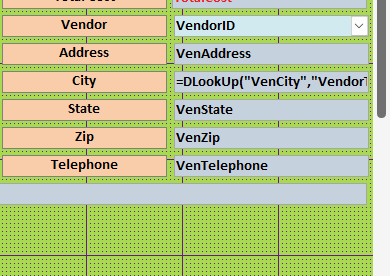
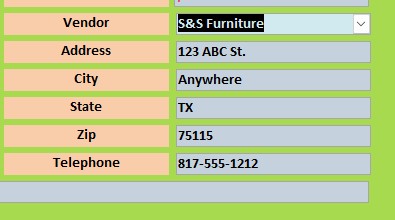
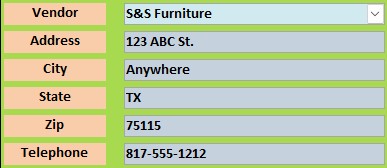
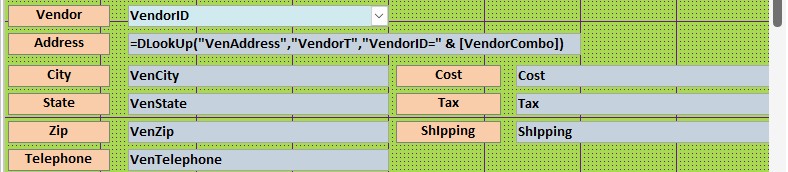
Interesting. I am using it for address,city,state,zip, and telephone # getting the data from my vendor table. I am using it on several forms. And I only use =DLookUp("VenAddress","VendorT","VendorID=" & [VendorCombo]) in the address field and it brings over all of the fields at once. I do not have have to use it in each field. It works. Thank you
Ben Perry  @Reply  
      
43 days ago
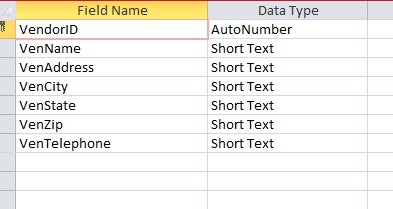
Screenshots of your design might be helpful. Are you storing all that information in a single field in the table?
Lee Shastid OP  @Reply  
    
43 days ago
No its separate fields. Which screen shot do you want to see?
Lee Shastid OP  @Reply  
    
43 days ago

Lee Shastid OP  @Reply  
    
43 days ago

Lee Shastid OP  @Reply  
    
43 days ago

Ben Perry  @Reply  
      
43 days ago
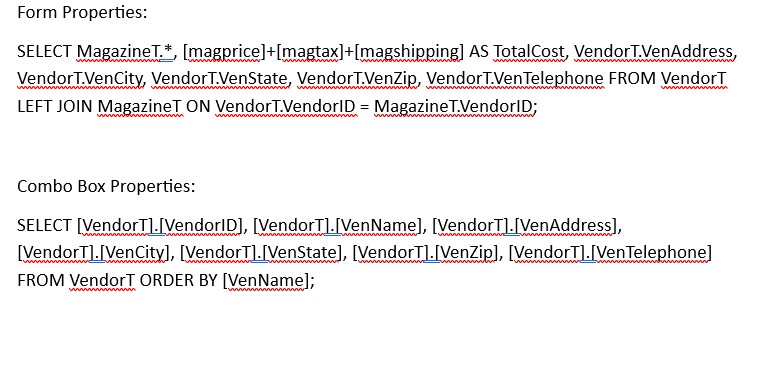
Your table looks fine for a vendor table to record the information. The pics don't clearly identify the form structure. What is the record source for it? Do you have any code for the combo box (like auto fill the address and phone fields)?
Lee Shastid OP  @Reply  
    
43 days ago
Ok Ben Here is what I hope you are looking for. And there is no code for auto fill. The Dlookup auto fills soon as I put the vendor name in the vendor field.
Lee Shastid OP  @Reply  
    
43 days ago

Lee Shastid OP  @Reply  
    
43 days ago

Lee Shastid OP  @Reply  
    
43 days ago

Lee Shastid OP  @Reply  
    
43 days ago

Ben Perry  @Reply  
      
43 days ago
I just reread my earlier questions and realized I may not have been as clear as I intended. Is that last pic your control source for the form or for the combo box? If it is for the form, I would be very confident that is why the address fields are getting filled in as soon as you select a vendor.
Lee Shastid OP  @Reply  
    
43 days ago
It is for the form. I think I didn't snip it correctly. Here is the Info I think you wanted.
Lee Shastid OP  @Reply  
    
43 days ago

Ben Perry  @Reply  
      
43 days ago
I would say that's your complication. Having that sql statement as the form record source is likely pulling in the additional information. Unfortunately, im not fluent enough in SQL to say for certain. Based on my experience and what seems to be Richard's teaching, the proper reliable way is to set your form record source to a table like MagazineT possibly MagazineQ which would contain MagazineT.* plus your calculated total cost with a subform tied to VendorT.
Lee Shastid OP  @Reply  
    
43 days ago
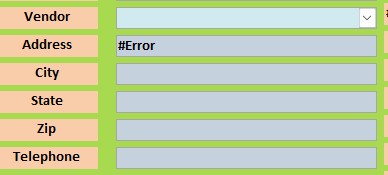
I have a query for my calculated TotalCost. I think I brought the query in and used all the fields in the query. That SQL listed above is what access did on its on. I am not savvy at SQL at all. If that will cause problems for me then I shall change things. Thank you. I just changed it and the DLookUp is doing what it is suppose to do I believe. Thank you

This thread is now CLOSED. If you wish to comment, start a NEW discussion in Access Forum.
 

Next Unseen

 
New Feature: Comment Live View


The following is a paid advertisement
Computer Learning Zone is not responsible for any content shown or offers made by these ads.
 

Learn
 
Access - index
Excel - index
Word - index
Windows - index
PowerPoint - index
Photoshop - index
Visual Basic - index
ASP - index
Seminars
More...
Customers
 
Login
My Account
My Courses
Lost Password
Memberships
Student Databases
Change Email
Info
 
Latest News
New Releases
User Forums
Topic Glossary
Tips & Tricks
Search The Site
Code Vault
Collapse Menus
Help
 
Customer Support
Web Site Tour
FAQs
TechHelp
Consulting Services
About
 
Background
Testimonials
Jobs
Affiliate Program
Richard Rost
Free Lessons
Mailing List
PCResale.NET
Order
 
Video Tutorials
Handbooks
Memberships
Learning Connection
Idiot's Guide to Excel
Volume Discounts
Payment Info
Shipping
Terms of Sale
Contact
 
Contact Info
Support Policy
Mailing Address
Phone Number
Fax Number
Course Survey
Email Richard
[email protected]
Blog RSS Feed    YouTube Channel

LinkedIn
Copyright 2026 by Computer Learning Zone, Amicron, and Richard Rost. All Rights Reserved. Current Time: 4/30/2026 2:29:37 AM. PLT: 1s