Last night, somewhere around the traditional "this'll only take five minutes" hour of 2:00 AM, I made a few changes to the website. The changes themselves seemed perfectly reasonable at the time. In fact, most bad decisions in software engineering begin with that exact sentence. Unfortunately, one of those changes appears to have broken the short-link system that powers a lot of the navigation around the site.
If you've been here for any length of time, you know I use short links all over the place. Instead of sending you to some giant URL that looks like it escaped from a SQL query, I can give you something simple like 599cd.com/ACD1 for Access Developer 1. Those links are used extensively throughout the site, especially on your My Courses page.
At the moment, those short links are not behaving themselves.
The good news is that the courses themselves are still there. The videos are still there. The database has not been launched into a black hole. You can still get to everything using the regular site navigation.
For now, instead of using My Courses, click the Courses link on the main menu at the top of the page. You know the one: Home, Courses, TechHelp, Forums, and so on. From there, navigate to the course you want normally. For example, this should get you where you need to go:
Courses > Access > Developer > Developer 1
As far as I can tell, the problem is isolated to the short-link database. I'm already working on it and expect to spend the next couple of hours repairing the damage. Hopefully by the time some of you read this, the problem will already be resolved.
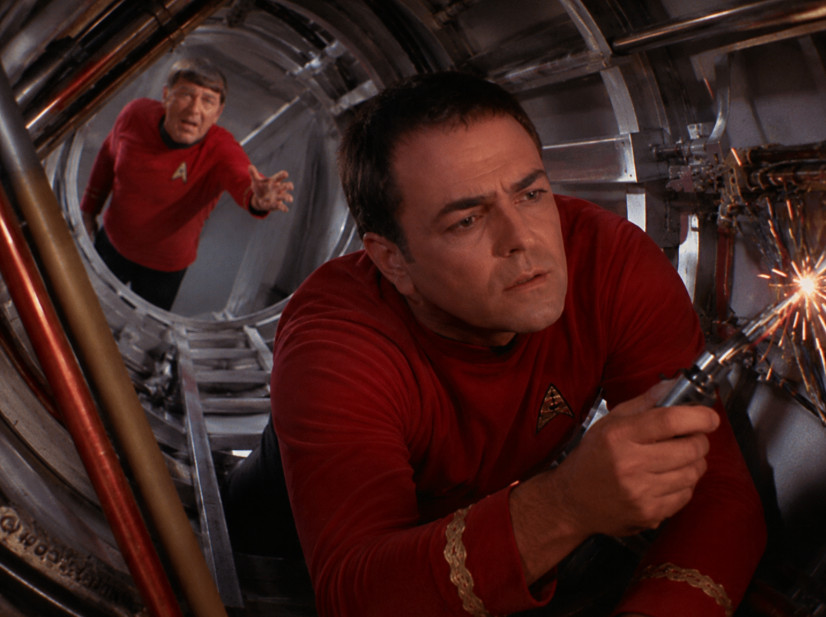
This is one of those moments where I remind everyone that my website, and my database for that matter, are a lot like Scotty's engine room. Most days it hums along beautifully. The lights blink. The engines purr. The ship cruises at warp speed. But every now and then I decide to "improve" something, reroute a plasma conduit, or replace a perfectly functional relay with a "better" one.
Then suddenly I've got warning lights flashing, EPS conduits sparking, and Klingons pounding on the hull while Scotty is screaming I canna give her any more, cap'n!
The funny thing is that these problems almost never show up when I'm making the change. Everything looks fine. Tests pass. Systems appear normal. Then six hours later some completely unrelated subsystem wanders into Sickbay complaining that it can no longer find its left kidney. Software is weird like that.
So if your course links aren't working right now, my apologies. This one is entirely on me. The repair crews are already on deck, the coffee pot is operational, and the captain is currently crawling around inside the Jeffries tubes trying to figure out what exactly exploded.
I'll post another update once everything is back online.
The good news is that I found the problem, repaired the offending links in the database, and everything should now be working properly again.
The bad news is that web browsers are stubborn little beasts.
Even though the links on the server have been fixed, your browser may still have the old versions cached locally. In other words, the website knows the correct answer now, but your browser may still be confidently insisting that yesterday's answer is the right one.
If you're still having trouble, you have a few options.
First, you can simply use the normal site navigation. Click Courses on the main menu bar (not My Courses), then navigate to the course you want. Everything should work normally through the regular menu system.
Second, you can manually clear your browser cache for my website. Once the cached files are cleared, your browser should grab the updated links immediately.
Or... you can do absolutely nothing. Eventually your browser will realize its cached copy is out of date and fetch the new version automatically. How long that takes depends on the browser, cache settings, and occasionally the phase of the moon. Seriously, it varies. Sometimes it's a few hours. Sometimes it's a day or two. Modern browsers generally revalidate cached content pretty frequently, but there isn't one universal timer that applies to everyone.
So if you're still seeing broken links, don't panic. The server-side issue has been fixed. What's left is mostly a browser caching issue.
Sorry again for the inconvenience. This is what happens when the captain decides to make "one quick change" at 2:00 in the morning. The ship is operational again, the warp core is stable, and Scotty has stopped yelling at me from inside the Jeffries tube.
Mostly.
LLAP
RR
Donald Blackwell
@Reply 3 months ago
Bet you're rethinking those self sealing stem bolts you picked up on the promenade, aren't you? Lol
Jeffrey Kraft
@Reply 3 months ago
Good New Chief... the My Courses works. Now can we do something about my chair and the Food Replicator. I distinctly asked for a Mocha Latte Cold. Feared if there were any problems I'd get one hot, or worse Earl Grey. What I got instead can best be discribed as "Skunk Juice" with a side of "Tribble". Oh and um Vic Fontaine is now covering Rush songs... I know you like that but..... Tom Sawyer.... on an endless loop is a bit much.
Thomas Gonder
@Reply 3 months ago
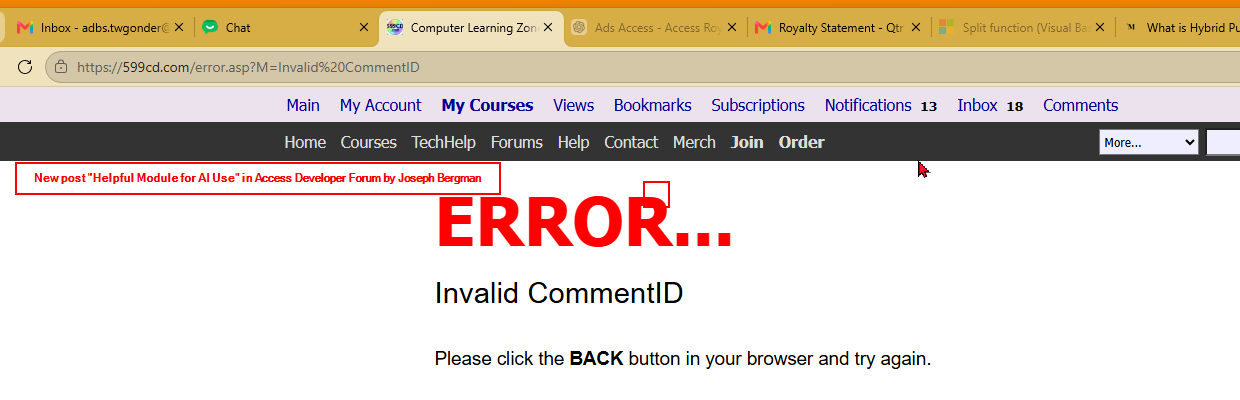
Recent links in the Notifications are failing for me.
Yeah, unfortunately, if your notifications are pointing to an old link, then it might not work. But only class pages that are affected. It shouldn't be forum posts and comments. Can you share specifically what's not working? Like, hover your mouse over the link so I can see what the URL is and post a screenshot.
Also, an invalid comment ID could be that the user deleted their comment. That happens sometimes. If it happens with multiple comments, then it's an issue. If it's just that one, it could be deleted, but I need to know what the ID is to tell you for sure.
Donald Blackwell
@Reply 3 months ago
https://599cd.com/blog/da?ID=125062 This link gives me that error - may be a deleted post but just in case. The link text is: New post "Helpful Module for AI Use" in Access Developer Forum by Joseph Bergman
John Sahagian
@Reply 3 months ago
This image reminds me of episode "Doomsday Machine". Spock to Scotty: Try inverse phasing of short links.
The problem with the way that the notifications work is I used a really cheesy, simple way out when I first built it. I didn't actually store that CommentID in an actual ID field in the notification table. That notification is just a text field, and I build the link as part of the text field when I create the notification. I could run a query to check every single notification in the database to find the ones that that link is involved in. I could do that, but it happens so rarely that people delete a comment that it's not really worth the time or the effort.
You gotta remember my database and my website are kind of like, it works well enough for now. I'll make it better later. It's on my to-do list. It's the same thing I teach you guys in the videos, right? Make it work first, then make it work better later.
One thing I did just fix today was, I don't know if anybody noticed, but the My Enrolled Courses link on your My Courses page took forever to generate before. That's because, like a dummy, I had a DLookup up in the middle of a recordset loop. I joined tables together into a view on the server and got rid of the the DLookup, and voila, it's loading almost instantly now.
ALL of the Blog (main page) and Comments pages used to have DLookups inside recordset loops in them. I've been slowly getting rid of them all, and the site's running a lot faster.
Progress...
Jeffrey Kraft
@Reply 3 months ago
Richard I noticed how slow the courses loaded. I screamed at my PC that my internet speed is really good. Why is this so slow..... I guess it's only as fast as the slowest thing.
Yeah, that was all my fault. When I first built the site, I didn't realize just how slow it was because of the way I built it. Every course on that page had to check whether the current user owned it so it could show either the "Enrolled" status or the "Buy Now" link. My brilliant solution at the time? A DLookup inside the loop. For every. Single. Course.
I did have one exception built in for myself. If the CustomerID was mine, it skipped the DLookup because, well, I obviously own every course. That's why it always loaded nice and fast for me. Funny how that worked out, huh?
Not too long ago, I logged in with one of my other accounts to test a feature, and I remember thinking, "Wait a minute... why is this so darn slow?" That's when I discovered it. It's one of those things I warn people about in my classes all the time: don't put a DLookup inside a loop. I made it work years ago, then never went back and revisited it because, as far as I could tell, it ran fine.
That's the funny thing. I'm not really a user of my own website the way you guys are. I spend most of my day recording videos and working on new content. The one part of the site I actually use like a regular user is the forums, which is why I've added so many features there over the years. But I don't usually log in and browse courses or shop for them like everyone else does, so some of those rough edges can hide from me for a long time.
I know there are still plenty of places that need work. The order form, for example, is about 20 years old. I've patched it here and there, made it prettier, and bolted on new features, but underneath it's still based on old HTML I wrote back before I knew what I was doing. There are lots of little improvements like that still on my to-do list.
I don't have a dozen developers working behind the scenes. It's just little old me recording videos, answering customer emails, fixing bugs, and trying to improve the website one piece at a time. That's why feedback like yours is so valuable. It lets me know where I should spend my time next. The squeaky wheel gets the grease, right?
Sorry, only students may add comments.
Click here for more
information on how you can set up an account.
If you are a Visitor, go ahead and post your reply as a
new comment, and we'll move it here for you
once it's approved. Be sure to use the same name and email address.
This thread is now CLOSED. If you wish to comment, start a NEW discussion in
Captain's Log.