Free Lessons
Courses
Seminars
TechHelp
Fast Tips
Templates
Topic Index
Forum
ABCD
 
Home   Courses   TechHelp   Forums   Help   Contact   Merch   Join   Order   Logon  
 
Back to Access Forum    Comments List
Upload Images   @Reply   Bookmark    Link   Email   Next Unseen 
Security Warning When One Database Opens Another
Cliff Hall 
      
34 hours ago
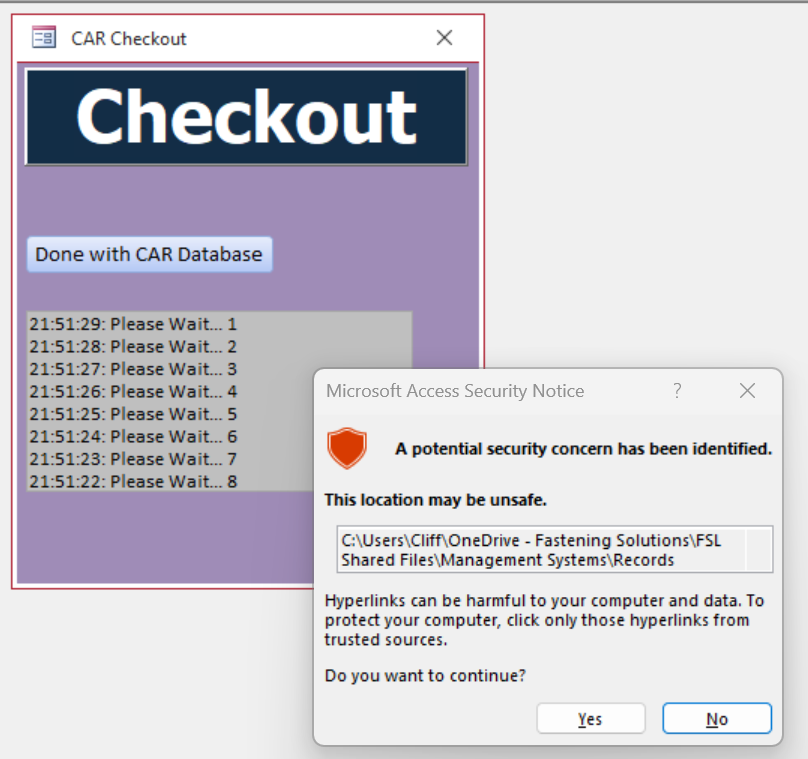
I am using an Access database on Onedrive, which I know is not recommended.  I am using Richard's Checkout database front end which checks via inuse.txt if anyone else is using the database.  Works well.   Database location is trusted, and the Checkout database opens without a security warning.  When the Checkout database opens the main database with this command "Application.FollowHyperlink CurrentProject.Path & "\FastSol CAR3.accdb"", I get the hyperlink security concern warning even though the main database is in the same location as the checkout database. Why?   Richard did not get that error in his example.  

I am wondering if I should open the main database with a shell command instead.

Cliff Hall OP  @Reply  
      
34 hours ago

Cliff Hall OP  @Reply  
      
34 hours ago
The "offending" command is at 18:48 of the File Sharing video here https://599cd.com/blog/display-article.asp?ID=2234
Kevin Robertson  @Reply  
          
34 hours ago
You answered your own question with the last sentence of your original post.

Try it Yourself
Cliff Hall OP  @Reply  
      
34 hours ago
Kevin Using a shell command may be a solution (which I will figure out how to do from the video), but it doesn't answer my question why it is happening.  I wanted to learn why AND solve the problem, but I will settle for just solving the problem.
Cliff Hall OP  @Reply  
      
21 hours ago
I changed the command
"Application.FollowHyperlink CurrentProject.Path & "\FastSol CAR3.accdb""
to  
Shell "cmd /c start """" """ & CurrentProject.Path & "\FastSol CAR3.accdb""", vbHide

And it worked - the database opened without a security warning.  I needed extra double quotes because of the space in my filename.
I still don't know why Richard's statement worked for him, but not for me.
Add a Reply Upload an Image
Next Unseen

 
New Feature: Comment Live View


The following is a paid advertisement
Computer Learning Zone is not responsible for any content shown or offers made by these ads.
 

Learn
 
Access - index
Excel - index
Word - index
Windows - index
PowerPoint - index
Photoshop - index
Visual Basic - index
ASP - index
Seminars
More...
Customers
 
Login
My Account
My Courses
Lost Password
Memberships
Student Databases
Change Email
Info
 
Latest News
New Releases
User Forums
Topic Glossary
Tips & Tricks
Search The Site
Code Vault
Collapse Menus
Help
 
Customer Support
Web Site Tour
FAQs
TechHelp
Consulting Services
About
 
Background
Testimonials
Jobs
Affiliate Program
Richard Rost
Free Lessons
Mailing List
PCResale.NET
Order
 
Video Tutorials
Handbooks
Memberships
Learning Connection
Idiot's Guide to Excel
Volume Discounts
Payment Info
Shipping
Terms of Sale
Contact
 
Contact Info
Support Policy
Mailing Address
Phone Number
Fax Number
Course Survey
Email Richard
[email protected]
Blog RSS Feed    YouTube Channel

LinkedIn
Copyright 2026 by Computer Learning Zone, Amicron, and Richard Rost. All Rights Reserved. Current Time: 7/7/2026 4:37:29 PM. PLT: 0s