We wish to find the truth, no matter where it lies. But to find the truth we need imagination and skepticism both. We will not be afraid to speculate, but we will be careful to distinguish speculation from fact.
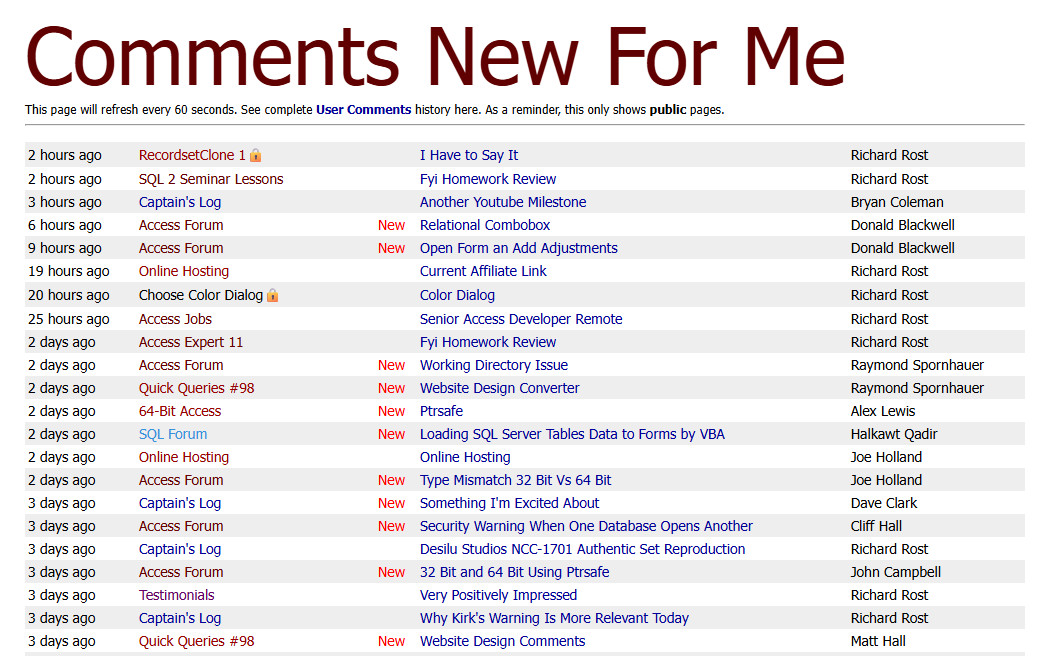
I took a few minutes and built a new Comments New For Me page that shows all of the recent comments across the entire site and lets you quickly see which ones are new to you.
The biggest improvement is that it's sorted by the most recent reply, not just the original post. That means if someone replies to an older thread, it jumps back to the top of the list. The short list on the home page doesn't do that. That one only shows the newest top-level posts. If you want to keep up with new activity across the entire site, use the new page. You'll find it on the home page right next to the Forums link, in red.
The list may include threads that you don't currently have access to, such as members-only discussions or classes that you haven't purchased. For example, in the screenshot below, the top thread is "RecordsetClone 1," which is part of Access Developer 59. You'll see it in the list, but if you don't own that class, clicking it will let you know that access is required. Those threads are marked with a small lock icon. And yeah, the lock shows for everyone. I'm still working on a way to remove the lock if you can see that thread.
Truly private areas, such as the Moderator Forum and the Access Veterans Forum, will not appear in this list. If you're a member of one of those private forums, be sure to subscribe to it so you'll receive notifications when new posts are made.
I hope this makes it a little easier to keep up with new discussions and discover older threads that have become active again. Enjoy!
Just one little side note. I had to slightly change the way that views are logged. You might notice some older threads where you did indeed read the entire thread, but it still says new. If you read it again, it will now mark it as new. Moving forward, this should work fine, but you might find older threads that you have already read that will still show up as new. There's nothing I can do about that. Before, I used to just track when you viewed the top-level comment. Now I have to track when you read the last comment in the thread.
Alex it's possible. Anything's possible. What count are you looking for specifically?
Bill Mark Langdell
@Reply 3 months ago
Richard, I appreciate the changes you made to the comments list with a flag of "new". This makes it so much easier to follow up on all the comments I have missed. Thank you so much for this! Tusen tack! [A thousand thanks in Swedish]
If you are a Visitor, go ahead and post your reply as a
new comment, and we'll move it here for you
once it's approved. Be sure to use the same name and email address.
This thread is now CLOSED. If you wish to comment, start a NEW discussion in
Captain's Log.