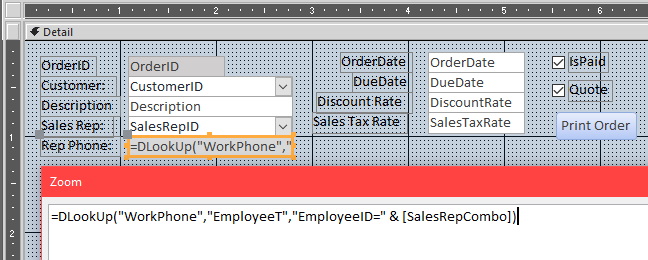
Microsoft Expert 10 Time Line 11:02. When setting up the "Reps Phone" using a DLook Function I keep getting an error in the Phone Number box #ERROR Before I click on the Box or the label it blinks rapidly. I have re-watched the entire Video several times. I am unable to get it to work, I loaded up the database 10 from the library and it runs ok. What might be wrong. Here is the info on the SalesRepCombo combo box and the Reps Phone Text Box. Combo Box Name: SalesRepCombo Control Source: SalesRepID RowSource:SELECT [EmployeeT].[EmpolyeeID], [EmployeeT].[FirstName], [EmployeeT].[LastName] FROM EmployeeT ORDER BY [FirstName], [LastName]; Default Vaule: =Forms![CustomerF]![SalesRepCombo] SalesRepPhone: Text Box ControlSource: =DLookUp("WorkPhone","EmployeeT","EmployeeID=" & [SalesRepCombo])
Sure it does. See the "Upload Images" link at the top of the thread? And yes... always finish the entire lesson before you post about a problem. Sometimes I intentionally leave errors and problems in the video so I can explain them later.
OK. Did you double-check all of your spelling? Make sure your combo box is named "SalesRepCombo" and your phone number field is "WorkPhone" in the table.
Johnny Alvarez
@Reply 5 years ago
I found my error...
In the EmployeeT the EmployeeID was spelled as EmployeID
And I almost gave up on this...Sorry for all the trouble.
Thanks!
If you are a Visitor, go ahead and post your reply as a
new comment, and we'll move it here for you
once it's approved. Be sure to use the same name and email address.
This thread is now CLOSED. If you wish to comment, start a NEW discussion in
Access Expert 10.