Free Lessons
Courses
Seminars
TechHelp
Fast Tips
Templates
Topic Index
Forum
ABCD
 
Home   Courses   TechHelp   Forums   Help   Contact   Merch   Join   Order   Logon  
 
Back to Access Forum    Comments List
Upload Images   @Reply   Bookmark    Link   Email   Next Unseen 
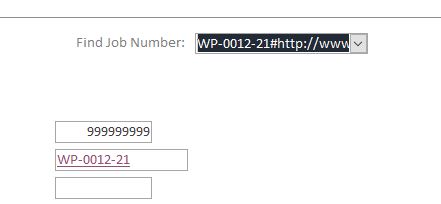
Hyperlink Combo box shows URL
Mark Fannin 

5 years ago
I made a form using a combox box to find open job numbers.  The Job Number field is a hyperlink in the table.  The combo box brings the hyperlink URL text. How do I get rid of the URL text and just see the job number?  Picture attached.  I've gone through all the properties and it's driving me nuts.  Many thanks.
Mark Fannin OP  @Reply  

5 years ago

Richard Rost  @Reply  
          
5 years ago
This is one of the reasons I tell people NOT to use the Hyperlink data type. In fact, I'm re-recording Access Beginner 1 now, and I specifically told people NOT to use it for the email address field, which I did the last time I recorded it in 2013. It's just a mess. You have to use the HyperlinkPart function to decode it and pull it apart into its pieces (address, visible name, etc.). I cover it in Access Expert 5. Since you're a Platinum member, I'd be happy to do a TechHelp video on it since I haven't covered it yet. Let me know.
Mark Fannin OP  @Reply  

5 years ago
Yes, thank you.  Seems like every time I learn something new I stumble forward into a new mess.  I'm a victim of my good intentions I guess.  Thank you for the references in the reply.  I will endeavor to persevere.
Richard Rost  @Reply  
          
5 years ago
I've added it to my TechHelp list. I need a video to explain WHY I don't like the Hyperlink fields anyhow. I don't want to overload beginner students with too much "because I said so," so I like having these TechHelp videos so I can say in the course "if you REALLY want to know why, there's a link below." Just like multi-value fields and attachments, the hyperlink data type was added as a crutch to give non-developers a way to quickly launch web pages and email clients instead of just storing the value as text and using the appropriate ONE LINE of code to launch these things. Video coming soon. Give me a couple days.

This thread is now CLOSED. If you wish to comment, start a NEW discussion in Access Forum.
 

Next Unseen

 
New Feature: Comment Live View


The following is a paid advertisement
Computer Learning Zone is not responsible for any content shown or offers made by these ads.
 

Learn
 
Access - index
Excel - index
Word - index
Windows - index
PowerPoint - index
Photoshop - index
Visual Basic - index
ASP - index
Seminars
More...
Customers
 
Login
My Account
My Courses
Lost Password
Memberships
Student Databases
Change Email
Info
 
Latest News
New Releases
User Forums
Topic Glossary
Tips & Tricks
Search The Site
Code Vault
Collapse Menus
Help
 
Customer Support
Web Site Tour
FAQs
TechHelp
Consulting Services
About
 
Background
Testimonials
Jobs
Affiliate Program
Richard Rost
Free Lessons
Mailing List
PCResale.NET
Order
 
Video Tutorials
Handbooks
Memberships
Learning Connection
Idiot's Guide to Excel
Volume Discounts
Payment Info
Shipping
Terms of Sale
Contact
 
Contact Info
Support Policy
Mailing Address
Phone Number
Fax Number
Course Survey
Email Richard
[email protected]
Blog RSS Feed    YouTube Channel

LinkedIn
Copyright 2026 by Computer Learning Zone, Amicron, and Richard Rost. All Rights Reserved. Current Time: 5/6/2026 12:07:27 PM. PLT: 0s