Free Lessons
Courses
Seminars
TechHelp
Fast Tips
Templates
Topic Index
Forum
ABCD
 
Home   Courses   TechHelp   Forums   Help   Contact   Merch   Join   Order   Logon  
 
Back to Access Forum    Comments List
Upload Images   @Reply   Bookmark    Link   Email   Next Unseen 
Access 2016 Ribbon Changed
Paul Evans 
    
5 years ago
Can anyone tell me why my Ribbon & Quick Access Tool Bar icons have changed color and style on their own? How do I restore them to their previous look?

Thanks
Richard Rost  @Reply  
          
5 years ago
Let's see what you mean. Post a screen shot.
Paul Evans OP  @Reply  
    
5 years ago

Richard Rost  @Reply  
          
5 years ago
They look normal to me. Aside from that you have the Quick Launch toolbar under the Ribbon instead of over it, they look fine.
Adam Schwanz  @Reply  
           
5 years ago

Adam Schwanz  @Reply  
           
5 years ago
Is the difference just the office version?
Paul Evans OP  @Reply  
    
5 years ago
Yes Adam it is. I can assure you both it has changed DEFINATELY!
Richard Rost  @Reply  
          
5 years ago
What did it look like before?
Paul Evans OP  @Reply  
    
5 years ago
In design view Tools the view code Icon/Vector was a different shape and color. The save Icon/Vector on the Quick Access Toolbar was a different shape and color, it was Blue not Purple. The undo and redo move arrows Icon/Vectors were Blue not Black and thicker. If you right click on a form the Icons/Vectors have also changed. The Design Icon/Vector was colored and not Black and White.
Richard Rost  @Reply  
          
5 years ago
Do you have 2016 retail or a 365 subscription? There are minor differences from version to version and even from bitness to bitness. Here's my Office 365 version on a Windows 8 machine running 32-bit Office, which is what I use for my training videos.
Richard Rost  @Reply  
          
5 years ago

Richard Rost  @Reply  
          
5 years ago
The only difference I can see between that and my other computer which is running Office 365 on Windows 10 with 64 bit Office is that the form captions are left aligned instead of centered.
Richard Rost  @Reply  
          
5 years ago

Paul Evans OP  @Reply  
    
5 years ago
Hi Richard,
This is what the Icons/Vectors looked like previous


Richard Rost  @Reply  
          
5 years ago
You didn't post another picture.
Paul Evans OP  @Reply  
    
5 years ago
I'm not getting the upload link on form. I have e-mailed it to your own e-mail address
Richard Rost  @Reply  
          
5 years ago
Upload Images link is up top...
Richard Rost  @Reply  
          
5 years ago

Paul Evans OP  @Reply  
    
5 years ago

Richard Rost  @Reply  
          
5 years ago
Paul, what version were you using before? That's the Access 2003 logo on the left side. Microsoft made a MAJOR revision to Access in 2007 when they introduced the Ribbon.
Richard Rost  @Reply  
          
5 years ago
And to answer your original question... how do you go back to the original menu? You can't. You have to learn the Ribbon. And yes, a lot of us were VERY upset with Microsoft in 2007 when they made this change. After you get used to it, however, it really is a lot better than the old File - Edit - View menus.
Paul Evans OP  @Reply  
    
5 years ago
As previously stated by me the following Icons/Vectors, SAVE, UNDO ARROW and DESIGN are all clearly colored on the enclosed bar.
The SAVE Icon/Vector is now purple and the ARROW and DESIGN Icon/Vectors are now black and white on the Ribbon.
Richard Rost  @Reply  
          
5 years ago
OK... what seems to be the problem then? If they just changed in color but everything still works fine, what's wrong?
Richard Rost  @Reply  
          
5 years ago
Oh hold on a second... that's the VBA Editor Window. You threw me there when you said "Ribbon." The VBA editor doesn't have a Ribbon. It has a classic File - Edit - View menu WITH that Access 2003 logo on it (surprisingly). And yes, that's how it's supposed to look.
Paul Evans OP  @Reply  
    
5 years ago
I know what you are saying Richard. I only used to VBA Edotor Window as an example. I should have made that plain to you, sorry.
I used it to show you the colors and style of the Icon/Vectors that were on my Ribbon from the day I installed Access until about a week or two ago. Also, I am using Access 2016 not 2003 as you assume. I did a full re-install of Office yesterday, which made no difference.
Alex Hedley  @Reply  
           
5 years ago
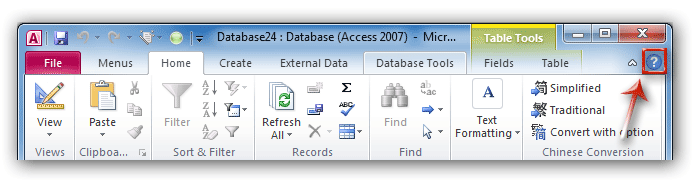
2010: 2010
Paul Evans OP  @Reply  
    
5 years ago

Paul Evans OP  @Reply  
    
5 years ago
This what my Ribbon looks like. It was very similar to the one posted by Alex until 2/3 weeks ago
Alex Hedley  @Reply  
           
5 years ago
Paul, theres a slight difference but nothing as major as when the original ribbon came out. Unless Im missing something.
Office likes to updating things, especially with 365, and they dont tend to give you an option to keep older versions.
Whats your issue with the change?
Paul Evans OP  @Reply  
    
5 years ago
That's exactly my issue Alex. They don't give me an optiion. Such is life!!!
Alex Hedley  @Reply  
           
5 years ago
You can build your own ribbon and pick your own images, would be a massive amount of work but its an option.
Paul Evans OP  @Reply  
    
5 years ago
Thanks for that Alex. I think I'll wait until Microsoft do another update and change it back!!! Ha! Ha!

This thread is now CLOSED. If you wish to comment, start a NEW discussion in Access Forum.
 

Next Unseen

 
New Feature: Comment Live View


The following is a paid advertisement
Computer Learning Zone is not responsible for any content shown or offers made by these ads.
 

Learn
 
Access - index
Excel - index
Word - index
Windows - index
PowerPoint - index
Photoshop - index
Visual Basic - index
ASP - index
Seminars
More...
Customers
 
Login
My Account
My Courses
Lost Password
Memberships
Student Databases
Change Email
Info
 
Latest News
New Releases
User Forums
Topic Glossary
Tips & Tricks
Search The Site
Code Vault
Collapse Menus
Help
 
Customer Support
Web Site Tour
FAQs
TechHelp
Consulting Services
About
 
Background
Testimonials
Jobs
Affiliate Program
Richard Rost
Free Lessons
Mailing List
PCResale.NET
Order
 
Video Tutorials
Handbooks
Memberships
Learning Connection
Idiot's Guide to Excel
Volume Discounts
Payment Info
Shipping
Terms of Sale
Contact
 
Contact Info
Support Policy
Mailing Address
Phone Number
Fax Number
Course Survey
Email Richard
[email protected]
Blog RSS Feed    YouTube Channel

LinkedIn
Copyright 2026 by Computer Learning Zone, Amicron, and Richard Rost. All Rights Reserved. Current Time: 5/7/2026 5:24:56 PM. PLT: 1s