Free Lessons
Courses
Seminars
TechHelp
Fast Tips
Templates
Topic Index
Forum
ABCD
 
Home   Courses   TechHelp   Forums   Help   Contact   Merch   Join   Order   Logon  
 
Back to Sliders    Comments List
Upload Images   @Reply   Bookmark    Link   Email   Next Unseen 
Slider Control
James Hopkins 
     
5 years ago
Hey Richard, I am create a Form that I can use to be filtered by using a "Sliding Bar" to filer Data by Clicking on to. Is there a way that I can create something make this in Access.
Alex Hedley  @Reply  
           
5 years ago
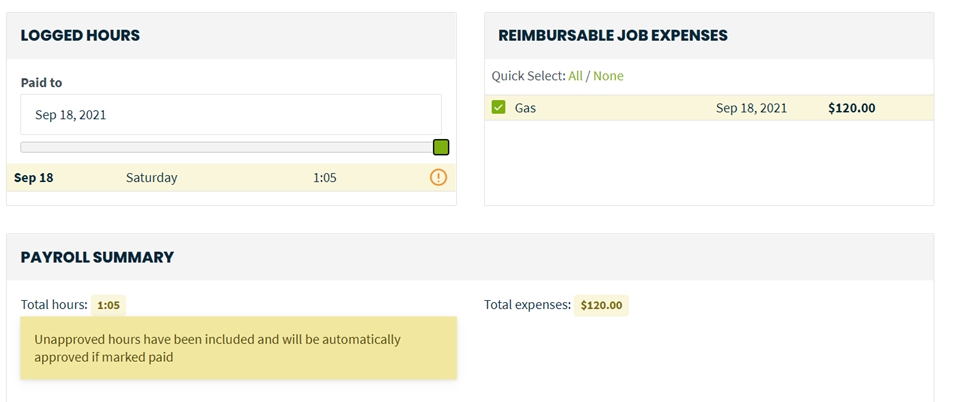
Have you used this functionality in another app that you can share a picture of to help explain a little more
James Hopkins OP  @Reply  
     
5 years ago

James Hopkins OP  @Reply  
     
5 years ago

Alex Hedley  @Reply  
           
5 years ago
What's the range of the filter?

Can't remember if there's a Slider Control in the Control Box, did you take a look?
Scott Axton  @Reply  
        
5 years ago
I don't recall ever seeing a slider bar in Access.
I'm wondering do you move the slider to make the change or is it moved by the figures values that make the slider move?

If it is the latter you might take a look at Progress Bar and Progress Bar 2 for some ideas.
Kevin Robertson  @Reply  
          
5 years ago
There is a Slider ActiveX Control. I've never used it so I have no idea how good it is.
James Hopkins OP  @Reply  
     
5 years ago
Hey Scott, I wanting to physically move the "Slider" by clicking to move or slide.
James Hopkins OP  @Reply  
     
5 years ago
I am wanting to use to filter the Data by "Days, Weeks, Months, or Years" to view the Data.
Scott Axton  @Reply  
        
5 years ago
Other than a 3rd party Add in or Active X control as Kevin suggested I'm not aware of any native solution for you.
I know that it is "best practice" in general to stay away from those types of controls as they tend to cause other issues if you share your db.

Even looking through my course materials and the TechHelp videos I don't have suggestions.  Sorry!

The best I can suggest is to utilize a series of either combo boxes or list boxes to set criteria for your filters.  Many of those would require some VBA to get it working properly.

Maybe the others or even Richard will chime in with suggestions.  

Adam Schwanz  @Reply  
           
5 years ago
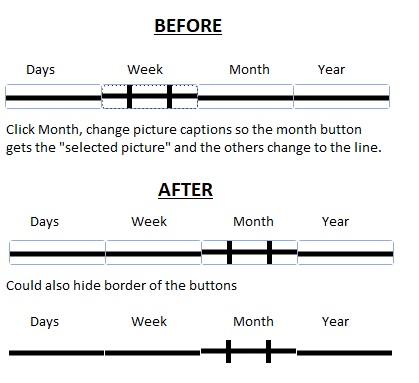
You could make a "fake" one, it wouldn't scroll, but you could make 4 buttons with images on them that look like a scroll line, and then as you push the button the images change accordingly and apply the filters :P.
James Hopkins OP  @Reply  
     
5 years ago
Hey Adam, can you illustrate this for me.
Adam Schwanz  @Reply  
           
5 years ago

Adam Schwanz  @Reply  
           
5 years ago
Ignore my 10second made lines in Paint, they're uneven, but thats the basic idea, I'm sure you could find/make MUCH more smooth looking pictures for buttons
James Hopkins OP  @Reply  
     
5 years ago
Oh ok Adam, that should work the same way if I am sorting through dates.
Adam Schwanz  @Reply  
           
5 years ago
Yea you could put whatever you wanted there, since its not a real scroller though i would probably only put a handful of buttons on there, so when they push near where the date is on the fake slider, it will hit the button that does what they want.
Richard Rost  @Reply  
          
5 years ago
Maybe I'll do something with the slider control.
James Hopkins OP  @Reply  
     
5 years ago
Thanks Guys for all your help on this Question....
Richard Rost  @Reply  
          
5 years ago
OK. I just did a video about Sliders.
Richard Rost  @Reply  
          
5 years ago

Alex Hedley  @Reply  
           
5 years ago
I loved that show!
Richard Rost  @Reply  
          
5 years ago
I did too... the first 2 seasons. Then it got SUPER dumb. As soon as Gimli left it went right down hill.
Scott Axton  @Reply  
        
5 years ago
Richard -
Great video(s).  You absolutely convinced me not to use them.  LOL

This thread is now CLOSED. If you wish to comment, start a NEW discussion in Sliders.
 

Next Unseen

 
New Feature: Comment Live View


The following is a paid advertisement
Computer Learning Zone is not responsible for any content shown or offers made by these ads.
 

Learn
 
Access - index
Excel - index
Word - index
Windows - index
PowerPoint - index
Photoshop - index
Visual Basic - index
ASP - index
Seminars
More...
Customers
 
Login
My Account
My Courses
Lost Password
Memberships
Student Databases
Change Email
Info
 
Latest News
New Releases
User Forums
Topic Glossary
Tips & Tricks
Search The Site
Code Vault
Collapse Menus
Help
 
Customer Support
Web Site Tour
FAQs
TechHelp
Consulting Services
About
 
Background
Testimonials
Jobs
Affiliate Program
Richard Rost
Free Lessons
Mailing List
PCResale.NET
Order
 
Video Tutorials
Handbooks
Memberships
Learning Connection
Idiot's Guide to Excel
Volume Discounts
Payment Info
Shipping
Terms of Sale
Contact
 
Contact Info
Support Policy
Mailing Address
Phone Number
Fax Number
Course Survey
Email Richard
[email protected]
Blog RSS Feed    YouTube Channel

LinkedIn
Copyright 2026 by Computer Learning Zone, Amicron, and Richard Rost. All Rights Reserved. Current Time: 6/15/2026 1:17:11 AM. PLT: 0s