Free Lessons
Courses
Seminars
TechHelp
Fast Tips
Templates
Topic Index
Forum
ABCD
 
Home   Courses   TechHelp   Forums   Help   Contact   Merch   Join   Order   Logon  
 
Back to Access Forum    Comments List
Upload Images   @Reply   Bookmark    Link   Email   Next Unseen 
Total up Login Log Off Time
Brent Rinehart 
        
5 years ago
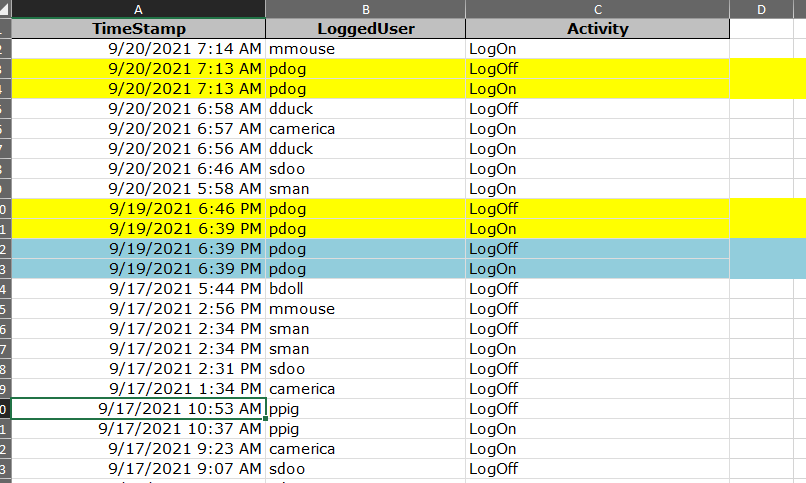
I have a table where it logs the users log in and log off time each time they open and close the database how could I total up all the time spend in the database for each day by each user. For example User A log on and off day 1 for 20 minutes and then later in that day they log on and off again on day 1 for 60 min, I would like to show for that user on that day that the user was in the database for a total of 80 min. Bellow is a snip of the table with some made up usernames. I need the most help with what do they call these aggregate queries?
Brent Rinehart OP  @Reply  
        
5 years ago

Adam Schwanz  @Reply  
           
5 years ago
I think the end result using an aggregate query is Correct, Aggregate Query

Getting the value's is going to be the fun part though with multiple logins a day. There's no like SessionID or anything linking the login/outs by chance is there? That would be simple then. Otherwise we're going to need some kind of loop to go through and total the days values.
Brent Rinehart OP  @Reply  
        
5 years ago
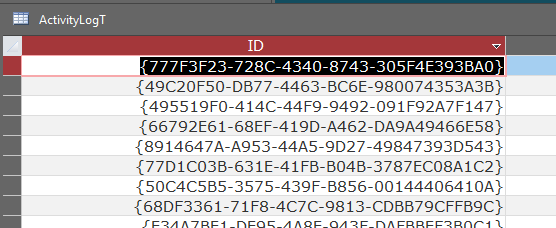
I do use a replication ID
Brent Rinehart OP  @Reply  
        
5 years ago

Adam Schwanz  @Reply  
           
5 years ago
Ok and thats a unique key that pairs a login with a logoff?

What do you want to do with currently logged in but not logged off yet? Are you trying to only look into the past for information purposes or do you want a daily running total on a timer event too?
Brent Rinehart OP  @Reply  
        
5 years ago
I just want to be able to run a report at the end of the day or week that show total time logged into the database each day and total for the week for each user.
Scott Axton  @Reply  
        
5 years ago
Adam - Replication ID is used just like Auto number.  In fact if you drop down Field Size in an AutoNumber field's properties you can see the option.  It offers a much higher probability of not duplicating id's.
Richard covered it (I believe) here:  Sync Remote Database

Brent -   Unfortunately I don't think a regular aggregate query alone will work for this. You may be able to use it in conjunction with grouping in a report but unless the in and out are contained in the same record I cant think of a way to figure out which record belongs to which in order to subtract them.

You might be able to factor in the "next" record using the time stamp for that user using a DMax().

Adam Schwanz  @Reply  
           
5 years ago
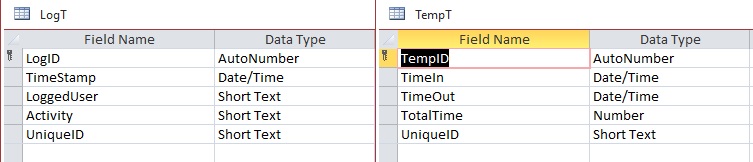
I tried a few things and got sick of the query not letting me have it my way. So I went the complex way and used VBA LOL. Assuming you have that unique ID that matches the LogOn and LogOff with the same key, this should work. You should be able to make a query off this table (you'll have to get the date off the unique ID to group by). This might not get you right to your answer but it should get close.

I made a temp table and a recordset to do this.

    Set db = CurrentDb
    Set rs = db.OpenRecordset("Select * From LogT")
    Set rs2 = db.OpenRecordset("Select * From TempT")
    
    While Not rs.EOF
        If rs!Activity = "LogOn" Then
            rs2.AddNew
            rs2!UniqueID = rs!UniqueID
            rs2!TimeIn = rs!TimeStamp
            rs2!TimeOut = DLookup("TimeStamp", "LogT", "UniqueID=""" & rs!UniqueID & """" & " and Activity= 'LogOff'")
            rs2!TotalTime = DateDiff("n", rs2!TimeIn, rs2!TimeOut)
            rs2.Update
        End If
        rs.MoveNext
    We
Adam Schwanz  @Reply  
           
5 years ago

Adam Schwanz  @Reply  
           
5 years ago
Ah, yea. If you don't have a unique ID scratch all that stuff I just said LOL.
Adam Schwanz  @Reply  
           
5 years ago
To clarify too, by unique ID I was meaning something like a sessionID, so that a login and a logout are linked to one number. Not the autonumber.
Scott Axton  @Reply  
        
5 years ago
Could you put the TimeIn and Time Out in the same record like in the Calculate Total Time w DateDiff video?
Adam Schwanz  @Reply  
           
5 years ago
Yea, if they were separate but in the same record it's a lot easier. Richard should have a techhelp coming out soon(?) about getting the second value from dmin/dmax.

Basically what I think you're going to need to do is some complex dmax/min based on the loginname and > < Date values to get the values togethor in one record. Then we could work with that with a query or recordset like I made above.
Brent Rinehart OP  @Reply  
        
5 years ago
I appreciate all your help, but I think I am probably over my head on this one maybe Richard  would come up with a great Tech Help video to show a better way of tracking Log  in and off for each user. I could send a copy of the database and  if you guys want to maybe come up with a better way to do it and let me know what it might cost to do it, I might be up to it this is a database I use to track projects at work and I do this on my own time so I try to keep cost as low as possible, but I am willing to pay for some help too.
Scott Axton  @Reply  
        
5 years ago
OK did a lot of thinking on what you could do here.  It's very hard (as you have experienced) to pair the individual LogOn and LogOff events.

I would change the structure of your table slightly OR EVEN BETTER create a new table.    A la Employee Time Clock .   Especially watch the extended cut.

TimeClockT
TimeClockID - AutoNumber
EmployeeID - Foreign Key
TimeIn - Date/Time
TimeOut - Date/Time

Now use your startup (LogOn) event to create the record for TimeClockT.
On the shutdown event (LogOff) find the last record for that employee (machine?) that has a LogOn without a LogOff and put the time stamp in the LogOff.

This will allow you to calculate the time in a simple query for each line.  See the Calculate Total Time Spent video.
Once you have that, creating the aggregate query or reporting using groups becomes much more easy.

BTW - did you figure out the "force shutdown" timer event from the other post?


Adam Schwanz  @Reply  
           
5 years ago
I was thinking make a new table too with something to pair the clockin/out. What other fields do you have in that table? I'm close to getting a dmin recordset to work but I need something to say what's next.
Adam Schwanz  @Reply  
           
5 years ago
I really am starting to love recordsets ;). Check this out.

    Dim db As Database
    Dim rs As Recordset
    Dim rs2 As Recordset
    Dim NextDate As Date
    
    Set db = CurrentDb
    Set rs = db.OpenRecordset("Select * From LogT")
    Set rs2 = db.OpenRecordset("Select * From TempT")
    
    While Not rs.EOF
        NextDate = Nz(DMin("TimeStamp", "LogT", "LoggedUser=""" & rs!LoggedUser & """" & " and Activity= 'LogOff' and TimeStamp>#" & rs!TimeStamp & "#"), Now())
        If rs!Activity = "LogOn" And NextDate - rs!TimeStamp <> 0 And DCount("TimeIn", "TempT", "TimeIn=#" & rs!TimeStamp & "#") < 1 Then
            rs2.AddNew
            rs2!LoggedUser = rs!LoggedUser
            rs2!TimeIn = rs!TimeStamp
            rs2!TimeOut = NextDate
            rs2!TotalTime = DateDiff("n", rs2!TimeIn, rs2!TimeOut)
            rs2.Update
        End If
        rs.MoveNext
    Wend
    
    rs2.Close
    rs.Close
    db.Close
    
    Set rs2 = Nothing
    Set rs = Nothing
    Set db = Noth
Adam Schwanz  @Reply  
           
5 years ago

Adam Schwanz  @Reply  
           
5 years ago
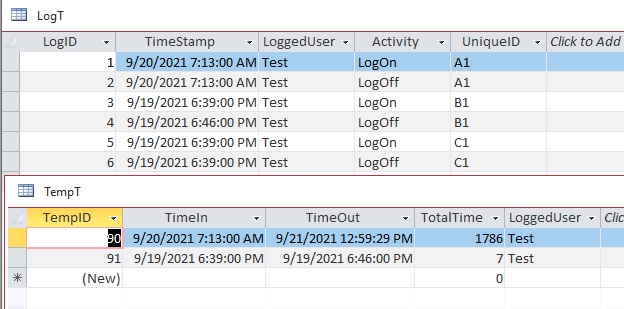
If you copy that kind of setup that should let you get a TempT like mine and get the totaltime(minutes) logged on.
Adam Schwanz  @Reply  
           
5 years ago
Also note it skips records with no time between in/out (6:39 to 6:39) this was screwing up my numbers and doesn't add time to your "daily use" anyways.
Adam Schwanz  @Reply  
           
5 years ago
Just thought, this line here
If rs!Activity = "LogOn" And NextDate - rs!TimeStamp <> 0 And DCount("TimeIn", "TempT", "TimeIn=#" & rs!TimeStamp & "#") < 1 Then

needs to be changed to check for username as well, two users could login at the same time and wouldn't pass that then.
If rs!Activity = "LogOn" And NextDate - rs!TimeStamp <> 0 And DCount("TimeIn", "TempT", "LoggedUser=""" & rs!LoggedUser & """" & " and TimeIn=#" & rs!TimeStamp & "#") < 1 Then
Brent Rinehart OP  @Reply  
        
5 years ago
Guys you are amazing putting so much time into this I will try to get to this tonight and see what I can come up with I've been very busy with work and not had much time to work on access the auto shut down have not got to work yet  Everytime I use anything with timers nothing works, so I'm still messing with that don't know if it's a bug with my access or I'm just doing something wrong I am running ntje latest access so it shouldn't be that.
Brent Rinehart OP  @Reply  
        
5 years ago
I watch the Time Clock Video I like it, is there a way to do this without user interaction? the way mine is setup now is it logs the users name when they log on and off without them even knowing anything, everything happens in the background all fields are hidden on the main menu that stays open the whole time.

I took in from another YouTube video sorry I cheated on Richard with this one.
Brent Rinehart OP  @Reply  
        
5 years ago

Scott Axton  @Reply  
        
5 years ago
Brent - FYI I too, started out watching other instructors.  I just found that Richards content was the BEST bar none.  Believe me I've paid for some real CRAP "courses".  

On to your question.  Yes, you can log the event LogOn and LogOff just like you have been.  The only difference is that you are updating the last LogOn record.  The act of closing down the database - I'm assuming users click a close button - is the same as clicking the clock out button that Richard shows in the video.  Just put the same code for the event LogOff before your Quit command to close the db.  Make sense?

Adam has done some great heavy lifting (above) for a table that has the records as you currently have them.  I don't know how much you have already or if this project is in production even.  I personally think having the data as you need it in the first place is better. Rather than manipulating all the data as Adam has shown, to solve a problem.  (Sorry Adam!)


Adam Schwanz  @Reply  
           
5 years ago
I agree Scott, but if the new table isn't an option or if he wants to keep his old records now he can move them to the new table initially with my method ;).
Richard Rost  @Reply  
          
5 years ago
You could do it without a recordset provided that every logout has a corresponding login. Just use DLookup and DMax. Shall I demonstrate? This might make a cool TechHelp.
Adam Schwanz  @Reply  
           
5 years ago
I'd like to see that yea, I tried doing that first but I was running into problems with the duplicate 6:39in 6:39out 6:39in 6:46 out
it was getting me 639-646 and 639-646 (14minutes instead of 7).
Richard Rost  @Reply  
          
5 years ago
See that's the thing... you'd have to have better control over that. Every logout needs to have a proper corresponding login. You can't do two logins in a row. Duplicates wouldn't matter as long as it went: 6:39 in, 6:39 out, 6:39 in, 6:40 out. I'll put something together.
Scott Axton  @Reply  
        
5 years ago
Yes Please!
Maybe even a Gold Extended Cut to the other video(s)
Brent Rinehart OP  @Reply  
        
5 years ago
Richard if you would put something together I would love it, Im still working on Record Sets and the guys were helping me a lot but they are clearly way more advanced then me and I am just not getting it to work. If you could squeeze in a auto shut down if there is no activity in the database for a set amount of time there would be the two topics that have been slowing me down and I have not got to work, if I'm asking for too much I take what ever you can give me :)
Richard Rost  @Reply  
          
5 years ago
Adam's code will work, but I'll show you how to do it without a recordset. Recording it now.
Richard Rost  @Reply  
          
5 years ago
Here you go: Track Log On. I mixed it with a question from another member. Your stuff is in the Extended Cut, Brent.
Adam Schwanz  @Reply  
           
5 years ago
How would you dmin it when you don't have seconds though? That's where I was getting duplicate problems, he just has 6:39 to 6:39 not 6:39:01 to 6:39:02. Curious if that's still possible with that way, short of trying to use the next available primary key ID number. Or would you just filter out any value that has a logon time that's equal to a logoff time (since it's 0 minutes anyways)?
Brent Rinehart OP  @Reply  
        
5 years ago
Richard Thank You I have my code built a little different, but I will do it just like this, this is so much more simpler I never thought of doing append query. Thank You all for your help
Scott Axton  @Reply  
        
5 years ago
Richard - Great solution.  I love this forum and it's members willingness to help each other.

Adam - If Brent's data is automatically inserted when the user logs on, my assumption is (was) that he is using Now() because he has the time element in his TimeStamp field. Therefore seconds would be there even if it doesn't show because of formatting.

You are right though - I did a lot of assuming.  If manually entered or somehow there was an exact time match different issue.
Adam Schwanz  @Reply  
           
5 years ago
Good point, i was presuming it was not formatted and may have been trying to solve a different problem.
Brent Rinehart OP  @Reply  
        
5 years ago
Is there a way to prevent the user from opening another instance of the database if its already opened? I am noticing the user opening the database twice which causes multiple log ons before a log off.
Adam Schwanz  @Reply  
           
5 years ago
You could have it check before it logs the current login. Just need to lookup if the current user is already logged in without a logout, and if they are, either messagebox/exit the database, or throw in a logout before the login processes, or put it in a log for you to manually inspect later.
Adam Schwanz  @Reply  
           
5 years ago
There also appears to be some Windows API options but I'd explore the easier option first.
Richard Rost  @Reply  
          
5 years ago
Adam: I'd strongly suggest recording seconds. If not, see my solution for today's video, finding the second order date. Just find the Log entry that doesn't have the same ID.

Brent: Access shouldn't open a 2nd instance of a particular database if it's named the same. At least it doesn't for me. You could try making a table field "LoggedOn" and then if the user tries to open a second instance (or log on another machine) it just quits.
Brent Rinehart OP  @Reply  
        
5 years ago
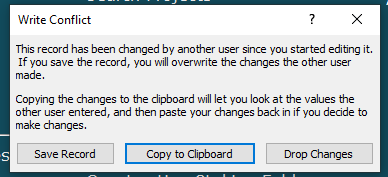
Hi Richard I double checked and I was able to open the database twice on my desktop and have to instances of the database running at the same time, this causes the user on the same machine to be logged in twice and when you shut down one you end up with a write conflict (image shown below) I'm not sure what you mean by adding a field to the table  dont understand how that would work. If I could get some help on either making it to where if the user opened the database again and another instance was opened it would shut that down causing the user to be logged off and then the user would get logged on again when the user opens the second copy.
Brent Rinehart OP  @Reply  
        
5 years ago

Adam Schwanz  @Reply  
           
5 years ago
If you want it to automatically close the first instance of the database, I would think you're going to need to use API.

It looks like an example of the API you want is HERE
Adam Schwanz  @Reply  
           
5 years ago
Although I still think the checking if user is curently logged on, put messagebox telling them they have it open already, and then closing the database is far simpler.
Adam Schwanz  @Reply  
           
5 years ago
Also, if you try that API, be aware of, as Scott I believe coined it, your "bitness". You may need to PtrSafe some stuff, 64-Bit Access
Brent Rinehart OP  @Reply  
        
5 years ago
Thanks I'll look into and report back
Richard Rost  @Reply  
          
5 years ago
You already have their log on/off activity. Just determine whether or not that table has them as logged ON already, and if so, pop up a message and exit the database. That's the simplest solution. If they previously had a crash and weren't logged out properly they'll need to contact an admin (you) to clear their status. Not only does it work, but it makes your job that much more important. LOL
Brent Rinehart OP  @Reply  
        
5 years ago
Ok I'll see if I can get that to work, I was told by one of the users today that they only open the database once but they keep getting that write conflict popping up, this only started happening once I added the login feature.
Richard Rost  @Reply  
          
5 years ago
That could be caused by multiple concurrent reads by the same user too. It's weird. Say you are editing a record in a table, but something else in the same database, by the same user, tries to DLookup a value from that open table. It can cause a write conflict.

This thread is now CLOSED. If you wish to comment, start a NEW discussion in Access Forum.
 

Next Unseen

 
New Feature: Comment Live View


The following is a paid advertisement
Computer Learning Zone is not responsible for any content shown or offers made by these ads.
 

Learn
 
Access - index
Excel - index
Word - index
Windows - index
PowerPoint - index
Photoshop - index
Visual Basic - index
ASP - index
Seminars
More...
Customers
 
Login
My Account
My Courses
Lost Password
Memberships
Student Databases
Change Email
Info
 
Latest News
New Releases
User Forums
Topic Glossary
Tips & Tricks
Search The Site
Code Vault
Collapse Menus
Help
 
Customer Support
Web Site Tour
FAQs
TechHelp
Consulting Services
About
 
Background
Testimonials
Jobs
Affiliate Program
Richard Rost
Free Lessons
Mailing List
PCResale.NET
Order
 
Video Tutorials
Handbooks
Memberships
Learning Connection
Idiot's Guide to Excel
Volume Discounts
Payment Info
Shipping
Terms of Sale
Contact
 
Contact Info
Support Policy
Mailing Address
Phone Number
Fax Number
Course Survey
Email Richard
[email protected]
Blog RSS Feed    YouTube Channel

LinkedIn
Copyright 2026 by Computer Learning Zone, Amicron, and Richard Rost. All Rights Reserved. Current Time: 6/16/2026 6:31:43 PM. PLT: 0s