Free Lessons
Courses
Seminars
TechHelp
Fast Tips
Templates
Topic Index
Forum
ABCD
 
Home   Courses   TechHelp   Forums   Help   Contact   Merch   Join   Order   Logon  
 
Back to Access Forum    Comments List
Upload Images   @Reply   Bookmark    Link   Email   Next Unseen 
Dashboard Charting
Ashlyn M Talley 
    
5 years ago
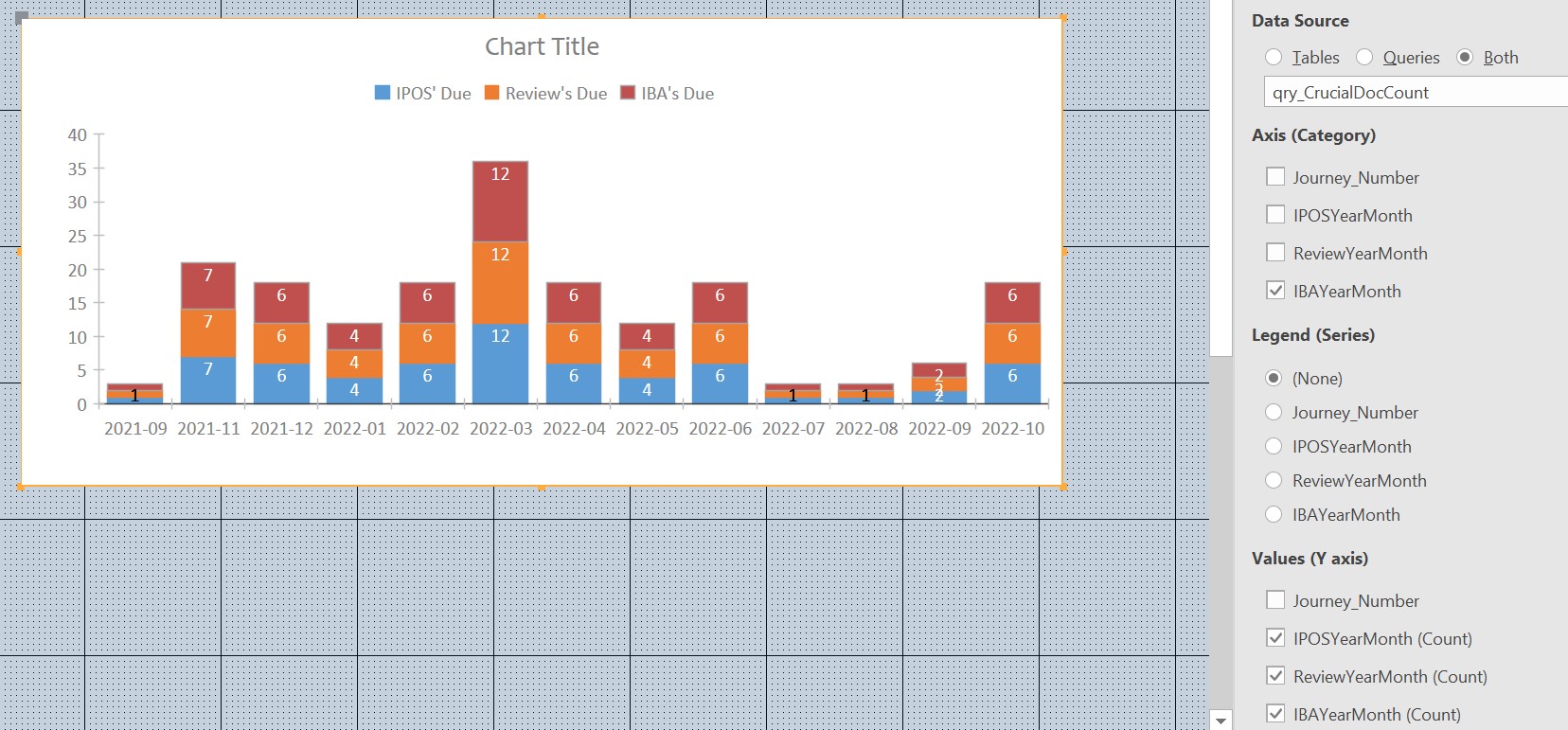
Im scratching my head a bit on this one, having to admit that Im not very familiar with much if any of Access charting features, Modern or Classic. I have 3 sets of documentation due (IPOS, IBA & Review) on a regular basis and my hope was to get a bearing on how much of this document falls in any particular month so I can schedule accordingly.

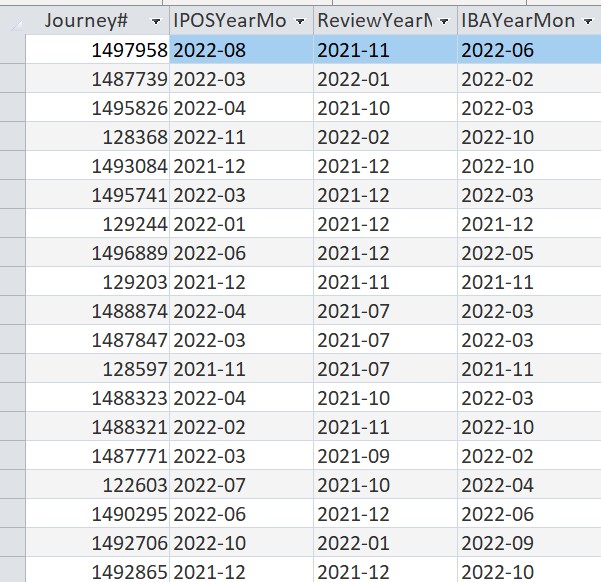
I thought the modern stacked column bar chart would be ideal for form/dashboard. The data source is a query that Ive used to both summarize and reformat the dates. The results are displayed in the charting but other than the Axis Category - IBAYearMonth all of the data labels are incorrect. All the data labels for each document read the same. If it isnt the chart settings that need to be reworked, wondering if my data needs to be better summarized to reflect more count than date?

Including my SQL statement:

SELECT qry_Documenation_Review.Journey_Number, Year([ipos_due]) & "-" & Format(Month([ipos_due]),"00") AS IPOSYearMonth, Year([Review_Date]) & "-" & Format(Month([Review_Date]),"00") AS ReviewYearMonth, Year([IBA_Due]) & "-" & Format(Month([IBA_Due]),"00") AS IBAYearMonth
FROM qry_Documenation_Review
WHERE (((Year([ipos_due]) & "-" & Format(Month([ipos_due]),"00"))<>"-"));
Ashlyn M Talley OP  @Reply  
    
5 years ago

Ashlyn M Talley OP  @Reply  
    
5 years ago

Richard Rost  @Reply  
          
5 years ago
You might be better off with an Aggregate query first to perform the Count. Then chart those results.
Ashlyn M Talley OP  @Reply  
    
5 years ago
Super helpful... I'm able to use the reformatted date field twice, first by group then by count to arrive at totals for one set of documents. I'm thinking I would need to create a query for each of the other two documents that I'm tracking then a query to combine all three or is there a less cumbersome way?
Richard Rost  @Reply  
          
5 years ago
You could try to combine them all in one query... but that gets tricky. Best to just use 3 queries and then join them all together by the date.
Ashlyn M Talley OP  @Reply  
    
5 years ago
Ahhh, now I know about Left Joins &#129488;. Not all of my data occupied each month. I was getting ready to copy and paste the SQL here until I noticed it said "Inner Join". I remember, more than likely from one of your videos, about Joins... At that time I wondered why would anyone ever use that? Now I know.
Richard Rost  @Reply  
          
5 years ago
If you're missing records, you probably want to use Outer Joins
Ashlyn M Talley OP  @Reply  
    
5 years ago
Gotta ya... Thanks!

This thread is now CLOSED. If you wish to comment, start a NEW discussion in Access Forum.
 

Next Unseen

 
New Feature: Comment Live View


The following is a paid advertisement
Computer Learning Zone is not responsible for any content shown or offers made by these ads.
 

Learn
 
Access - index
Excel - index
Word - index
Windows - index
PowerPoint - index
Photoshop - index
Visual Basic - index
ASP - index
Seminars
More...
Customers
 
Login
My Account
My Courses
Lost Password
Memberships
Student Databases
Change Email
Info
 
Latest News
New Releases
User Forums
Topic Glossary
Tips & Tricks
Search The Site
Code Vault
Collapse Menus
Help
 
Customer Support
Web Site Tour
FAQs
TechHelp
Consulting Services
About
 
Background
Testimonials
Jobs
Affiliate Program
Richard Rost
Free Lessons
Mailing List
PCResale.NET
Order
 
Video Tutorials
Handbooks
Memberships
Learning Connection
Idiot's Guide to Excel
Volume Discounts
Payment Info
Shipping
Terms of Sale
Contact
 
Contact Info
Support Policy
Mailing Address
Phone Number
Fax Number
Course Survey
Email Richard
[email protected]
Blog RSS Feed    YouTube Channel

LinkedIn
Copyright 2026 by Computer Learning Zone, Amicron, and Richard Rost. All Rights Reserved. Current Time: 5/2/2026 8:42:01 AM. PLT: 1s