Free Lessons
Courses
Seminars
TechHelp
Fast Tips
Templates
Topic Index
Forum
ABCD
 
Home   Courses   TechHelp   Forums   Help   Contact   Merch   Join   Order   Logon  
 
Back to Access Forum    Comments List
Upload Images   @Reply   Bookmark    Link   Email   Next Unseen 
Table Data Auto Populate
Taruna Matharu 

5 years ago
Hello Richard,

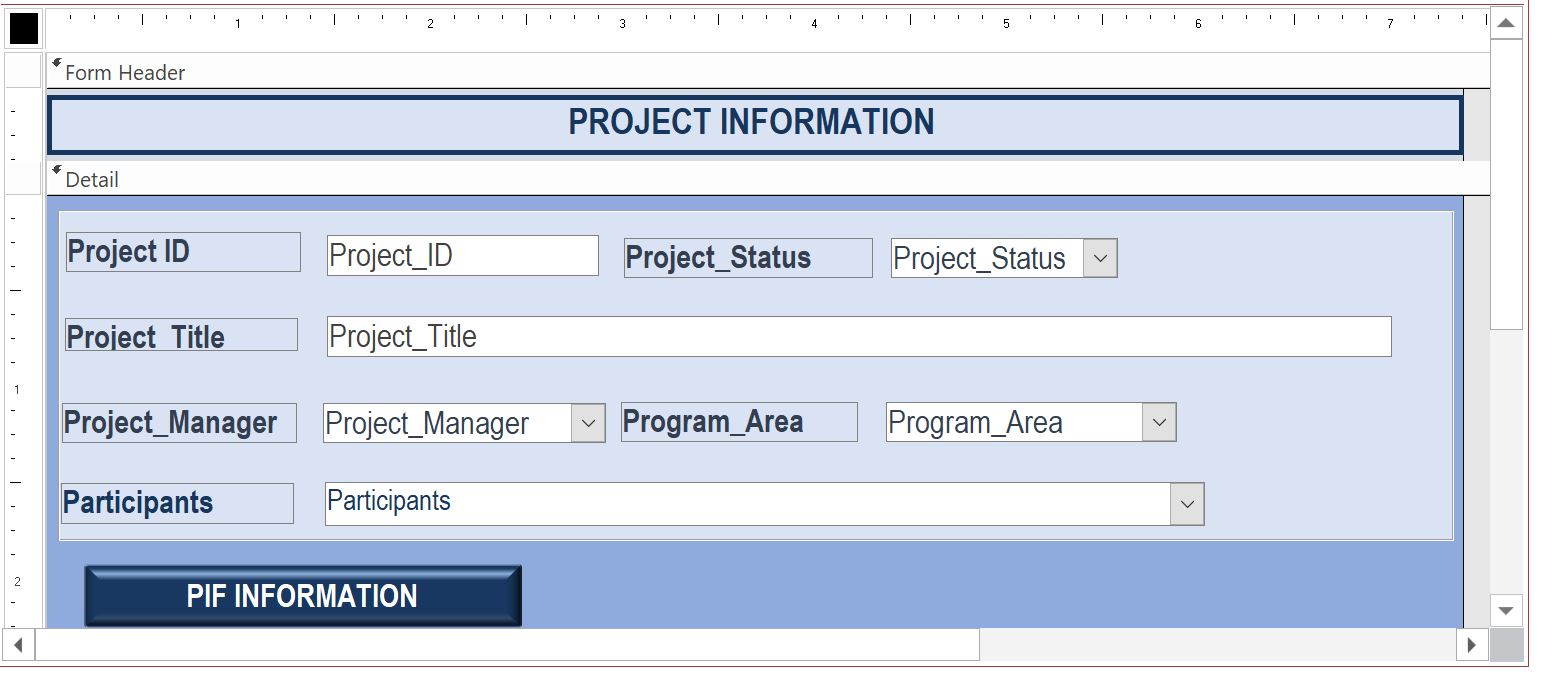
I have a Form for project information (Entry form) and that data is stored in APL Table
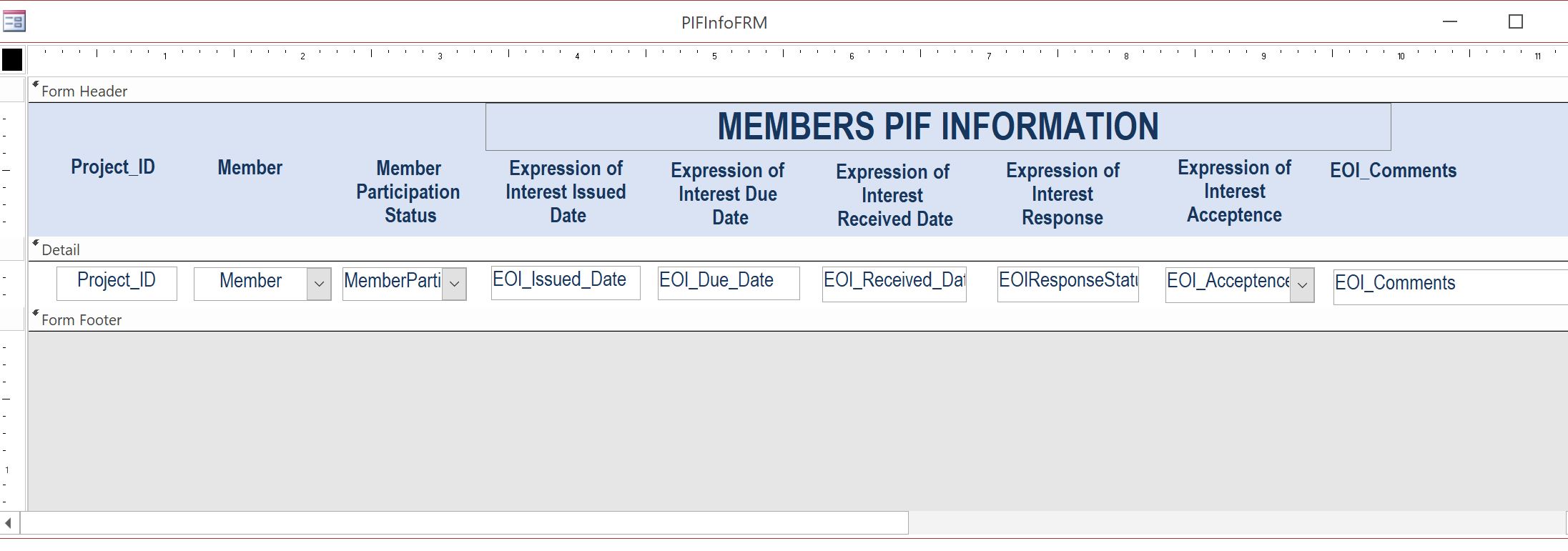
This form has a sub form that is a part of another Table   NewProjectJPPJPAIssued  
Is there a way that when I enter the information in the project information (Entry form) even this Table   NewProjectJPPJPAIssued some fields data gets auto populated?
Project ID
Project Title
Project Manager
Project Status
Thanks
Taruna
Taruna Matharu OP  @Reply  

5 years ago

Taruna Matharu OP  @Reply  

5 years ago

Scott Axton  @Reply  
        
5 years ago
Taruna
Sorry but for me the question is not totally clear.  If you would,  restate the question, using an example and what you expect the results to be.

For example:  When I'm entering an Order and I choose a customer using the customer combo I would like it to fill in the Address, City, and Zip on the order.
Scott Axton  @Reply  
        
5 years ago
By the way, how far along are you in the Beginner series.  The answers to your questions will need to fit your knowledge level.
I would answer another Developer student differently that one that is just starting out.
Richard Rost  @Reply  
          
5 years ago
Please see Context
Taruna Matharu OP  @Reply  

5 years ago
Hi Scott,

Early September, I had done Access Training for Level 1 and 2 outside of this group which was 4 days training . I am revisiting beginner Level 1 at Computer Learning Zone. I will review the Context Link that Richard has shared and rephrase my question and post so it is clear to you. Thanks for responding.
Taruna Matharu OP  @Reply  

5 years ago

Taruna Matharu OP  @Reply  

5 years ago
Hi Scott,

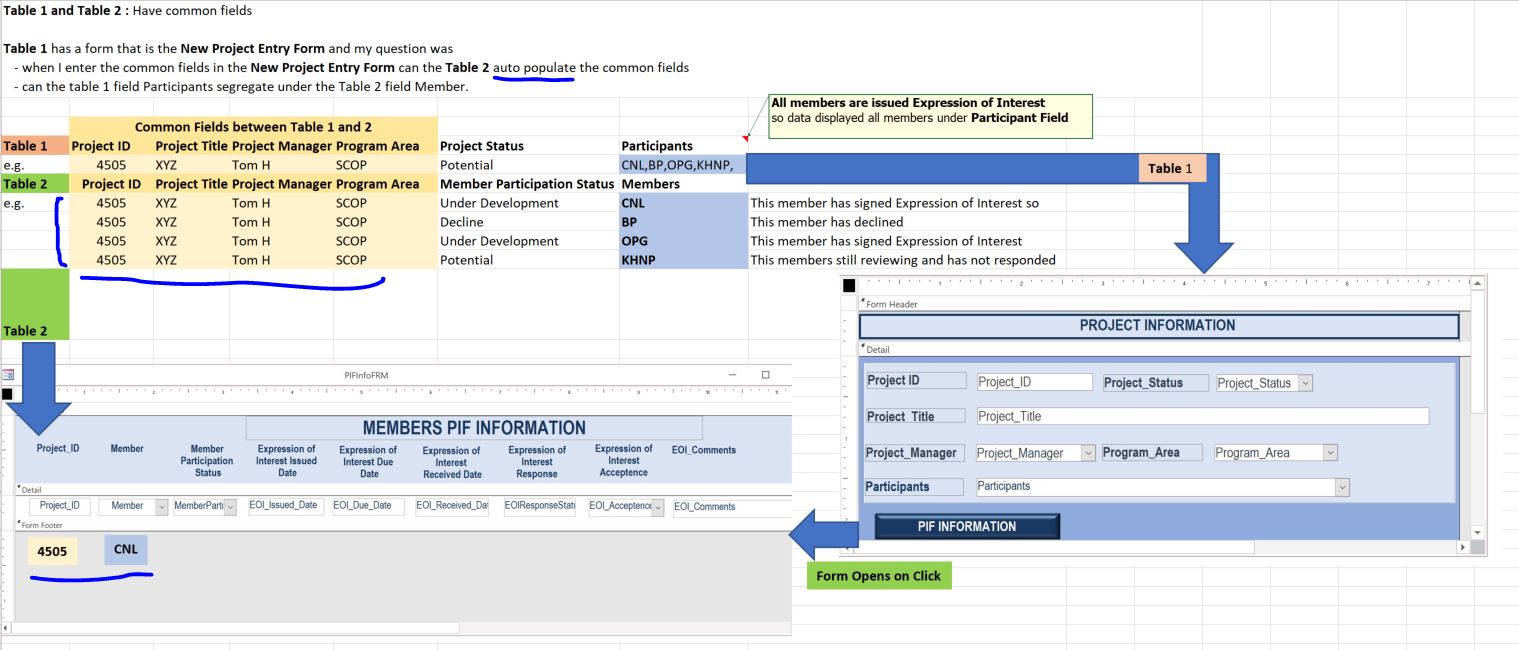
I have posted the image, let me know if this was helpful. I am posting my questions below it is also in the image.

Table 1 and Table 2 : Have common fields
Table 1 has a form that is the New Project Entry Form and my question was
   - when I enter the common fields in the New Project Entry Form can the Table 2 auto populate the common fields
   - can the Table 1 field Participants segregate under the Table 2 field Member.
The button that has PIF Information opens the Table 2 form, is it possible when we click this button first it runs a query where the table 2 common fields get auto populated and then the form opens ?
Scott Axton  @Reply  
        
5 years ago
Taruna -

I know this isn't going to be the answer you want but...  
I REALLY suggest that you place your project on hold.  You need to get through the Basic and in to at least Expert 1 and 2.
From what I can see, based on your graphic, your tables are not relational and you are really putting yourself at a disadvantage.
  
Moving forward right this moment with out the base knowledge will really make your life miserable in the future.  You will most likely need to do a heavy overhaul if not a total re-write.  The whole purpose of a relational data base is to reduce duplication and redundancy by creating the relationships.

We could force the program to do the wrong thing but that would be doing you a disservice.
Richard Rost  @Reply  
          
5 years ago
Scott is right. Participants, for example, should each be a separate record in a related table, not crammed together in one field. Relationships.
Taruna Matharu OP  @Reply  

5 years ago
Hi Scott,

Thanks for your feedback, however I would like to clarify that the Participants in the form is only for display purpose, the form has a list of all projects and under the participant field all members that are part of that project are mentioned. The relation is associated with the project number and as Richard mentioned each Member is a separate record.

This thread is now CLOSED. If you wish to comment, start a NEW discussion in Access Forum.
 

Next Unseen

 
New Feature: Comment Live View


The following is a paid advertisement
Computer Learning Zone is not responsible for any content shown or offers made by these ads.
 

Learn
 
Access - index
Excel - index
Word - index
Windows - index
PowerPoint - index
Photoshop - index
Visual Basic - index
ASP - index
Seminars
More...
Customers
 
Login
My Account
My Courses
Lost Password
Memberships
Student Databases
Change Email
Info
 
Latest News
New Releases
User Forums
Topic Glossary
Tips & Tricks
Search The Site
Code Vault
Collapse Menus
Help
 
Customer Support
Web Site Tour
FAQs
TechHelp
Consulting Services
About
 
Background
Testimonials
Jobs
Affiliate Program
Richard Rost
Free Lessons
Mailing List
PCResale.NET
Order
 
Video Tutorials
Handbooks
Memberships
Learning Connection
Idiot's Guide to Excel
Volume Discounts
Payment Info
Shipping
Terms of Sale
Contact
 
Contact Info
Support Policy
Mailing Address
Phone Number
Fax Number
Course Survey
Email Richard
[email protected]
Blog RSS Feed    YouTube Channel

LinkedIn
Copyright 2026 by Computer Learning Zone, Amicron, and Richard Rost. All Rights Reserved. Current Time: 5/6/2026 4:28:43 AM. PLT: 0s