Free Lessons
Courses
Seminars
TechHelp
Fast Tips
Templates
Topic Index
Forum
ABCD
 
Home   Courses   TechHelp   Help   Contact   Merch   Join   Order   Logon   Forums   
 
Back to Access Forum    Comments List
Pending Approval    Upload Images   @Reply   Bookmark    Link   Email   Next Unseen 

Anonymous 
 
Attakrit Charatchaiwanna  @Reply  
   
5 years ago

Alex Hedley  @Reply  
           
5 years ago
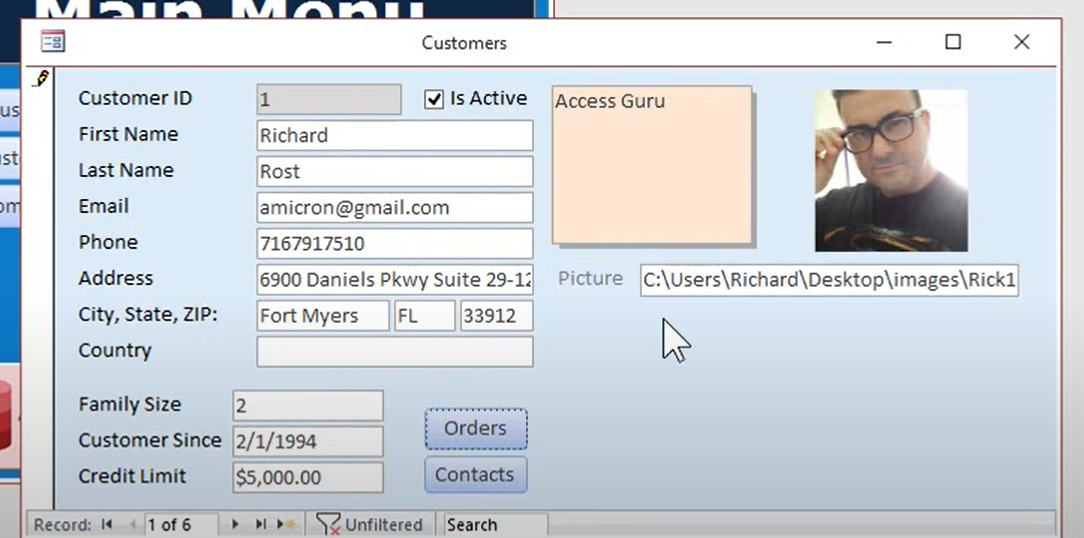
You need to bind the Picture textbox to a field in your Form.
Did you add a new Field called MyPicture to your CustomerT
Attakrit Charatchaiwanna  @Reply  
   
5 years ago
The different condition is the picture box I used is the textbox in form not table field
Scott Axton  @Reply  
      
5 years ago
Please correct me if I am not understanding your post correctly.
If I didn't understand you correctly, please try and explain exactly what you are wanting to do in your database.

-------
You are using the "Pick a File with FileDialog" code from the Code Vault.  
You are wanting to remember the starting folder path for picking your files.  Correct so far?

If that is the case you need to change the line of code:  InitialFolder As String = "" and put in you beginning path between the "".  InitialFolder As String = "C:\MyFiles\"
Change C:\MyFiles\ to the folder path that you want to default to.

Go watch the Images video if you haven't already.  Especially the Extended Cut for Members.
Scott Axton  @Reply  
      
5 years ago
You said, "The different condition is the picture box I used is the textbox in form not table field".

You must have a field in your table to store the path into.
If you don't have a field in your table to store that path to the file name Access will only display that picture while you are on that form.  You will not see it when you leave that record then come back.  
As Alex said above in his reply, you must have a field to store the information in (bound to the form).

Attakrit Charatchaiwanna  @Reply  
   
5 years ago
Thank a lot for your replying. The reason I decided not to store in field is when I move the WholeRecord Folder, I have to browse all record again. So I decided to Name the picture as recordID and use text box to store folder path that can be browse or change the main folder path
exp. textbox = "C:\Folder\"
       link image = [textbox]&[recordid]&"jpg"
Now I can be able to store the path by fill the textbox control source as ="C:\folder\" but can be done only in design view
Thank again Scott and Alex for all reply and any furthur suggestion
Scott Axton  @Reply  
      
5 years ago
Forgive the questions.  Obviously we have a small issue with our difference in first language.

Do I understand correctly that you want to have the folder separate so that you can change it in the future but still keep the image name the same?

I see that you only have started the Beginner courses.  Would you tell me about your experience with Access?  That will tell me how to answer your questions within your knowledge level.
Richard Rost  @Reply  
          
4 years ago
If you want to be able to change the value of that text box use the default value to store the folder, not the control source. Default value can be edited in form view.

This thread is now CLOSED. If you wish to comment, start a NEW discussion in Access Forum.
 

Next Unseen

 
New Feature: Comment Live View


The following is a paid advertisement
Computer Learning Zone is not responsible for any content shown or offers made by these ads.
 

Learn
 
Access - index
Excel - index
Word - index
Windows - index
PowerPoint - index
Photoshop - index
Visual Basic - index
ASP - index
Seminars
More...
Customers
 
Login
My Account
My Courses
Lost Password
Memberships
Student Databases
Change Email
Info
 
Latest News
New Releases
User Forums
Topic Glossary
Tips & Tricks
Search The Site
Code Vault
Collapse Menus
Help
 
Customer Support
Web Site Tour
FAQs
TechHelp
Consulting Services
About
 
Background
Testimonials
Jobs
Affiliate Program
Richard Rost
Free Lessons
Mailing List
PCResale.NET
Order
 
Video Tutorials
Handbooks
Memberships
Learning Connection
Idiot's Guide to Excel
Volume Discounts
Payment Info
Shipping
Terms of Sale
Contact
 
Contact Info
Support Policy
Mailing Address
Phone Number
Fax Number
Course Survey
Email Richard
[email protected]
Blog RSS Feed    YouTube Channel

LinkedIn
Copyright 2026 by Computer Learning Zone, Amicron, and Richard Rost. All Rights Reserved. Current Time: 7/15/2026 6:25:28 AM. PLT: 0s