Free Lessons
Courses
Seminars
TechHelp
Fast Tips
Templates
Topic Index
Forum
ABCD
 
Home   Courses   TechHelp   Forums   Help   Contact   Merch   Join   Order   Logon  
 
Back to Access Forum    Comments List
Upload Images   @Reply   Bookmark    Link   Email   Next Unseen 
Subscript out of range error
Dan Jackson 
            
4 years ago
Hi guys,

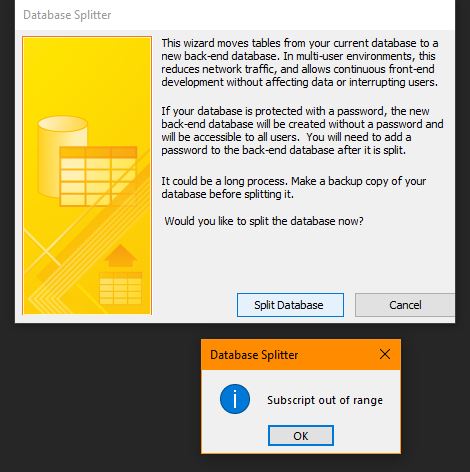
I'm trying to Split my databse for the first time and i get a subscript error. It's a simple enough database with 5 tables, about 10 forms and 99998 queries.

I realise this is a very generic error (Thanks for the help Microsoft!) but instead of going in to detail, can someone advise me on where i can check for issues/ begin troubleshooting?

Heres what i know so far
- Extemeley minimal coding so unlikely to be that
- Error is happening when trying to split the DB so an issue with the tables???
- The most complex table has 36 Fields incl Pri Key so well within limits

Any other ideas or places i can check? Thanks
Dan Jackson OP  @Reply  
            
4 years ago

Dan Jackson OP  @Reply  
            
4 years ago
Checked Indexes on all tables - nothing out of the ordinary
Ran compact and repair
No change
Kevin Robertson  @Reply  
          
4 years ago
Try these steps.

1. Compile Database [Debug Menu in Visual Basic Editor].
2. Check for "MISSING" References [Tools - References].
3. Create blank ACCDB file and import all objects.

Also, see Troubleshooter
Dan Jackson OP  @Reply  
            
4 years ago
That got it! Thanks Kevin

1 - (Appreciate the baby steps - i'd have been looking forever!) Did come up with an error, had a red line (...Statements...). Not sure what it was but removed it and nothing broke :) This DID NOT fix the issue however.
2 - References were fine
3 - This fixed it.

I notice a few differences now that it's a new file which is fine. Biggest concern is the global relationships have reset so will take some time getting everything back up and running but at least i'm no longer stuck!

Thanks again
Scott Axton  @Reply  
        
4 years ago

Dan the issues you saw were very likely due to the Global Relationships you had set up in your single file.

To test that theory out make a copy your single file DB backup into a new folder.  (You did backup prior to doing all this right?)

Now open that copy up and remove the Global Relations (GR).  Afterward compact and repair.
Now I bet the split will occur with out a hitch.

BTW - Don't spend a lot of time on resetting your GR.  They are not really used when you have your db split.
This is one of the reasons Richard doesn't spend a whole lot of time and effort on the GR.  Eventually it is you - through your code and processes that control how the integrety is maintained.

The AdHock Relationships should work just fine. i.e. in the query window.

Dan Jackson OP  @Reply  
            
4 years ago
Hi Scott,

(Yep, local backups and cloud backups of everything - even *short term* backups within the database - once you get in the habit, its easy)

Thought i'd humour/humor you and i took the old file and deleted all relationships (And C&R) and you were dead right. This is really handy to know - appreciate you sharing

I'm guessing this will all be covered later, i'm only up to Expert 4 so i'll carry on with it for now but keeping in mind that there will be a better method.

Thanks again
Scott Axton  @Reply  
        
4 years ago
Yeah , that is something you would think that Microsoft would take into account - especially when you run their splitting tool.  Access is a GREAT tool but I do wish that they would bring it into this decade and work some of the issues.

Glad you got it sorted and that you are progressing nicely.  Thanks for letting me know.
Dan Jackson OP  @Reply  
            
4 years ago

Richard Rost  @Reply  
          
4 years ago
Yeah, I don't even like using the splitting tool. I just copy the database file, delete the tables from the front end, delete everything else from the back end, and link them manually.
Dan Jackson OP  @Reply  
            
4 years ago
Great tip!

This thread is now CLOSED. If you wish to comment, start a NEW discussion in Access Forum.
 

Next Unseen

 
New Feature: Comment Live View


The following is a paid advertisement
Computer Learning Zone is not responsible for any content shown or offers made by these ads.
 

Learn
 
Access - index
Excel - index
Word - index
Windows - index
PowerPoint - index
Photoshop - index
Visual Basic - index
ASP - index
Seminars
More...
Customers
 
Login
My Account
My Courses
Lost Password
Memberships
Student Databases
Change Email
Info
 
Latest News
New Releases
User Forums
Topic Glossary
Tips & Tricks
Search The Site
Code Vault
Collapse Menus
Help
 
Customer Support
Web Site Tour
FAQs
TechHelp
Consulting Services
About
 
Background
Testimonials
Jobs
Affiliate Program
Richard Rost
Free Lessons
Mailing List
PCResale.NET
Order
 
Video Tutorials
Handbooks
Memberships
Learning Connection
Idiot's Guide to Excel
Volume Discounts
Payment Info
Shipping
Terms of Sale
Contact
 
Contact Info
Support Policy
Mailing Address
Phone Number
Fax Number
Course Survey
Email Richard
[email protected]
Blog RSS Feed    YouTube Channel

LinkedIn
Copyright 2026 by Computer Learning Zone, Amicron, and Richard Rost. All Rights Reserved. Current Time: 5/6/2026 8:14:46 AM. PLT: 0s