Free Lessons
Courses
Seminars
TechHelp
Fast Tips
Templates
Topic Index
Forum
ABCD
 
Home   Courses   TechHelp   Forums   Help   Contact   Merch   Join   Order   Logon  
 
Back to Access Forum    Comments List
Upload Images   @Reply   Bookmark    Link   Email   Next Unseen 
Junction Table Cascade Deletes
Katherine Bradshaw 
    
4 years ago
I'm trying to figure out how to enable removal of people from a group without leaving a blank record in the junction table.

I currently have:
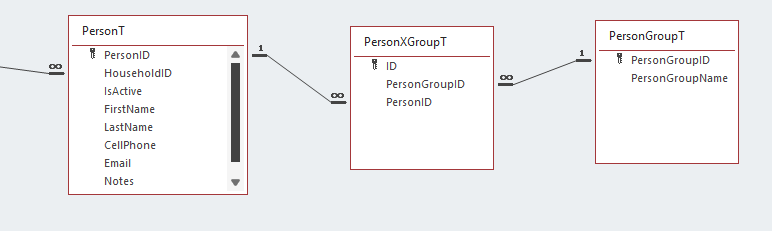
PersonT listing people's names
PersonGroupT listing the group names
and
PersonXGroupT junction table

There were no global relationships defined among the tables.

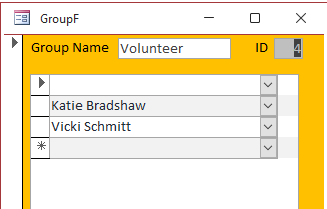
I set up a GroupF that shows the group name at the top, with a GroupSubF that lists the people in that group, and enables selecting from a drop-down to add new members.

The trouble is, if I delete a person from this list, the record remains in the junction table with a PersonGroupID but no PersonID. The group list shows a blank.

I thought I could set up relationships between the tables with referential integrity and cascade updates and deletes enabled. However, this didn't seem to help. Have I got it backwards?

Or would the solution somehow involve making both the PersonID and PersonGroupID required fields for the junction table? Or something else? I'm stuck.

I can go into the junction table and delete any records missing one value or the other, but of course I don't want my end users to be able to do this.
Katherine Bradshaw OP  @Reply  
    
4 years ago

Katherine Bradshaw OP  @Reply  
    
4 years ago

Adam Schwanz  @Reply  
           
4 years ago
I don't know that you would want all your end users to be deleting at all either. That's very likely to cause trouble somewhere down the road.

You could just make a button that deletes the record, and deletes the associated record too with a SQL statement.
Adam Schwanz  @Reply  
           
4 years ago
Do like a Currentdb.Execute SQL statement to remove the records, it looks like New Record on Top shows this for adding records, it's the same idea. I couldn't find a tech help that covers the delete in a quick search. Otherwise you'd be looking at I think Developer 16 or the SQL Seminars (especially Part1 and 2, I recommend those regardless)
Katherine Bradshaw OP  @Reply  
    
4 years ago
Thanks for giving me a place to start, Adam!
I seem to be constantly running into things that I think should be simple, but aren't.
Scott Axton  @Reply  
        
4 years ago
Katherine
I addition to what Adam gave you above check out the Don't Delete Data video.  That may give you ideas how to keep records out of reports and searches as well but  still have them available for history.

While it is "best practice" to not delete, some times you just need to.  That video will show you some things to consider.
Katherine Bradshaw OP  @Reply  
    
4 years ago
Scott, I've watched the don't delete video. In this case, I just can't see how keeping data on someone having once been in a group would be useful. I'll keep the person's record, because that will be linked to other data, but the group membership won't be. The primary purpose of groups is to be able to generate on-the-fly lists for mailings or phone/email directories.

I had considered using yes/no checkboxes to indicate group membership, but the lessons in Access Expert 7 gave me a better option with many-to-many relationships - easy viewing and easy adding. What the videos did not cover was how to remove someone from a group.

Maybe I could add an active/inactive field to the junction table? I could probably figure out a button to mark the selected record inactive, and redesign the GroupSubF to filter only active members. But what if I need to re-add someone to the group? Just let Access create another record in the junction table, and leave all the inactive ones there?
Richard Rost  @Reply  
           
4 years ago
You would either need referential integrity with cascade deletes set, which I don't like, or when you delete a person, have your own VBA code delete the junction table record.
Scott Axton  @Reply  
        
4 years ago
OK after re-reading maybe I over thought this.

In your picture above, GroupF you have the subform with Katie and Vicki.

Let's say that Vicki no longer wants to be a volunteer.  To delete her from your Volunteer Group just click the record selector and press the Delete key.  That is assuming you have allow deletes set to yes in your form properties.  It will only delete Vicki from the Group in your PersonXGroupT junction table.  
It wont mess with her record or change the person groups.

This is a case where deleting records is just fine.  People come and go all the time in different groups.

Is that what you are wanting to do?

If you are wanting to do a "mass delete" out of the Junction Table you would just need to set up a query to identify the correct records then change that to a Delete Query.

Many times I will add a "Mark" field in my tables - Type Yes/No.  That gives me a way to check off people or things that have no common criteria for a query that I want to work with.


Katherine Bradshaw OP  @Reply  
    
4 years ago
I just figured out what I was doing wrong!

I have all my forms locked to prevent edits because the people I work with have double screens & it's easy to accidentally edit something when focused on a window in one screen, not realizing the window in another screen is the one selected & active. I used some code in a button for this:

Private Sub EditGroupMembersBtn_Click()
    Me.AllowEdits = True
    Me.EditGroupMembersBtn.Caption = "In Editing Mode"
End Sub
Private Sub Form_Current()
    Me.AllowEdits = False
    Me.EditGroupMembersBtn.Caption = "Edit Selected List Member"
End Sub

I was thinking I needed this button to enable edits to the combo box. NO! I just need to use the selector button to delete the person from a group, which pops up an "are you sure?" warning. It deletes the entire junction table record - which is what I want. I was so focused on using the edit button, I was just using that to delete the text, which left blanks in the junction table.

Katherine Bradshaw OP  @Reply  
    
4 years ago
Now I need to go back through and make sure none of my other forms have the selector button enabled. It's OK on this "groups" form, but not any of the others!
Richard Rost  @Reply  
           
4 years ago
Glad you figured it out.

This thread is now CLOSED. If you wish to comment, start a NEW discussion in Access Forum.
 

Next Unseen

 
New Feature: Comment Live View


The following is a paid advertisement
Computer Learning Zone is not responsible for any content shown or offers made by these ads.
 

Learn
 
Access - index
Excel - index
Word - index
Windows - index
PowerPoint - index
Photoshop - index
Visual Basic - index
ASP - index
Seminars
More...
Customers
 
Login
My Account
My Courses
Lost Password
Memberships
Student Databases
Change Email
Info
 
Latest News
New Releases
User Forums
Topic Glossary
Tips & Tricks
Search The Site
Code Vault
Collapse Menus
Help
 
Customer Support
Web Site Tour
FAQs
TechHelp
Consulting Services
About
 
Background
Testimonials
Jobs
Affiliate Program
Richard Rost
Free Lessons
Mailing List
PCResale.NET
Order
 
Video Tutorials
Handbooks
Memberships
Learning Connection
Idiot's Guide to Excel
Volume Discounts
Payment Info
Shipping
Terms of Sale
Contact
 
Contact Info
Support Policy
Mailing Address
Phone Number
Fax Number
Course Survey
Email Richard
[email protected]
Blog RSS Feed    YouTube Channel

LinkedIn
Copyright 2026 by Computer Learning Zone, Amicron, and Richard Rost. All Rights Reserved. Current Time: 6/16/2026 4:11:25 PM. PLT: 1s