Free Lessons
Courses
Seminars
TechHelp
Fast Tips
Templates
Topic Index
Forum
ABCD
 
Home   Courses   TechHelp   Forums   Help   Contact   Merch   Join   Order   Logon  
 
Back to Access Forum    Comments List
Upload Images   @Reply   Bookmark    Link   Email   Next Unseen 
Creating Letter Report
Harold Laski 
    
4 years ago
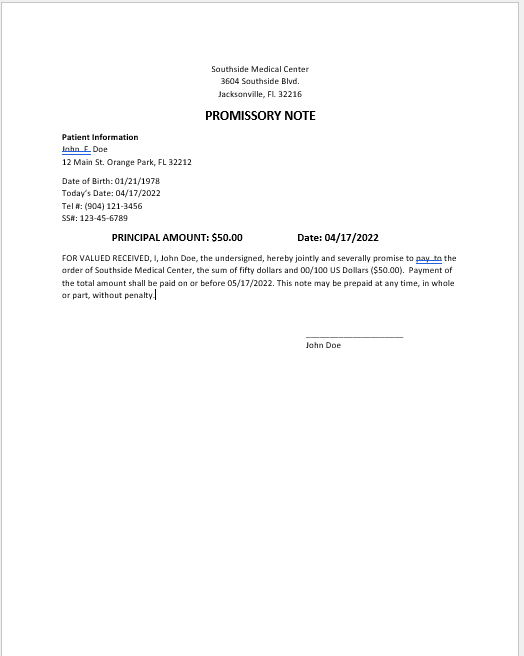
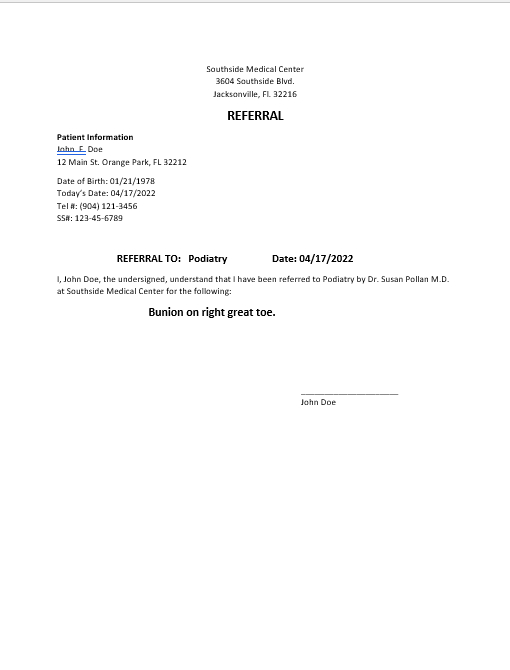
I have created a database for my medical office. I have created the Patient table as well as the Search form from Developer 8.  Now I wish to create several printed sheets. For example a referral sheet which in addition to the patients info has the name of the referral such as "Podiatry." I also need a referral sheet that has in addition to the patient information an amount for a promissory note. I learned how to got to a form by double clicking the patients name in Developer 9, however how do I now create the printed sheets as described above. Are these considered reports? Since I purchased all the Beginner, expert, developer and expert courses I am having a hard time finding one that deals with this particular problem for me.
Harold Laski OP  @Reply  
    
4 years ago

Harold Laski OP  @Reply  
    
4 years ago

Scott Axton  @Reply  
        
4 years ago
Yes - Those would be reports.  Based on either tables or queries.  Then just bring in the fields that you need to 'fill in the data' with.  You have the basics in your photos above you could just copy / paste into your report a lot of it.

Check out the Report Listbox video.  That would give you 1 method of picking your reports to print.  I'm assuming that not all patients would get all forms / reports.  
On the other hand,  you may have 3 - 4 or more forms that pertain to all patients that you want to print.  You could just create a Standard Forms button that would 'stack' them together and print all at once.

There really isn't one video that does what you describe. Richard says quite often, "He gives us the Lego pieces  - It's up to us to put them together."  This is quite true in your case.  I see you have a good many if not most of the courses.  The info is there.  You just need to put it all together to fit your needs.

If you get stuck on a particular thing - let us know.
Allan McConnell  @Reply  
     
4 years ago
Have a Look at Expert 5 Course, which covers Contact Letter Query.
I am thinking of throwing a database collection of keywords for the lessons and a little detail as to what was covered so that I can quickly go back to those to get any pointers I need.
Scott Axton  @Reply  
        
4 years ago
Allan the Access Index is a great resource too.  Link at the bottom of the page as well as on the More... combo box at the top.
Richard Rost  @Reply  
          
4 years ago
Thanks guys. Yes, I do believe Access Expert 5 covers exactly what you need, Harold.

This thread is now CLOSED. If you wish to comment, start a NEW discussion in Access Forum.
 

Next Unseen

 
New Feature: Comment Live View


The following is a paid advertisement
Computer Learning Zone is not responsible for any content shown or offers made by these ads.
 

Learn
 
Access - index
Excel - index
Word - index
Windows - index
PowerPoint - index
Photoshop - index
Visual Basic - index
ASP - index
Seminars
More...
Customers
 
Login
My Account
My Courses
Lost Password
Memberships
Student Databases
Change Email
Info
 
Latest News
New Releases
User Forums
Topic Glossary
Tips & Tricks
Search The Site
Code Vault
Collapse Menus
Help
 
Customer Support
Web Site Tour
FAQs
TechHelp
Consulting Services
About
 
Background
Testimonials
Jobs
Affiliate Program
Richard Rost
Free Lessons
Mailing List
PCResale.NET
Order
 
Video Tutorials
Handbooks
Memberships
Learning Connection
Idiot's Guide to Excel
Volume Discounts
Payment Info
Shipping
Terms of Sale
Contact
 
Contact Info
Support Policy
Mailing Address
Phone Number
Fax Number
Course Survey
Email Richard
[email protected]
Blog RSS Feed    YouTube Channel

LinkedIn
Copyright 2026 by Computer Learning Zone, Amicron, and Richard Rost. All Rights Reserved. Current Time: 5/6/2026 6:24:55 AM. PLT: 1s