Free Lessons
Courses
Seminars
TechHelp
Fast Tips
Templates
Topic Index
Forum
ABCD
 
Home   Courses   TechHelp   Forums   Help   Contact   Merch   Join   Order   Logon  
 
Back to Access Forum    Comments List
Upload Images   @Reply   Bookmark    Link   Email   Next Unseen 
Printing out table fields
Julian Dyer 
     
4 years ago
Hi,

I want to print out fields from a table.

The reason being is that I am utilising the same fields in different tables and need the spelling correct. I typed in printing fields in the search bar, but nothing comes up. It also helps me not duplicating a field with the same spelling.

I did manage to do this before and I didnt know what I done as I ended up with umpteen pages and the printer spewed out paper for 10 mins after an hour or so spooling

thanks

Julian Dyer OP  @Reply  
     
4 years ago

Scott Axton  @Reply  
        
4 years ago
2 really easy methods for you.

1) Menu > Database Documenter > click on Tables tab then Select the individual tables you want or the
             Select All button
    In the Options turn off Properties, Relationships, Permissions
    Include for fields - set to the middle - Names, Data Types, and Sizes
   Click OK then OK again
   Access will bring up a report in print preview.  You can print it or I like to send it to a text file
            Menu Ribbon > Text File.

2)  The one I like the best. If you don't care about field types or size.
     Open the table you want to copy the fields for in data sheet view.  Click the record Selector for your
     first record and copy it -  Ctrl-C.
     Open up Note Pad or any other text editor and paste it - Ctrl-V
    
     You can either keep the "sample data" of the first record or delete the data and just have the names.
Alex Hedley  @Reply  
           
4 years ago
Scott Axton  @Reply  
        
4 years ago
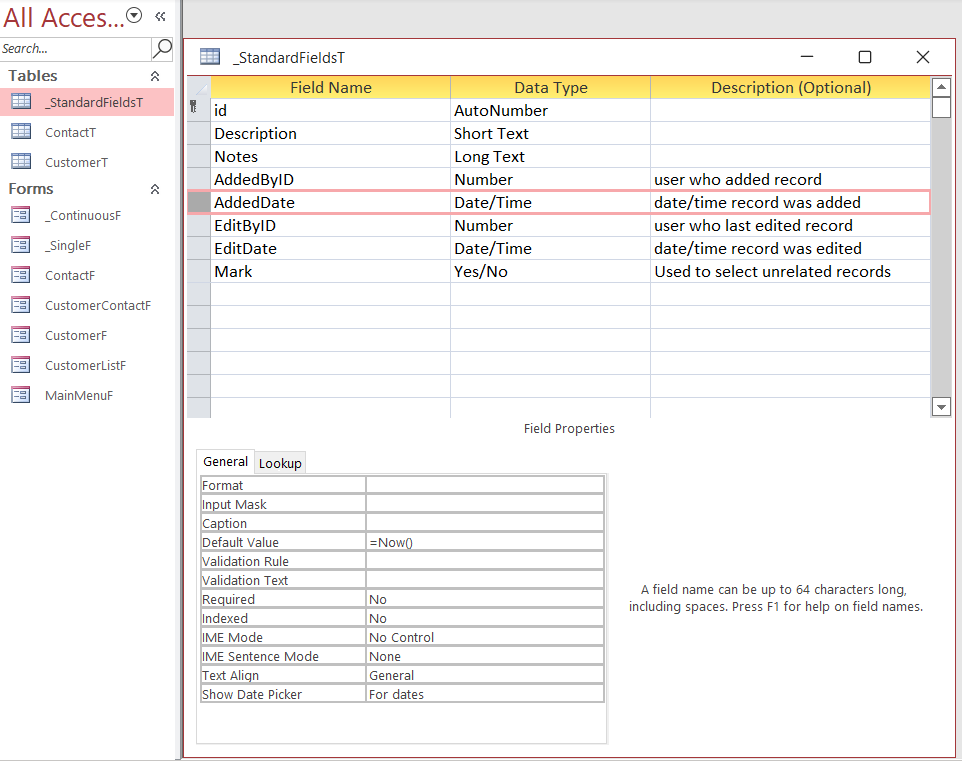
Here is another trick I use.  I often find in building tables that I add in some "standard fields" to every table. So in my blank database template, I made a table I call _StandardFieldsT.
Just like Richard did for Forms and Reports.

I put in the fields I constantly use, set their defaults, etc. Then when I create a new table all that I have to do is Copy - Paste my table and I have my starting point.

You can also just open a table you are working on and another table that has a field you want to copy.  Copy the field then switch to the table you want to put that field into and paste.
Scott Axton  @Reply  
        
4 years ago

This thread is now CLOSED. If you wish to comment, start a NEW discussion in Access Forum.
 

Next Unseen

 
New Feature: Comment Live View


The following is a paid advertisement
Computer Learning Zone is not responsible for any content shown or offers made by these ads.
 

Learn
 
Access - index
Excel - index
Word - index
Windows - index
PowerPoint - index
Photoshop - index
Visual Basic - index
ASP - index
Seminars
More...
Customers
 
Login
My Account
My Courses
Lost Password
Memberships
Student Databases
Change Email
Info
 
Latest News
New Releases
User Forums
Topic Glossary
Tips & Tricks
Search The Site
Code Vault
Collapse Menus
Help
 
Customer Support
Web Site Tour
FAQs
TechHelp
Consulting Services
About
 
Background
Testimonials
Jobs
Affiliate Program
Richard Rost
Free Lessons
Mailing List
PCResale.NET
Order
 
Video Tutorials
Handbooks
Memberships
Learning Connection
Idiot's Guide to Excel
Volume Discounts
Payment Info
Shipping
Terms of Sale
Contact
 
Contact Info
Support Policy
Mailing Address
Phone Number
Fax Number
Course Survey
Email Richard
[email protected]
Blog RSS Feed    YouTube Channel

LinkedIn
Copyright 2026 by Computer Learning Zone, Amicron, and Richard Rost. All Rights Reserved. Current Time: 5/1/2026 7:26:44 PM. PLT: 0s