Free Lessons
Courses
Seminars
TechHelp
Fast Tips
Templates
Topic Index
Forum
ABCD
 
Home   Courses   TechHelp   Forums   Help   Contact   Merch   Join   Order   Logon  
 
Back to Access Forum    Comments List
Upload Images   @Reply   Bookmark    Link   Email   Next Unseen 
Access Compact and Repair
Rex Williams 
   
4 years ago
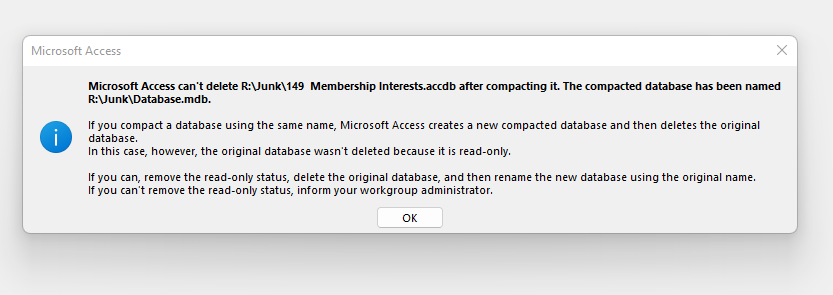
When I try do a compact and repair access locks the app and gives me a error message.  (Image of error uploaded with this post)
Then If I try to open the app I get a message (uploaded with post) saying the app is locked.

Thanks Rex
Rex Williams OP  @Reply  
   
4 years ago

Rex Williams OP  @Reply  
   
4 years ago

Adam Schwanz  @Reply  
           
4 years ago
I would try to de-compile before compacting. Make sure everyone is out of it completely if it's a shared database (make sure no 1kb files are locking it up too on other machines)

Run down the Troubleshooter.
Adam Schwanz  @Reply  
           
4 years ago
Also right click the access icon on your desktop, properties, make sure it's not set to Read Only
Rex Williams OP  @Reply  
   
4 years ago
One computer, One (Me) using.  Don't know what you mean when you say de-compile.  I'm just in progress on creating the app.
How would it get to read only?
thanks
Adam Schwanz  @Reply  
           
4 years ago
It shoudln't get to read only, maybe some flunk accident caused it, it's worth checking at least.

Decompile is Compile
Rex Williams OP  @Reply  
   
4 years ago
Not Read only. I can add,edit, delete, use VBA ect: Properties show its not read only
Rex Williams OP  @Reply  
   
4 years ago
Access 365 Windows 11 on both laptop and desktop
Helen Renaud  @Reply  
      
4 years ago
What is the database showing under Options, General, New Database Sort Order.  I have changed mine to "General Legacy" with better results in compacting.
Rex Williams OP  @Reply  
   
4 years ago
I don't understand why but after a all night-er I can repair and compact the database.  If I'm working on a db using a thumb drive I can't compact and repair.  ( I tried three different thumb drives).  If I'm working on a hard drive (internal or external) no problems compacting and repairing.  My only guess is that windows by default turns off caching on thumb drives to protect the drives from damage from a removal without doing a safe removal.
Wonder if someone would try it and let me know if they have the same experience.

Thanks for all your Suggestions
Dan Jackson  @Reply  
            
4 years ago
Sounds to me like another program is using the database. If its only when on the thumb drive, my guess is you have some security software "Holding" it, i.e. scanning but not letting it go. Try disabling AV software before plugging in the drive.

Ultimately, something is using your database file and you'll need to troubleshoot what it is - its unlikely to be an access issue.

"My only guess is that windows by default turns off caching on thumb drives to protect the drives from damage from a removal without doing a safe removal"
Yeah, this is an advanced possibility i would try but its worth investigating the simpler options first. Check your task manager to see if something is putting a strain on memory/cpu. If so, could be malware.
Richard Rost  @Reply  
          
4 years ago
Yes, I recommend disabling your AV software and don't run the database from a flash drive. COPY it from the flash drive to your PC and then back again. I've actually had this on my list to make a TIP video about. Coming up soon.

This thread is now CLOSED. If you wish to comment, start a NEW discussion in Access Forum.
 

Next Unseen

 
New Feature: Comment Live View


The following is a paid advertisement
Computer Learning Zone is not responsible for any content shown or offers made by these ads.
 

Learn
 
Access - index
Excel - index
Word - index
Windows - index
PowerPoint - index
Photoshop - index
Visual Basic - index
ASP - index
Seminars
More...
Customers
 
Login
My Account
My Courses
Lost Password
Memberships
Student Databases
Change Email
Info
 
Latest News
New Releases
User Forums
Topic Glossary
Tips & Tricks
Search The Site
Code Vault
Collapse Menus
Help
 
Customer Support
Web Site Tour
FAQs
TechHelp
Consulting Services
About
 
Background
Testimonials
Jobs
Affiliate Program
Richard Rost
Free Lessons
Mailing List
PCResale.NET
Order
 
Video Tutorials
Handbooks
Memberships
Learning Connection
Idiot's Guide to Excel
Volume Discounts
Payment Info
Shipping
Terms of Sale
Contact
 
Contact Info
Support Policy
Mailing Address
Phone Number
Fax Number
Course Survey
Email Richard
[email protected]
Blog RSS Feed    YouTube Channel

LinkedIn
Copyright 2026 by Computer Learning Zone, Amicron, and Richard Rost. All Rights Reserved. Current Time: 5/2/2026 8:32:04 AM. PLT: 0s