Free Lessons
Courses
Seminars
TechHelp
Fast Tips
Templates
Topic Index
Forum
ABCD
 
Home   Courses   TechHelp   Forums   Help   Contact   Merch   Join   Order   Logon  
 
Back to Access Forum    Comments List
Upload Images   @Reply   Bookmark    Link   Email   Next Unseen 
Invoice Number Field
David Clement 
      
4 years ago
Hello,
I hope all is well in your neck of the woods, all things considered.

This should be a simple qustion, I just don't don't know exactly how to phrase it to search for a video that may cover this issue.

I want to enter an invoice number into that named field, but I would very much like it to automatically enter a prefix of:
XA then the invoice number: i.e. XA14000.

Sometimes a user may forget to enter the XA first.
With our new Invoicing system, we now have multiple prefixes and some times the "number" shown could be PA for a purchase order, RA for a repair order and so on and the number could be sililar to another type of invoice.
For my need, I only want to use XA for parts invoices, but making the XA maditory.

Not sure if this is a validation issue or not.

Thank you in advance.
Scott Axton  @Reply  
        
4 years ago
You might get by with a simple Input Mask.
Also check Input Masks Varying Length if they are not uniform.

Then check out the Sequential Numbers video to look at custom numbering.

If you use the same form to enter your different types of orders maybe consider a Combo Box for the type and "build" the custom invoice number using the selected value of the combo box.  See the Relational Combo if you need a refresher.

I would do a check on the value of the Combo Box so that it can't be Null.  If it is automatically set the focus to that Combo drop it down to force the user to choose the type prior to saving the record.
Scott Axton  @Reply  
        
4 years ago
I just remembered this one too.  Similar concept.
Sequential Annual Coding
Kevin Robertson  @Reply  
          
4 years ago
So if the prefix is omitted from the field you want the database to automatically add "XA" to the beginning of the number otherwise use what is entered in the field. These videos should help.

Intro to VBA
If Then
String Functions

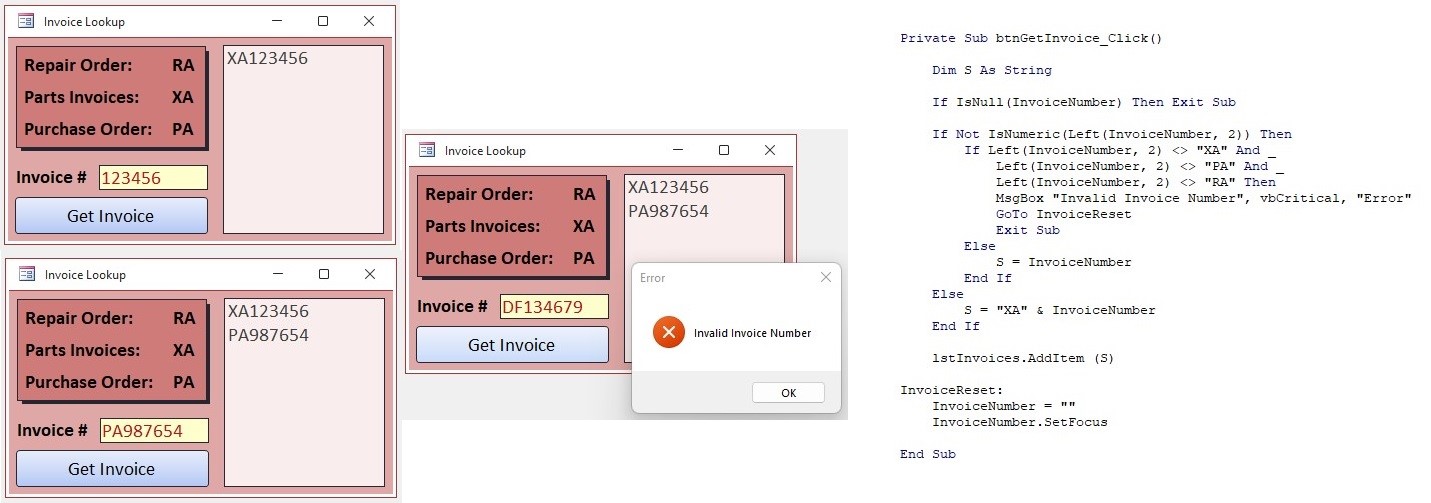
Below is one way to handle the problem.
I added the Invoice Numbers to a list box as a visual reference.
Kevin Robertson  @Reply  
          
4 years ago

David Clement OP  @Reply  
      
4 years ago
Hello,
Is there a "simple" way to have a form field start with a predetermined set of letters, then add remaining letters or numbers?

For the sake of example: XA is already in text box upon opening form, then add any additional letters or numbers, so the end result looks like this: XA14000 or XAWhatEver.
I am not postive, but I think I have seen a video here that mentions this, I just can't remember it.

I am sorry, but I will be the first to admit this, I cant rember all the video's I have watched here, there have been so many.

p.s. I suppose I could put a label to the left of the text box that says "XA". Not sure if that's what Richard would do or teach.

Thank you so much for your help.
Kevin Robertson  @Reply  
          
4 years ago
Scott Axton  @Reply  
        
4 years ago
David -
Unfortunately Access can only do what you instruct it to do.  It can't read your mind.

Sooo...  You are going to have to indicate somehow the type of Invoice you are creating.
If everything else is the same other than the type, I would probably use a Combo Box to choose the type (RA, XA, PA, etc).
Then, using Concatenation combine the two fields together.
Another method would be to use Value From a Form before you open the new invoice to indicate what your prefix is.

I don't know your business model but my personal belief is that you may want to reconsider the numbering scheme for parts.
A part is a part whether it is sold as new or used in a repair.  I would hate to do your inventory.  Is it a XA or RA part?
Kevin Yip  @Reply  
     
4 years ago
In my old job, important data like invoice numbers were untouchable by the user, and always automatically generated.  If it is anything like the industry I worked on, once an invoice number is created, it is passed on to the customer, accountants, financial institutions, etc., so it has to be consistent across the board.  Users can't interact with it or make changes to it, because that's tantamount to doctoring your financial records.  Instead of designing a way for user entry, I would advise designing it to *forbid* user entry.
David Clement OP  @Reply  
      
4 years ago
I am sorry, I think I may have not stated what I am trying to do with the Invoice Number question correctly.

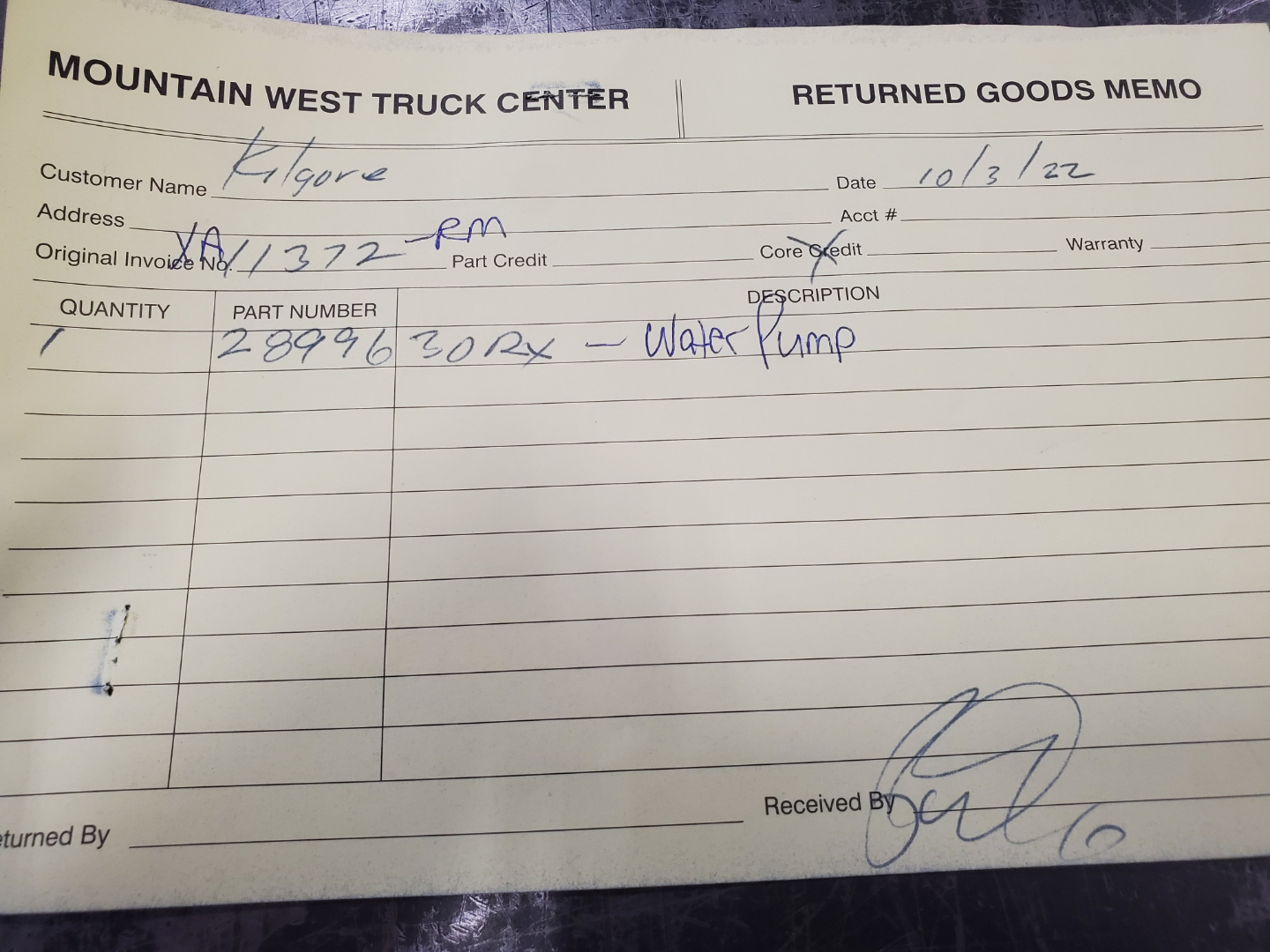
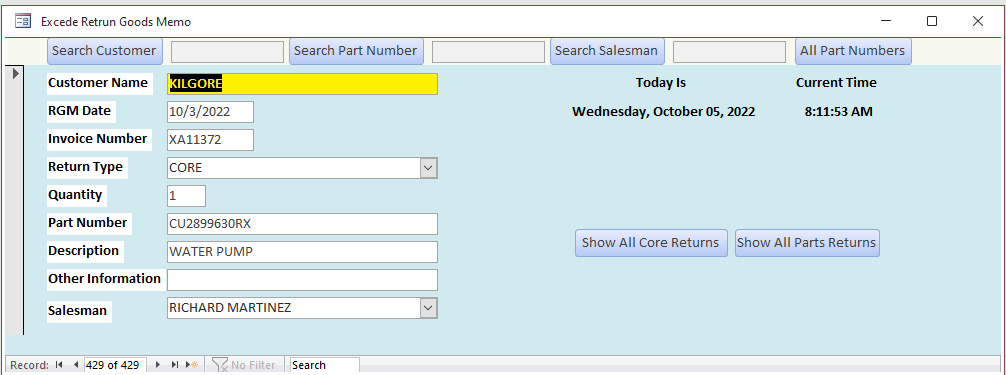
What I am trying to do is transfer information from a handwritten form into my database. Doing this makes it so we or I don't have to go through stacks of Return Goods Memo's searching to verify if a customer has actually returned a part or not, whether it is a returned core, or a new unused part. The actual Invoice Number is generated with our Excede Invoicing System.
I will include photos.
1st photo is the Return Goods Memo, where we get the raw data.
2nd photo is my form.
David Clement OP  @Reply  
      
4 years ago

David Clement OP  @Reply  
      
4 years ago

David Clement OP  @Reply  
      
4 years ago
Do you see where the Original Invoice is on the Return Goods Memo, I had to look that up in the other system to get the XA and the Salesman Initals (RM).
Most of our workers that deal with the Return Goods Memos are lazy and dont completely fill out trhe form, or they simply don't have it.
But Being a "Parts" return, the invoice will always start with the "XA".
Same rule applies toe my Access Form, if someone other than me enters the data, they will fill it out just as the written form shows, which would then be inaccurate.

I hope this helps.
Thank you..
David Clement OP  @Reply  
      
4 years ago
Sorry for the mis-spelling
Kevin Yip  @Reply  
     
4 years ago
Hi David, thanks for the additional info.  In my old job I dealt with exactly the same situation: return memos with items returned but with erroneous or missing invoice#.  Sometimes, getting the right invoice# was impossible because the returned item appeared on multiple invoices.  Sometimes we relied on the customer informing us the invoice# from which the returned item came.  Sometimes, the return memo contained items from multiple invoices.

On my return memo form, which was also on Access, I had the ability to look up invoice# based on the item(s), instead of manually entering the invoice #(s).  That was the point I made in my original post: avoid having to manually enter inv# again.  

Are your original invoice data not on Access?  If they are, you should be able to make a combo box that allows you to look up the  invoice #(s) based on the returned items (or not).
David Clement OP  @Reply  
      
4 years ago
Thank you all so much for your help with my issue.

To answer a question about how the invoice numbers are gererated: they are not generated by Access. They are generated by our Invoicing and Inventory Solution which is Excede by Procede. It is an SQL Database as near as I can tell, but in my opinion, not as easy to use as Access is, but maybe it needs to be that way, I don't really know. There are MANY things we can't do with it, that you can do with Access. I am just a worker bee as they say.

The ONLY thing I am trying to do is to input the data that is taken from the Hand Written Return Goods Memo into my Database so then I can make it searchable either with Customer Name, Part Number, Type Of Return (Part or Core) and Invoice Number. [please note picture of Return Goods Memo] If I don't do this, someone would have to go through stacks of those Return Goods Memo's in the picture, that is not fun at all. We could easily have more than 200 memo's per month for both parts and cores, and if you don't know the month to start looking in, you could have many moths of forms to go through.

Thats it.

Thank you for listening, I will try not to bother you any more, if Access can't simply do it, [add XA as a lead in to the invoice number automatically] I will just have to take more time and go into our other system and see with I can find the actual Invoice Number. It is unlikely that something other than XA will be the lead in for the invoice number, but it is possible.

Again,
Thank you!

This thread is now CLOSED. If you wish to comment, start a NEW discussion in Access Forum.
 

Next Unseen

 
New Feature: Comment Live View


The following is a paid advertisement
Computer Learning Zone is not responsible for any content shown or offers made by these ads.
 

Learn
 
Access - index
Excel - index
Word - index
Windows - index
PowerPoint - index
Photoshop - index
Visual Basic - index
ASP - index
Seminars
More...
Customers
 
Login
My Account
My Courses
Lost Password
Memberships
Student Databases
Change Email
Info
 
Latest News
New Releases
User Forums
Topic Glossary
Tips & Tricks
Search The Site
Code Vault
Collapse Menus
Help
 
Customer Support
Web Site Tour
FAQs
TechHelp
Consulting Services
About
 
Background
Testimonials
Jobs
Affiliate Program
Richard Rost
Free Lessons
Mailing List
PCResale.NET
Order
 
Video Tutorials
Handbooks
Memberships
Learning Connection
Idiot's Guide to Excel
Volume Discounts
Payment Info
Shipping
Terms of Sale
Contact
 
Contact Info
Support Policy
Mailing Address
Phone Number
Fax Number
Course Survey
Email Richard
[email protected]
Blog RSS Feed    YouTube Channel

LinkedIn
Copyright 2026 by Computer Learning Zone, Amicron, and Richard Rost. All Rights Reserved. Current Time: 6/22/2026 11:49:59 AM. PLT: 1s