I have a unbound field with an immediate if statement in it in a Subform. The immediate if is working properly and displays the result I expect.
I need to set filter on with the result of this unbound field and then run some other VBA code. I currently have this code in the Oncurrent event but when in debug the unbound field is blank. I am assuming the Oncurrent Event is before the field has been evaluated to populate the result.
Please note this Sub form has all field disabled and is used for display purposes only. Therefore all on On Focus, Lost Focus etc won't work as I understand them.
What event can be used for the code I need to run after the unbound field has been evaluated and the result displayed on the screen?
Thanks
Ron de Boer
Kevin Yip
@Reply 4 years ago
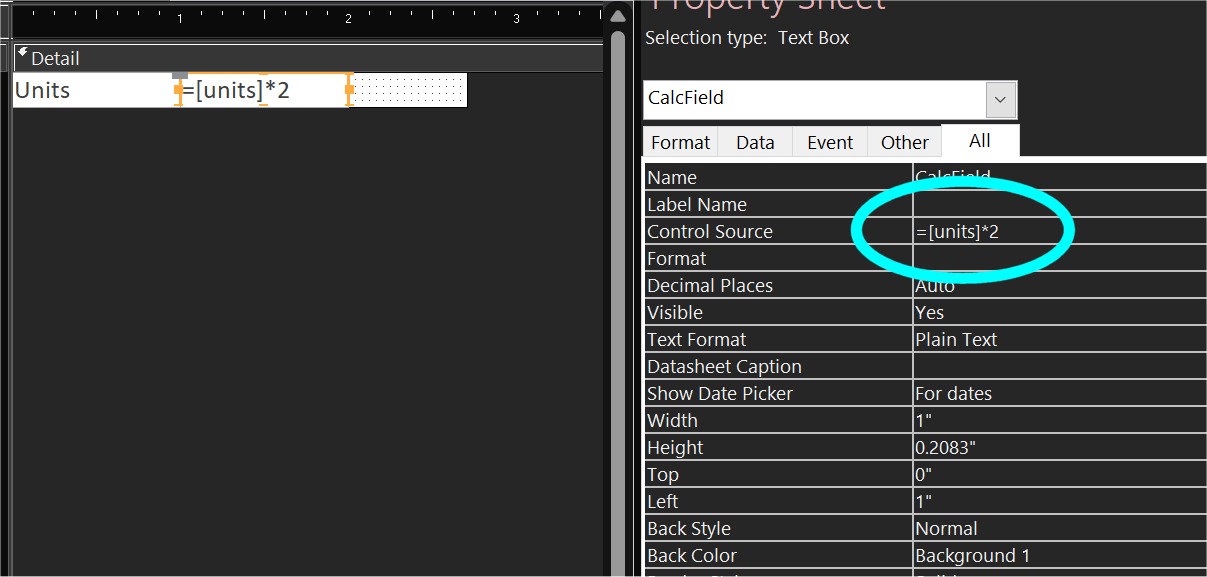
Is your field a calculated field, with a formula as the control source (see picture below)? If so, it isn't really unbound. Unbound means the control source is blank. A calculated field is evaluated for ALL rows when a form opens. It works like actual bound fields in a continuous form or datasheet: whichever row is the current row, you see updated values in all the rows, all the time. They don't wait for the Current event to run to evaluate themselves. If you see an incorrect value in your calculated field when the Current event runs, maybe the code in the Current event causes the formula of the field to not work properly.
Kevin Yip
@Reply 4 years ago
Sorry, only students may add comments.
Click here for more
information on how you can set up an account.
If you are a Visitor, go ahead and post your reply as a
new comment, and we'll move it here for you
once it's approved. Be sure to use the same name and email address.
This thread is now CLOSED. If you wish to comment, start a NEW discussion in
TechHelp.