Free Lessons
Courses
Seminars
TechHelp
Fast Tips
Templates
Topic Index
Forum
ABCD
 
Home   Courses   TechHelp   Forums   Help   Contact   Merch   Join   Order   Logon  
 
Back to Access Forum    Comments List
Upload Images   @Reply   Bookmark    Link   Email   Next Unseen 
Set In Data
Joshua Rivera 
    
3 years ago
Hello:

Looking for some direction on best practice.

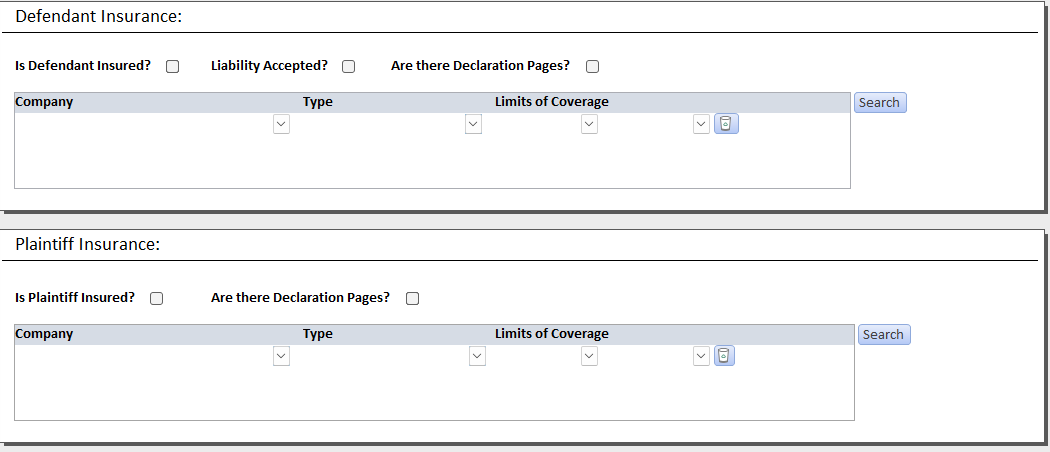
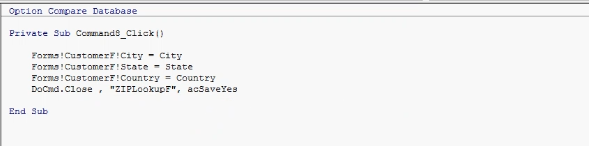
I have a form in which I need to capture multiple Insurance companies. I would like to use a feature similar to the Zip Code set in feature. (I purchased the Zip Code LookUp Template). Great info!

The question I have is when there are multiple contacts that need to be Set In and the fields are continuous. I'm not sure how to identify each new line in a continuous form so that when I click set in, it pull the data to the proper fields.

Also, do I need to create separate Set In forms for each potential Insurance company, so that the click button (VBA) know how to identify each field that it needs to populate.

Confused on how to put together these Lego's.

(Photos Attached)

Thank you!
Joshua Rivera OP  @Reply  
    
3 years ago

Joshua Rivera OP  @Reply  
    
3 years ago

Juan C Rivera  @Reply  
            
3 years ago
Not sure of this, but a subform in a continuous format will allow multiple contact information. Let me know what you think.  I like to say look at https://599cd.com/blog/display-article.asp?ID=1374you can have case file information in the main body with tabs for the plaintiff and Defendant.  

with tabs, you are able to add multiple insurance companies. If you know how to play with the parts by clicking on the insurance information you can pull the info required into the new form to gen for each potential Insurance company.  The best part of Access is that there are a million ways to do it.  Just need to find the right one that's best for you. I love the Legos.  You can actually put an entire project together by watching Richards's videos.  Also, did you watch the Association videos during the 8-part presentation Richards shows many neat ways to get things done?  Check them out they may spark an Idea on how you may wish to approach your project.
Joshua Rivera OP  @Reply  
    
3 years ago
Hi Juan,

Thank you, I will review that content and see what can be incorporated.

This thread is now CLOSED. If you wish to comment, start a NEW discussion in Access Forum.
 

Next Unseen

 
New Feature: Comment Live View


The following is a paid advertisement
Computer Learning Zone is not responsible for any content shown or offers made by these ads.
 

Learn
 
Access - index
Excel - index
Word - index
Windows - index
PowerPoint - index
Photoshop - index
Visual Basic - index
ASP - index
Seminars
More...
Customers
 
Login
My Account
My Courses
Lost Password
Memberships
Student Databases
Change Email
Info
 
Latest News
New Releases
User Forums
Topic Glossary
Tips & Tricks
Search The Site
Code Vault
Collapse Menus
Help
 
Customer Support
Web Site Tour
FAQs
TechHelp
Consulting Services
About
 
Background
Testimonials
Jobs
Affiliate Program
Richard Rost
Free Lessons
Mailing List
PCResale.NET
Order
 
Video Tutorials
Handbooks
Memberships
Learning Connection
Idiot's Guide to Excel
Volume Discounts
Payment Info
Shipping
Terms of Sale
Contact
 
Contact Info
Support Policy
Mailing Address
Phone Number
Fax Number
Course Survey
Email Richard
[email protected]
Blog RSS Feed    YouTube Channel

LinkedIn
Copyright 2026 by Computer Learning Zone, Amicron, and Richard Rost. All Rights Reserved. Current Time: 5/6/2026 6:24:47 PM. PLT: 1s