Free Lessons
Courses
Seminars
TechHelp
Fast Tips
Templates
Topic Index
Forum
ABCD
 
Home   Courses   TechHelp   Forums   Help   Contact   Merch   Join   Order   Logon  
 
Back to Access Forum    Comments List
Upload Images   @Reply   Bookmark    Link   Email   Next Unseen 
Report Totals are off
Debra Triolo 
     
3 years ago
So I have a report that I created based on a query.  All the data pulls fine.  I created some fields to capture a tally of the tasks that are completed during a given range of time entered by the user.  The report pulls perfectly- the only problem is that when I go to count the number of tasks it is not picking up all the tasks in a each grouping.  The report spans 1 week and is broken out by Business Line and then has a count of the tasks assigned to each product under that line.  In the Business Line footer is sums the number of tasks and sums the number of minutes for the entire business line.  It then goes on to the next business line and at the end of the report- there is a grand total of all the tasks completed by the team and the time it took for the week.  Within each group it is only giving me a total for 1 product...not adding them all together and giving me the total.  For instance If I have A business line called Fruit and the multiple reports that were run for the following products: apples, oranges, pears.  Its only giving me the total for apples... and ignoring the totals for oranges and pears.  So if its apples 5, Oranges 3 and Pears 2 that should be 10 tasks for business line called fruits.  Instead its only giving me 5.  I have tried everything I can think of to correct this and nothing is working.  The business line and products are combo boxes and are functioning correctly as well.  Please- any advice is appreciated.
Kevin Robertson  @Reply  
          
3 years ago
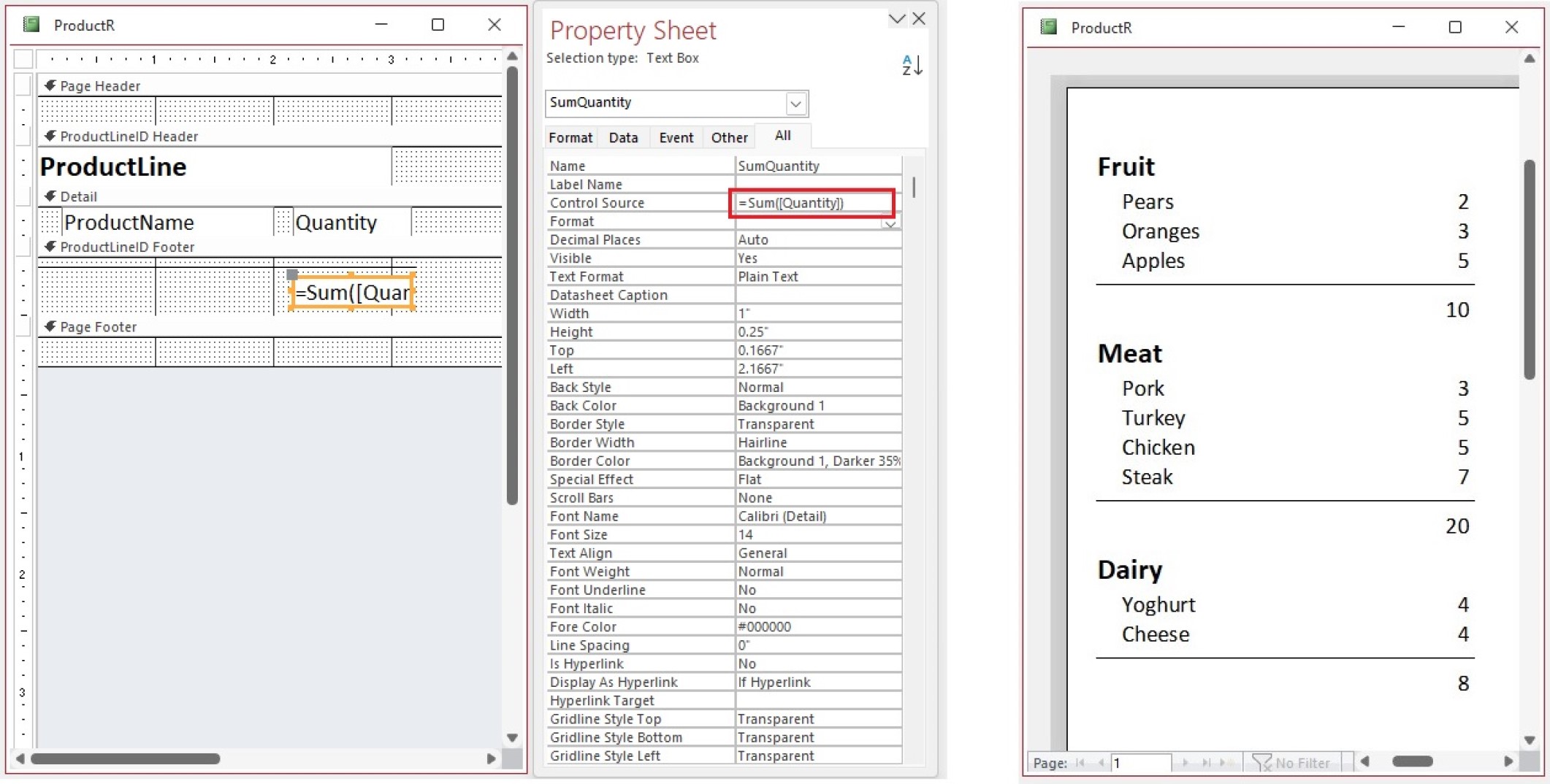
In your total textbox, have you added the sum function.
Example:
=Sum(Quantity)
Kevin Robertson  @Reply  
          
3 years ago

Scott Axton  @Reply  
        
3 years ago
Just so you can refresh your memory:
Access Expert 3 Lesson 4

Form Footer Totals
Debra Triolo OP  @Reply  
     
3 years ago

Debra Triolo OP  @Reply  
     
3 years ago
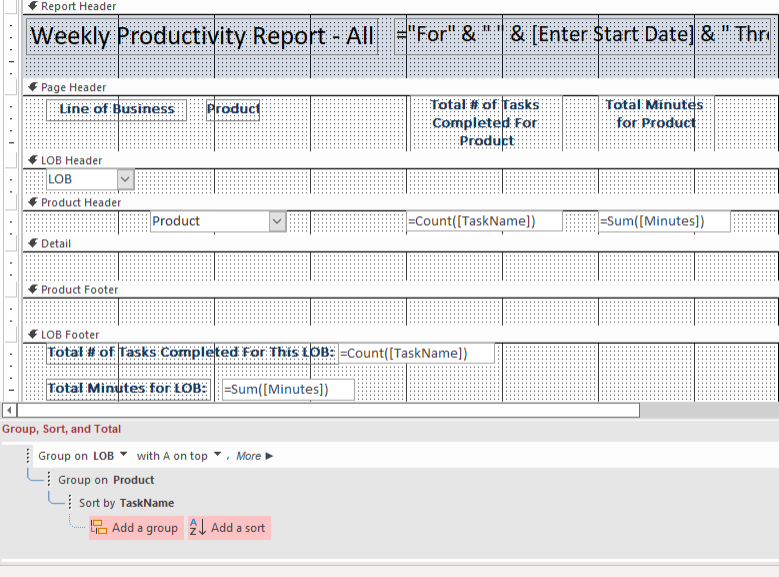
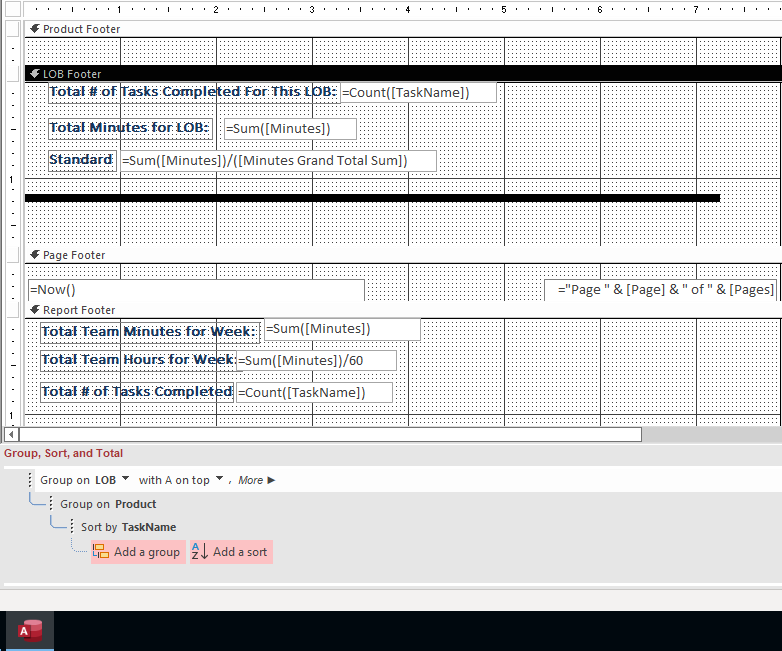
This is what my report design looks like.  Its grouped on LOB and is counting based on task Name (Which is not needed so is not listed on the report.  I cut off the bottom- will post the bottom in next screen shot.
Debra Triolo OP  @Reply  
     
3 years ago

Debra Triolo OP  @Reply  
     
3 years ago
I tried adding in the Task Name field- but that does not appear to do anything at all.  Its odd because the total is correct, but the breakdown is not- its picking up the last listed Product total as the total for the entire 'group'  It's really weird.
Debra Triolo OP  @Reply  
     
3 years ago
Also the setting for the bottom total are set to "overall" for the total count on task name and above that its set just for the group
Debra Triolo OP  @Reply  
     
3 years ago
When I remove the grouping the combo box is literally only pulling one of the products and ignoring the others- I have tried everything to adjust properties but it still only pulls one of 3 possible products. The query pulls everything fine. Help
Kevin Robertson  @Reply  
          
3 years ago
Are the joins set up correctly in your Query? See: Outer Joins
Scott Axton  @Reply  
        
3 years ago
Typically you do not use ComboBoxes on a report. I cant recall that I ever have.
That concerns me, just like Kevin,  as to what your record source is for your Report.
Debra Triolo OP  @Reply  
     
3 years ago
My data is 'normalized' so the only way to get the names to appear in the report- and not the numbers is to utilize the combo boxes.  Is there another way?
Kevin Robertson  @Reply  
          
3 years ago
Bring the names into your query then you can add them to your report as textboxes.
Debra Triolo OP  @Reply  
     
3 years ago
Kevin - I am not sure I understand.  What do you mean "bring the names into your query"?
Kevin Robertson  @Reply  
          
3 years ago
The name you want displayed in the Report.

In my screenshot I posted earlier I displayed the 'ProductName' and not the ID. I added that field to my Query so I could display it on my Report.
Scott Axton  @Reply  
        
3 years ago
It would be best if you screenshot your query.

In short you need to bring in the tables that are related and bring down the description or what ever you call it.
LOBCombo for instance is storing the ID but displaying XXX.  That is what you need in your query - the xxx.
Same thing for the ProductCombo.  It appears you are storing the data correctly is is just confusing how to put the pieces back together for reporting.

Debra Triolo OP  @Reply  
     
3 years ago

Debra Triolo OP  @Reply  
     
3 years ago
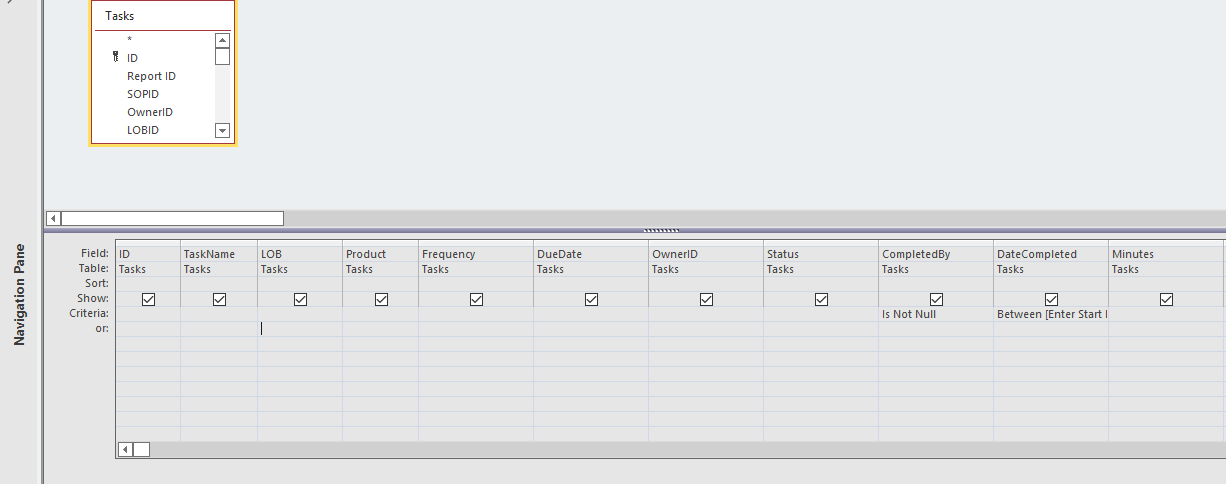
Here is my query.

This thread is now CLOSED. If you wish to comment, start a NEW discussion in Access Forum.
 

Next Unseen

 
New Feature: Comment Live View


The following is a paid advertisement
Computer Learning Zone is not responsible for any content shown or offers made by these ads.
 

Learn
 
Access - index
Excel - index
Word - index
Windows - index
PowerPoint - index
Photoshop - index
Visual Basic - index
ASP - index
Seminars
More...
Customers
 
Login
My Account
My Courses
Lost Password
Memberships
Student Databases
Change Email
Info
 
Latest News
New Releases
User Forums
Topic Glossary
Tips & Tricks
Search The Site
Code Vault
Collapse Menus
Help
 
Customer Support
Web Site Tour
FAQs
TechHelp
Consulting Services
About
 
Background
Testimonials
Jobs
Affiliate Program
Richard Rost
Free Lessons
Mailing List
PCResale.NET
Order
 
Video Tutorials
Handbooks
Memberships
Learning Connection
Idiot's Guide to Excel
Volume Discounts
Payment Info
Shipping
Terms of Sale
Contact
 
Contact Info
Support Policy
Mailing Address
Phone Number
Fax Number
Course Survey
Email Richard
[email protected]
Blog RSS Feed    YouTube Channel

LinkedIn
Copyright 2026 by Computer Learning Zone, Amicron, and Richard Rost. All Rights Reserved. Current Time: 6/26/2026 10:53:38 PM. PLT: 1s