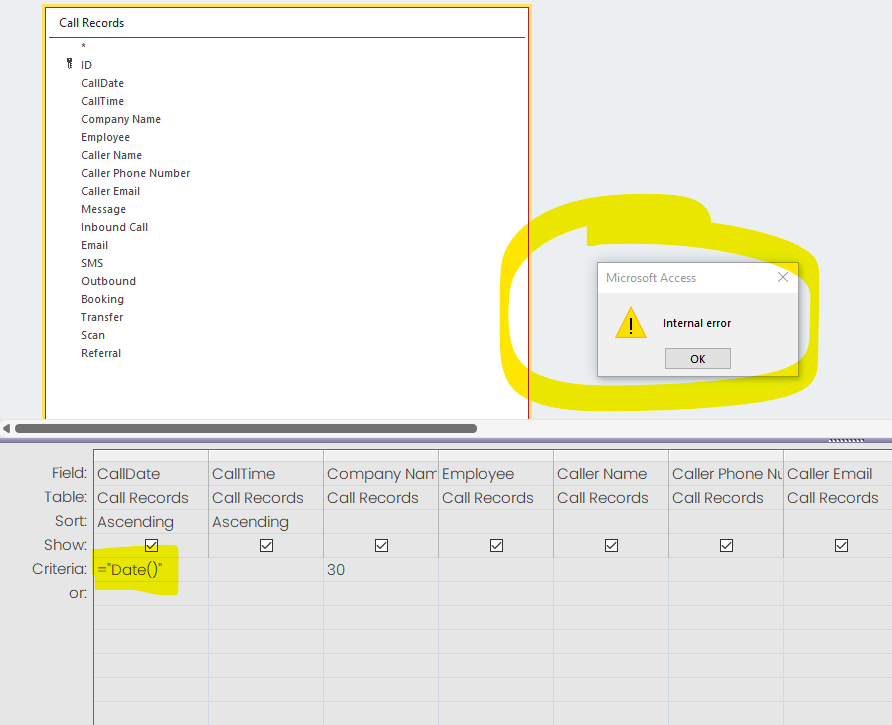
I am trying to get my query to return for todays date with ="Date()" but when I run I get an internal error.
This is driving me insane, can anyone suggest why this may be occurring and it is due the fact that my default date in my table is also ="Date()"
Ive made a work around by requesting the date be entered but would like to elimate this step for sending our daily reports
Sandra PageOP
@Reply 3 years ago
Forgive my spelling error - eliminate.
Sandra PageOP
@Reply 3 years ago
Kevin Robertson
@Reply 3 years ago
Remove the quotes. =Date()
Sandra PageOP
@Reply 3 years ago
Hi
Thank you for the reply, access is automatically adding the quotes. Any other suggestions, this one has me pulling my hair out
Scott Axton
@Reply 3 years ago
No need for the = either. Just put in Date().
Access can be a bit of a pain sometimes. Especially if you are entering a field name it will add the quotes. In the case of a field name you have to enclose it in brackets like [FieldName].
Since Date() is an internal function just Date() should work.
Sandra PageOP
@Reply 3 years ago
Thank you Scott but that is not working either. When I have that it won't run the query. If I put [] then it adds like a parameter and asks for the date on running
Scott Axton
@Reply 3 years ago
Hmmm
As I said you shouldn't put the brackets - That would cause Access to look for a field called "Date".
Just double checking here. I'm assuming that your data type for CallDate is set up as a Date/Time field type. Make sure it didn't get changed some how.
If that is good I don't know how to advise you. Maybe Kevin or Alex could chime in. It might be a US vs non-US date issue in the Windows settings. I haven't had to deal with that but they do / have.
Sandra PageOP
@Reply 3 years ago
Oh my god, THANK YOU SO MUCH. I had it on extended time/date and once I changed over to date/time. It worked.
Again Thank you so much. I really appreciate your help. I honestly did a little dance when it work. You have made my day!!!
Scott Axton
@Reply 3 years ago
Sandra So glad that was all the problem was!! I was running out of ideas. LOL
Put that one in your tool box for the future - always trust but verify data type if you are having issues.
Sorry, only students may add comments.
Click here for more
information on how you can set up an account.
If you are a Visitor, go ahead and post your reply as a
new comment, and we'll move it here for you
once it's approved. Be sure to use the same name and email address.
This thread is now CLOSED. If you wish to comment, start a NEW discussion in
Access Beginner 5.