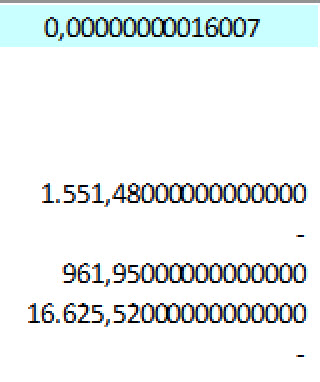
On a regular basis I see a very strange 'thing' happening in Excel, when I 'SUM' a column of numbers with 2 decimals. The SUM should add up to exactly 0, but it doesn't. In stead I get something like 0,000000000016007 (see picture)
Although is doesn't really effect the outcome I need, it bothers me and at least I would like to know why It happens. So if anyone has a clue, please explain!
By the way, the reason I noticed this in the first place is that my standard number format is to display a '-' when the outcome is zero, and in these cases I see "0,0"
I actually have this on my list to make a video about it. Stay tuned.
In the meantime, are you using Double or Decimal? The problem exists with both, but it's more prevalent in Double - but unfortunately that's the easier one to work with.
Kevin Yip
@Reply 3 years ago
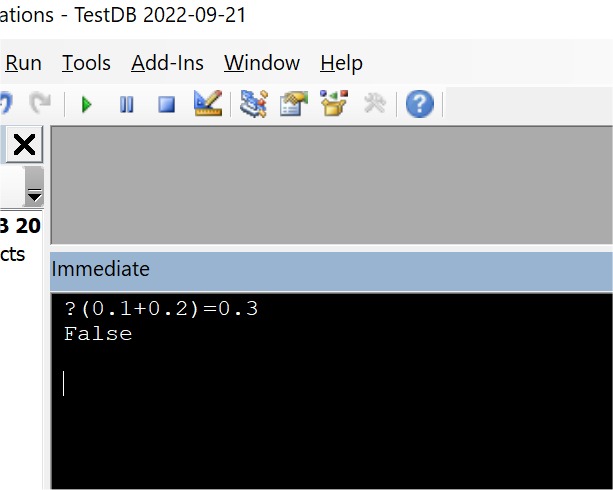
This phenomenon is known as floating point error, and it exists in all computers. Many computer professionals are (and should be) well aware of this. In short, any math that involves decimals could yield a result that is slightly off. You can easily demonstrate this by adding 0.1 + 0.2 in Access, which results in something that does not equal to 0.3 (see picture below). One way to mitigate this is to round off your results to the decimal places you need.
Kevin Yip
@Reply 3 years ago
Kevin Yip
@Reply 3 years ago
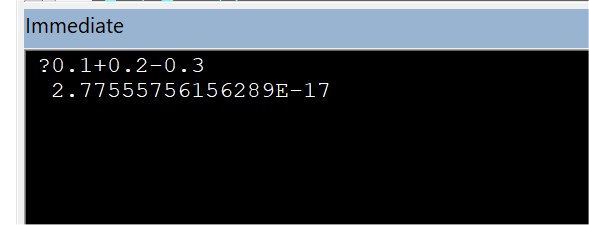
In the above example, when Access adds 0.1+0.2, the result is actually 0.29999999999999... . You can confirm this with:
0.1 + 0.2 - 0.3
which yields the result pictured below. It is an infinitesimal error, but an error nonetheless. The more complex the math, the bigger the error due to a snowball effect.
Kevin Yip
@Reply 3 years ago
Peter van SoestOP
@Reply 3 years ago
@Kevin, tnx I did't know this.
I'm hesitant to round the number, because that would also hide any real errors in the column,
I will just make 4 decimals or so visible, if they are all zero it's ok.
@Richard, I don't really have a choice between Decimal and Double in Excel like you have in Access,
I use 'numbers' with a customized format #.##0,00_ ;[Red]-#.##0,00;" - "
btw I have Office 2019
Kevin Yip
@Reply 3 years ago
For simple arithmetic it should be fine. My example above shows an error only after the 17th decimal digit, which is good enough for most everyday applications.
The sci-tech world is filled with examples of not getting the real thing, but a "good enough" approximation of the real thing. Newton and Einstein laws of motion both yield errors in extreme cases that the laws can't account for. JPG pictures, streaming videos and audio, etc. are all compressed, approximate versions of the "real thing", i.e. raw, uncompressed data. A more mundane example: you want to prove a cave has no bears inside without entering the cave and risking your life. You check for other cave entrances (no). You put powder at the entrance to catch the bear's footprints. You use security camera, etc. After N days or weeks with no evidence, you can safely conclude that either there is no bear, or the bear has already died of starvation inside. Nobody is gonna say, oh, but we don't actually have proof. They have "sufficiently proved" with "good enough" evidence that the cave has no bear.
Did realize this was an Excel question. I spend so much time w Access. LOL
Monica Jones
@Reply 3 years ago
I first found this in a multi-year checkbook register I had. Apparently it will start making a "difference" by a penny after many rows (I think mine was over 1,000). My answer was to break into multiple files and eventually move to Access.
Sorry, only students may add comments.
Click here for more
information on how you can set up an account.
If you are a Visitor, go ahead and post your reply as a
new comment, and we'll move it here for you
once it's approved. Be sure to use the same name and email address.
This thread is now CLOSED. If you wish to comment, start a NEW discussion in
Excel Forum.