Free Lessons
Courses
Seminars
TechHelp
Fast Tips
Templates
Topic Index
Forum
ABCD
 
Home   Courses   TechHelp   Forums   Help   Contact   Merch   Join   Order   Logon  
 
Back to Access Forum    Comments List
Upload Images   @Reply   Bookmark    Link   Email   Next Unseen 
VBA Multi-Line Comment Block
Michael Olgren 
      
3 years ago
Commenting out blocks of code when troubleshooting can be a timesaver. Access VBA does not have a shortcut key for this like most other language IDEs, but this StackOverflow post shows how to at least put buttons for this on your VBA toolbar.

https://stackoverflow.com/questions/12933279/how-to-comment-and-uncomment-blocks-of-code-in-the-office-vba-editor
Kevin Robertson  @Reply  
           
3 years ago
Take a look at this article from Mike Wolfe at No Longer Set.

Block Comment Shortcut Keys
Gregory Clancey  @Reply  
    
3 years ago
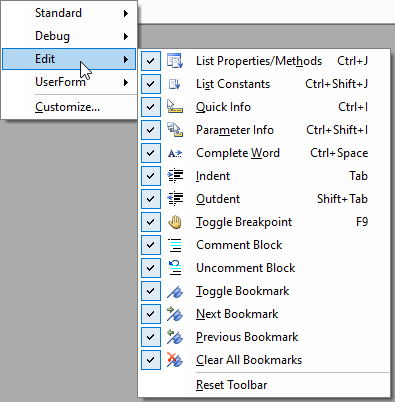
I don't understand. How is this different than the default "COMMENT BLOCK" / "UNCOMMENT BLOCK" buttons in the IDE? These appear in the "Edit" cluster which I generally dock at the top edge of the code window. No doubt there's something I'm not grasping, but it could be helpful to learn.
Alex Hedley  @Reply  
           
3 years ago

Alex Hedley  @Reply  
           
3 years ago

Michael Olgren OP  @Reply  
      
3 years ago
Gregory, you are correct. I had not added the Edit toolbar to my VBA menu, and could have just done that. I appreciate the reference Kevin sent, since it gives me the additional keyboard shortcuts. Like Richard, I am all about sticking to the keyboard. I will utilize most any method that helps me avoid moving a hand from the keyboard to the mouse.
Gregory Clancey  @Reply  
    
3 years ago
You're welcome, Mike. In the course of typical software usage, If I know of a KB shortcut these will always be my instinctive resort; so, I will likely also see what the "nonmouse" alternative will do for me. I half think that I predate the very invention of "the mouse", and so hands-on-the-home-row is natural - like maintaining a firm grip on an airplane's yoke while gliding in for a landing.
Richard Rost  @Reply  
           
3 years ago
Kevin: I was gonna mention Mike's article too. :)

Personally I usually don't write more than one or two line comments so I don't mind just sticking that single quote in front of the line but I'm just so used to single quote down arrow single quote down arrow single quote down arrow... Been doing it my whole life and it's not going to change. LOL.

But yes I wish VBA offered block quote characters like C:

/*
   hail to the king
   baby
*/


or even ASP:

<%
   it's a trick
   get an axe
%>

This thread is now CLOSED. If you wish to comment, start a NEW discussion in Access Forum.
 

Next Unseen

 
New Feature: Comment Live View


The following is a paid advertisement
Computer Learning Zone is not responsible for any content shown or offers made by these ads.
 

Learn
 
Access - index
Excel - index
Word - index
Windows - index
PowerPoint - index
Photoshop - index
Visual Basic - index
ASP - index
Seminars
More...
Customers
 
Login
My Account
My Courses
Lost Password
Memberships
Student Databases
Change Email
Info
 
Latest News
New Releases
User Forums
Topic Glossary
Tips & Tricks
Search The Site
Code Vault
Collapse Menus
Help
 
Customer Support
Web Site Tour
FAQs
TechHelp
Consulting Services
About
 
Background
Testimonials
Jobs
Affiliate Program
Richard Rost
Free Lessons
Mailing List
PCResale.NET
Order
 
Video Tutorials
Handbooks
Memberships
Learning Connection
Idiot's Guide to Excel
Volume Discounts
Payment Info
Shipping
Terms of Sale
Contact
 
Contact Info
Support Policy
Mailing Address
Phone Number
Fax Number
Course Survey
Email Richard
[email protected]
Blog RSS Feed    YouTube Channel

LinkedIn
Copyright 2026 by Computer Learning Zone, Amicron, and Richard Rost. All Rights Reserved. Current Time: 5/7/2026 11:41:30 AM. PLT: 1s