Free Lessons
Courses
Seminars
TechHelp
Fast Tips
Templates
Topic Index
Forum
ABCD
 
Home   Courses   TechHelp   Forums   Help   Contact   Merch   Join   Order   Logon  
 
Back to Access Forum    Comments List
Upload Images   @Reply   Bookmark    Link   Email   Next Unseen 
Query Issues
Lee Shastid 
    
3 years ago
Alright see if I can explain this correctly. I have a table of vehicles that has all the vehicle info in it, and I have a table with all the purchase info from those vehicles in that table. User created ID from 101 thru 138. In both tables there is a Field for notes. When I run my query the Field header shows  Vehicles Tables.Notes and PurchaseInfoTable.Notes. Why are the headers showing up with the.(DOT) in them? And also it takes record #101 and moves it somewhere else either in the middle of the records or at the bottom. Any help would be appreciated.
John Davy  @Reply  
         
3 years ago
When Access has 2 fields with the same name it must know which one (you or it) is referring to; therefore it precedes the field name with the table name. ie Vehicles Tables.Notes (you should not use spaces) in your naming conventions. What is your sort order. I will have to see what you are doing in order to diagnose the 'move' issue.

john
Lee Shastid OP  @Reply  
    
3 years ago
After I run the query. I have to sort the field and it straightens it up correctly. When I try and save the query I get a dialog box that says in the Title Bar says Enter Parameter Value. Query1.RecordNumber. I do not use spaces in my naming conventions. I picked up on that from Richard in his videos.
Lee Shastid OP  @Reply  
    
3 years ago
Let me correct myself. It will save it but when I click on it to open it up is when i get the dialog box
Lee Shastid OP  @Reply  
    
3 years ago
I just tried by not entering anything in the box and it opened it back but the sort was all kind of crazy instead of just that 1 record.
John Davy  @Reply  
         
3 years ago
When you get the message Enter Parameter Value look for a typo, for Access is looking for something it cannot find. In your case it cannot find RecordNumber in the Query1. (you should give each query a good meaningful name) so check to see if RecordNumber exists in the table or is it spelled another way.
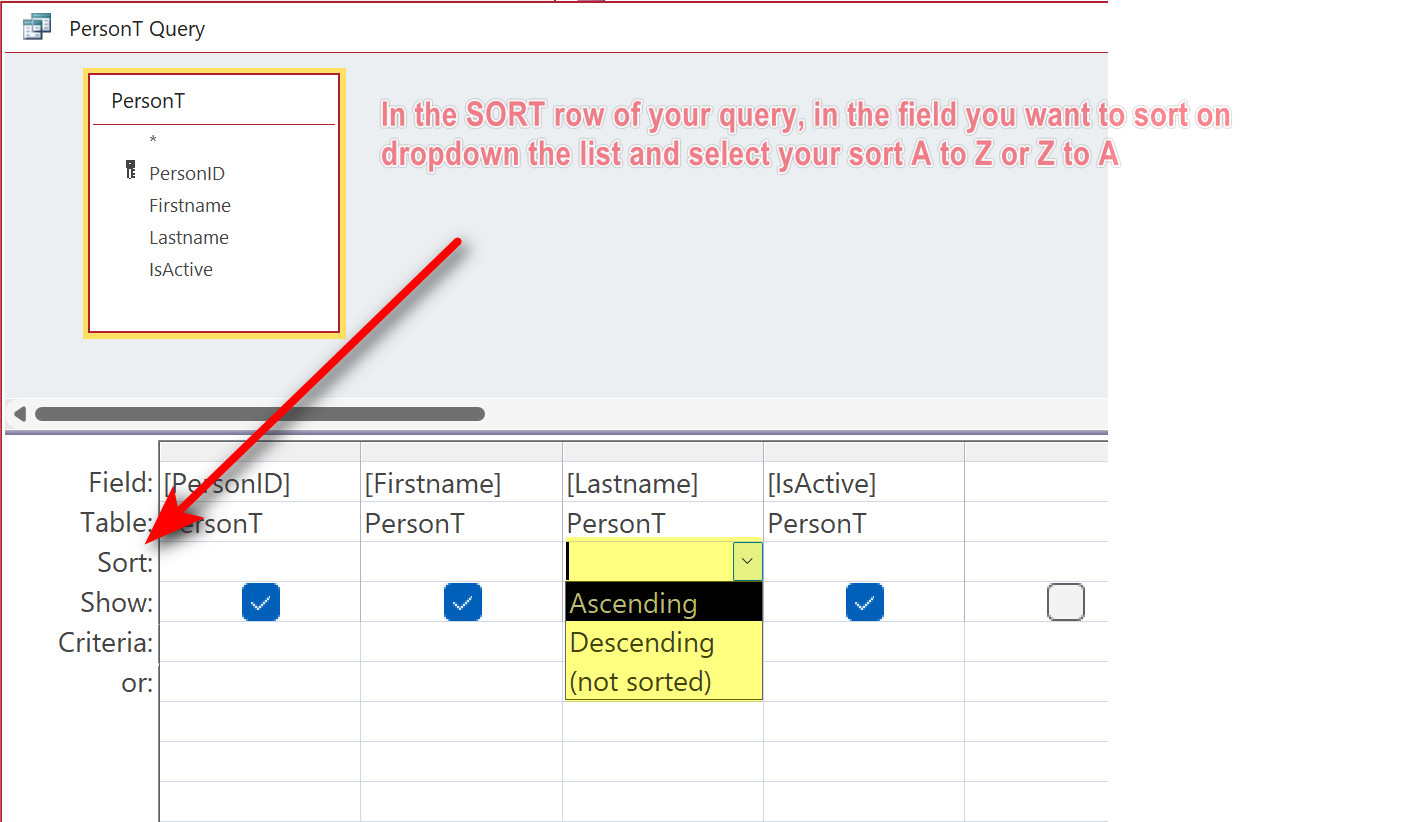
Also, put the sort that you want in the query.

HTH  John
Lee Shastid OP  @Reply  
    
3 years ago
So what do you mean put the sort in the query? Can you give me an example?
Lee Shastid OP  @Reply  
    
3 years ago
under the record Number i use >=101 and <=138 and it does the same thing
John Davy  @Reply  
         
3 years ago

John Davy  @Reply  
         
3 years ago
Hi Lee
I made a simple query and did a screen clip for you

HTH   John
Lee Shastid OP  @Reply  
    
3 years ago
Thank you very much for your help. This was my first ever DB so I am learning. So in saying that I must have corrupted the data or did something quirky. The DB is so small at this point I just started over. I am manually putting the data back in so as not to cut and paste or import it in. That way I know it is not corrupt. If I still have the same issue when I get it back up and running, well I dont know what I will do. LOL. Thank you very much for all the help.
Scott Axton  @Reply  
        
3 years ago
It seems to me that you didn't watch the Access Beginner 1.
These questions and more are covered there.

You really need to get the basics down first before diving into the deep end.  One would never be able to write a Magna Carta without first learning the ABCs.
If you did watch it go back and watch it again.  You must have missed a thing or two.
Lee Shastid OP  @Reply  
    
3 years ago
Well Scott you are incorrect. I have watched it 2 times and few segments on certain areas. Sometimes it is just hard for someone that is not deeply into computers and Databases to wrap all things together. But that is why there are forums I thought at least. To the ones that have provided  help. Thank you and it is appreciated.

This thread is now CLOSED. If you wish to comment, start a NEW discussion in Access Forum.
 

Next Unseen

 
New Feature: Comment Live View


The following is a paid advertisement
Computer Learning Zone is not responsible for any content shown or offers made by these ads.
 

Learn
 
Access - index
Excel - index
Word - index
Windows - index
PowerPoint - index
Photoshop - index
Visual Basic - index
ASP - index
Seminars
More...
Customers
 
Login
My Account
My Courses
Lost Password
Memberships
Student Databases
Change Email
Info
 
Latest News
New Releases
User Forums
Topic Glossary
Tips & Tricks
Search The Site
Code Vault
Collapse Menus
Help
 
Customer Support
Web Site Tour
FAQs
TechHelp
Consulting Services
About
 
Background
Testimonials
Jobs
Affiliate Program
Richard Rost
Free Lessons
Mailing List
PCResale.NET
Order
 
Video Tutorials
Handbooks
Memberships
Learning Connection
Idiot's Guide to Excel
Volume Discounts
Payment Info
Shipping
Terms of Sale
Contact
 
Contact Info
Support Policy
Mailing Address
Phone Number
Fax Number
Course Survey
Email Richard
[email protected]
Blog RSS Feed    YouTube Channel

LinkedIn
Copyright 2026 by Computer Learning Zone, Amicron, and Richard Rost. All Rights Reserved. Current Time: 6/22/2026 1:06:40 PM. PLT: 1s