Free Lessons
Courses
Seminars
TechHelp
Fast Tips
Templates
Topic Index
Forum
ABCD
 
Home   Courses   TechHelp   Forums   Help   Contact   Merch   Join   Order   Logon  
 
Back to Access Forum    Comments List
Upload Images   @Reply   Bookmark    Link   Email   Next Unseen 
Hide the X
Giovanni Miranda 
    
3 years ago
I was looking through my saved conversations the other day and ran across one where the user wanted to "MAKE" his database so that his users would have to use the buttons created for the form to EXIT without closing the database.

I unfortunately deleted that post and was wondering if someone could re-direct me to it so I could implement it into mine as well.  It had something to do about being able to hide the "X" at the top corner of the window?

Any help would be greatly appreciated.
Giovanni Miranda OP  @Reply  
    
3 years ago
That's okay, I've found it...
Kevin Robertson  @Reply  
          
3 years ago
Is it any of these videos?

Prevent Close
On Unload
Prevent Shutdown
Giovanni Miranda OP  @Reply  
    
3 years ago
Thanks Kevin,

Could you answer this question for me too?

"Well, I've done this with my Main Form as well and all works fine, but...when I'm on my Main Form and I click on the top border so I can go into design view it puts up the Warning message.  I've tried to use the design button on the very top menu as well as the design button at the lower right of the form as well and it still gives me that message.  But, if I do click on "Yes" it does take me to the Design Form.  I've got the code the same as what was shown on the video, any suggetions or advice on why I'm getting that Warning message when I try to get into Design View?  It also happens when I'm coming out of Datasheet View."

Thanks.
Kevin Robertson  @Reply  
          
3 years ago
What video?
What warning message?
Giovanni Miranda OP  @Reply  
    
3 years ago
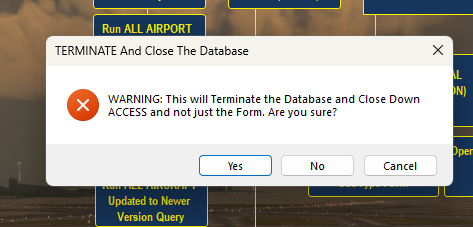
Prevent Shutdown using the On Unload Event Procedure, this is the Warning msg I get when I'm trying to get into the Design View from the Main Menu.  I thought that this was only suppose to come on when I tried to close the database accidentally so the user would know not to shutdown the database, code included with the warning msg screenshot.
Giovanni Miranda OP  @Reply  
    
3 years ago

Giovanni Miranda OP  @Reply  
    
3 years ago

Kevin Robertson  @Reply  
          
3 years ago
As far as I know there is no way to prevent this (I tried for about 30 minutes). As soon as you click the 'X' to close the Application the Unload event fires so you can't detect if the view has changed to Design View.

You can verify this by adding MsgBox Me.CurrentView to the top of the Unload event.
No matter what you do the value will be 1 (Form View).

This shouldn't be an issue though as your end users should never have to go into Design View anyway so won't have this problem.

If anyone knows a way around this please let us know.
Giovanni Miranda OP  @Reply  
    
3 years ago
I appreciate your response back Kevin, what is dissmaying is that Richard never goes through this little mishap in his video.  Is there any way you can contact him to see if he knows of a way to get around this?  Even though my users won't be going into Design View it's just frustrating having to deal with this every time I have to modify the design in one way or another.  Maybe he might have some insight you and I haven't thought of yet.

This thread is now CLOSED. If you wish to comment, start a NEW discussion in Access Forum.
 

Next Unseen

 
New Feature: Comment Live View


The following is a paid advertisement
Computer Learning Zone is not responsible for any content shown or offers made by these ads.
 

Learn
 
Access - index
Excel - index
Word - index
Windows - index
PowerPoint - index
Photoshop - index
Visual Basic - index
ASP - index
Seminars
More...
Customers
 
Login
My Account
My Courses
Lost Password
Memberships
Student Databases
Change Email
Info
 
Latest News
New Releases
User Forums
Topic Glossary
Tips & Tricks
Search The Site
Code Vault
Collapse Menus
Help
 
Customer Support
Web Site Tour
FAQs
TechHelp
Consulting Services
About
 
Background
Testimonials
Jobs
Affiliate Program
Richard Rost
Free Lessons
Mailing List
PCResale.NET
Order
 
Video Tutorials
Handbooks
Memberships
Learning Connection
Idiot's Guide to Excel
Volume Discounts
Payment Info
Shipping
Terms of Sale
Contact
 
Contact Info
Support Policy
Mailing Address
Phone Number
Fax Number
Course Survey
Email Richard
[email protected]
Blog RSS Feed    YouTube Channel

LinkedIn
Copyright 2026 by Computer Learning Zone, Amicron, and Richard Rost. All Rights Reserved. Current Time: 5/6/2026 10:18:42 PM. PLT: 0s