Free Lessons
Courses
Seminars
TechHelp
Fast Tips
Templates
Topic Index
Forum
ABCD
 
Home   Courses   TechHelp   Forums   Help   Contact   Merch   Join   Order   Logon  
 
Back to Access Forum    Comments List
Upload Images   @Reply   Bookmark    Link   Email   Next Unseen 
No records found message
Kevin Rackliff 
      
3 years ago
I am using a Select Query for users to input a value to search for, then a form would open to display the results. If no records are found the form opens with no records. I would like the message "No records found" to be displayed if the query returns no records and I don't want the form to open. I have watched the video that does something similar to avoid printing blank invoices from a report but this is a bit different. Any pointers on which videos deal with no records from a query would be appreciated. Also any quick solution to have the query display the message would be appreciated. Thanks
Scott Axton  @Reply  
        
3 years ago
I'm assuming that you are referring to the No Data video as not helping.  Yeah that is only for Reports.  Unfortunately there isn't an equivalent in forms or queries. You have to write your own.

To get you started check out the Search, Open, Add video.  Also take a look at the RecordCount video.

This is going to take some VBA programming but between the two videos there is enough to get you started.

I don't see that you have gone through any of the courses so I don't know what your experience level is.  You didn't mention anything on how you are searching the records so I cant give any guidance on how to integrate this into your db.
Sami Shamma  @Reply  
             
3 years ago
Hi Kevin
On several of my databases, I have something similar to what you're looking for. However, I approached it slightly differently.
I have a form with a header section and a detail section. In the header section, I have my search box in which of the user enters the search text.
The detailed section will then display only the results from the query.
If this works for you, I will send you screenshots and the code behind it.
Checkout the video on 'Search Form 2.0'

Link:  

Search Form 2.0
Kevin Rackliff OP  @Reply  
      
3 years ago
Thanks for the responses, I will check out the videos and post if I still need help.
Kevin Rackliff OP  @Reply  
      
3 years ago
Hi, I have watched the videos and I think I have a basic understanding. The videos deal with variables that are integers, like a phone number, but my data type is Text (mix of letters and numbers). Would a String be the data type for my variable? If so I will watch the Intro to VBA  video. Thanks
Kevin Robertson  @Reply  
          
3 years ago
Yes. A String variable is what you need for text.

Variables
Kevin Rackliff OP  @Reply  
      
3 years ago
Hi Sami, I have looked at various ways to try and get the result I am looking for, using a string, but as the search is driven by a query I am going around in circles. Your approach seems to be the simplest as I just want my users to enter data to be searched and using a query seems to be the way to go. I would be grateful if you would share the screenshots you offered. Thanks in advance
Sami Shamma  @Reply  
             
3 years ago

Sami Shamma  @Reply  
             
3 years ago
Hi Kevin

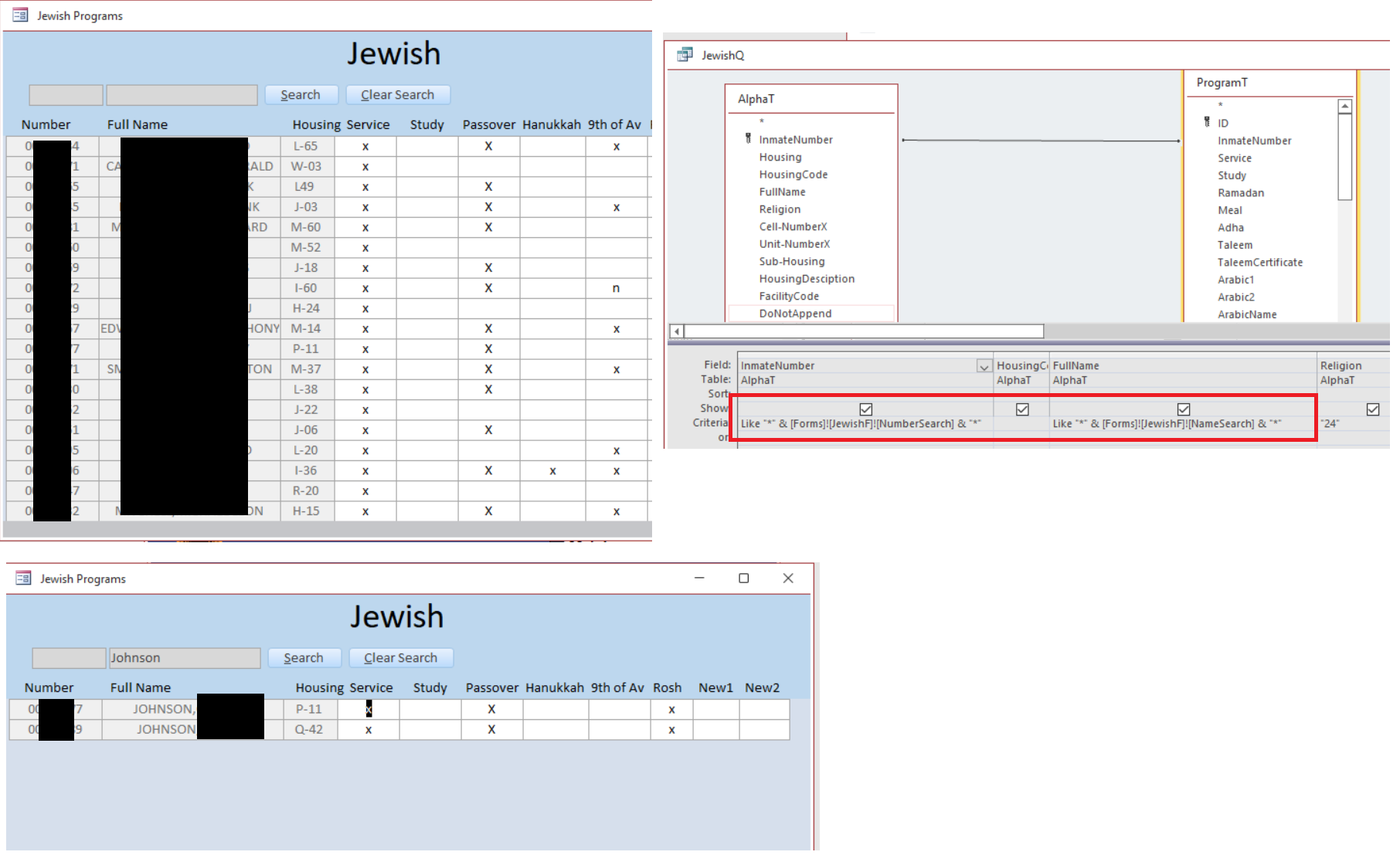
I sent you three screen shots, the first one shows the form when it opens. the record sours is the query to the right of it. the bottom shot shows it working.

Sorry I had to redact the dada for privacy reasons.

I learned all of this from Richard's videos.

Good luck. If you need more help don't hesitate to ask

Sami
Kevin Rackliff OP  @Reply  
      
3 years ago
Thanks Sami. What you have shared in your query is similar to what I have in my VBA for selecting from a list, per Richards video. I think between your query and my VBA I should be able to figure this out. Thanks again
Sami Shamma  @Reply  
             
3 years ago
Good luck

This thread is now CLOSED. If you wish to comment, start a NEW discussion in Access Forum.
 

Next Unseen

 
New Feature: Comment Live View


The following is a paid advertisement
Computer Learning Zone is not responsible for any content shown or offers made by these ads.
 

Learn
 
Access - index
Excel - index
Word - index
Windows - index
PowerPoint - index
Photoshop - index
Visual Basic - index
ASP - index
Seminars
More...
Customers
 
Login
My Account
My Courses
Lost Password
Memberships
Student Databases
Change Email
Info
 
Latest News
New Releases
User Forums
Topic Glossary
Tips & Tricks
Search The Site
Code Vault
Collapse Menus
Help
 
Customer Support
Web Site Tour
FAQs
TechHelp
Consulting Services
About
 
Background
Testimonials
Jobs
Affiliate Program
Richard Rost
Free Lessons
Mailing List
PCResale.NET
Order
 
Video Tutorials
Handbooks
Memberships
Learning Connection
Idiot's Guide to Excel
Volume Discounts
Payment Info
Shipping
Terms of Sale
Contact
 
Contact Info
Support Policy
Mailing Address
Phone Number
Fax Number
Course Survey
Email Richard
[email protected]
Blog RSS Feed    YouTube Channel

LinkedIn
Copyright 2026 by Computer Learning Zone, Amicron, and Richard Rost. All Rights Reserved. Current Time: 5/6/2026 4:18:15 AM. PLT: 1s