Free Lessons
Courses
Seminars
TechHelp
Fast Tips
Templates
Topic Index
Forum
ABCD
 
Home   Courses   TechHelp   Forums   Help   Contact   Merch   Join   Order   Logon  
 
Back to Access Forum    Comments List
Upload Images   @Reply   Bookmark    Link   Email   Next Unseen 
Combo box for multiple fields
Juan Iturriaga 
    
3 years ago
Hi, I am in the process of developing database to manage my finances (bank, credit cards, etc.), and it is all working well.  My registers have a Payee Combo Box that get payees from a Payee Table, same for my Categories (Expense Accts).  I have been updating data imported from my bank and credit card companies and I am near being up-to-date and then I thought that I should have created a Payee Combo Box that populates also the Category (Expense Acct).  How can I make that change without destroying all the Categories that I have already set correctly all these days?  Please help!
Sami Shamma  @Reply  
             
3 years ago
Hi
Your requirements are not clear. Can you share a screenshot of where you want the combo box and the underline table for your category?
Richard Rost  @Reply  
           
3 years ago
Yeah, how is everything set up? Are these related tables?
Juan Iturriaga OP  @Reply  
    
3 years ago

Juan Iturriaga OP  @Reply  
    
3 years ago

Juan Iturriaga OP  @Reply  
    
3 years ago

Juan Iturriaga OP  @Reply  
    
3 years ago

Juan Iturriaga OP  @Reply  
    
3 years ago
Hi gentlemen, thank you for getting back with me.  

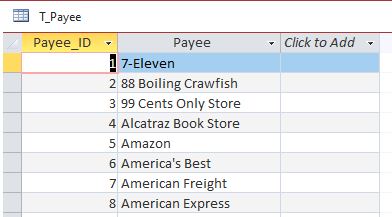
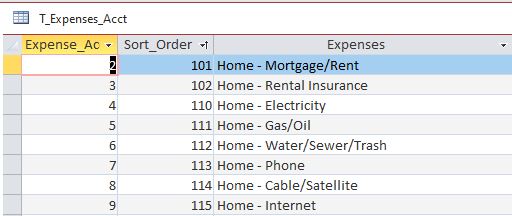
So, I have a table "T_Transactions", where all transactions go into.  A table "T_Payee", where payees are listed and selected for new transactions, and a table "T_Expenses_Acct", where expense accts. (or categories) are listed and selected for new transactions.  

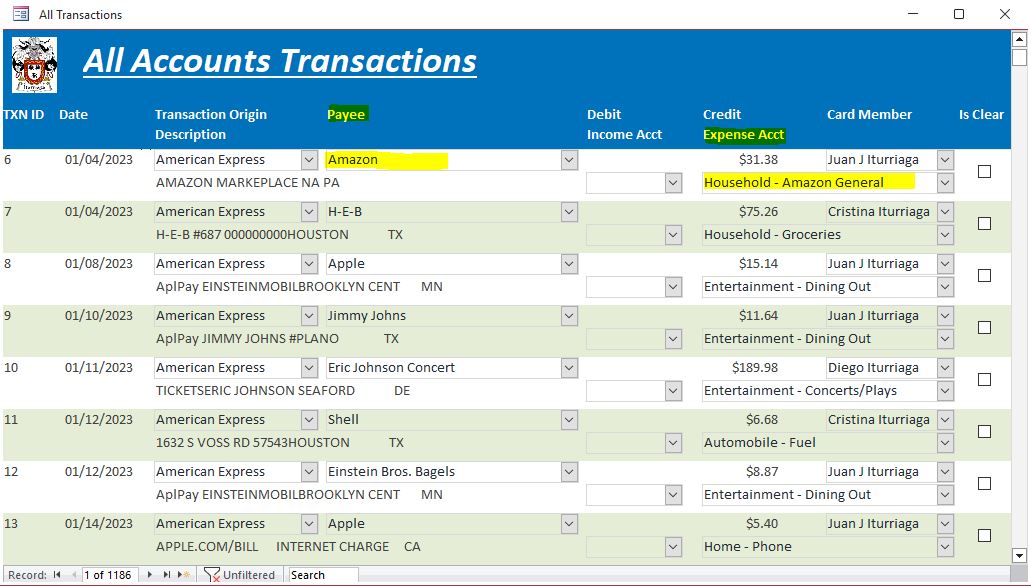
I downloaded transactions from my bank and credit card comp. websites and formatted in Excel to import into my Access database.  After being almost caught-up with the selection of payees and corresponding expense acct on all the transactions, I thought that it would have been nice to select the Payee and have the expense acct. automatically populated, essentially use a Combo Box that uses VBA programming to do it.  I tried it in a test form and it works, but can't figure out how to implement that in my existing "F_Transactions" form without affecting the payees and corresponding expense acct already in each transaction.

I have uploaded screenshots of the 3 tables and my form.  I'm having tons and tons of fun setting up different Access databases, my first ones after YEARS of doing EVERYTNING in Excel.

Your guidance is greatly appreciated.  

Best regards,

Juan
Sami Shamma  @Reply  
             
3 years ago
Let me understand you correctly. You are saying there is a relationship between Payee and Expense accounts? that the payee should determine the Expense account?

you said:
" it would have been nice to select the Payee and have the expense acct. automatically populated"

please clarify

This thread is now CLOSED. If you wish to comment, start a NEW discussion in Access Forum.
 

Next Unseen

 
New Feature: Comment Live View


The following is a paid advertisement
Computer Learning Zone is not responsible for any content shown or offers made by these ads.
 

Learn
 
Access - index
Excel - index
Word - index
Windows - index
PowerPoint - index
Photoshop - index
Visual Basic - index
ASP - index
Seminars
More...
Customers
 
Login
My Account
My Courses
Lost Password
Memberships
Student Databases
Change Email
Info
 
Latest News
New Releases
User Forums
Topic Glossary
Tips & Tricks
Search The Site
Code Vault
Collapse Menus
Help
 
Customer Support
Web Site Tour
FAQs
TechHelp
Consulting Services
About
 
Background
Testimonials
Jobs
Affiliate Program
Richard Rost
Free Lessons
Mailing List
PCResale.NET
Order
 
Video Tutorials
Handbooks
Memberships
Learning Connection
Idiot's Guide to Excel
Volume Discounts
Payment Info
Shipping
Terms of Sale
Contact
 
Contact Info
Support Policy
Mailing Address
Phone Number
Fax Number
Course Survey
Email Richard
[email protected]
Blog RSS Feed    YouTube Channel

LinkedIn
Copyright 2026 by Computer Learning Zone, Amicron, and Richard Rost. All Rights Reserved. Current Time: 5/7/2026 8:55:02 AM. PLT: 0s