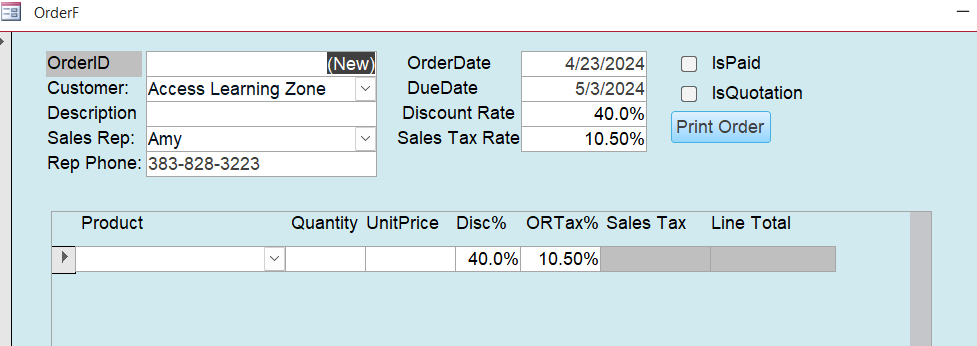
Just got down to the end of the lesson and the first glitch I've had. When it comes to making the phone number appear on the order form I enter in the formula and change what need to be but when I save and reopen I get this in the box: #Name? No idea why.This is the formula I used and it appears to look correct: =DLOOKUP(WorkPhone","EmployeeT","EmployeeID=" & ([SalesRepCombo]). Ken
Kevin Robertson
@Reply 2 years ago
You are missing the opening quote for WorkPhone and you have an extra parenthesis before SalesRepCombo.
Like Kevin pointed out, the syntax is extremely important and it seems at this point like it's tough to remember where to put everything. But just keep practicing, and eventually you'll get it. Each of those items, like WorkPhone, EmployeeT, are all discrete strings, so each one has to have quotes around it. And you always have to make sure that you have a matching opening and closing quote and parentheses. Practice makes perfect.
Kenneth WykoffOP
@Reply 2 years ago
Thanks Gentlemen,
I pasted this in: =DLookUp("WorkPhone","EmployeeT","EmployeeID=" & [SalesRepCombo]) and it still comes up with the same thing. I checked the EmployeeT to see if anything looked wrong in that but it appears to be ok too. In the OrderT there is a column labeled SalesRepID but it is all empty. Did I miss something again?
Guys again my apologies, I was sure I changed the SalesRepID to Combo but apparently, I missed it or it never saved. Once it was changed it now all works. Again thanks for your total patience with me. After a while everything starts looking the same and I do get a bit confused. Again thank you all. Ken
If you are a Visitor, go ahead and post your reply as a
new comment, and we'll move it here for you
once it's approved. Be sure to use the same name and email address.
This thread is now CLOSED. If you wish to comment, start a NEW discussion in
Access Expert 10.