Free Lessons
Courses
Seminars
TechHelp
Fast Tips
Templates
Topic Index
Forum
ABCD
 
Home   Courses   TechHelp   Forums   Help   Contact   Merch   Join   Order   Logon  
 
Back to Access Forum    Comments List
Upload Images   @Reply   Bookmark    Link   Email   Next Unseen 
Bottom of text boxes cut off
Kyle Rapp 
    
2 years ago
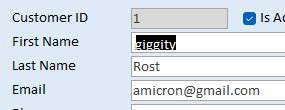
Hey Guys, I've got several text boxes on a form, where the bottom of the the letters get cut off.  For example, whenever there is a lowercase g, the bottom of the g is missing.  The text box is definitely tall enough.   Even if I make it taller and set the top and bottom padding to 0, it still cuts off the bottoms of the letters. (even in a short text field like an email address field)  Anyone run into this before?

Thanks,
Kyle
Kyle Rapp OP  @Reply  
    
2 years ago
Attaching a screenshot.  You can see that the textbox is plenty tall, but the bottoms of letters g,p,j and y are cut off.  In fact, the j looks like an i and even the bottom of @ is cutoff.
Kyle Rapp OP  @Reply  
    
2 years ago

Richard Rost  @Reply  
          
2 years ago
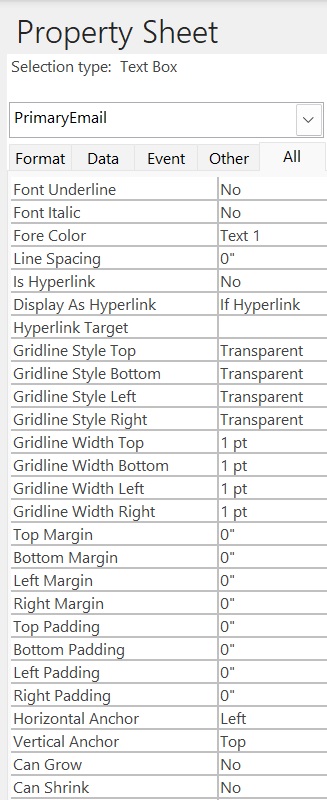
Check the padding and the MARGIN settings. You usually want 0 margins and the default is 0.0208 for padding.
Richard Rost  @Reply  
          
2 years ago
You can see what even a tiny .02 margin can do...
Richard Rost  @Reply  
          
2 years ago

Kyle Rapp OP  @Reply  
    
2 years ago
Unfortunately, setting the margins to 0 didn't fix it either.
Kyle Rapp OP  @Reply  
    
2 years ago

Kevin Robertson  @Reply  
          
2 years ago
What font are you using? If you change the font does the problem still occur?
Do you have the latest Office updates?
Richard Rost  @Reply  
          
2 years ago
Yeah, that's the next thing I'd check - the font.
Kyle Rapp OP  @Reply  
    
2 years ago
Bingo!  Was using the default, which was Aptos (Detail) size 11.  Changed to Calibri and the problem is gone.  With Calibri I was able to go all the way up to 14 and still fit.   I'm guessing Aptos Detail has some style assigned to it that adds spacing inside the format of the font.  That's all I can think.  Case closed...thanks guys!
Richard Rost  @Reply  
          
2 years ago
I'm not a big fan of that Aptos font.

Kevin for the win, again! :)
Thomas Gonder  @Reply  
      
2 years ago
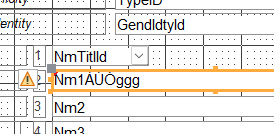
I had a similar problem with the tildes on capital letters needed for Spanish (and other languages). It happened with Ariel and other fonts. The solution for me was to add a 0,051 Top Margin, all the rest to 0.
Thomas Gonder  @Reply  
      
2 years ago

Thomas Gonder  @Reply  
      
2 years ago
Just another hint learned the hard way. If you enter a Top Margin property of 0,051 (non USA decimal) then Access will convert it to ,053. There seems to be some rounding going on as best as I can tell. So, enter ,050 and it will become ,051. Kinda a pain when you copy and paste, you gotta pay attention.

This thread is now CLOSED. If you wish to comment, start a NEW discussion in Access Forum.
 

Next Unseen

 
New Feature: Comment Live View


The following is a paid advertisement
Computer Learning Zone is not responsible for any content shown or offers made by these ads.
 

Learn
 
Access - index
Excel - index
Word - index
Windows - index
PowerPoint - index
Photoshop - index
Visual Basic - index
ASP - index
Seminars
More...
Customers
 
Login
My Account
My Courses
Lost Password
Memberships
Student Databases
Change Email
Info
 
Latest News
New Releases
User Forums
Topic Glossary
Tips & Tricks
Search The Site
Code Vault
Collapse Menus
Help
 
Customer Support
Web Site Tour
FAQs
TechHelp
Consulting Services
About
 
Background
Testimonials
Jobs
Affiliate Program
Richard Rost
Free Lessons
Mailing List
PCResale.NET
Order
 
Video Tutorials
Handbooks
Memberships
Learning Connection
Idiot's Guide to Excel
Volume Discounts
Payment Info
Shipping
Terms of Sale
Contact
 
Contact Info
Support Policy
Mailing Address
Phone Number
Fax Number
Course Survey
Email Richard
[email protected]
Blog RSS Feed    YouTube Channel

LinkedIn
Copyright 2026 by Computer Learning Zone, Amicron, and Richard Rost. All Rights Reserved. Current Time: 5/6/2026 3:50:35 PM. PLT: 1s