Free Lessons
Courses
Seminars
TechHelp
Fast Tips
Templates
Topic Index
Forum
ABCD
 
Home   Courses   TechHelp   Forums   Help   Contact   Merch   Join   Order   Logon  
 
Back to Access Developer Forum    Comments List
Upload Images   @Reply   Bookmark    Link   Email   Next Unseen 
Where is all the VBA
Peter van Soest 
    
2 years ago
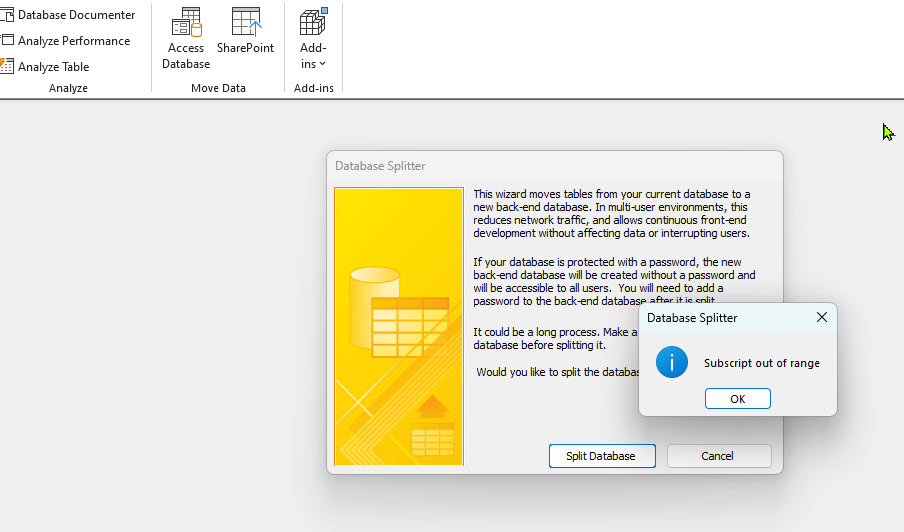
In trying to split the database to front-/ backend I allways get 'Subscript out of range' error.  Ik know dat one of the possible solutions is debugging the used VBA code is. And thats where I get confused: where do I find all used code? I know I can find it when opening a form that has VBA attached trough a button or event, but isn't there an way I kan list / debug all the used code in the database?
Franklin Sellers  @Reply  
    
2 years ago
You shouldn't need any VBA to split a database; all you're doing is linking the tables in from a repository database into a desktop version.

However, there's additional VBA in modules. If you can open the VBA editor, you should see the modules listed at the bottom of the Project window on the left.

Click the Debug button on the toolbar and then click on Compile. The database will jump to the first code error it comes across, including any in a module.
Adam Schwanz  @Reply  
           
2 years ago
John Davy  @Reply  
         
2 years ago
Hi Peter
Try Rick's Tech Help Video  https://599cd.com/blog/display-article.asp?ID=1373

John
Thomas Gonder  @Reply  
      
2 years ago
@ Peter Are you saying you get a "Subscript out of range error" when splitting the database? Or after when you try to run you front end application?

Range errors are normally Run Time Errors (RTE) and happen at run time, not at compile. Depending on the error handling in your procedures, you should get a debug button which will take you to the problem code line. That said, I have had times where RTEs occur and just give a message without a debug option (if I recall correctly), in which case, you want to set a breakpoint at the start of your first suspect procedure, and just F8 through each line until you get to the RTE.

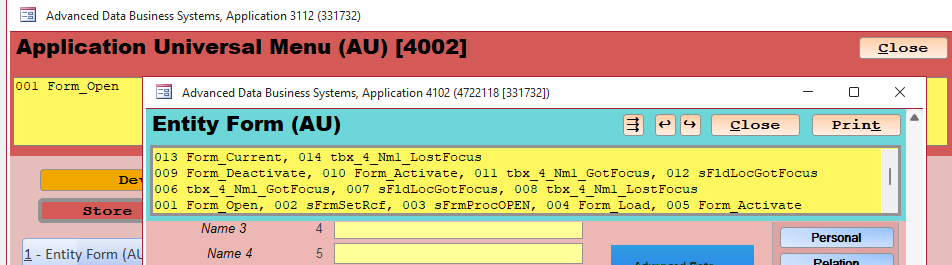
I've found having this kind of status display (example in next post) in all my form/{report} procedures invaluable during development, and when getting a bug report from a user.
Thomas Gonder  @Reply  
      
2 years ago

Peter van Soest OP  @Reply  
    
2 years ago
@Thomas, yes I get the message when splitting the database with the tool in Access.
Peter van Soest OP  @Reply  
    
2 years ago

Kevin Robertson  @Reply  
          
2 years ago
Are there any errors in your code?
Debug -- Compile

Thread: Subscript out of range
Thomas Gonder  @Reply  
      
2 years ago
@ Kevin R. I'm curious, why do you think a code bug would cause the Database Splitter tool to fail? I can't imagine why Access would care when the idea is just to move objects to different db files.

@ Peter S. I've seen some strange things happening recently with MS Access upgrades. Has one been done on your machine recently? Are you able to decompile and recompile the original .accdb file before it's split? Just to test Kevin's suspicion.
Adam Schwanz  @Reply  
           
2 years ago
@Thomas I've seen just about everything break, even splitting the database, when the compile is broken.

At any rate, compiling is a 3 second fix so no reason not to do that :).
Peter van Soest OP  @Reply  
    
2 years ago
@Kevin: the answer I'm am (still) looking for with this topic, is there a central place in the database were I can debug--compile ALL the written VBA code used in the database. As I see it, I'll have to check the VBA on each separate form.

@Thomas: I don't have a subscription or updates, I have MS Office proffesional plus 2021

Adam Schwanz  @Reply  
           
2 years ago
Peter, debug->compile does compile the entire database. It will stop if it finds a bug on any form, then you fix that bug and compile again, it may find another bug on the same form, or on another form, or complete with no errors. You just keep pressing it until it finds no errors.
Joe Holland  @Reply  
      
2 years ago
I open the code in my databases by pressing Alt F11 with the database open (it does not matter where or what you are open to). Then choose Debug on the menu and Compile to compile all the code in the database.
Thomas Gonder  @Reply  
      
2 years ago
@ Peter, I also have Office 2021, and updates seem to run even without my initiating them from the File>Account>Update Options>Update Now. How do I know this? About a year ago, I wrote down the Build number after an Access update, then checked it a few months later when doing another manual update, and they weren't the same.

@ Joe I suspect, no real proof other than observation, that doing a Debug>Compile will only do procedures that Access thinks have changed. Why do I think this? After doing a decompile, the compile takes a second or two, longer it would seem than without the decompile.  Also, I've had odd bugs that occur after a compile or new code, that magically disappear after doing a decompile, even without doing a post compile.
Thomas Gonder  @Reply  
      
2 years ago
@ Peter, Adam S. previously provided a link (in blue word compile) in this thread that shows how to decompile and recompile.
Richard Rost  @Reply  
           
2 years ago
If a simple compile doesn't show any errors, run down the Troubleshooter.

This thread is now CLOSED. If you wish to comment, start a NEW discussion in Access Developer Forum.
 

Next Unseen

 
New Feature: Comment Live View


The following is a paid advertisement
Computer Learning Zone is not responsible for any content shown or offers made by these ads.
 

Learn
 
Access - index
Excel - index
Word - index
Windows - index
PowerPoint - index
Photoshop - index
Visual Basic - index
ASP - index
Seminars
More...
Customers
 
Login
My Account
My Courses
Lost Password
Memberships
Student Databases
Change Email
Info
 
Latest News
New Releases
User Forums
Topic Glossary
Tips & Tricks
Search The Site
Code Vault
Collapse Menus
Help
 
Customer Support
Web Site Tour
FAQs
TechHelp
Consulting Services
About
 
Background
Testimonials
Jobs
Affiliate Program
Richard Rost
Free Lessons
Mailing List
PCResale.NET
Order
 
Video Tutorials
Handbooks
Memberships
Learning Connection
Idiot's Guide to Excel
Volume Discounts
Payment Info
Shipping
Terms of Sale
Contact
 
Contact Info
Support Policy
Mailing Address
Phone Number
Fax Number
Course Survey
Email Richard
[email protected]
Blog RSS Feed    YouTube Channel

LinkedIn
Copyright 2026 by Computer Learning Zone, Amicron, and Richard Rost. All Rights Reserved. Current Time: 6/27/2026 12:04:21 AM. PLT: 1s