Free Lessons
Courses
Seminars
TechHelp
Fast Tips
Templates
Topic Index
Forum
ABCD
 
Home   Courses   TechHelp   Forums   Help   Contact   Merch   Join   Order   Logon  
 
Back to Access Forum    Comments List
Upload Images   @Reply   Bookmark    Link   Email   Next Unseen 
Unable to create new record
Timothy Bariteau 
     
2 years ago
I work at a ministry that provides housing for people. My database has a table called ResidentT which contains all of our clients personal info. I also have a table called ResidentArchiveT. When a client moves out (or moves back in), with one click of a button on the Main Menu, I can switch all of their info from one table to the other, and vice versa. This keeps our main ResidentT from getting too cumbersome for basic day-to-day operations, as combo boxes, reports and lists are not populated with people no longer living here. Yet, we can keep their info in the archive table, in case they come back to live with us at some point.

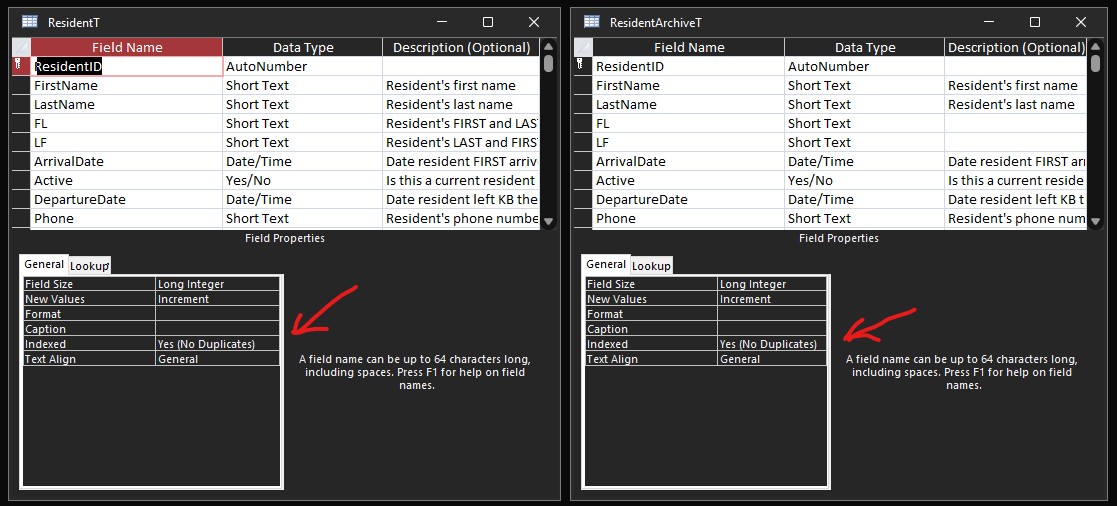
In both tables, each Resident has their own unique ResidentID. It is the primary key, an AutoNumber, and is set to "Yes (No Duplicates)" on both tables.

Everything has worked fine until this past Friday. I do not know what I did wrong, but for some reason I am now unable to create a NEW AutoNumber on the ResidentT. When I create a new record on the ResidentT, instead of getting a NEW ResidentID, it uses an already claimed ResidentID AutoNumber (from the ResidentArchiveT).

What did I do wrong? How do I fix this?

Thank you for your help!
Timothy Bariteau OP  @Reply  
     
2 years ago
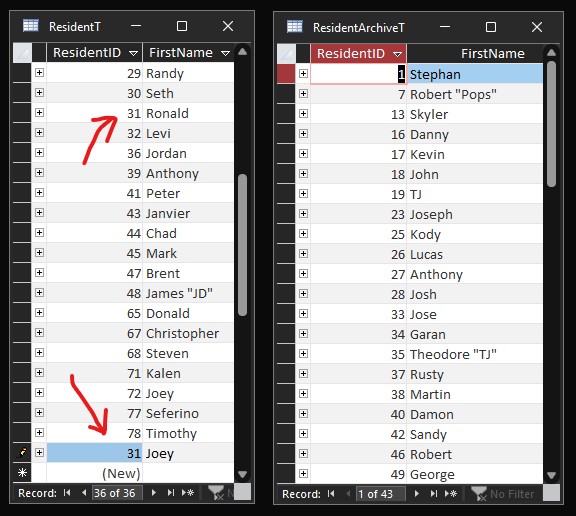
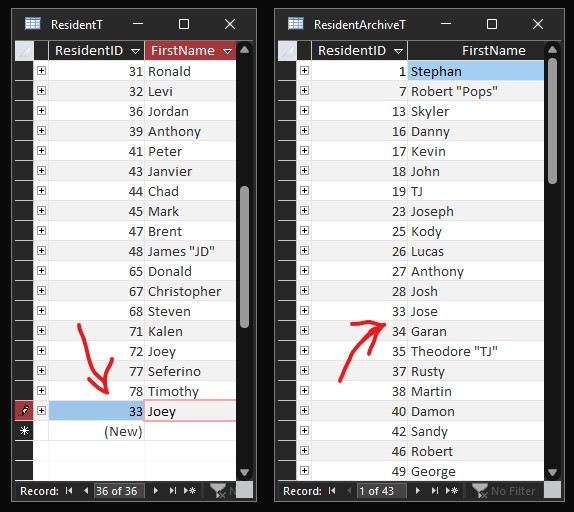
Oh. Wonderful. I went to get a screenshot and discovered it is now DUPLICATING the AutoNumber from it's own table now, too! Even though the ResidentID field's indexing is set to "Yes (No Duplicates)".  Basically it is going up sequentially, one AutoNumber every time I try to make a new record.  So, last Friday when this issue started, instead of giving me the correct NEW AutoNumber, which should have been 79, it gave me 13 (which was on the ResidentArchiveT), and every time since then as I've tried to solve this it gives me the next number...so now I'm up to 31, which is a duplicate on the ResidentT, the same table I'm trying to create the new record on.

I'm so confused!

I'll upload 2 screenshots to show you the duplicate AutoNumber on both tables.
Timothy Bariteau OP  @Reply  
     
2 years ago

Timothy Bariteau OP  @Reply  
     
2 years ago

Timothy Bariteau OP  @Reply  
     
2 years ago

Kevin Robertson  @Reply  
          
2 years ago
There are no duplicates in the second image. They are 2 different tables.
Can we see the ResidentT in Design View?
Kevin Robertson  @Reply  
          
2 years ago
Have you tried a Compact and Repair?
Are the Relationships set up correctly (in the Relationships widow)?
What happens if you delete these Relationships?
Try creating a new database and import all your objects to this database.

Try running through the Troubleshooter
Alex Hedley  @Reply  
           
2 years ago
ResidentT has 32 then 36.
Presume 33 (34, 35) was deleted when archiving.

Do you compact and repair?
Alex Hedley  @Reply  
           
2 years ago
Alex Hedley  @Reply  
           
2 years ago
Could you set an IsActive flag instead then just have Queries to show the two lists?
Alex Hedley  @Reply  
           
2 years ago
ALTER TABLE <Table> ALTER COLUMN <ID_Field> COUNTER(1,1);
Kevin Yip  @Reply  
     
2 years ago
One way to cause "duplicate autonumbers" is to delete a row and then append a new row with an old autonumber.  Suppose you have a table with autonumbers 1, 2, 3, 4, 5, etc., and you delete row 1.  Then you run an append query (INSERT INTO Table1 (ID) SELECT 1) to add row 1 again.  That "1" will become the new "seed" for the autonumber field.  And the next row you add WILL use autonumber 2, which already exists in your table, thus a duplicate.  Timothy, you said you've been moving data between the two tables; so perhaps something like the aforementioned scenario has occurred in one of those times.
Timothy Bariteau OP  @Reply  
     
2 years ago
Ok, after doing a compact and repair, it seems to be working again.  Maybe that is all that was needed.  I know I don't do one very often, but our database is still really small, so I did not realize it would need that yet, but I guess so.  Hopefully, that is all it was and it will work fine now.  And I'll be sure to do compact and repair regularly from now on.  Thanks for the advice and help guys!

This thread is now CLOSED. If you wish to comment, start a NEW discussion in Access Forum.
 

Next Unseen

 
New Feature: Comment Live View


The following is a paid advertisement
Computer Learning Zone is not responsible for any content shown or offers made by these ads.
 

Learn
 
Access - index
Excel - index
Word - index
Windows - index
PowerPoint - index
Photoshop - index
Visual Basic - index
ASP - index
Seminars
More...
Customers
 
Login
My Account
My Courses
Lost Password
Memberships
Student Databases
Change Email
Info
 
Latest News
New Releases
User Forums
Topic Glossary
Tips & Tricks
Search The Site
Code Vault
Collapse Menus
Help
 
Customer Support
Web Site Tour
FAQs
TechHelp
Consulting Services
About
 
Background
Testimonials
Jobs
Affiliate Program
Richard Rost
Free Lessons
Mailing List
PCResale.NET
Order
 
Video Tutorials
Handbooks
Memberships
Learning Connection
Idiot's Guide to Excel
Volume Discounts
Payment Info
Shipping
Terms of Sale
Contact
 
Contact Info
Support Policy
Mailing Address
Phone Number
Fax Number
Course Survey
Email Richard
[email protected]
Blog RSS Feed    YouTube Channel

LinkedIn
Copyright 2026 by Computer Learning Zone, Amicron, and Richard Rost. All Rights Reserved. Current Time: 5/6/2026 4:36:17 AM. PLT: 1s