I have been reviewing the lessons and have come up with a question. When inputting data to an order such as customer addresses, if I change the info on the customer form which changes data in the table it effects all previous invoices for this customer. this is not a good thing sometimes. I would like to find out if there is a way to change table data that would not effect previous orders or invoices.
Kevin Robertson
@Reply 2 years ago
This is one of the instances when you may need to store the address data in multiple locations: the Customer Table AND the Order Table.
Kevin Yip
@Reply 2 years ago
You can set up a one-to-many table for, say, your customer addresses so you can store both old and current addresses. When a customer changes address, you ADD the new address and KEEP the old one, instead of changing the old to the new. Old records that use the old address will stay the same so they won't be affected, while new records will use the new address going forward. This is a variation of Richard's rule "Do not delete anything."
The address table may look something like:
CustID AddrID AddrNote Address
1000 1 Old .......
1000 2 Current .......
1001 1 Old .......
1001 2 Current .......
1002 1 Current .......
Richard Van WagonerOP
@Reply 2 years ago
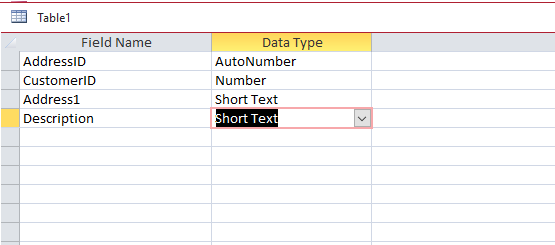
Is this the way the address Table should look?
Richard Van WagonerOP
@Reply 2 years ago
Kevin Yip
@Reply 2 years ago
That is the general idea. Also, you need to have a way to prevent the users from choosing an old and invalid address, obviously.
Richard Van WagonerOP
@Reply 2 years ago
How can this be done (Choosing Correct Address)?
Kevin Yip
@Reply 2 years ago
You can hide all the old addresses in your combo box so that user can't choose them. The combo box's row source could be something like:
SELECT * FROM AddressesT WHERE Description <> "Old" AND CustomerID = ...
This is one of those instances where I would say to definitely copy the customer's address to the order table so that you know what their address was at the time the order was placed or shipped. I cover that in the extended cut for Invoicing.
Richard Van WagonerOP
@Reply 2 years ago
Thanks! This works just fine. I thought about this a few days ago, but couldn't wrap my head around it.
Sorry, only students may add comments.
Click here for more
information on how you can set up an account.
If you are a Visitor, go ahead and post your reply as a
new comment, and we'll move it here for you
once it's approved. Be sure to use the same name and email address.
This thread is now CLOSED. If you wish to comment, start a NEW discussion in
Access Expert 10.