Free Lessons
Courses
Seminars
TechHelp
Fast Tips
Templates
Topic Index
Forum
ABCD
 
Home   Courses   TechHelp   Forums   Help   Contact   Merch   Join   Order   Logon  
 
Back to Access Forum    Comments List
Upload Images   @Reply   Bookmark    Link   Email   Next Unseen 
Database Wont Open 64 Bit Error
Debra Triolo 
     
2 years ago
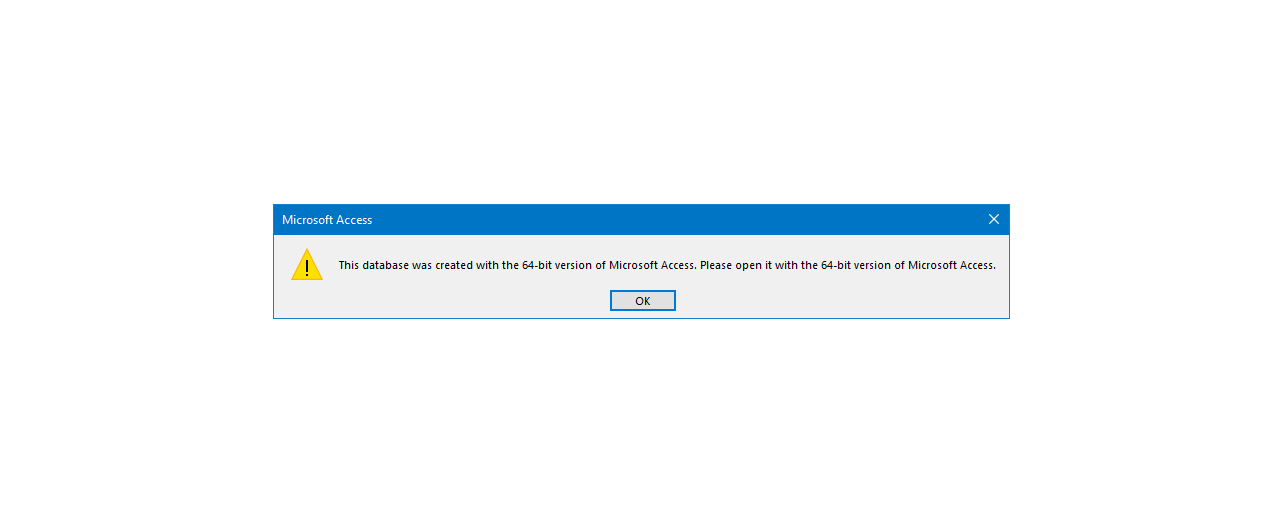
So I rolled out the latest version of my front end to my team this morning. When I went to go into it, it threw up an error stating I was trying to open a file created on a 64 bit version and would not allow the database to open. Some of the other members of my team got the same message, some did not. I did not upgrade my access and it says that my version of access is not supposed to update. I think my company rolled out some sort of update, but not to everyone at once.  What can I do to assist my team members so that they can open it?  If I cannot find a workaround then the entire database is lost. Please help!
Adam Schwanz  @Reply  
           
2 years ago
Can try some steps Troubleshooter.

You can also try to enable everything in your database with PTRSafe
64-Bit Access

I would also try to find out if your company did do some kind of update, although it seems unlikely that they would put some update out that would uninstall/reinstall office as a different bitness.
Debra Triolo OP  @Reply  
     
2 years ago
I will try your suggestions. All I know is at 11PM last night I was running a 32-bit version of access and at 1AM when i created the new front end file- it somehow became a 64 bit version
Debra Triolo OP  @Reply  
     
2 years ago

Debra Triolo OP  @Reply  
     
2 years ago
The error message Richard is talking about in his video is not the one I am getting and I don't think his fix will help with this. I uploaded the error message I am getting....some people are getting it and it says 32 -bit instead of 64 bit.
Alex Hedley  @Reply  
           
2 years ago
Who created the database you are opening?
Debra Triolo OP  @Reply  
     
2 years ago
I did. There are actually two separate databases for two entirely different teams and this error is only affecting a few people on each team
Debra Triolo OP  @Reply  
     
2 years ago
Ironically, it does not affect my admin copy of the front end. So for a quick fix I have distributed a copy of the admin copy with all the menus and design/layout disabled so no one can mess with the tables or structure/design of anything.
Richard Rost  @Reply  
           
2 years ago
If your company rolled out an Office Update and upgraded you from 32 to 64 bit, that would definitely cause the problem. The easiest way to fix it is to create new 64-bit files and import all of your objects.
Sami Shamma  @Reply  
             
2 years ago
What Richard said is exactly what happened at my department. it took me over 2 weeks to get the problem fixed as the IT department were taking their time updating the 700 computers in the department. I had to get them to Give priority To my users.
Debra Triolo OP  @Reply  
     
2 years ago
The problem is that not everyone has been updated. Some people are still running on 32 bit. Its like the company is doing some type of graduated roll out
Richard Rost  @Reply  
           
2 years ago
Yeah, that's definitely a tough spot. You can use conditional compilation in your VBA code, but that's a nightmare. I never made a video on this because I strongly encourage everyone to switch to 64 bit.
Richard Rost  @Reply  
           
2 years ago
Here's an article specifically dealing with 32 v 64 bit conditional compile.
Debra Triolo OP  @Reply  
     
2 years ago
For now the quick fix of distributing the admin copy of the front end with all the menus and design features disabled has worked in the short term. I know eventually everyone will be moved over to 64-bit. I am working on an upgrade to the front end for one of the databases and will be distributing it in January. My hope is that the company will have everyone swapped over by then- eliminating this issue. Only time will tell. I still don't fully understand why the admin copy of the front end works for everyone, but not the .accde version, but its better than it not working at all. :)
Richard Rost  @Reply  
           
2 years ago
There are certain things that are very specific in compiled versions, so an ACCDB file will be a lot more forgiving than an ACCDE file will.

This thread is now CLOSED. If you wish to comment, start a NEW discussion in Access Forum.
 

Next Unseen

 
New Feature: Comment Live View


The following is a paid advertisement
Computer Learning Zone is not responsible for any content shown or offers made by these ads.
 

Learn
 
Access - index
Excel - index
Word - index
Windows - index
PowerPoint - index
Photoshop - index
Visual Basic - index
ASP - index
Seminars
More...
Customers
 
Login
My Account
My Courses
Lost Password
Memberships
Student Databases
Change Email
Info
 
Latest News
New Releases
User Forums
Topic Glossary
Tips & Tricks
Search The Site
Code Vault
Collapse Menus
Help
 
Customer Support
Web Site Tour
FAQs
TechHelp
Consulting Services
About
 
Background
Testimonials
Jobs
Affiliate Program
Richard Rost
Free Lessons
Mailing List
PCResale.NET
Order
 
Video Tutorials
Handbooks
Memberships
Learning Connection
Idiot's Guide to Excel
Volume Discounts
Payment Info
Shipping
Terms of Sale
Contact
 
Contact Info
Support Policy
Mailing Address
Phone Number
Fax Number
Course Survey
Email Richard
[email protected]
Blog RSS Feed    YouTube Channel

LinkedIn
Copyright 2026 by Computer Learning Zone, Amicron, and Richard Rost. All Rights Reserved. Current Time: 5/7/2026 1:14:09 PM. PLT: 1s